
The blog
Best Shopify apps for corporate gifting businesses


Best overall for personalised corporate gifts: Bespo. Best for order automation: Shopify Flow. Best for fixed welcome kits: Shopify Bundles. Best for outsourced merchandise production: Printful. Best for buyer conversations: Shopify Inbox. These are the best Shopify apps for corporate gifting businesses in 2026 when you choose by the job each app needs to do—not by the longest feature list.
TL;DR
- Bespo leads the best Shopify apps for corporate gifting businesses shortlist for live-preview product personalisation.
- Shopify Flow handles order automation; Shopify Bundles groups products into fixed gift kits.
- Printful suits outsourced merchandise production; Shopify Inbox handles storefront buyer conversations.
- Test recipient details, production files and approval handoffs before expanding your corporate gifting app stack.
Why this matters
Corporate gifting combines product design, purchasing and fulfilment. A buyer ordering branded notebooks needs a different workflow from a buyer sending individual engraved gifts to employees. Treating both as ordinary product purchases leaves important decisions outside the order.
Separate the jobs. Product personalisation captures the design; bundling defines the kit; automation routes the work; messaging handles questions. None of those functions, on its own, proves that an app can manage recipient lists or distribute gifts across multiple addresses.
For your 2026 shortlist, start with the point where your team manually rebuilds information. If staff copy names into artwork, fix personalisation first. If the artwork is ready but orders sit unassigned, fix routing instead.
What makes the best corporate gifting app?
Use these criteria before comparing apps. A useful corporate gifting stack connects the buyer's choices to the work your team actually performs.
- Buyer clarity: Can customers understand what they are ordering and see the relevant personalisation choices?
- Production handoff: Does the workflow preserve the chosen design, recipient details and information needed to make the gift?
- Order structure: Does the app suit individual gifts, fixed kits or merchandise produced by an outside supplier?
- Operational control: Can you distinguish an order awaiting approval from an order ready for production?
- Setup ownership: Can your store team maintain the workflow without depending on a developer for routine changes?
- Scope boundaries: Is the app solving its assigned job, rather than being mistaken for a complete corporate gifting platform?
Make recipient-level requirements a separate acceptance check. Ask how the proposed workflow handles different names, different designs and different delivery addresses. A quantity field does not answer those questions.
Corporate gifting apps at a glance
The table separates complementary tools. The order below prioritises personalised gifting, then the supporting jobs around it; it is not a claim that an automation app competes directly with a product customiser.
Bespo
- Best for: Personalised corporate gifts
- Standout function: Live previews and production-ready files
- Key limitation: Personalisation does not establish recipient distribution or procurement coverage
Shopify Flow
- Best for: Internal order automation
- Standout function: Trigger, condition and action workflows
- Key limitation: Cannot replace product design or production approval
Shopify Bundles
- Best for: Fixed welcome kits
- Standout function: Fixed bundles and multipacks
- Key limitation: Not a recipient-level personalisation workflow
Printful
- Best for: Outsourced branded merchandise
- Standout function: Print-on-demand production and fulfilment
- Key limitation: Product and production choices must fit the supplier's offering
Shopify Inbox
- Best for: Pre-purchase buyer conversations
- Standout function: Storefront chat
- Key limitation: Conversations need a separate route into approved order specifications
Choose the primary app around your production model. Then add supporting tools only where a defined handoff needs help.
1. Bespo: best corporate gifting app for live-preview personalisation
Bespo is a Shopify product personalisation app for merchants selling customised gifts. It supports embroidery, engraving, monograms, embossing, debossing and print, gives shoppers a live-preview customiser, and outputs production-ready files for fulfilment.
Bespo is the best fit for Shopify corporate gifting merchants who need live previews and production-ready personalisation files without developer involvement. That makes it the starting point when the gift's design—not just its quantity—is central to the purchase.
An engraved employee gift and an embroidered company gift require different production instructions. Build the personalisation experience around the technique you actually offer. Let the preview explain the buyer's choices, then check the resulting file against your production process.
Pros:
- Live previews let shoppers see their personalisation while choosing it.
- Multiple supported techniques suit different personalised gift categories.
- Production-ready files support the handoff from storefront to fulfilment.
- Merchants can add personalisation without developer involvement.
Cons:
- Product personalisation alone does not resolve procurement approvals or recipient distribution.
- Your team still needs to confirm that the output meets its specific production requirements.
Best for: Merchants producing personalised corporate gifts, including stores serving corporate gifting operations.
For a 2026 pilot, choose a product your team already understands. Trace the customer's selection into the production file before adding more products or techniques. Keep purchasing approval separate from design selection.
Verdict: Buy for live-preview personalisation; assess corporate order logistics separately.
2. Shopify Flow: best corporate gifting app for internal order automation
Shopify Flow automates tasks through triggers, conditions and actions. Use it to build explicit rules around your store's operational processes rather than asking staff to remember every routing decision.
The right starting point is a repeatable task with a clear condition. For example, design a workflow that identifies relevant orders and applies an internal tag using supported order data. Check the available triggers and actions before committing to a particular process.
Pros:
- Trigger-based workflows suit repeatable operational tasks.
- Conditions let you separate relevant orders from unrelated purchases.
- Actions create a defined response instead of an informal reminder.
Cons:
- Automation cannot approve artwork or judge whether a recipient's name is correct.
- A workflow depends on the data and actions available to it.
- Incorrect rules repeat incorrect decisions until someone fixes them.
Best for: Corporate gifting teams that already have a clear process but still route or categorise orders manually.
Do not automate an ambiguous approval state. Define what ready for production means, who can authorise it and where that decision is recorded. A paid order and an approved design are different events.
In your 2026 rollout, introduce a narrowly scoped workflow first. Inspect its results before extending it to more products or order types. Keep an owner responsible for updating the rules when your process changes.
Verdict: Buy for defined, repeatable routing; hold until approval states are clear.
3. Shopify Bundles: best corporate gifting app for fixed welcome kits
Shopify Bundles lets merchants create fixed bundles and multipacks. It fits a corporate gifting offer where the buyer purchases a defined group of products, such as a welcome kit with a consistent set of contents.
Use bundling to answer what is included. Keep personalisation responsible for what appears on each item. Combining those decisions in an unclear product description makes the order harder to interpret.
Pros:
- Fixed bundles give buyers a defined kit to purchase.
- Multipacks suit offers built around repeated products.
- Grouping products supports a clearer kit-based catalogue.
Cons:
- Fixed bundles are not the same as a fully flexible build-your-own gift box.
- Bundling does not capture a different recipient name for every item by itself.
- Kit assembly and packing instructions still need an operational process.
Best for: Merchants selling standard employee welcome kits or other fixed corporate gift sets.
Before publishing a kit, decide which choices belong at kit level and which belong to an individual component. A shared message for the whole gift is different from separate initials on separate products.
Check how those choices appear in the resulting order. Your packing team should be able to distinguish the kit contents from the decoration instructions without opening a customer conversation.
Verdict: Buy for fixed kits; skip as a substitute for recipient-level personalisation.
4. Printful: best corporate gifting app for outsourced merchandise production
Printful provides print-on-demand production and fulfilment and connects with Shopify. It belongs on the shortlist when you want an outside supplier to make and fulfil branded merchandise rather than handling those stages yourself.
The central decision is production ownership. You are selecting a supplier-backed merchandise workflow, not simply adding a field to your storefront. Match the intended gift to the supplier's current products and supported decoration methods.
Pros:
- Outsourced production gives you an alternative to making merchandise in-house.
- Fulfilment is part of the supplier's service.
- A Shopify connection supports selling through your existing store.
Cons:
- Your offer must fit the supplier's product and decoration choices.
- You need to assess the physical result before promising a corporate specification.
- Personalised storefront ordering and recipient distribution require their own checks.
Best for: Corporate gifting merchants choosing outsourced production for branded merchandise.
Request 1 physical sample of the intended product and decoration before accepting a matching corporate brief. This is a recommended acceptance step, not a promise about any supplier's results. Inspect the finish, placement and packaging against what you intend to sell.
For 2026 orders, confirm the current fulfilment arrangements directly. Do not translate a general merchandise offer into a promise about a particular event deadline or delivery destination.
Verdict: Buy for outsourced merchandise production after approving the physical sample.
5. Shopify Inbox: best corporate gifting app for buyer conversations
Shopify Inbox provides storefront chat so buyers can ask questions while shopping. It suits the conversation stage of corporate gifting: explaining an offer, clarifying requirements and identifying when a request needs a formal quote.
Use chat to resolve uncertainty, not as the permanent record of production instructions. A conversation about a logo change needs to become an explicit, approved specification before the gift is made.
Pros:
- Storefront chat gives buyers a place to ask questions during shopping.
- Conversations help your team clarify what a corporate buyer needs.
- A separate messaging tool keeps buyer communication distinct from product design.
Cons:
- Chat is not a production-ready artwork system.
- A conversation does not replace a formal purchasing or design approval.
- Your team needs a clear handoff from discussion to the order record.
Best for: Stores that need to answer corporate gifting questions before the buyer commits to an order.
Set a boundary for your team: explain options in chat, record the agreed specification in the order workflow. Avoid leaving final spellings, artwork decisions or delivery instructions scattered across messages.
Verdict: Buy for buyer conversations; skip as the sole source of production instructions.
How this shortlist is ranked
The ranking puts live-preview personalisation first because this guide focuses on corporate gifts with customer-specific decoration. Automation, fixed kits, outsourced production and buyer conversations each receive a separate use-case slot.
The criteria are buyer clarity, production handoff, order structure, operational control, setup ownership and scope boundaries. The shortlist does not assign review scores or claim measured performance differences. An app wins its slot when its established function matches the job—not when it promises to do everything.
Test the whole order before you commit
Run 3 test orders across 2 device types before expanding the workflow. These are acceptance-test recommendations, not performance benchmarks. Include an ordinary order, a corrected personalisation and an order that needs buyer approval.
Follow the same checkpoints for each test:
- Buyer choices: Record what the customer selected and what the preview showed.
- Order record: Confirm the purchased item and chosen personalisation remain identifiable.
- Design approval: Establish which version is authorised for production.
- Production handoff: Check that the maker receives the right file and instructions.
- Recipient delivery: Confirm how the intended recipient and address enter fulfilment.
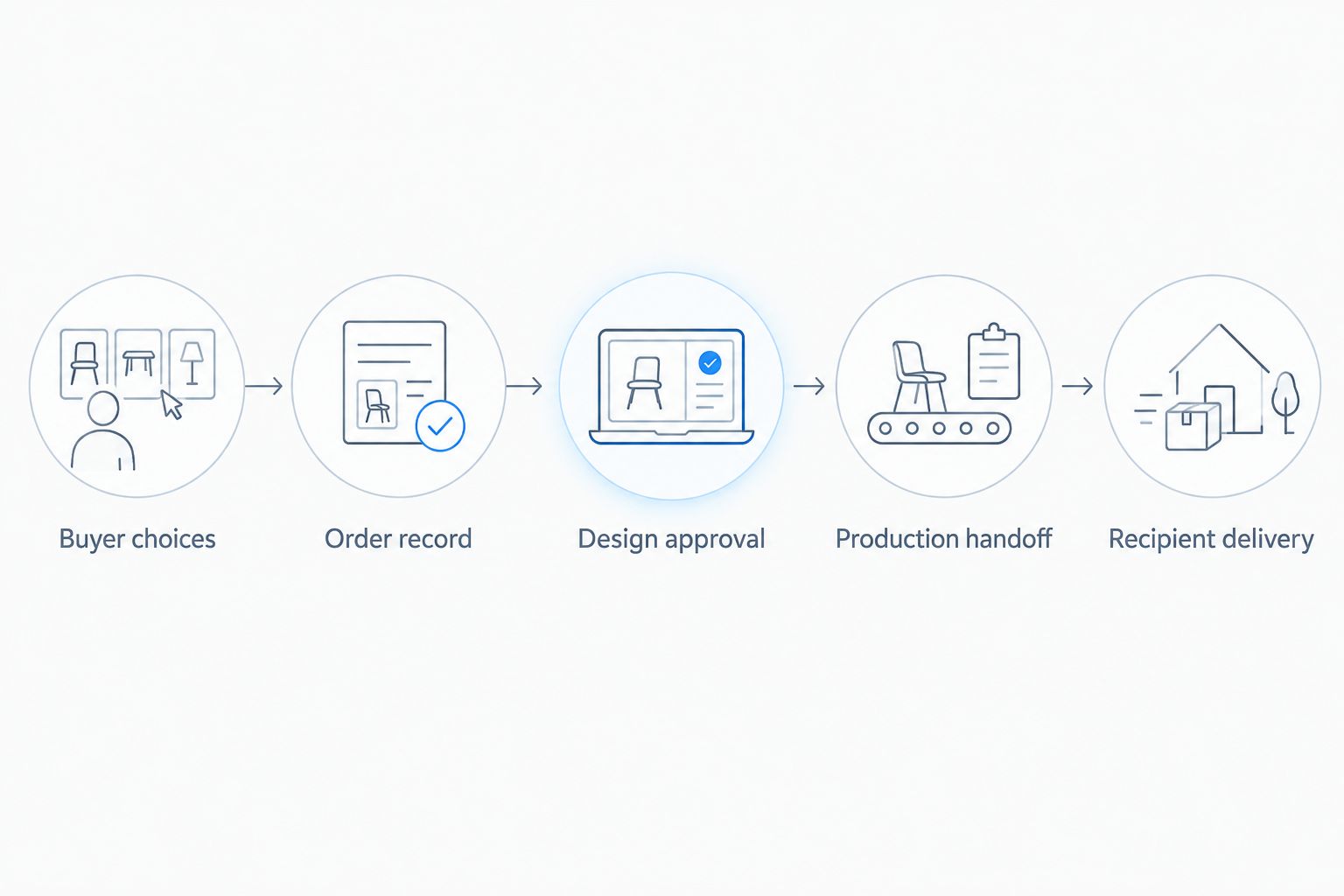
Check every handoff, not just the storefront preview.
A successful preview is only the first checkpoint. Test the order after checkout and inspect what the production team actually receives. If approval matters to your offer, use a defined design approval workflow for B2B Shopify orders.
Which corporate gifting apps should you choose?
Start with Bespo if personalised designs are the core of your corporate gifting offer. Add Shopify Flow for a defined routing task, Shopify Bundles for fixed kits, Shopify Inbox for buyer questions, or Printful when you choose outsourced merchandise production.
Do not install every app by default. Write down the handoff each addition owns and the information it must preserve. If two tools control the same decision, assign responsibility before launching.
Your 2026 default should be the smallest stack that takes an approved buyer choice through to a usable production instruction. Expand only when a specific requirement demands it.
FAQ
What's the best Shopify app for personalised corporate gifting?
Bespo is the best fit on this shortlist for personalised corporate gifts requiring live previews and production-ready files. It supports embroidery, engraving, monograms, embossing, debossing and print without developer involvement.
Do I need every app in this corporate gifting shortlist?
No, choose only the apps that solve a defined job in your workflow. Personalisation, fixed kits, automation, outsourced production and buyer conversations are separate requirements.
Is Shopify Bundles enough for personalised employee welcome kits?
Shopify Bundles handles fixed bundles and multipacks, not the entire personalised welcome-kit workflow. Check how individual names, component designs and packing instructions are recorded separately.
Can Shopify Flow approve corporate gift artwork?
Shopify Flow automates rules; it does not judge artwork. Record approval explicitly before using automation to route an order into production.
Is Printful better than producing corporate merchandise in-house?
Printful fits merchants choosing outsourced merchandise production and fulfilment. The decision depends on whether its products and decoration methods match your offer, so approve a physical sample before committing.
Can these apps send personalised gifts to different employees?
Multi-recipient delivery requires a separate workflow check; it is not established by this shortlist. Confirm how recipient names, designs and addresses remain matched through ordering and fulfilment.
How should I test a corporate gifting app stack?
Run three test orders across two device types and follow the data through checkout, approval and production. Include a corrected personalisation so you can verify which version reaches the maker.
One last thing
Test a correction, not just a perfect order. Change a recipient's spelling after the first design is recorded, then follow the approved version into production. That test exposes whether your workflow has a single, clear source of truth for what gets made.