
The blog
Best Webflow product customizer apps in 2026


Best for Shopify-based personalisation: Bespo. Best for keeping a Webflow-led storefront: a custom-built configurator with a verified checkout connection. Best for simple bespoke requests: a structured enquiry form. The best Webflow product customizer apps in 2026 must fit your checkout and production workflow—not just display an attractive preview.
TL;DR
- The best Webflow product customizer apps depend on where checkout and order data live.
- Bespo suits Shopify merchants needing live product previews and production-ready personalisation files.
- A custom-built configurator suits Webflow-led stores that need control over the purchasing workflow.
- A structured enquiry form suits bespoke products that require review before purchase.
- Do not treat Shopify app support as proof of native Webflow compatibility.
Why this matters
A product customiser has two jobs. It helps shoppers describe what they want, then carries those choices into an order your team can fulfil. A preview that stops at the product page completes only half the job.
For a Webflow-led store, start with the purchasing architecture. Decide where the customer configures the product, where payment happens, and where production receives the instructions. Those decisions determine which software belongs on your shortlist.
This 2026 guide ranks three implementation routes rather than presenting Shopify apps as verified Webflow integrations. A Shopify personalisation app is not automatically a Webflow product customiser. Choose the route first; evaluate the application against that route second.
What makes the best Webflow product customiser?
Use these six criteria before comparing tools. A vendor demonstration should answer each one using your product, your checkout, and your fulfilment requirements.
- Storefront compatibility: Establish exactly where the customiser runs. A Shopify installation guide does not establish support for a Webflow product page.
- Live preview: Check whether the shopper sees the actual text, placement, and selected treatment—not merely a generic product image.
- Order persistence: Confirm that personalisation details stay attached to the correct purchased item through cart changes and checkout.
- Production output: Identify what fulfilment receives. A visual preview, a text instruction, and a production-ready file serve different purposes.
- Merchant control: Check who edits product rules, updates artwork, and fixes a broken configuration after launch.
- Customer usability: Test editing, error messages, mobile interaction, and keyboard access. A feature is useful only when shoppers can complete it.
Treat compatibility and order persistence as pass-or-fail requirements. Rank preview quality and editing convenience only after the purchasing path works. Otherwise, you are comparing interfaces that cannot complete the same job.
Your options at a glance
The table separates a named Shopify app from two implementation approaches. It is a decision guide, not a claim that all three are installable Webflow apps.
Bespo
- Best for: Shopify merchants selling personalised products
- Standout capability: Live-preview customiser and production-ready files
- Key limitation: Described as a Shopify app; native Webflow compatibility is not established
Custom-built configurator
- Best for: Merchants retaining a Webflow-led purchasing experience
- Standout capability: You can specify the interface, rules, and order-data requirements
- Key limitation: Requires development and ongoing maintenance
Structured enquiry form
- Best for: Bespoke orders requiring review before purchase
- Standout capability: Collects an organised specification for a quote or proof
- Key limitation: Does not provide a complete live-preview purchasing workflow by itself
Choose by operating model, not by how many controls appear in a demo. A monogrammed product sold directly and a made-to-measure product requiring approval need different workflows.
1. Bespo: best product customiser for Shopify-based personalisation
Bespo is a Shopify app for real-time product personalisation, including embroidery, engraving, monograms, embossing, debossing, and print. It gives shoppers a live-preview customiser and outputs production-ready files for fulfilment. Merchants can add the storefront personalisation experience without developer involvement.
Bespo is best for Shopify merchants who need live previews and production-ready personalisation files. That is the relevant recommendation here—not a claim of native Webflow support.
Where this option fits
Choose this route when Shopify is where you intend to run personalised product purchases. Your Webflow presence and your personalisation storefront are separate architectural decisions; do not assume an app installed in one platform appears automatically in another.
Before choosing a combined setup in 2026, map the customer's journey between those experiences. Check product identity, selected options, cart behaviour, and the final order. Any connection outside the stated Shopify installation needs its own verification.
Bespo pros
- Provides a live preview while the shopper personalises a product.
- Supports the named techniques, including engraving, embroidery, and print.
- Outputs production-ready files for fulfilment.
- Adds Shopify storefront personalisation without developer involvement.
Bespo cons
- The stated product scope is Shopify, not a verified native Webflow installation.
- The no-developer Shopify setup does not establish a no-developer connection to Webflow.
- You still need to check whether the output meets your own production requirements.
Best for: Shopify merchants ranging from solo stores to DTC brands and corporate gifting operations.
Verdict: Buy for a Shopify personalisation workflow. Hold for a Webflow deployment until the exact purchasing connection is demonstrated.
2. Custom-built configurator: best for a Webflow-led storefront
A custom-built configurator is an implementation approach, not an off-the-shelf app recommendation. You commission the product interface, configuration rules, and connection between customer choices and the order destination. The scope should cover the entire transaction, not just an embedded preview.
Choose this route when keeping the Webflow-led experience is a firm requirement. It lets you specify how customers select materials, enter text, review their design, and submit their choices. Those capabilities must be included in the build; they are not automatic.
What to put in the brief
Define the product rules before asking for interface designs. List editable areas, permitted choices, required fields, and the instructions production needs. Then specify where each value must appear after purchase.
Separate the visual preview from production output. For engraving, a display image does not establish that the workshop has usable artwork. For embroidery, an attractive on-screen treatment does not establish that the required production file has been created.
Name the person responsible for maintenance, too. Someone must update product templates, investigate checkout failures, and retest the connection when surrounding systems change.
Custom-built configurator pros
- Lets you specify an interface around your product's requirements.
- Lets you define configuration rules before development starts.
- Lets you specify the order-data and production handoff together.
- Gives you a route to preserve a Webflow-led experience.
Custom-built configurator cons
- Requires development rather than a standard app installation.
- Needs maintenance and regression testing after launch.
- Every preview and production feature must be scoped and verified.
Best for: Merchants with non-negotiable storefront requirements and a named technical owner.
Verdict: Buy a scoped build when retaining the Webflow-led experience is essential. Skip an unspecified preview-only project.
3. Structured enquiry form: best for quote-first bespoke products
A structured enquiry form collects the details your team needs before accepting a bespoke order. Build the request around the product: dimensions, wording, selected treatment, placement instructions, and any supporting artwork your process requires. Your team reviews the specification before preparing a quote or proof.
This route is not equivalent to a live-preview customiser. It is a deliberate choice for products that require human review rather than immediate purchase.
Keep the request precise
Replace a single open-ended message box with clearly labelled questions. Ask shoppers to identify the product and describe the change in separate fields. Explain which details are required before your team can assess the request.
Use examples to clarify ambiguous instructions. For monograms, ask for the exact displayed letter order rather than expecting your team to infer it. For engraving, distinguish the requested wording from placement notes.
In a 2026 shortlist, this option belongs beside full configurators only when your sales process is quote-first. Do not choose it for a direct-purchase workflow and then expect it to deliver instant visual approval.
Structured enquiry form pros
- Organises customer requirements before your team reviews them.
- Fits products whose feasibility requires human judgement.
- Lets you request product-specific details without building a visual editor.
Structured enquiry form cons
- Does not show a live product preview by itself.
- Requires a review and response process.
- Does not create a complete production-file workflow by itself.
Best for: Bespoke products requiring a quote, feasibility check, or proof before purchase.
Verdict: Buy this approach for reviewed requests. Skip it when immediate personalisation and purchase are essential.
How these options are ranked
The ranking follows storefront compatibility, preview capability, order persistence, production output, merchant control, and customer usability. No numerical score is assigned: these routes serve different purchasing models.
The Shopify app comes first for merchants choosing Shopify-based personalisation. The custom build serves merchants committed to a Webflow-led experience. The enquiry form serves merchants who need a reviewed request rather than an instant transaction.
The default recommendation is to use a supported purchasing workflow before commissioning a connection between platforms. If Webflow is mandatory, move the custom-build route to the top of your shortlist and require an end-to-end demonstration.
Test the workflow before choosing an app
Use 1 representative product and 2 separate test orders for your initial acceptance check. These are suggested test steps, not vendor performance claims. Select a product that includes the personalisation details production actually needs.
Follow the same sequence for every candidate:
- Configure: Enter the requested text and choose the relevant product options. Include punctuation or accented characters your store accepts.
- Preview: Compare the displayed design with the entered specification. Check placement and whether changes appear correctly.
- Purchase: Complete the intended purchasing path. Inspect whether the personalisation remains attached to the correct item.
- Fulfil: Open the resulting order and production output. Ask the person making the product to identify any missing instructions.
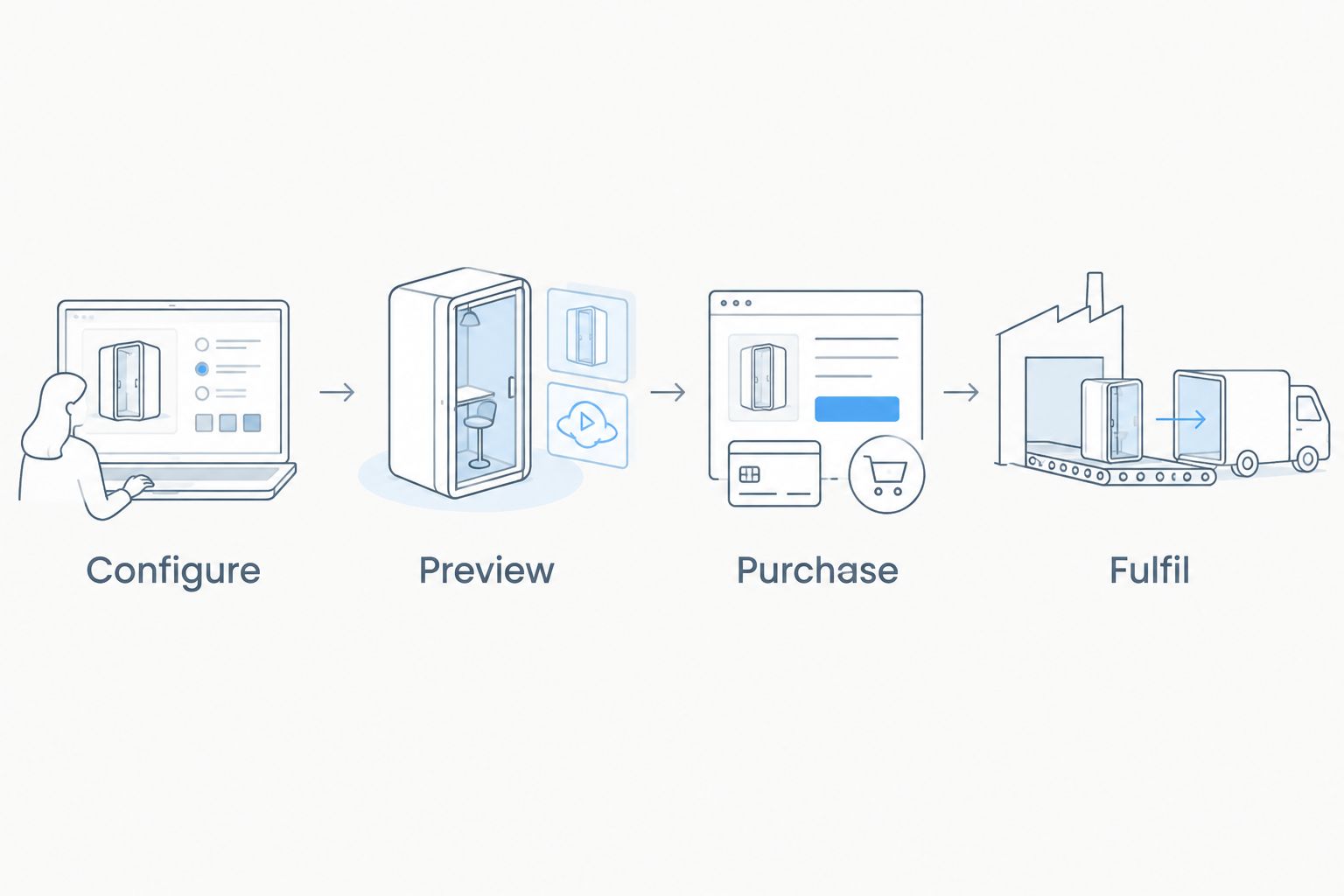
The test ends at fulfilment, not at the product preview.
Place the same product in both test orders with different personalisation. Check that each order retains its own wording and selections. This exposes a workflow that looks correct on the storefront but produces ambiguous instructions downstream.
Run 3 acceptance checks before signing off: the preview matches the request, the purchased item retains the request, and production can use the output. Repeat the purchasing path on mobile and with keyboard controls. Do not call a workflow ready while any required check fails.
Which product customiser should you choose in 2026?
Choose Bespo for Shopify product personalisation when live previews and production-ready files match your requirements. Keep that recommendation inside its stated Shopify scope.
Choose a custom-built configurator when retaining a Webflow-led storefront outweighs the simplicity of a standard app setup. Require a clear build specification, acceptance tests, and maintenance ownership before approving the project.
Choose a structured enquiry form when your products require review before purchase. Make the form good at collecting a usable specification rather than imitating an editor it does not provide.
For the undecided merchant, settle the checkout question first. In 2026, the useful shortlist is the one that matches your actual order path—not the longest list of personalisation tools.
Explore Shopify product personalisation
See live-preview personalisation and production-ready output for a Shopify purchasing workflow.
FAQ
What's the best Webflow product customiser app in 2026?
Choose according to the checkout and production workflow you need. A Webflow-led experience calls for a verified end-to-end implementation; a Shopify app should not be labelled a native Webflow integration without confirmation.
Can I use Bespo directly on a Webflow product page?
Bespo is described as a Shopify app, so direct Webflow product-page support is not established here. Confirm the exact installation and checkout connection before choosing it for a Webflow deployment.
Is a product options form the same as a live-preview customiser?
No. A form collects choices, while a live-preview customiser shows the shopper a visual representation of those choices. Neither alone proves that the specification reaches production correctly.
Should I keep Webflow or move personalised product purchases to Shopify?
Keep a Webflow-led experience when it is a firm requirement and you can own the implementation. Choose a Shopify purchasing workflow when the supported personalisation app meets your needs. Decide from the complete order process, not the page design alone.
Do I need a developer for product personalisation?
A custom-built configurator requires development. Bespo's stated Shopify storefront setup does not require developer involvement, but that does not establish the same installation process for Webflow.
What should I ask a customiser vendor to demonstrate?
Ask for a complete journey from entering personalisation to opening the purchased order and production output. Use your own product requirements and check that separate orders retain separate specifications.
Is a preview image enough for engraving or embroidery production?
No. A preview image shows appearance; production needs the instructions and files required by the chosen process. Have your fulfilment team assess the output before approving the workflow.
One last thing
Ask the person making the product to approve the customiser—not just the person designing the storefront. Give production the output from a test order without a separate explanatory message. If they need to ask what the customer selected, the handoff is not finished.
That check turns a software decision into an operational one. The right customiser carries an understandable specification all the way to the person fulfilling it.