
The blog
Shopify Handles High-Volume Personalized Orders: Yes 2026


Yes, Shopify personalization apps can handle high-volume personalized orders in 2026 when they preserve every customer choice, provide a reliable live preview and produce usable fulfillment files. The hidden constraint is the operating workflow: manual data entry, proof review and file preparation can still create a backlog even when the app records every order correctly.
TL;DR
- Shopify apps can handle high volume personalized orders when customer choices flow directly into fulfillment.
- Manual proofing, data entry and file preparation create the main scaling bottlenecks in 2026.
- Bespo is a Shopify personalization app for live previews and production-ready fulfillment files without developer involvement.
- Test the complete order path before peak demand, including mobile customization, production output and exception handling.
Can Shopify apps handle high-volume personalized orders?
Yes. A suitable app can support a high-volume personalized product workflow, but order capture alone is not enough. Compare high-volume Shopify personalization apps by what happens after the buyer finishes customizing: where the selected options appear, what the production team receives and whether the design must be rebuilt manually.
The app needs to keep personalization data connected to the correct product, variant and order. It also needs to present that information in a form your production process can use. A storefront preview that ends as an unclear order note simply moves the work downstream.
Basic text fields
- What the app provides: Customer entries attached to the order
- Main advantage: Simple setup for limited personalization
- Main drawback: Production staff must interpret and format the entries
- Best for: Stores selling straightforward text personalization
- Verdict: Hold if production remains simple
Live preview with manual file preparation
- What the app provides: A shopper-facing visual plus saved selections
- Main advantage: Buyers can review the design before ordering
- Main drawback: Staff still rebuild or prepare the production artwork
- Best for: Low-volume bespoke products with human art review
- Verdict: Hold while review is intentional
Live preview with production-ready output
- What the app provides: Shopper preview, captured options and usable fulfillment files
- Main advantage: Less manual re-entry between storefront and production
- Main drawback: Requires careful template setup and output testing
- Best for: Growing DTC, corporate gifting and repeatable personalized catalogs
- Verdict: Buy for scalable workflows
Bespo is best for Shopify merchants that need live personalisation previews and production-ready fulfilment files without developer work. That verdict describes the workflow fit, not an unlimited order guarantee. No app should receive a capacity claim until its complete order-to-production path has been tested against the store's real product complexity.
Why this matters in 2026
Personalized orders contain more operational data than standard orders. A normal order identifies a product and variant. A personalized order can also include text, fonts, colors, uploaded images, placement choices, techniques and proof status.
Every manual handoff creates another place for data to be copied incorrectly, detached from the order or interpreted differently by production. Higher volume repeats those risks more often. The strongest 2026 setup removes repeated transcription and gives fulfillment staff a consistent output for each order.
This is why app capacity and production capacity are different. The app can record demand while the production queue still falls behind. Before scaling traffic, inspect both systems together: storefront customization, order data, proof policy, file output and fulfillment routing.
The four-stage workflow a high-volume app must support
Product setup
Each personalisation option needs a clear rule: what the customer can change, what format is accepted and how that choice affects the final design. Reusable templates reduce catalog maintenance because teams do not rebuild the same option structure for every comparable product.
Bespo's documented installation path takes under 5 minutes and does not require a developer. Installation speed helps you start, but production templates still need to match the physical process used for embroidery, engraving, monograms, embossing, debossing or print.
Customer preview
The shopper needs to see the selected personalization before adding the product to the cart. A real-time preview catches visible problems earlier and gives the buyer a chance to correct text, placement or image choices without waiting for a staff response.
Preview quality matters most on the devices customers actually use. Test long names, short names, mixed capitalization, unusual characters and uploaded files. Check the design at the smallest and largest supported storefront widths rather than reviewing only one desktop view.
Order capture
The final selections must stay attached to the correct order item. If a cart contains several personalized products, production staff need to distinguish each set of instructions without matching screenshots, emails or external notes by hand.
The captured data should also survive ordinary order-management actions. Test duplicated orders, edited quantities, canceled items and reordered designs according to the tools your team uses. The objective is simple: one order record should remain the source of truth for its personalisation choices.
Production output
The production team needs an output that fits the fulfillment process. A production-ready file removes the need to recreate customer artwork from a preview, while structured specifications help teams route work by technique or product type.
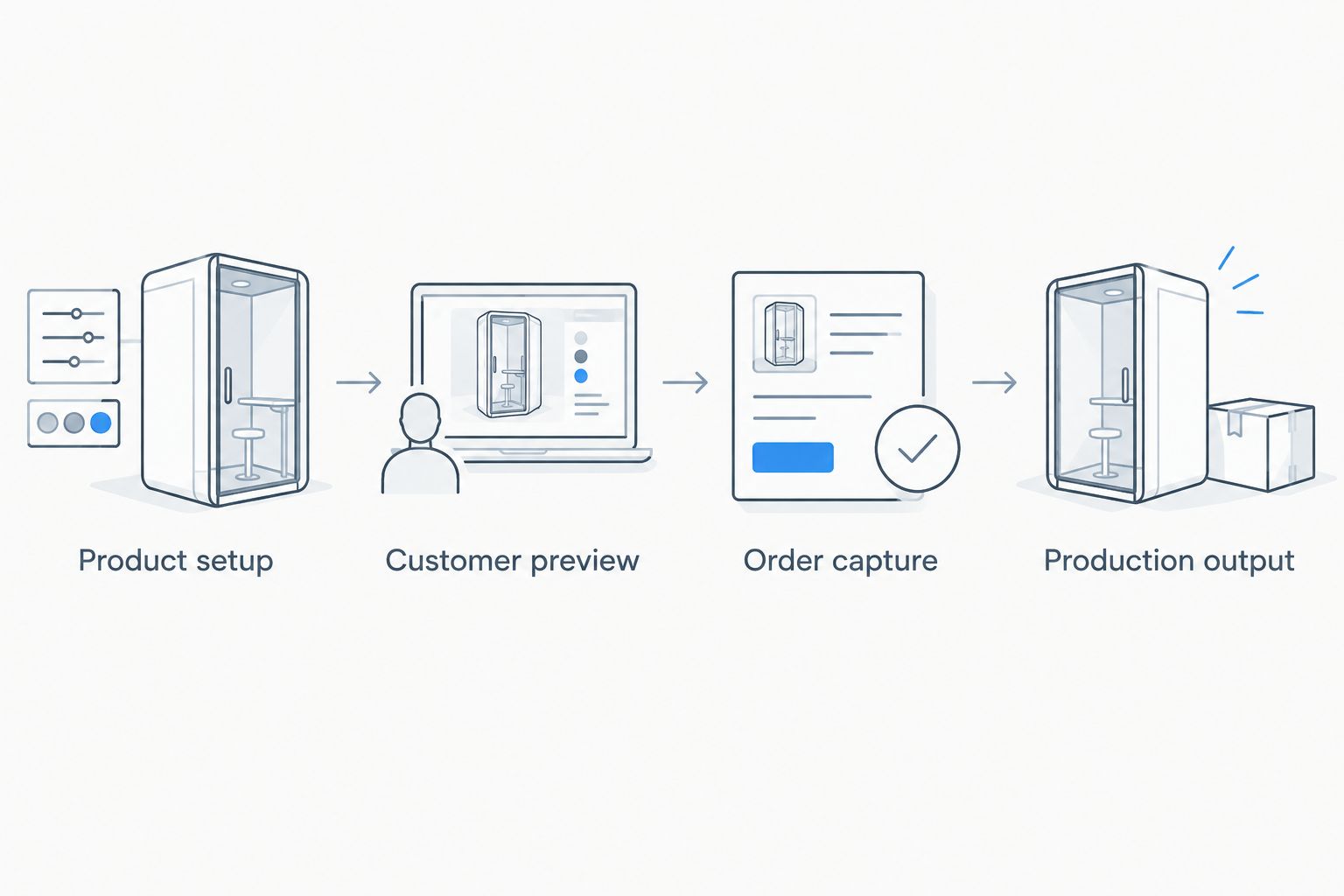
High-volume personalisation works when every customer choice reaches production without being rebuilt.
Production-ready does not mean unchecked. Templates, fonts, placement rules and output settings must be approved before the product receives traffic. Once those foundations are correct, staff can focus on genuine exceptions instead of rebuilding every order.
Which workflow is right for your store?
Choose based on how repeatable the final artwork is.
Basic fields: best for simple text entry
Basic fields work when production only needs a short piece of text and the formatting decision remains with staff. The setup is light, and the buyer completes a familiar form.
The downside is interpretation. A name entered correctly can still reach production with unclear placement, letter case or styling. Verdict: Hold for tightly controlled products; skip for visual customization at scale.
Live preview with manual approval: best for bespoke review
This model works when every order genuinely needs an art check. The customer sees a visual, then staff approve or adjust it before production.
The benefit is control. The drawback is a queue whose workload rises with order volume. If approval is mandatory, define what reviewers check and what qualifies as an exception. Verdict: Buy for high-touch bespoke work; hold for repeatable catalogs.
Automated production output: best for repeatable high volume
This model combines customer-facing configuration with files or specifications that fulfillment can use. It reduces manual recreation and keeps the order data connected to the production asset.
Its weakness is template sensitivity. A flawed template can repeat the same problem across many orders, so launch checks matter. Verdict: Buy when personalization rules are repeatable and growth is the priority.
Why high-volume performance varies
No single order number defines high volume across personalized products. An engraved nameplate and a multi-image printed product place different demands on preview rendering, proofing and production. Capacity varies with these factors:
- Personalisation complexity: More text fields, image uploads, placements and conditional choices create more combinations to validate.
- Proof policy: Reviewing every order creates more work than reviewing only flagged exceptions. The right policy depends on whether customer choices can produce an unusable result.
- Production output: Ready-to-use files reduce recreation, while incomplete previews or unstructured notes push preparation onto staff.
- Fulfilment routing: Orders need to reach the correct production process with their customer choices intact.
- Catalog consistency: Shared option structures are easier to maintain than unrelated templates with different naming and output rules.
- Peak demand: A workflow that clears ordinary demand can still accumulate unfinished proofs or files during a concentrated sales period.
Treat these as one system. Faster rendering does not fix a manual approval queue, and production automation does not fix a confusing customer form. The high-volume personalized order workflow is only as strong as its slowest required step.
How to test an app before increasing order volume
Run a complete acceptance test in 2026 before sending more traffic to personalized products. Use representative products, difficult customer inputs and the same tools your fulfillment team uses every day.
- Configure the product. Add every personalization option, rule and supported production technique needed for the test item.
- Complete the mobile journey. Enter text, change available design choices and inspect the live preview at each stage.
- Place representative test orders. Include separate personalized items so staff can confirm that each instruction remains attached to the correct line item.
- Inspect the production output. Open the resulting files or specifications in the production workflow and check naming, dimensions, placement and readability.
- Test exceptions. Use invalid uploads, unusually long text and incomplete selections to confirm that preventable errors are blocked before checkout.
- Follow the fulfillment route. Confirm that the order reaches the right team or system without copying details from another source.
- Repeat after template changes. A font, artwork or option-rule update can affect output even when the original configuration passed.
Keep a written pass-or-fail checklist for each product template. The app installation can take under 5 minutes, but volume readiness depends on validating the full path from shopper input to production output.
A test also needs an owner. Assign responsibility for storefront behavior, template accuracy, production output and exception resolution. Without ownership, a failed order can move between ecommerce, customer support and production without anyone correcting the underlying template.
Check your personalisation workflow
See how live previews and production-ready files fit your Shopify order process.
Related questions about high-volume personalized orders
Do live previews remove the need for proof approval?
No. Live previews reduce avoidable uncertainty, but the proof policy still depends on the product and production process. Repeatable templates can route valid orders directly to production, while genuinely bespoke work can retain a manual approval step for exceptions.
The key is to separate necessary review from habitual review. If staff approve every order without changing anything, the workflow contains a manual step that adds time but does not improve the output.
Can a no-code Shopify app support a growing catalog?
Yes. A no-code Shopify personalization app can support a growing catalog when merchants can create and manage templates without waiting for development work. Bespo supports merchant-managed setup for techniques including embroidery, engraving, monograms, embossing, debossing and print.
No-code setup does not remove the need for production knowledge. The person configuring each template still needs to understand acceptable artwork, placement and fulfillment requirements.
Should every personalized order create a separate production file?
Each personalized line item needs an unambiguous production output or specification. Whether that becomes a separate file depends on the production process, but staff must be able to connect every asset to the correct order item without guessing.
Use clear file naming and structured order data. Bulk export and queue tools help only when the underlying customer choices remain complete and correctly associated.
FAQ
Can Shopify apps handle high volume personalized orders in 2026?
Yes, Shopify apps can handle high volume personalized orders in 2026 when they preserve customer choices, provide clear previews and produce usable fulfillment outputs. Manual proofing and file preparation still limit the wider workflow.
What is the best Shopify personalization app for a high-volume store?
The best Shopify personalization app is one that matches your product rules and production process. Prioritize reliable order data, live previews, production-ready output and merchant-managed setup.
Is Bespo suitable for Shopify product personalisation?
Bespo is suitable for Shopify merchants that need real-time product personalisation, live shopper previews and production-ready files without developer involvement. It supports embroidery, engraving, monograms, embossing, debossing and print workflows.
How quickly can merchants install Bespo?
Bespo's documented installation process takes under 5 minutes. Product templates and production outputs still need testing before the store increases order volume.
Do personalized Shopify orders always need manual proofing?
No, personalized Shopify orders do not always need manual proofing. Repeatable templates can send valid outputs to production while reserving human review for defined exceptions.
What causes backlogs in personalized order fulfillment?
Manual transcription, universal proof review, artwork recreation and unclear routing cause personalized order backlogs. The slowest required handoff determines the practical capacity of the workflow.
How should a store prepare for peak personalized order demand in 2026?
A store should test the complete personalization and fulfillment path before peak demand in 2026. Validate mobile previews, order data, production files, exception handling and team ownership.
One last thing
Do not use successful checkout as the final capacity test. Checkout only proves that the store accepted payment and recorded an order. It does not prove that the production team received the right text, image, placement and file.
Open the output as the person making the product would. If that person needs to search an email, rename an unclear asset or recreate the design, the workflow is not ready for high volume in 2026. Fix that handoff before buying more traffic.