
The blog
Personalized Products Without Inventory? Yes (2026)


Yes. You can sell personalized products without holding inventory by having a print-on-demand supplier, a production partner or a made-to-order workshop produce each item after a customer orders it. You still need a way to capture the customer’s choices, send usable instructions to the producer and handle mistakes or delays. In 2026, no inventory in your hands does not mean no production work to manage.
TL;DR
- Yes, you can sell personalized products without holding inventory if a partner produces each order after purchase.
- Print-on-demand suits repeatable designs; a specialist production partner suits engraving, embroidery or other technique-specific work.
- Bespo is best for Shopify merchants who need live personalisation and production-ready files, not a product supplier.
- Confirm how customization details reach your producer before you publish a product page.
Why this matters
Inventory is only one part of a personalized order. A shopper chooses a name, image or design; someone must turn that choice into the right physical product. Removing stock from your business does not remove that handoff.
If you are planning your first catalog, start with a guide to selling personalized products on Shopify. Then decide who supplies the blank item, who applies the personalization and who checks the finished order. Those decisions determine whether your store can sell without holding stock.
Can you sell personalized products without holding any inventory?
Yes, if your production arrangement starts with the customer’s order rather than stock you own. The right arrangement depends on what you are selling and how much control the production technique needs.
Print-on-demand supplier
- Best for: Repeatable printed designs on products the supplier offers
- Advantage: The supplier produces orders after purchase
- Limitation: You are limited by its catalog and supported customization methods
Specialist production partner
- Best for: Engraved, embroidered or otherwise technique-specific products
- Advantage: A producer can handle work suited to its equipment
- Limitation: You must agree on file requirements, order details and responsibility for errors
Made-to-order workshop
- Best for: Products with hands-on construction or finishing
- Advantage: Production follows the approved order specification
- Limitation: Capacity and production timing depend on the workshop
These are production models, not storefront tools. A product customizer collects what the shopper wants. The producer makes the item. You need both sides of that process, plus a dependable way to pass the order between them.
The models also differ in what you control. A supplier with a fixed catalog makes product selection simpler but limits your options. A specialist partner gives you a route to a particular technique, but its workflow needs careful setup. A made-to-order workshop can follow a detailed specification, while placing more responsibility on you to define and approve that specification. None of the models removes your responsibility to present accurate options on the product page.
How to set up a no-inventory workflow
- Choose the product. Identify the physical item and the exact part a customer can personalize. Do not promise an option before a producer confirms it can make that option.
- Choose the producer. Ask what it supplies, what it produces after an order and what it expects you to provide. A producer that personalizes an item is not necessarily the supplier of the item itself.
- Define the customer’s choices. Decide whether the shopper enters text, selects a style or provides an image. Keep the choices within what the producer can reproduce.
- Define the production handoff. Agree on the file format, spelling checks, order identifier and approval point. Make it clear who stops an order when information is missing.
- Test the full order. Submit a sample personalization through the storefront and inspect what reaches the producer. Check the finished item against the shopper’s choices before treating the workflow as ready.
This sequence matters more than the choice of app. A clear preview does not help if production receives the wrong name or cannot use the file. Equally, a capable producer cannot fix customer choices that the storefront never captured.
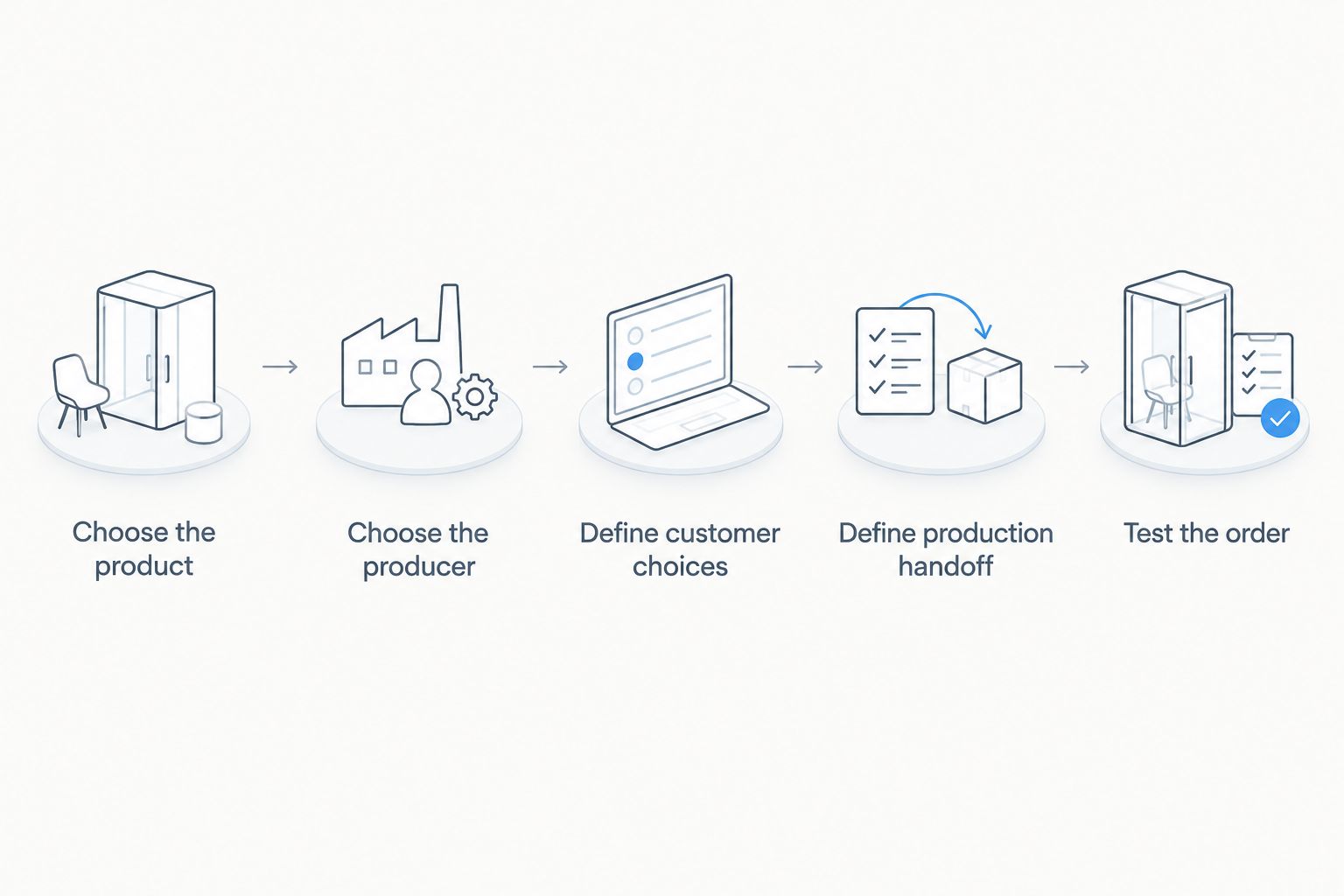
Test the handoff between the storefront and producer before accepting customer orders.
Print-on-demand: best for repeatable printed products
A print-on-demand supplier produces an item after receiving an order. That makes it a direct route to selling a personalized printed product without buying a batch first, provided the supplier supports the item and the design choices you want to offer.
The advantage is a defined production route. You can build your storefront around products the supplier can make rather than finding a separate workshop for every order. The constraint is just as important: a print supplier’s available items and methods define what you can sell through that supplier. Do not assume a printed-product workflow also covers engraving or embroidery.
Before launch, send a test order containing the kinds of customer input your product page accepts. Check whether the design, spelling and chosen product reach production together. If you offer image uploads, check the actual file that the producer receives; a storefront preview is not itself proof that the production file is usable.
Print-on-demand is the best fit for a product whose design can be reproduced through the supplier’s stated process. It is a poor fit when the item, material or technique you need falls outside that process. In 2026, choose the supplier’s confirmed capabilities first, then build your personalization options around them.
Specialist partners: best for engraving and embroidery
Engraving and embroidery require production instructions that match the item and technique. A specialist partner can produce orders as they arrive without requiring you to keep finished personalized products on a shelf. Whether it also supplies the unpersonalized items is a separate question to settle before selling.
The benefit is access to a specific production method without operating the equipment yourself. The drawback is the handoff: the partner needs the correct text or artwork, placement instructions and an agreed method for handling an unclear order. A customer-facing preview and a production specification serve different purposes; check both.
For a Shopify storefront, Bespo is best for merchants who need shoppers to preview personalisation and need production-ready files for fulfilment. Bespo supports techniques including embroidery, engraving, monograms, embossing, debossing and print, and merchants can set it up without a developer. Its role is customization, not supplying blanks or producing the physical goods. Confirm a production partner’s requirements before setting up the choices you offer through Bespo.
This model is the best fit when the technique matters as much as the product. It is less suitable if you have no confirmed producer or cannot establish what files and instructions that producer accepts. Do not publish the engraved or embroidered option until the producer has approved the handoff.
Made-to-order workshops: best for detailed specifications
A made-to-order workshop starts production from an order specification rather than selecting a finished personalized item from your stock. This works when customers need choices a fixed supplier catalog cannot represent, as long as the workshop agrees to make those choices.
The advantage is control over what the order asks the workshop to make. The limitation is that each choice adds something to check. If a customer can choose text, material and placement, the producer must receive all of them together and know which version is approved. You also need a process for resolving an incomplete request before work begins.
Made-to-order is the best fit when your producer has confirmed both the product and the customization process. It is not a shortcut around production planning. In 2026, write the specification as if the workshop has never seen your product page: identify the item, each selected option and the final design information.
Why no-inventory selling varies
Your workflow depends on factors you can verify before taking an order:
- Who supplies the unpersonalized item. A producer can apply a design without supplying the item it goes on. Establish who sources it and how it reaches production.
- Which technique the producer supports. Printing, embroidery and engraving need different equipment and instructions. Match the product page to a confirmed method.
- What the shopper can submit. Typed text, selected options and uploaded artwork create different checks. Limit inputs to what your producer can use.
- What reaches fulfilment. A preview shows the shopper an intended result; the producer needs the agreed production information. Test that transfer with an order.
- Who approves and fixes errors. Decide how to catch missing details and who handles a mismatch between the customer’s order and the produced item.
Your next move is to map one product from customer input to finished item. Write down each handoff, then find the gap. If the gap is product supply, a customizer will not close it. If the gap is collecting and preparing personalization details, a supplier alone will not close it. Bespo addresses the storefront customization and file-output side for Shopify merchants; production still needs its own arrangement.
Do you need a print-on-demand company to sell without stock?
No. A print-on-demand company is one route, but a specialist partner or made-to-order workshop can also produce after a customer orders. Choose based on the product and technique, not the no-inventory label. A partner must confirm whether it supplies the underlying item as well as personalizing it.
Can customers preview a product before it exists?
Yes. A live preview can show the choices a customer makes before the physical item is produced. Bespo provides a live-preview customizer for Shopify merchants, but the preview does not replace a production check: confirm that the producer receives usable files and the correct order details.
What happens if the supplier cannot make a selected option?
Remove that option from the product page until a producer confirms it. Taking an order first creates a problem you cannot solve by holding less inventory. If you change producers in 2026, recheck the available items, techniques and file requirements before reopening the option.
FAQ
Can you sell personalized products without holding inventory in 2026?
Yes. Arrange for a print-on-demand supplier, specialist partner or made-to-order workshop to produce each item after purchase, and confirm how it receives the customer's choices.
What's the best no-inventory model for personalized products?
Choose the model that supports your product and technique. Print-on-demand suits repeatable printed designs; a specialist partner suits technique-specific work such as engraving or embroidery.
Does Bespo manufacture or ship personalized products?
Bespo is a Shopify product personalisation app, not a product manufacturer or shipping provider. It gives shoppers a live preview and outputs production-ready files for fulfilment.
Do I need to buy blank products before taking orders?
Not if your production partner agrees to supply the blanks as part of its order workflow. If it only applies the personalization, you need a separate source for the underlying products.
Can I offer engraving without owning engraving equipment?
Yes, if a production partner agrees to engrave the products you sell. Confirm the item, design requirements and order handoff before offering engraving on your storefront.
Is a live preview the same as a production file?
No. A preview shows the customer the intended customization; the producer needs files and instructions it can use to make the item. Test both against a sample order.
What should I check before launching a personalized Shopify product?
Check that the producer can make every offered choice and receives the correct order information. Submit a sample order from the product page and compare the output with the customer's selections.
One last thing
The strongest no-inventory test is not whether you own stock. It is whether a producer can make the exact item your customer ordered from the information your store sends. In 2026, test that handoff before you add more products or more personalization options.