
The blog
Cost to switch print on demand providers: no fixed fee (2026)


There is no single published cost to switch print-on-demand providers in 2026. Your total depends on the replacement provider’s terms and the work needed to rebuild listings, move designs, test orders and change fulfilment. Price the transition as well as the new provider before you move a live product.
TL;DR
- How much does it cost to switch print on demand providers? There is no universal 2026 figure; calculate provider charges and migration work.
- A cheaper provider is not a cheaper switch if designs, product listings or order data need rebuilding.
- Bespo is best for Shopify merchants changing product personalisation, not for replacing a print-on-demand fulfiller.
- Test a sample order and its production file before moving live orders to a new route.
Why this matters
A provider switch changes more than the company printing your products. The product your shopper sees, the details your store sends with an order and the file your fulfiller receives all have to match. A low-looking provider charge tells you little about that handoff.
If your immediate problem is how shoppers enter names, upload artwork or preview a design, start with the storefront workflow. Bespo is a Shopify product personalisation app with a live-preview customiser and production-ready file output. It is not a print-on-demand fulfilment provider. Keeping that distinction clear can prevent you from replacing the wrong part of your setup.
How much does it cost to switch print-on-demand providers?
There is no defensible flat figure for a 2026 switch without your catalog, contract and workflow. Build a quote for the move itself, then compare the resulting order workflow with the one you have now. Ask each candidate provider for terms that apply to your products rather than treating a headline charge as the whole answer.
Provider terms
- What to check: Charges under your current and proposed arrangements
- What the switch requires: Confirm what changes when orders move
Catalog work
- What to check: Products, variants, artwork and listing details
- What the switch requires: Rebuild or verify every product you move
Store connections
- What to check: How Shopify sends orders and personalisation details
- What the switch requires: Configure and test the new order route
Samples
- What to check: Print placement, materials and finish
- What the switch requires: Approve a physical result before launch
Production files
- What to check: The format and information the fulfiller needs
- What the switch requires: Check that each submitted design can be produced
Transition orders
- What to check: Orders placed before and during the change
- What the switch requires: Assign each order to a fulfiller
Support work
- What to check: Questions or corrections generated by the move
- What the switch requires: Keep staff informed about the active route
Start with the products that actually need to move. For each one, record the current listing, design assets, personalisation fields and fulfilment destination. That makes the migration work visible before you agree to new terms.
Do not assume a file that works with your existing provider works with another. Ask the proposed provider what it accepts, then compare that requirement with what your Shopify setup produces. The cost of adapting files belongs in your switch decision, even when you do the work yourself.
What should you include in a switching quote?
Use this sequence to turn a vague estimate into a decision you can act on:
- List the products to move. Separate products that share artwork and settings from those with distinct designs or personalisation rules.
- Request terms for those products. Ask the proposed provider to explain its order charges, file requirements and any charges tied to your intended workflow. Get the terms for your current arrangement too.
- Estimate catalog work. Identify which listings, variants, mockups and design files must be recreated or checked.
- Map order data. Note what a fulfiller must receive: the chosen product, design, placement and any customer-entered details.
- Place a sample order. Check the storefront selection, submitted data, production file and physical result as one chain.
- Plan the handover. Decide which provider handles orders already placed and when new orders start using the new route.
Record staff work alongside provider charges. If a task has no external invoice, it still takes time away from maintaining the store. Keep the estimate tied to named products and tasks; a general migration allowance hides the items most likely to delay launch.
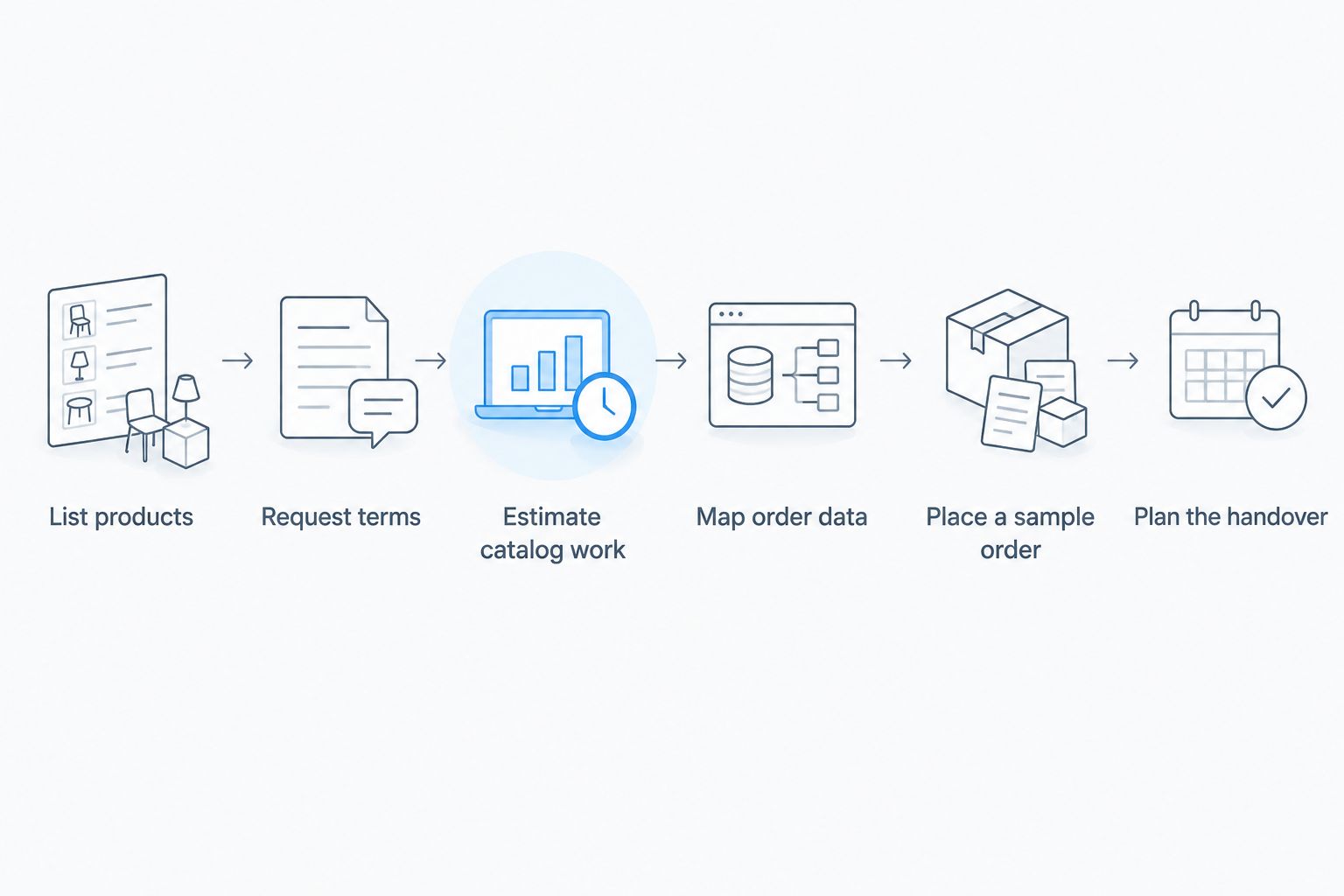
Check the order route and production result before changing live fulfilment.
Switch the fulfiller or change the personalisation workflow?
These are different decisions. A print-on-demand provider produces and fulfils the item. A Shopify customiser collects the shopper’s choices and prepares information for production. Changing one does not automatically fix a problem in the other.
Change print-on-demand provider
- Best for: Merchants whose production or fulfilment arrangement no longer fits
- Advantage: Addresses who makes and sends the product
- Limitation: Requires product, file and order-routing checks
Keep the provider; change the personalisation workflow
- Best for: Merchants whose main problem is collecting or previewing custom choices
- Advantage: Targets the storefront-to-production handoff without necessarily changing the fulfiller
- Limitation: Does not change the provider’s production capabilities or terms
Change both
- Best for: Merchants with separate storefront and fulfilment problems
- Advantage: Allows both workflows to be redesigned together
- Limitation: More moving parts to test during the handover
Bespo is best for Shopify merchants who need live product personalisation and production-ready files; it does not replace a print-on-demand fulfiller. Its advantage in this decision is a shopper-facing customiser that does not require developer involvement. Its limitation is equally clear: you still need a production partner or your own fulfilment operation.
If a provider tells you it cannot produce a particular item or use the file you supply, assess providers. If shoppers struggle to specify the design you sell, assess the customisation process. When both problems exist, test the full path before committing live orders to either change.
Why switching costs vary
The work behind a 2026 print-on-demand switch varies with what you sell and how orders reach production. Check these drivers against your own catalog:
- Catalog scope. More distinct products and variants create more listings to review. Count the items that require separate setup rather than relying on the total number of storefront pages.
- Artwork and file requirements. Existing designs need to meet the receiving fulfiller’s specifications. A design file and a storefront preview serve different purposes; verify both.
- Personalisation fields. Names, monograms, customer images and other choices must reach production with the correct order. The work rises when products use different rules.
- Store setup. A changed provider means checking how Shopify products and orders connect to its process. Identify what you need to configure before changing a live listing.
- Sample approvals. A sample reveals whether the submitted design produces the intended physical result. Include the sample process in the transition plan.
- Open orders. Orders already accepted need an assigned production route. Keep a record of which fulfiller owns each order during the handover.
These factors also tell you where to spend your attention. A simple catalog with repeatable designs has a different migration task from one where each order carries shopper-supplied artwork. Neither needs a generic cost estimate; both need a product-by-product plan.
How do you keep orders moving during a switch?
Treat the handover as an order-routing change, not just an app change. Set a clear point after which new orders go to the replacement provider, and keep the earlier orders assigned to the provider that accepted them. Then verify that your team can identify the route for any order it needs to check.
Before that point, run a sample purchase through the intended storefront flow. Compare what the shopper selected with what appears in the order and what reaches production. For a personalised item, inspect the actual production file as well as the on-screen preview. A good-looking preview alone does not prove the fulfiller has what it needs.
If you sell multiple product types, test each distinct production workflow. An embroidered item and a printed item can require different information even when their storefront fields look similar. Do not treat one successful sample as approval for every product.
Finally, keep the previous route available for unresolved orders until you know their status. Switching the destination for new purchases does not transfer responsibility for orders already in progress. That distinction protects your fulfilment team from having to reconstruct the handover from messages later.
Should you move every product at once?
Move a small, defined group first when your catalog has different products or personalisation rules. Choose products whose listings, artwork and production requirements you can inspect closely. Keep a record of what passes and what needs correction before moving the remaining catalog.
A staged move gives you a direct comparison between the intended workflow and the result. It also makes a failed sample easier to diagnose: you can check the listing, selected options, transmitted order details and production file without sorting through the whole catalog.
That is a process recommendation, not a claim that a staged move carries a particular charge. Get the proposed provider’s terms for a staged transition before choosing that route. The right sequence depends on the products you need to keep available and the orders already in progress.
Related questions
Does changing print-on-demand providers mean rebuilding Shopify listings?
Rebuilding depends on how the new provider connects to your existing products. Compare each current listing’s variants, artwork and order route with the proposed setup. Even when a listing stays live, verify that it sends the correct item and design to production.
Do you need new samples when you switch providers?
Order a sample for each distinct production workflow you plan to use. Review the physical result against the submitted design and the shopper’s selections. A storefront mockup cannot confirm the printed or embroidered outcome.
Can you switch providers without changing your customiser?
Yes, if the customiser supplies the information and files the new fulfiller requires. Check that handoff with a sample order before routing live purchases to the new provider. A compatible-looking product page is not proof of a compatible production file.
FAQ
How much does it cost to switch print on demand providers in 2026?
There is no universal switching figure in 2026. Compare provider terms, catalog work, samples, production-file changes and the time required to reroute orders.
Is switching print-on-demand providers just an app change?
No. You also need to verify product listings, artwork, order data and the production result before sending live orders through the new route.
Can I keep my Shopify products when changing fulfilment providers?
That depends on how the replacement provider connects to your existing listings. Check variants, artwork and order routing for every product you intend to keep live.
Should I order a sample before changing providers?
Yes. A sample lets you check whether the shopper’s selection, submitted file and physical product match before moving live orders.
Does a product customiser replace a print-on-demand provider?
No. A customiser handles shopper choices and production information; a print-on-demand provider produces and fulfils the item. Bespo is a Shopify personalisation app, not a fulfiller.
Can I move personalised products to a new fulfiller?
Yes, once you verify that the new fulfiller can use the information and production files your store supplies. Test a representative order for each distinct workflow.
What happens to orders placed before the provider switch?
Assign existing orders to a clear fulfilment route before changing where new orders go. Keep their status visible so your team knows which provider handles each one.
One last thing
The most useful question in a 2026 provider comparison is not which quoted charge looks lower. It is whether the proposed route produces the item the shopper configured, using the order details and file your store actually sends. Approve that handoff before you switch live fulfilment.