The blog
How Much Does Personalization Increase Conversion Rates 2026


There is no reliable percentage that tells you how much personalisation increases Shopify conversion rates in 2026. The lift depends on your products, shoppers and setup, and you can establish it only by comparing completed orders against the same eligible traffic in a controlled test. A live preview can help shoppers check their choices, but it does not guarantee more purchases.
TL;DR
- How much does personalization increase conversion rates? Shopify merchants need a controlled test; there is no fixed lift.
- Compare completed orders per eligible product-page visitor, not customiser clicks or add-to-cart events.
- Bespo suits Shopify merchants who need live-preview product personalisation without developer involvement; test its effect on your store.
- Check order accuracy and production work alongside conversion rate before keeping a new setup.
Why this matters
If you add a name field, an engraving option or a live preview, you change the buying experience. You also add decisions the shopper must make. Either change can affect whether an eligible visitor completes an order; a checkout count alone will not tell you which part helped or hurt.
Treat a claimed conversion lift as a question to test, not a forecast for your store. In 2026, the useful question is whether your own product page converts better and sends usable personalisation details to fulfilment. For a practical testing sequence, see the guide to A/B testing a Shopify product customiser widget.
How much does personalization increase Shopify conversion rates?
There is no supported point estimate or range for a Shopify store in the supplied information. An increase is not automatic. Measure conversion rate before and after a change only if the visitors, products and conditions are comparable; a concurrent control gives you a cleaner answer.
Standard product page
- What the shopper does: Chooses from the available product options
- Possible advantage: Fewer decisions before checkout
- Possible drawback: Cannot inspect a personalised result on the page
- Best for: Products where shoppers do not need to specify a name, design or message
Basic personalisation form
- What the shopper does: Enters the requested details
- Possible advantage: Captures instructions before the order is placed
- Possible drawback: Shoppers must judge the result without seeing it
- Best for: Simple requests that are easy to describe in text
Live-preview customiser
- What the shopper does: Enters details and sees a preview
- Possible advantage: Lets shoppers inspect their choices before ordering
- Possible drawback: Extra interaction can add friction if the steps are unclear
- Best for: Products where the appearance of the finished design affects the decision
These are test conditions, not published conversion results. A standard page can outperform a customiser if shoppers want a quick purchase. A live preview can be more useful when a buyer needs to see a monogram or engraving before committing. Neither outcome follows from the feature alone.
Keep the comparison fair. If you test a personalised option against a different product, different imagery or a different audience, the result cannot isolate the effect of personalisation. If you change the product page and the checkout experience together, you will not know which change moved completed orders.
What should you measure to find the lift?
Start with completed orders divided by eligible visitors for the product or product group being tested. Define an eligible visitor as someone who reached an experience where the tested option could appear. Apply that definition to both experiences. A customiser interaction rate is useful for diagnosing use, but it is not a purchase conversion rate.
- Choose the outcome. Use completed orders as the primary conversion event. Record how many eligible visitors saw each experience.
- Set the comparison. Show the existing page to a control group and the personalised experience to a test group. Keep the underlying product, other page content and traffic source as consistent as the test allows.
- Check exposure. Confirm that visitors assigned to the personalised page could actually see and use the fields or preview. Assignment alone does not establish that the feature appeared.
- Inspect the path. Look at option starts, completed configurations, add-to-cart events and completed orders. A drop between steps shows where to investigate; it does not prove why shoppers left.
- Review order details. Check that selected text, design choices and production instructions arrive in a usable form. A conversion gain is less useful if your team must resolve missing specifications by hand.
- Make the decision against your goal. Keep the change when the completed-order result and fulfilment workload support it. Revise or remove steps that add work without a corresponding benefit.
If a concurrent test is not possible, label a before-and-after comparison accurately. It shows what changed across periods, not how much of that change personalisation caused. Traffic mix and other page changes can move at the same time.
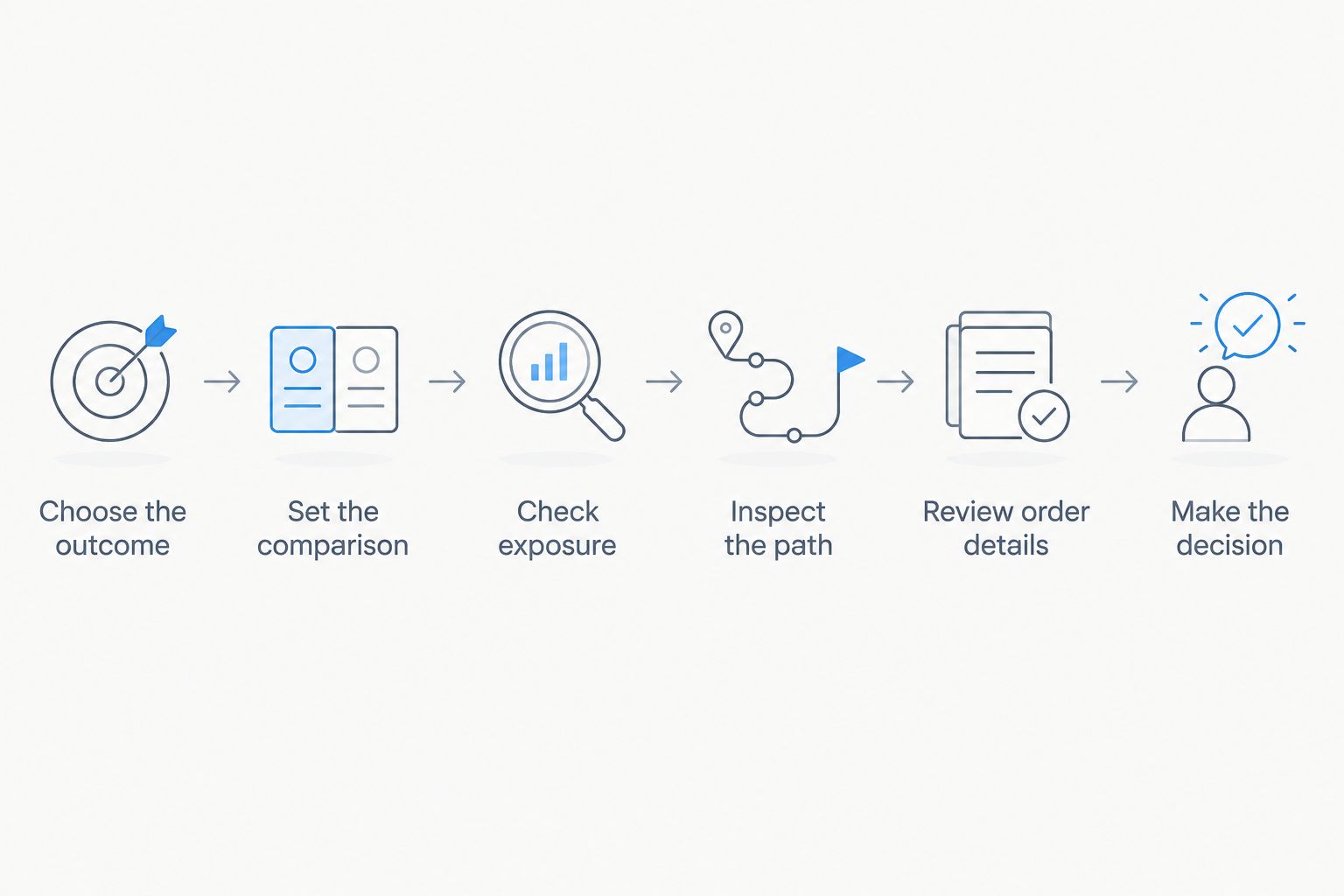
Completed orders answer the conversion question; order details show whether the result is usable.
In 2026, write down the outcome and exposure rules before changing the page. Otherwise, it is easy to switch between product-page conversion, add-to-cart rate and customiser engagement until one metric appears favourable. Each answers a different question.
Why does the conversion result vary?
- Product fit. A monogrammed item requires information that an unmodified item does not. The clearer the required choice, the easier it is to judge whether the interface helps the shopper complete it.
- Preview clarity. A preview is useful when it reflects the choices the buyer needs to check. If the shopper cannot tell what the final design represents, the preview does not resolve that uncertainty.
- Number of decisions. Text, typeface, colour and placement choices give shoppers control. Every choice also needs a clear label and an understandable next step.
- Mobile experience. Fields and previews must remain usable on the screen where the shopper opens the page. Test the whole path through checkout, not just the initial appearance of the widget.
- Traffic mix. Visitors arriving for a particular gift or customised item do not necessarily behave like visitors browsing an entire collection. Compare like with like.
- Order handoff. A completed order still needs accurate instructions. Check the information your fulfilment team receives before calling the change a success.
This is why a single benchmark cannot answer the headline question. In 2026, your result belongs to the product, page and audience you tested. Apply it to another product only after checking that shoppers face a similar decision.
Can a live preview increase conversions?
A live preview can help a shopper check personalised choices, but its effect on completed orders must be tested. Its clearest job is to show the entered name, initials or design choice in context. If the preview takes work to use or leaves the shopper unsure what will be produced, the extra step can work against checkout.
For Shopify merchants selling engraved jewellery, monogrammed goods or printed gifts, the buying question is concrete: can the shopper see and confirm the intended result? Compare a page with the preview against the existing buying path, then check both orders and configuration completion. Do not treat preview opens as purchases.
Bespo is best for Shopify merchants who need live-preview product personalisation without developer involvement, not a guaranteed conversion lift. The Bespo Shopify personalisation app supports embroidery, engraving, monograms, embossing, debossing and print, and outputs production-ready files. That makes it relevant when you need both a shopper-facing customiser and a fulfilment handoff. Its conversion effect still depends on your store’s test result.
Set up product personalisation
Add a live preview and capture production-ready files for personalised Shopify orders.
Is a higher add-to-cart rate enough?
No. Add-to-cart rate does not tell you how many eligible visitors placed an order. A shopper can configure a product and add it to the cart without completing checkout. Use add-to-cart events to locate friction, then judge the conversion question by completed orders.
The distinction matters when a customiser makes the product page more engaging. More option selections can be useful, but they are not a conversion lift unless the purchase outcome improves. In 2026, keep those measures separate in your test report.
Does offering more personalisation improve conversion?
No fixed number of options improves conversion across Shopify stores. Each option must help the buyer specify a result you can produce. Remove choices that do not serve that job, and explain any choice whose effect a shopper cannot see or understand.
Test a narrower configuration against the existing one if you suspect the form is slowing people down. Keep the product and audience comparable, then look at configuration completion and completed orders. Fewer fields are not automatically better if they omit information needed to fulfil the order.
How do you decide whether to keep personalisation?
Keep it when the test meets the conversion goal you set and the resulting orders are workable for fulfilment. A higher completed-order rate is a stronger signal than longer time on page or more preview interactions. It still needs to be weighed against the work created by unclear or incomplete order specifications.
Make the decision product by product. An engraving page and a corporate gifting page ask shoppers for different information, so a result from one should not be presented as the expected lift for the other. In 2026, document the experience you tested, who saw it and which outcome determined the decision.
FAQ
How much does personalization increase conversion rates on Shopify?
There is no supported universal percentage for Shopify stores. Compare completed orders per eligible visitor in a controlled test to measure your own lift.
Does a Shopify product customiser guarantee more sales?
No. A customiser adds a way to specify the product, but it can also add steps before checkout. Judge it by completed orders, not interactions alone.
Is a live preview better than a text field?
A live preview is better suited to purchases where shoppers need to inspect how their choices look. A text field is simpler when the requested detail is straightforward; test both against completed orders.
Should I count customiser clicks as conversions?
No. Customiser clicks show engagement, not completed purchases. Use them to diagnose the path and keep completed orders as the purchase outcome.
Can I measure personalisation with a before-and-after comparison?
Yes, but a before-and-after comparison cannot isolate personalisation when traffic or other page conditions also change. A concurrent control provides a clearer comparison.
What else should I check besides conversion rate?
Check whether shoppers finish configuring the product and whether completed orders carry usable production details. Those checks show where friction or fulfilment work enters the process.
Is Bespo suitable for testing live-preview personalisation?
Bespo provides a live-preview customiser for Shopify merchants without requiring developer involvement. It does not establish a conversion lift for your store; measure that against your existing page.
One last thing
A shopper can finish a customiser without finishing an order. That is the measurement trap: a busy preview can look successful while the completed-order rate stays unchanged. Set the purchase outcome first, then use interaction data to explain it. That keeps your 2026 decision tied to sales and usable orders, rather than activity on the product page.