The blog
Product Customizer Wishlist: Worth Adding? Yes, in 2026


Yes—a wishlist is worth adding to a product customizer in 2026 when it saves the shopper’s complete design and lets them resume without rebuilding it. Skip a product-only wishlist if your main goal is to preserve personalisation work: remembering the item is not the same as remembering its text, artwork, and layout.
TL;DR
- Is a wishlist feature worth adding to a product customizer? Yes, when it restores the complete personalised design.
- A product wishlist saves an item; a saved-design workflow must preserve editable personalisation choices.
- Judge wishlist value by restored designs and completed orders, not saved-item counts alone.
- Bespo provides Shopify product personalisation; assess wishlist requirements separately from live preview and production output.
Is a wishlist feature worth adding to a product customizer?
Add a wishlist to protect work shoppers have already done—not just to add another button. The decision rests on what gets saved, how reliably it returns, and whether shoppers can continue towards an order.
Start by separating product favourites from editable designs. The guide to letting customers save and reorder past Shopify designs covers a related workflow, but saving an unfinished design and reordering a purchased design need different checks.
Product wishlist
- Best for: Shoppers bookmarking items before personalising
- What it should preserve: Product reference
- Main benefit: Simple return path to the item
- Main limitation: Does not, by itself, preserve a custom design
Saved design
- Best for: Shoppers pausing or comparing personalised versions
- What it should preserve: Product reference, editable choices, and required assets
- Main benefit: Resumes the shopper’s work
- Main limitation: Needs restoration, storage, and validation rules
Cart persistence
- Best for: Shoppers who have finished designing
- What it should preserve: Selected item and its order details
- Main benefit: Keeps the next action close to checkout
- Main limitation: Requires testing after edits and return visits
These are workflow options, not claims about a particular app. Ask for a demonstration of the behaviour you need before choosing an implementation.
Why this matters
A personalised product has more to remember than its product page. Your shopper might enter initials, select a font, position an image, or choose an engraving treatment. A bookmark that returns them to a blank editor does not preserve those decisions.
For your 2026 feature plan, separate two goals: helping shoppers find a product again and helping shoppers continue a design. Both are useful. They need different acceptance criteria.
The downside is extra responsibility. Once you offer a save action, you need to explain what it preserves, where shoppers can retrieve it, and what happens when the underlying product configuration changes.
Product wishlist: best for bookmarking before personalisation
A product wishlist fits a browsing task. The shopper likes an item but has not started designing it, so returning to that product is enough.
Keep the label honest. Use wording such as Save product when the action stores only the product reference; do not call it Save design unless it preserves the design itself.
This approach offers a narrower implementation target. You still need a working retrieval route and clear saved-state feedback, but you are not promising to reconstruct an editable layout.
Its limitation is equally clear: a product bookmark cannot stand in for saved personalisation. Test the action after entering text or uploading artwork, not just on an untouched product page.
Recommendation: choose a product wishlist for product discovery, not design recovery. If shoppers expect their edits to survive, use a different workflow or change the label.
Saved design: best for pausing detailed personalisation
A saved-design workflow fits shoppers who have invested effort in an editable configuration. The acceptance test is whether they can reopen that configuration and continue from the same state.
Define the saved record before designing the button. Depending on the options you offer, it should preserve:
- The product and selected variant reference.
- Entered text, including punctuation and capitalisation.
- Font, colour, and personalisation technique selections.
- Uploaded assets needed to reconstruct the design.
- Placement, crop, scale, and rotation settings.
- A configuration version that supports later validation.
A preview image helps shoppers identify a saved design, but it is not the editable design. Do not use a thumbnail as a substitute for the underlying personalisation data.
The trade-off is ongoing maintenance. You need to handle deleted assets, changed templates, and outdated selections without silently replacing the shopper’s choices.
Recommendation: choose saved designs when preserving editable work is the requirement. Keep the first release focused on accurate restoration before adding sharing or reminders.
Cart persistence: best for completed designs
Cart persistence fits a shopper who has finished personalising and wants to buy later. The design has crossed from exploration into an order selection.
Test what happens when the shopper returns and edits the item. The cart must reflect the revised personalisation rather than retaining an earlier configuration behind an updated preview.
The benefit is a direct continuation towards checkout. The limitation is that a cart is not automatically a design library: it needs separate testing for comparison, multiple versions, and reopening the editor.
Recommendation: use cart persistence for finished selections, not as proof that unfinished designs are saved. Keep the distinction visible in your requirements and interface wording.
Why wishlist value varies
The case for a wishlist depends on the personalisation task you offer. Embroidery, engraving, monograms, embossing, debossing, and print create different sets of choices to preserve.
Use these factors to decide what your save workflow needs:
- Design effort: list every editable choice, from initials to artwork placement. More fields mean more restoration checks—not a guaranteed sales increase.
- Asset dependence: identify which uploads must remain accessible for a saved design to reopen correctly.
- Technique requirements: preserve the selected treatment and validate its current options when the shopper resumes.
- Comparison needs: decide whether shoppers need separate versions or just a way to return to one selection.
- Purchase handoff: confirm that restored choices reach the cart and order record without changing.
These factors define the scope. Do not build a design library when your shoppers only need product bookmarks, and do not offer bookmarks as a replacement for editable saving.
How do you test whether the wishlist is worth keeping?
Write the pass conditions before installation or development. For a 2026 launch, test preservation first, usability second, and commercial impact after the workflow functions correctly.
Define the promise
Specify exactly what Save product, Save design, and Add to cart mean on your storefront. Each action needs a distinct result.
Also define the retrieval route. A saved record is not useful if the shopper cannot find it again through the interface you provide.
Test restoration
Use 3 test designs: a text-only design, an uploaded-image design, and a design combining text with artwork. These are recommended test cases, not performance benchmarks; adapt them to the personalisation options you actually sell.
Save each design, leave the editor, and reopen it through the intended retrieval route. Compare the editable fields with the original choices, not just the preview image.
Check access
Test 2 browser contexts: the original browser and a separate browser session. This checks the boundaries of your saving method rather than assuming every saved record follows the shopper automatically.
If your chosen workflow supports accounts or shareable retrieval links, test those routes explicitly. If saving stays within the original browser, explain that boundary before the shopper relies on it.
Verify checkout
Make 1 paid test order through your normal ordering process, subject to your store’s testing procedures. Start with a saved design, restore it, edit it, and then purchase the revised version.
Inspect the order details and production handoff. A correct storefront preview does not replace checking the information used to fulfil the order.
Measure outcomes
Track saves, successful restorations, cart additions after restoration, and completed orders associated with restored designs. Keep these events separate so you can identify where the workflow stops working.
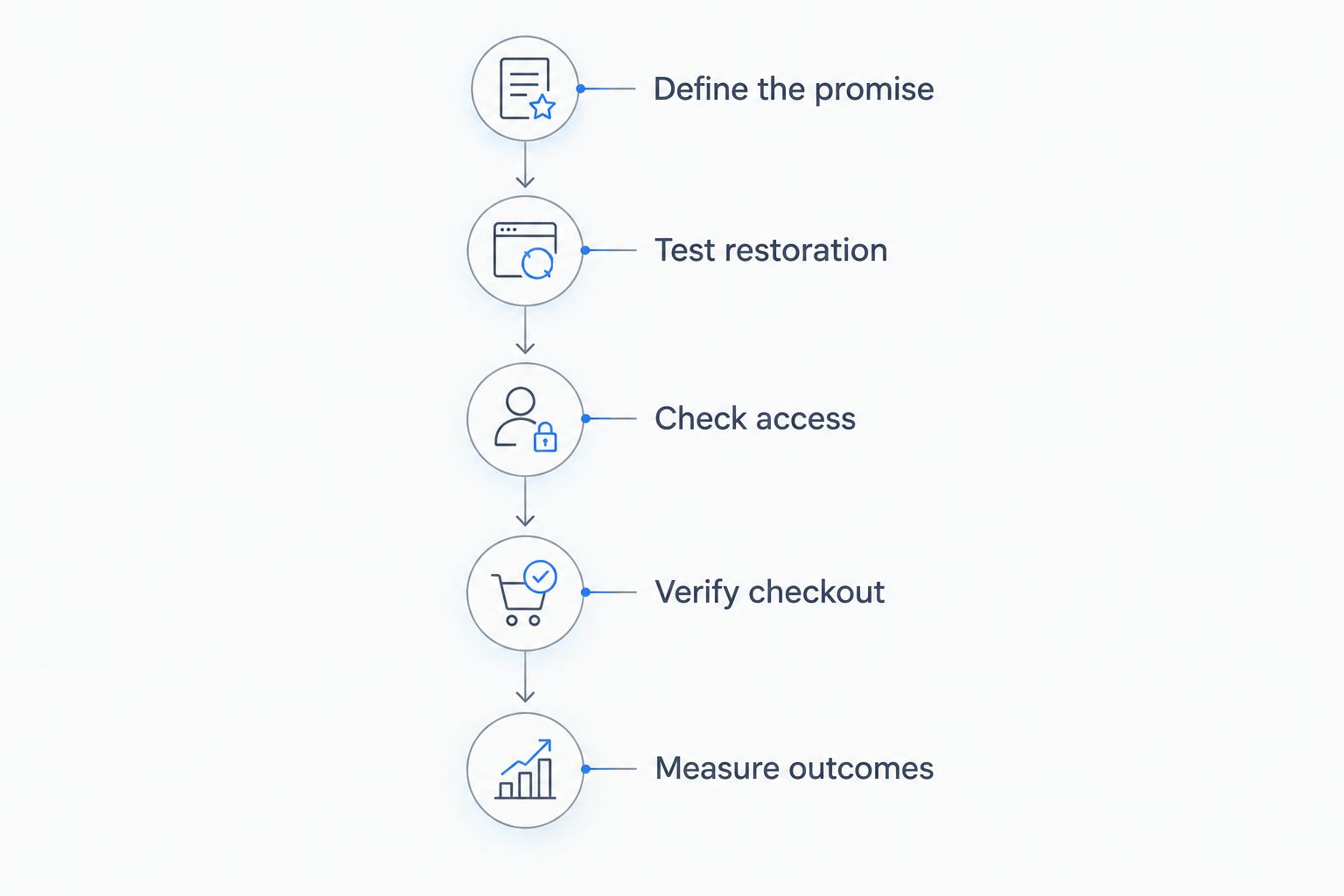
Prove that a saved design restores correctly before judging its commercial value.
Include failure cases in the test. Change an option, remove a test asset, and reopen an older design; the interface should explain a conflict rather than silently substitute a new selection.
What should you measure after launch?
Saved-item counts show use, not business value. Your 2026 review should follow the path from saving to restoration to purchase.
Use a measurement plan that answers specific questions:
Save actions
- Question it answers: Are shoppers using the feature?
- Interpretation limit: Saving does not prove buying intent
Successful restorations
- Question it answers: Does the workflow preserve usable designs?
- Interpretation limit: Technical success does not prove extra orders
Cart additions after restoration
- Question it answers: Do shoppers continue towards purchase?
- Interpretation limit: Cart additions are not completed orders
Orders after restoration
- Question it answers: Do restored designs reach checkout completion?
- Interpretation limit: Association alone does not establish uplift
Restoration failures
- Question it answers: Which saved designs cannot be resumed correctly?
- Interpretation limit: Investigate causes before changing the interface
If you compare versions, define the groups and attribution rules before the test. Keep other storefront changes separate wherever your test design allows.
Do not credit every order from a wishlist user to the wishlist. The useful question is whether offering the feature changes outcomes compared with a suitable baseline—not whether buyers ever pressed Save.
Where does Bespo fit in this decision?
Bespo is best for Shopify merchants who need live-preview product personalisation without developer involvement. It supports techniques including embroidery, engraving, monograms, embossing, debossing, and print, and outputs production-ready files for fulfilment.
Those capabilities address personalisation and production handoff. Your wishlist decision adds a separate requirement: preserving an unfinished configuration and restoring it accurately.
When evaluating Bespo, distinguish the product customizer from the proposed saving workflow. Verify the exact save-and-restore behaviour you need rather than treating live preview or production files as evidence of wishlist support.
That distinction protects the purchase decision. Choose the personalisation app for its stated role, then accept a wishlist workflow only after it passes your restoration tests.
Should customers have to create an account to save a design?
Require an account only when it serves your chosen retrieval model. Do not add registration simply because the Save button needs somewhere to lead.
Explain the access boundary clearly. If your implementation supports guest saving, test guest retrieval; if it requires an account, tell the shopper before saving and check that the design survives the sign-in process.
Is a preview image enough to save a customised product?
No—a preview image preserves appearance, not necessarily editable choices. Save the data needed to rebuild the design alongside any image used to identify it.
Test reopening and changing the design. A shopper who can view a thumbnail but cannot resume editing has a reference image, not an editable saved design.
Is a wishlist better than improving the customizer first?
Improve the customizer first when shoppers cannot reliably complete personalisation or carry their choices into the order. A wishlist does not repair a broken editor or an incorrect production handoff.
Add saving after the core purchase path works. The feature should preserve progress, not provide an escape route around unresolved problems.
FAQ
Is a wishlist feature worth adding to a product customizer?
Yes, when it preserves a complete design and lets the shopper resume without rebuilding it. Choose a product-only wishlist only when bookmarking the item is the intended job.
What is the difference between a product wishlist and a saved design?
A product wishlist remembers the item; a saved design preserves the personalisation needed to reopen an editable configuration. Label the action according to what it actually saves.
Will adding a wishlist increase Shopify sales?
Adding a wishlist does not establish a sales increase. Measure completed orders and compare outcomes using a defined test rather than treating saves as proof of additional revenue.
Can shoppers save personalised products without an account?
Guest saving depends on the implementation you choose. Verify the retrieval route and explain whether access is limited to the original browser or supports another tested method.
What should I test before launching saved designs?
Test 3 designs: text-only, uploaded-image, and combined text-and-artwork configurations, where those options apply. Reopen them, edit them, and verify that the revised choices reach the order and production handoff.
Does a live-preview customizer automatically include a wishlist?
No—live preview and wishlist saving are separate requirements. Bespo provides live-preview Shopify product personalisation; verify the saving behaviour you need as a separate acceptance check.
Should a saved design go straight to production?
No—a saved design is not a completed order or production approval. Keep saving separate from purchase and any approval steps your fulfilment process requires.
One last thing
Test the oldest saved design against the newest product configuration. A wishlist needs to preserve the shopper’s intention without pretending that every old selection remains valid forever.
Before your 2026 release, define how changed templates and removed options appear when a design reopens. An explicit correction step is better than an invisible substitution that reaches production.