The blog
Product personalization for optometry practices: complete 2026 guide


Optometry practice product personalization is the customization of retail accessories with the aim of selling products that shoppers can make their own. This 2026 guide covers product selection, Shopify setup, previews, and fulfillment—while keeping decorative choices separate from prescriptions, lens specifications, and clinical records.
TL;DR
- Product personalization for optometry practices should start with accessories, not prescription configuration.
- Bespo suits Shopify merchants who need live-preview product personalization without developer involvement.
- Validate each decoration technique on the actual material before publishing a customizable product.
- Keep retail personalization fields separate from clinical information and test the complete fulfillment handoff.
Why product personalization matters for optometry practices
An optometry practice needs a clear boundary between retail customization and clinical decisions. A shopper choosing initials for a spectacle case is making a decorative choice. A shopper selecting lens specifications is doing something different, and the storefront must make that distinction obvious.
Start with accessories your practice already sells or has approved for sale. Cases, pouches, and cleaning cloths are candidates to evaluate—not a requirement to expand your catalog. Confirm that your supplier can personalize the material before offering any option.
For Shopify storefronts, Bespo provides live-preview customization and production-ready files without developer involvement. That addresses the storefront-to-production handoff; it does not replace your clinical ordering process or manufacture the finished accessory.
Bespo is best for Shopify merchants who need live-preview product personalization without developer involvement.
The business test is practical: does the retail offer create orders you can fulfill accurately without pulling staff away from patient care? Use your own sales and production records to answer it. Do not assume a conversion lift or additional revenue before measuring results.
Set up product personalization in seven steps
Choose an accessory you can produce reliably
Begin manually. Ask your supplier which existing accessory supports decoration, request a sample, and inspect the result before creating a product page. A mockup establishes the idea; a physical sample establishes whether the technique works on that material.
For a first launch in 2026, start with 1 product. This is a recommended scope, not a platform limit. A narrow launch gives your team a manageable way to check text placement, order capture, and production instructions before extending the offer.
Assess the proposed decoration area alongside the product's everyday use. A name must not obscure important labeling, interfere with a closure, or require a change to the product's intended function. Treat frame decoration as a separate supplier-approval decision, not an automatic extension of case personalization.
- Identify a retail accessory already approved for sale.
- Ask the supplier to confirm material and technique compatibility.
- Obtain and inspect a decorated sample.
- Record the permitted decoration area.
- Keep clinical products outside the initial pilot.
Define the choices before building the page
Write the personalization rules in a shared document first. Specify what the shopper enters, what they select, and what the producer receives. Resolve ambiguity now rather than asking reception staff to interpret orders later.
A name field and a monogram field need different instructions. Full names preserve the shopper's wording; monograms require an explicit letter order. Show an example and state whether capitalization is preserved or changed. Set the text limit from a tested sample, not from an arbitrary marketing preference.
Separate the accessory variant from its decoration. The case color identifies the underlying item; the initials identify the customer-specific work. Both must remain clear in the order record.
Keep the first configuration restrained. Every additional choice needs a valid preview, a production rule, and a test. Do not publish a font or color simply because it looks appealing on screen.
- Define the accepted text format.
- Explain monogram order with an example.
- Set a sample-tested character limit.
- Offer only supplier-approved decoration choices.
- Distinguish product variants from personalized content.
Configure the Shopify product and preview
Build a manual proof first using the approved product image and a sample design. This gives you a reference for placement and scale before configuring the storefront. You do not need a customizer to decide what a correct result looks like.
Bespo product personalization provides a faster path for Shopify merchants through a live-preview customizer. The app supports embroidery, engraving, monograms, embossing, debossing, and print. Choose the technique your accessory and producer support; that list does not establish compatibility with every material.
Follow the installation sequence: install the app, enable the app embed, add the customization block, and configure the product's personalization options. Check the published page rather than stopping at the theme editor.
Describe the preview as a design preview, not a clinical fitting tool. Initial placement on a case is not evidence of eyewear fit, lens suitability, or a finished material's exact appearance. Explain relevant production differences in plain language.
- Configure the approved decoration technique.
- Match the preview area to the physical sample.
- Enable the app embed and customization block.
- Check each supported product variant.
- Explain what the preview represents.
Make the customizer usable for your shoppers
Test the page yourself before asking customers to use it. Complete the personalization with a keyboard, then repeat it on a phone. Check that labels, instructions, and errors remain understandable without relying on the product image alone.
Optometry practices should be especially deliberate about visual presentation. Do not make shoppers identify a font from a tiny image or distinguish decoration colors using swatches without text labels. Give every control a clear name and keep the customer's entered wording visible as text.
A product page needs more than a visually attractive preview. The shopper must understand what is required, what is optional, and how to correct a mistake. Test zoomed text and avoid placing essential instructions inside an image.
Use the guide to making a Shopify customizer accessible for screen readers to plan further checks. A guide or app installation alone does not establish accessibility compliance.
- Label text fields outside the input box.
- Add written names to color choices.
- Keep instructions readable when text is enlarged.
- Test keyboard navigation through the purchase flow.
- Explain errors beside the relevant control.
Separate retail information from clinical records
Review the proposed fields manually with the person responsible for your practice's information handling. For a decorated accessory, collect only the information needed to make and deliver that item. Do not add medical questions to improve the personalization experience.
Your 2026 retail setup should explicitly exclude prescription values, diagnoses, examination notes, and clinical documents from customization fields. Keep those details in the practice's established clinical workflow. A product personalizer is not a substitute for a clinical record system.
A name entered for decoration still needs appropriate handling. Identify which staff and suppliers receive it, why they need it, and how long the practice retains the retail production record. Avoid claiming that an app is suitable for regulated health information without a separate assessment.
Give staff an instruction for accidental submissions. If a shopper puts clinical information in a retail field, the team needs an approved response—not an improvised transfer to the decoration supplier.
- Remove prescription and diagnosis fields.
- Avoid unrestricted requests for clinical documents.
- Document who receives personalization content.
- Define retention rules for retail production records.
- Establish a response to accidental clinical submissions.
Verify the order-to-production handoff
Create a manual production sheet before automating anything. Include the order reference, accessory variant, exact personalization text, technique, placement, and approved design. Ask the producer to explain how they would make the item using that sheet alone.
Bespo outputs production-ready files for fulfillment. Confirm that the output meets your producer's requirements before using it for customer work. File output does not establish that a supplier accepts the format, that a machine is correctly configured, or that the physical result matches the preview.
For the pilot, run 3 test orders: a standard name, a monogram, and the longest permitted text. These are recommended checks, not a guarantee that every possible input has been covered. Add tests for any special characters you intend to accept.
Store the final production instruction with the order. If a customer requests a change, define which version becomes authoritative and who stops the earlier version from being produced.
- Confirm the producer's file requirements.
- Check text against the submitted order.
- Verify variant, technique, and placement together.
- Record the approved production version.
- Define how amendments reach the producer.
The handoff should follow a clear sequence: Order capture, Design check, Production file, Sample check, and Release. A later stage should not silently overwrite an earlier approval.
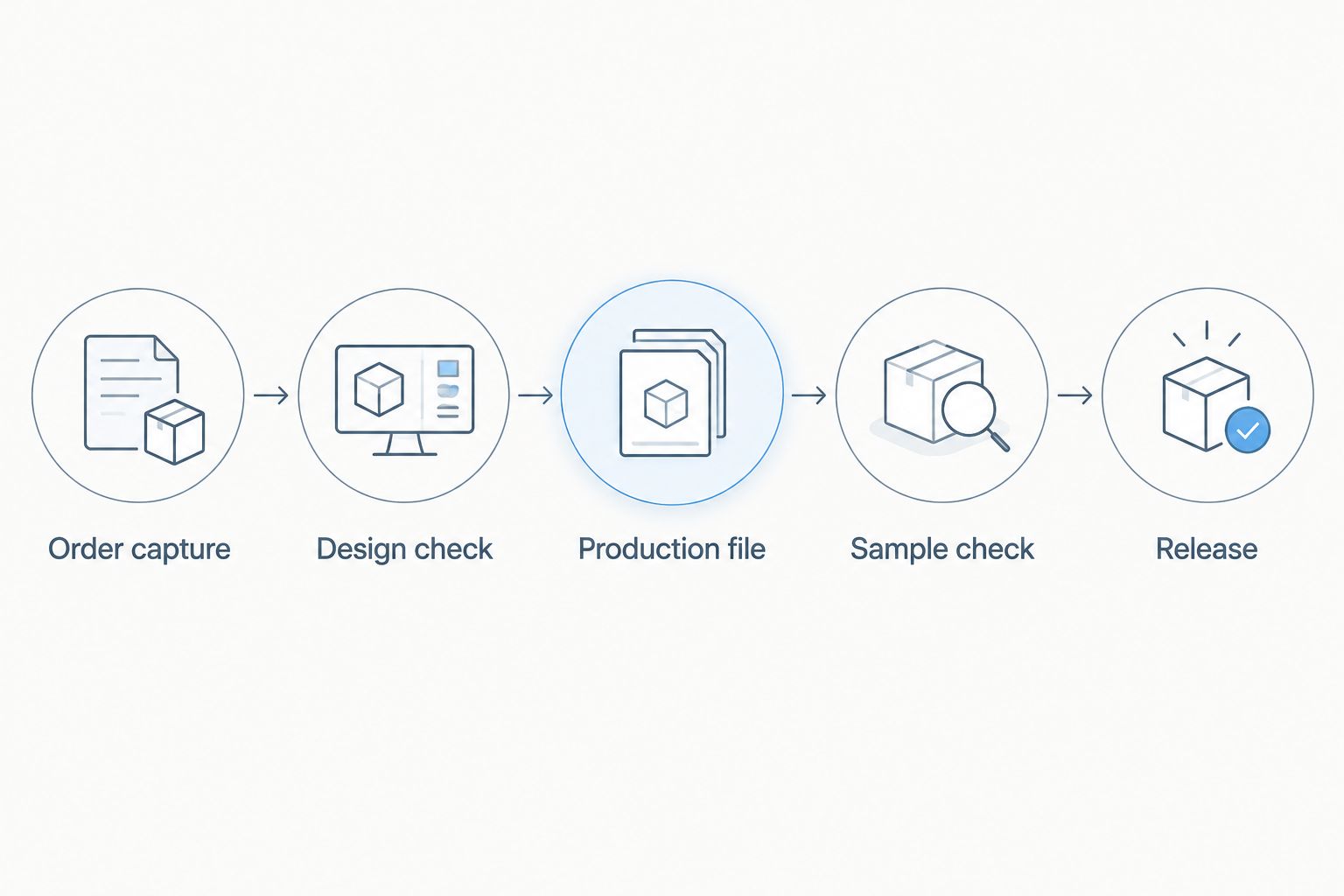
Verify the order and production file before releasing personalized work.
Measure the pilot before expanding it
Start with a spreadsheet. Record each personalized order, any customer correction, any production remake, and the staff time spent resolving problems. Keep the records specific enough to distinguish a shopper's typo from a production error.
Use a 30-day review period as a planning checkpoint for your 2026 pilot. It is not a promise of profitability or a statistically sufficient test. If the period produces little evidence, continue the pilot rather than treating a small sample as a verdict.
Compare personalized accessories with relevant standard accessories, not with clinical appointments or prescription sales. Look at completed orders, production effort, and contribution after fulfillment expenses. A higher order value alone does not establish a better commercial result.
Expand only when your team can explain the recurring problems and control them. If monogram instructions generate confusion, fix the instructions before adding more designs.
- Log completed personalized accessory orders.
- Separate customer edits from production mistakes.
- Record staff handling time per order.
- Compare relevant personalized and standard products.
- Resolve recurring errors before expanding.
Compare the options for your practice
Choose the workflow around the retail task. Manual capture is useful for validating an idea; a live preview is useful when shoppers need to see their design while ordering. Neither replaces supplier validation or clinical safeguards.
Manual personalization form and staff-created proof
- Best for: Testing a narrowly defined accessory offer
- Main advantage: Lets you validate instructions before committing to a storefront workflow
- Key limitation: Staff must create proofs and transfer production details
Bespo live-preview Shopify customizer
- Best for: Shopify practices selling customer-personalized accessories
- Main advantage: Shows shoppers their design and outputs production-ready files without developer involvement
- Key limitation: Requires Shopify and a separate, validated production process
Supplier-managed personalization request
- Best for: Practices whose producer already handles decorative work
- Main advantage: Keeps production decisions with the party making the accessory
- Key limitation: Depends on the supplier's process and customer-proof handoff
Fixed practice-branded accessories
- Best for: Practices needing a consistent retail design
- Main advantage: Avoids customer-specific design capture
- Key limitation: Does not let individual shoppers personalize the product
Choose manual capture for validation; choose live preview for an established Shopify personalization workflow. Fixed branding serves a different purpose. Do not present a practice logo on every case as individual product personalization.
Common mistakes optometry practices make
Treating decoration as prescription configuration
A retail customization page should not invite customers to interpret clinical specifications. Keep names, initials, and decorative placement in the retail workflow. Route lens and prescription questions through the practice's established process.
Offering frame engraving without supplier approval
Do not assume a technique approved for a spectacle case is appropriate for a frame. Obtain approval for the exact item, material, and placement before listing it. A storefront preview is not a material compatibility test.
Letting reception become the production inbox
Assign ownership of personalization questions and amendments. Otherwise, an order correction can sit alongside appointment messages without reaching the producer. Use an order reference and an authoritative production version for every change.
Hiding instructions inside the preview
Small visual labels make shoppers work harder to understand the offer. Put monogram order, text limits, and required choices in readable page text. The preview should support the instructions, not carry them alone.
Measuring sales without measuring rework
For your 2026 review, count corrections and production effort alongside orders. An accessory offer that requires repeated staff intervention needs a workflow fix before expansion. Do not confuse more sales with a well-functioning process.
FAQ
What is product personalization for optometry practices?
Product personalization for optometry practices is customer-specific decoration of retail products, such as adding a name or initials to an approved accessory. It is separate from prescription selection, lens specifications, and clinical care.
What should an optometry practice personalize first?
Start with an accessory that your supplier has confirmed can be decorated reliably. Approve a physical sample and a clearly defined decoration area before publishing the offer.
Is Bespo suitable for an optometry practice's Shopify store?
Bespo suits Shopify merchants who need live-preview product personalization without developer involvement. It outputs production-ready files, but the practice still needs a validated producer and a separate clinical workflow.
Can customers personalize prescription glasses with this workflow?
This guide covers decorative retail personalization, not prescription ordering. Any proposed frame decoration needs approval for the exact item, and clinical specifications should remain in the practice's established ordering process.
Do we need a developer to add live personalization?
Bespo lets Shopify merchants add real-time product personalization without developer involvement. You still need to configure the product, enable the storefront customization, and test the purchase-to-production handoff.
Should we collect prescriptions in personalization fields?
No—keep prescription details and clinical documents out of decorative personalization fields. Collect only the information needed for the retail item and assess its handling through the practice's information-management process.
Does a live preview replace a physical sample?
No—a live preview shows the proposed design, while a physical sample checks the actual material and production result. Validate the technique and placement before accepting customer orders.
One last thing
Test a name that is difficult to fit—not just one that looks good in a demonstration. Use the longest text you permit and any supported punctuation or accented letters. Check the storefront, order record, and production file against the same input.
A neat preview is only part of the job. The successful result is an accessory produced from the correct customer's approved instructions, without anyone guessing what the shopper meant.