
The blog
Best HulkApps alternatives for Shopify product customization


HulkApps Product Options gives Shopify merchants a way to collect extra product choices, but collecting choices is not the same as showing the finished design and preparing it for production. The best HulkApps alternative in 2026 is Bespo if you need live-preview personalisation and production-ready files; native Shopify variants are the better fit if customers only choose fixed options such as size or colour.
TL;DR
- Comparing HulkApps alternatives Shopify merchants can use? Bespo wins for live-preview product personalisation and production-ready files.
- Native Shopify variants fit fixed product choices, not shopper-written names or visual design previews.
- Keep HulkApps Product Options when collecting additional choices already meets your storefront and fulfilment needs.
- Test the customer selection, cart details and production handoff before replacing your current app.
Why this matters
Choose the app around what you sell, not around the longest feature list. A fixed colour selection, an engraved name and a personalised print are different jobs.
Your replacement needs to serve both sides of the order. Customers need to understand what they are buying. Your fulfilment team needs enough information to make it correctly.
For your 2026 shortlist, separate these requirements:
- Fixed choices: customers select an existing product variation.
- Personalisation: customers supply content that changes the finished product.
- Production handoff: your team receives the information or artwork needed to fulfil the order.
A product-options form answers what the customer selected. A live-preview customiser also shows how that selection looks. Production output addresses what happens after checkout.
Pick the simplest setup that completes the whole job. Do not replace a working options app just to add another interface.
HulkApps alternatives at a glance
This comparison separates an options app, a personalisation app and Shopify’s built-in variant system. They are alternatives for different requirements, not interchangeable tools.
HulkApps Product Options
- Best for: Collecting additional product choices
- Standout capability: Product-option fields on Shopify products
- Difference from HulkApps Product Options: The baseline for an options-led setup
- Main trade-off: Decide separately whether your workflow needs visual proofs or production artwork
Bespo
- Best for: Personalised products needing a preview and production output
- Standout capability: Live-preview customiser with production-ready files
- Difference from HulkApps Product Options: A personalisation workflow covering storefront design and fulfilment output
- Main trade-off: You still need to define what your production process accepts
Native Shopify variants
- Best for: Fixed choices such as size, colour or material
- Standout capability: Built-in product variations
- Difference from HulkApps Product Options: Keeps fixed choices within Shopify’s product model
- Main trade-off: Variants do not provide a shopper-written personalisation interface or design preview
Start with the distinction between a choice and a design. Selecting a blue product is a choice. Entering initials that appear on that product is personalisation.
For the second case, inspect the preview and the production output together. A convincing product-page experience alone does not establish that the order is ready to manufacture.
1. Bespo: best for live-preview Shopify personalisation
Bespo is a Shopify product personalisation app for merchants selling embroidery, engraving, monograms, embossing, debossing and print. Customers see a live preview, while the app outputs production-ready files for fulfilment. Storefront setup does not require developer involvement.
That combination suits a merchant who needs more than a record of selected options. Your customer sees the personalisation before ordering, and your fulfilment process receives a file rather than relying only on a written description.
Where it shines
- Visual personalisation: shoppers can preview their changes on the storefront.
- Production output: the workflow includes production-ready files for fulfilment.
- Multiple techniques: the stated scope includes embroidery, engraving, monograms, embossing, debossing and print.
- Merchant-managed setup: you can add storefront personalisation without a developer.
The key benefit is the connection between what shoppers configure and what fulfilment receives. Evaluate that connection with a real product, not a generic demonstration.
For example, an engraved item needs a clearly defined personalisation area. An embroidered product needs a design your production process accepts. The storefront and the workshop must agree on what the customer has ordered.
Where it falls short
- It is more workflow than fixed variants require. If you only sell predefined sizes and colours, a personalisation interface adds a task your customer does not need.
- Software does not replace production checks. Your team must still confirm that the output suits its materials, equipment and fulfilment process.
- No developer requirement does not mean no product preparation. You still need to decide which techniques and personalisation options to offer.
These are practical limits, not reasons to avoid a customiser. A personalisation app handles the selling and output workflow; your business remains responsible for the finished physical product.
Head-to-head: personalisation versus option collection
Use this table to match the buying requirement to the tool’s stated purpose. Treat additional capabilities as items to demonstrate in your own store, not assumptions.
Storefront experience
- Recommended personalisation app: Live-preview customiser
- HulkApps Product Options evaluation: Establish whether option collection alone is sufficient
Fulfilment output
- Recommended personalisation app: Production-ready files
- HulkApps Product Options evaluation: Check what your current setup passes to production
Merchant setup
- Recommended personalisation app: No developer involvement required
- HulkApps Product Options evaluation: Assess the setup work for your actual theme and products
Product scope
- Recommended personalisation app: Embroidery, engraving, monograms, embossing, debossing and print
- HulkApps Product Options evaluation: Match the option fields to each product’s requirements
Best for: Shopify merchants who need shoppers to preview personalisation and need production-ready files after ordering.
Verdict: Buy for a preview-to-production workflow; skip if fixed variants already cover the product.
2. Native Shopify variants: best for fixed product choices
Native Shopify variants are the direct alternative when your requirement is a set of predefined product combinations. Use them for choices such as size, colour or material when the customer selects from an existing list.
This is not a like-for-like replacement for a personalisation app. It is a way to avoid adding one when the product does not need it.
Where Shopify variants shine
- Keep fixed product choices in Shopify’s built-in product structure.
- Represent existing combinations rather than asking shoppers to design something.
- Avoid introducing a separate personalisation workflow for ordinary selections.
Where Shopify variants fall short
- Variants do not themselves collect a customer-written name or message.
- A variant selector is not a live design preview.
- Selecting a variant does not generate personalised production artwork.
Fixed selections
- Native Shopify variants: Built-in product options and combinations
- HulkApps Product Options evaluation: Decide whether extra option fields are necessary
Customer-written content
- Native Shopify variants: Requires a separate personalisation input
- HulkApps Product Options evaluation: Check the fields needed for your product
Visual design preview
- Native Shopify variants: Not supplied by the variant selector
- HulkApps Product Options evaluation: Evaluate preview needs separately from option collection
Best for: stores selling fixed combinations without customer-created text or artwork.
Verdict: Buy into the native setup for fixed choices; skip it as a standalone solution for visual personalisation.
How to choose your replacement in 2026
Do not compare every app against every possible feature. Write down the journey your customer and production team actually need, then test it from start to finish.
Use these checkpoints in order:
- Customer input: what does the shopper select or enter?
- Live preview: does the shopper need to see the design before ordering?
- Cart details: can the shopper confirm the selected personalisation?
- Production handoff: can your fulfilment team identify exactly what to make?
A fixed-choice product can stop at a variant selection. A personalised product needs an input method. A visually configured product adds a preview requirement. A production-led workflow also needs usable output.
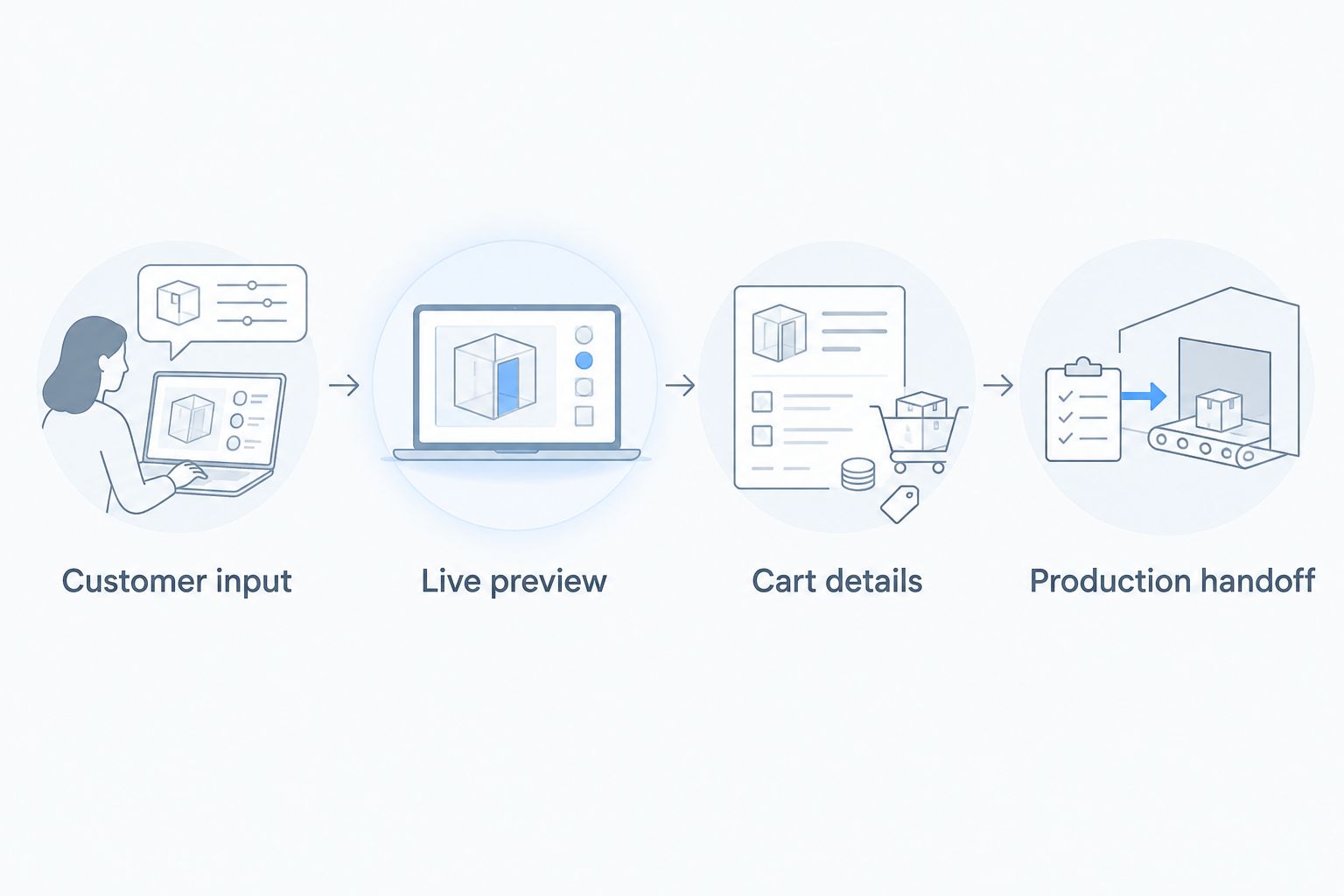
Choose the replacement around the complete order journey, not just the product-page form.
Start with the preview requirement
Ask whether the buyer needs to judge appearance before purchasing. Names, initials and other visible personalisation deserve a different evaluation from a fixed material selection.
Your test should compare the chosen content with the displayed result. Check spelling, placement and the selected product. Do not accept an attractive preview that represents a different configuration.
For a deeper shortlist, use the guide to live-preview product customiser apps for Shopify.
Then inspect the production requirement
Ask your fulfilment team to review the output before you commit. The person operating the equipment should confirm whether the order contains what they need.
Use a representative product. A simple name on a flat surface does not validate every personalisation technique in your catalogue.
Separate the file from the process. Receiving production-ready output does not remove your responsibility to confirm the material, technique and finished result.
Keep the buying journey short
Only request information that changes the product or fulfilment instructions. Every field should have a clear purpose.
Explain unfamiliar choices in plain language. Customers should not need to understand your workshop terminology to place an order.
Choose the app that completes your workflow with the fewest unnecessary decisions. That is a stronger selection rule than choosing the longest options menu.
Why people switch from HulkApps
A switch makes sense when your requirements move beyond collecting product choices. This is a workflow decision, not a claim that HulkApps has stopped working.
For a 2026 evaluation, identify the specific job you need to add:
- Show the personalised result: customers need to inspect the design, not just submit selections.
- Prepare fulfilment output: your team needs a production file rather than only an option record.
- Support a defined technique: your storefront needs to reflect how you sell engraving, embroidery, monograms or another personalisation method.
- Return to fixed choices: your product only needs ordinary variants, so an additional options workflow is unnecessary.
Do not switch because a comparison page declares one app the winner. Switch because the replacement completes a task your current configuration does not.
Write that task in a sentence before evaluating anything. For example: customers must preview their initials, and fulfilment must receive the corresponding production output. Then demonstrate that exact journey.
Test before you migrate
Keep your 2026 migration narrow. Start with 1 representative product, submit 3 test orders covering ordinary input, boundary-length input and a changed selection, and inspect the journey at 2 screen sizes.
These are test recommendations, not app performance benchmarks. The purpose is to expose workflow problems before they reach paying customers.
Check the storefront
Complete the order as a shopper. Enter personalisation, change it, move to the cart and confirm the final choice.
Look for duplicated fields, unclear instructions and a mismatch between the preview and the selected product. Repeat the test on your mobile layout.
Check the handoff
Open each test order as the person fulfilling it. Confirm the product, selected technique and personalisation details, then inspect the output your production process will use.
Record any manual interpretation still required. A change of app has not solved the handoff if the team must reconstruct the customer’s intention from scattered information.
Check the replacement scope
List what you are replacing and what you are retaining. Existing product choices, historical orders and production instructions are separate migration concerns.
Keep the old workflow accessible while you validate the new one. Do not assume a new app recreates historical configuration automatically.
Explore a preview-to-production workflow
Add Shopify personalisation with live previews and production-ready files, without developer involvement.
When staying with HulkApps is the right call
Keep HulkApps Product Options when its option collection already meets your needs. A replacement is unnecessary if customers understand the choices and fulfilment receives adequate instructions.
Its strength is the options-led approach. Its limitation as a decision category is that collecting options alone does not prove you have a visual personalisation or production-output workflow.
Judge your actual configuration. If previewing artwork is irrelevant and your team fulfils orders correctly from the collected choices, retain the working setup.
FAQ
What is the best HulkApps alternative for Shopify personalisation?
Bespo is the best fit in this shortlist when you need live-preview Shopify personalisation and production-ready files. Native Shopify variants are the better choice when customers only select fixed combinations.
Is a product-options app the same as a product customiser?
No. Option collection records a shopper’s choices, while a live-preview customiser shows the personalised design; production output is another requirement to assess separately.
Can I use Shopify variants instead of HulkApps?
Yes, when your product only needs predefined choices such as size or colour. Variants alone do not provide a shopper-written personalisation interface or a live design preview.
Do I need a developer to add Bespo personalisation?
No developer involvement is required to add Bespo storefront personalisation. You still need to decide which products, techniques and personalisation options to offer.
Does a live preview mean an order is ready for production?
No. A live preview shows the shopper’s design, but your fulfilment team must also validate the production output against its equipment and process.
What should I test before replacing a Shopify options app?
Test customer input, the displayed result, cart details and the production handoff. Start with a representative product and inspect both the customer journey and the fulfilment output.
Should I replace HulkApps if my current options work?
No. Keep the current setup when it captures the required choices and your team can fulfil orders correctly; replace it to meet a specific additional requirement.
One last thing
In 2026, your most useful comparison is not between feature lists. It is between the customer’s final selection and the production team’s final instructions.
Hand a test order to someone who did not configure the product. Ask them to identify exactly what to make without contacting the shopper. That exercise tests the part of personalisation that a storefront demo does not.