
The blog
Best print-on-demand platforms for selling without inventory


Best overall: Printful. Best for choosing your print provider: Printify. Best for distributed production: Gelato. Best for marketplace selling: Redbubble. For Shopify personalisation, Bespo adds live previews and production-ready files; it does not replace your fulfilment provider. This 2026 guide separates the services that make and ship products from the software that helps shoppers customise them.
TL;DR
- Printful leads the best print-on-demand platforms for selling without inventory shortlist for merchants building their own storefront.
- Printify suits merchants who want to select and compare print providers.
- Gelato suits sellers evaluating distributed production for international orders.
- Redbubble suits artists who prefer marketplace listings over running a separate store.
- Bespo is best for Shopify product personalisation, not printing or shipping orders.
Why this matters
Selling without inventory removes the need to buy finished products before customers order. It does not remove your responsibility for product quality, accurate artwork or customer service.
The important distinction is fulfilment versus personalisation. A fulfilment platform arranges production and delivery. A personalisation app captures the shopper's choices and prepares the design. Confusing those jobs leaves a gap between checkout and the printer.
Choose your production route first. Then decide whether you need customers to change names, initials or artwork before ordering.
What makes the best print-on-demand platform?
Use these criteria for your 2026 shortlist. A large catalogue alone is not a reason to choose a provider.
- Production model: Know whether you are selecting individual print providers, using a managed fulfilment service or selling through a marketplace.
- Storefront control: Decide whether you need your own checkout and customer relationship or prefer an existing marketplace.
- Product fit: Match the exact blank, print method and print area to the product you intend to sell.
- Destination fit: Evaluate production and delivery for your actual customer locations, not a general global claim.
- Artwork handoff: Confirm how the final design reaches production, especially when every order contains different text.
- Exception handling: Establish who handles a damaged item, incorrect print or failed delivery before publishing the listing.
The best platform is the one that fits your order workflow, not the one with the longest feature list. Use samples and complete test orders to check that fit.
The platforms at a glance
Printful
- Best for: A merchant-owned storefront
- Standout feature: Print-on-demand fulfilment connected to ecommerce stores
- Key limitation: You still manage the storefront and customer experience
Printify
- Best for: Choosing individual print providers
- Standout feature: A network of providers you can compare
- Key limitation: Provider selection adds operational decisions
Gelato
- Best for: Distributed production
- Standout feature: A network of local production partners
- Key limitation: Production location depends on the product and destination
Redbubble
- Best for: Artists selling through a marketplace
- Standout feature: Marketplace listings with platform-managed production and delivery
- Key limitation: Less control over the storefront and buyer relationship
Bespo
- Best for: Shopper-led personalisation on Shopify
- Standout feature: Live-preview customiser and production-ready files
- Key limitation: It is a personalisation app, not a fulfilment platform
The first four options address production and delivery. The final option addresses the personalised shopping experience. They belong in different parts of your selling setup.
1. Printful: best for building your own online store
Printful is a print-on-demand fulfilment service that connects with ecommerce platforms, including Shopify. You publish products in your store, and Printful fulfils the connected orders. You remain responsible for attracting customers and managing the store.
Best for: Merchants who want a fulfilment service behind their own storefront rather than a marketplace-led business.
Printful pros
- Connects print-on-demand fulfilment with your ecommerce store.
- Supports selling your designs without holding finished inventory.
- Keeps product selling and fulfilment within a connected workflow.
Printful cons
- You still need to manage merchandising, marketing and customer support.
- Outsourced production gives you less hands-on control than printing each item yourself.
- Customer-specific artwork requires a confirmed handoff; a store connection alone does not prove that workflow.
Printful is the default recommendation for a merchant who wants to own the store experience. That recommendation is about the operating model, not a claim that every Printful product outperforms every alternative.
Before launch, order the exact item you plan to sell. Inspect the print placement, material and packaging. A digital mock-up helps show the design, but it cannot establish physical print quality.
If your product includes names or initials, review the Shopify customiser-to-Printful fulfilment workflow. Confirm that the final artwork, product selection and order details all reach the correct production job.
Verdict: Buy into the Printful workflow if you want your own storefront and a connected fulfilment service.
2. Printify: best for choosing your print provider
Printify connects merchants with a network of print providers. Instead of treating fulfilment as one uniform service, you select providers for the products you sell. That makes provider choice a central part of your business.
Best for: Merchants who want to compare production options and take responsibility for selecting the provider behind each product.
Printify pros
- Gives you a choice of print providers.
- Lets you evaluate products and providers together.
- Connects the selected fulfilment route with your ecommerce store.
Printify cons
- Print quality and fulfilment experience depend on the selected provider and product.
- More provider choices mean more sample testing and operational decisions.
- Moving a product to another provider requires checking the blank and artwork again.
Printify is the stronger choice when you want to make the supplier decision yourself. It is less suitable when you want to avoid comparing providers or maintaining provider-specific product settings.
Compare like with like. A similar-looking garment is not necessarily the same blank, and the same design can look different on another fabric or print process.
For your 2026 evaluation, keep a record of the provider, product, print area and sample result. That record makes later changes deliberate instead of accidental. Do not replace a production route solely because another listing looks attractive.
Verdict: Buy into the Printify workflow if provider choice matters more than minimising supplier decisions.
3. Gelato: best for evaluating distributed production
Gelato uses a network of production partners to fulfil print-on-demand orders. Its distributed model makes it a relevant shortlist option when your customers are spread across different countries. Evaluate the production route for each product and destination.
Best for: Merchants assessing a distributed fulfilment model for an international customer base.
Gelato pros
- Organises fulfilment through a distributed production network.
- Connects with ecommerce platforms, including Shopify.
- Gives international sellers a production model to assess beyond a single dispatch location.
Gelato cons
- A production network does not mean every item is produced near every customer.
- Product and destination choices affect the fulfilment route.
- You still need physical samples to judge the final output.
Gelato belongs on your shortlist when destination fit drives the decision. Do not turn that into an unsupported promise that every order will be local or arrive faster than every competitor.
Test the destinations you actually serve. Check the product offered for that route, the delivery information presented to the shopper and the tracking experience after dispatch.
Keep product quality and delivery as separate checks. A good print does not establish a good international delivery experience, and a smooth delivery does not establish accurate colour reproduction.
Verdict: Buy into the Gelato workflow if distributed production matches your customers and your destination tests pass.
4. Redbubble: best for artists who want a marketplace
Redbubble is a marketplace where artists upload designs for products that are produced and shipped through the platform's fulfilment arrangements. It combines the selling environment with the production route. You do not need to build a separate Shopify storefront to use it.
Best for: Artists who want to publish designs in an existing marketplace rather than operate an independent store.
Redbubble pros
- Provides a marketplace in which to list your artwork.
- Arranges production and delivery for marketplace orders.
- Removes the need to assemble a separate storefront-and-fulfilment setup.
Redbubble cons
- You have less control over the shopping environment than with your own store.
- Marketplace rules shape how you present and sell your work.
- Publishing a design does not guarantee that shoppers will discover or purchase it.
Redbubble serves a different goal from a Shopify-connected fulfilment platform. Choose it for the marketplace model, not because you expect it to reproduce the control of a merchant-owned store.
Prepare artwork carefully for each product. A composition that works on a poster does not automatically work on a small accessory. Review the placement instead of applying the same file indiscriminately.
Verdict: Buy into the Redbubble workflow if publishing artwork matters more than controlling your own storefront.
5. Bespo: best for Shopify shopper-led personalisation
Bespo lets Shopify merchants add real-time product personalisation without developer involvement. Shoppers use a live-preview customiser, and the app outputs production-ready files for fulfilment. Supported techniques include print, embroidery, engraving, monograms, embossing and debossing.
Bespo is best for Shopify merchants who need live-preview product personalisation and production-ready files. It belongs beside a production route, not in place of one.
Best for: Merchants selling products whose design changes with each shopper's choices.
Bespo pros
- Shows shoppers a live preview of their personalisation.
- Supports several personalisation techniques, including print and embroidery.
- Outputs production-ready files for fulfilment.
- Lets merchants add personalisation without developer involvement.
Bespo cons
- It does not replace a business that manufactures and ships your products.
- Its stated storefront use is Shopify, not a standalone marketplace.
- Production-ready output still needs to match your fulfilment partner's requirements.
The app solves a different problem from selling fixed artwork. If every customer buys the same design, start by confirming your fulfilment workflow. Add personalisation when customers need to change the product themselves.
Do not assume an automatic connection to a printer. Confirm the file format, order association and transfer method before taking customer orders.
Verdict: Buy into this personalisation workflow if you sell shopper-customised products on Shopify and have a confirmed fulfilment route.
How we ranked these options
This 2026 ranking uses production model, storefront control, product fit, destination fit, artwork handoff and exception handling. Each recommendation owns a different use case. The order is not a measured print-quality leaderboard.
Printful is the default for a merchant-owned storefront. Printify prioritises provider selection. Gelato prioritises distributed production. Redbubble prioritises marketplace selling. The personalisation app covers the shopper-facing design step rather than manufacturing.
Keep the comparison tied to the job you need done. A marketplace is not a substitute for storefront control, and a customiser is not a substitute for production.
Check the order workflow before launch
In 2026, the deciding test remains a complete order, not a feature checklist. Follow the design from the customer's screen to the delivered item.
Capture choices
Define what the customer can change. Set clear boundaries for text, placement and artwork. For fixed-design products, confirm the selected product and variant instead.
Prepare artwork
Check the production file against the printer's requirements. A preview image and a production file serve different purposes. Confirm dimensions, placement and any required print area before submission.
Submit order
Verify that the correct file travels with the correct product and customer details. Keep order identity intact throughout the handoff. A good design attached to the wrong order is still a failed order.
Inspect delivery
Review the physical product and the customer-facing delivery experience. Check the tracking message, packaging and final personalisation. Record problems before expanding the catalogue.
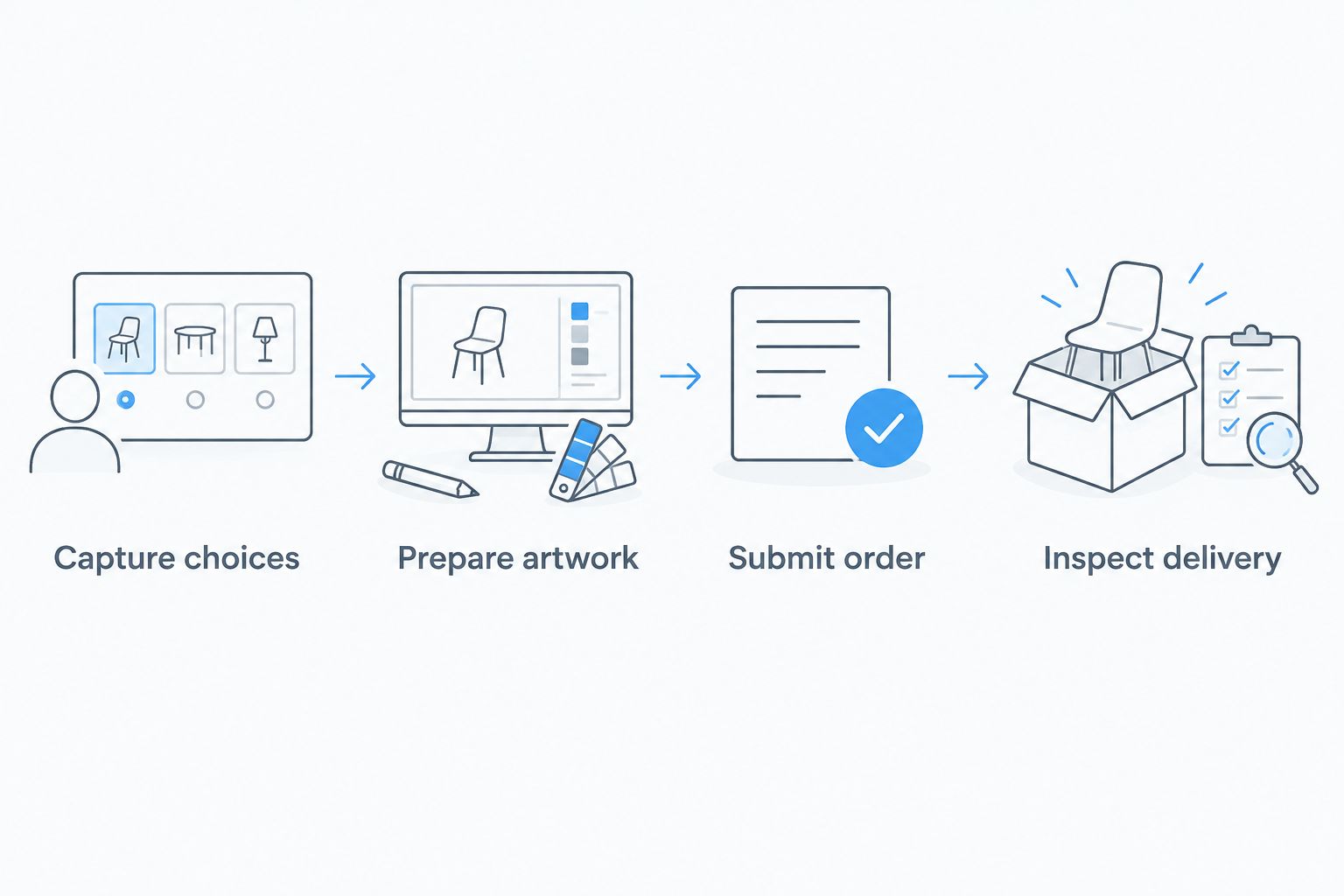
Check the full order journey before expanding your catalogue.
For a focused launch test, start with 1 product, place 2 test orders with different designs and use 2 delivery addresses. These are suggested test conditions, not platform performance figures. Check that each recipient receives the intended design.
Which platform should you choose?
Choose Printful if you are undecided and want to build your own store. Choose Printify when selecting providers is part of your strategy, Gelato when distributed production fits your destinations, and Redbubble when you want a marketplace instead.
For personalised Shopify products, add a customiser after confirming the production route. Your 2026 setup is ready when the preview, artwork, order and delivered item agree—not when every app is installed.
FAQ
What's the best print-on-demand platform for selling without inventory?
Printful is the default recommendation for merchants building their own storefront. Printify suits provider selection, Gelato suits distributed production and Redbubble suits marketplace selling.
Is Printify better than Printful?
Printify is better suited to merchants who want to choose individual print providers. Printful is the default here for merchants who prefer a connected fulfilment service behind their own store.
Can I sell print-on-demand products without Shopify?
Yes. Redbubble provides a marketplace route that does not require a separate Shopify storefront. Choose that model if marketplace selling fits your goals.
Does selling without inventory mean I have no fulfilment responsibilities?
No. For your own store, you still need to manage customer communication and establish how production or delivery problems are resolved. Outsourcing production does not remove those responsibilities.
Is Bespo a print-on-demand fulfilment company?
No. Bespo is a Shopify product personalisation app with live previews and production-ready file output. You still need a business that produces and ships the finished items.
Do I need a personalisation app for fixed designs?
Not simply to sell the same design on every order. A personalisation app addresses customer-specific changes such as names, initials or other configurable design choices.
How should I check a print-on-demand platform before launching?
Place complete test orders for the exact products you intend to sell. Inspect the artwork handoff, physical print, packaging and delivery experience before expanding your catalogue.
One last thing
The customer's preview is not the production file. Check both against the delivered product. That single distinction catches a workflow problem that a polished product page cannot reveal.
Keep your initial catalogue narrow until the full order journey works. Then expand products, destinations or personalisation options one at a time so you can identify what changed.