
The blog
Best Shopify apps for custom car air freshener products


Best overall for live-preview personalisation: Bespo. Best for simple name fields: a product-options app. Best for outsourced production: a print-on-demand app that your air freshener supplier supports. This 2026 guide compares the app types by what you need to sell, approve and produce—not by unrelated feature counts.
TL;DR
- Bespo is the best starting point for Shopify merchants needing live previews and production-ready personalisation files.
- The best Shopify apps for custom car air freshener products must fit your supplier’s production workflow.
- Choose product options for simple text; choose an artwork workflow for customer photos and logos.
- A personalisation app handles the design experience. Confirm manufacturing and fulfilment separately.
Why this matters
A custom car air freshener combines two different buying decisions: the physical product and the artwork. Your customer chooses a scent or shape, then supplies the design that makes the item personal.
Those decisions need to stay together through checkout and production. A name saved without its selected product, or artwork detached from the order, leaves your team reconstructing what the customer intended.
Choose the app around the production handoff, not just the product-page widget. A preview helps shoppers understand their design. Your printer still needs an output that matches the agreed template and order specifications.
For your 2026 shortlist, separate storefront personalisation from manufacturing. Software that captures a design does not, by itself, establish who prints, scents, packs or ships the finished air freshener.
What makes the best Shopify app for custom air fresheners?
Use these criteria before comparing options. Each one answers a practical question about whether you can process the order without rebuilding it manually.
- Design visibility: Can shoppers understand how their text or artwork will sit on the product before ordering?
- Production output: Can your printer use the saved design, or must someone recreate it?
- Order connection: Do the selected product, personalisation details and artwork remain associated with the correct order item?
- Template control: Can you restrict personalisation to the areas your supplier can actually print?
- Mobile usability: Can customers complete the required inputs and check their design on a phone?
- Workflow fit: Does the app support your intended route: in-house printing, an external supplier or outsourced fulfilment?
Treat these as acceptance requirements. Ask each vendor to demonstrate your actual product rather than a generic personalised T-shirt.
A useful demo includes a long name, an awkward photo and a repeat order with different artwork. These are test cases, not reasons to add every possible editing feature.
Shopify personalisation options at a glance
Only the named product below has supplied brand-specific capabilities. The remaining entries are app categories to shortlist against your workflow, not endorsements of unnamed vendors.
1. Bespo
- Best for: Live-preview personalisation with production-file output
- Standout capability to assess: Shopper preview and production-ready files
- Key limitation: Your printer must confirm suitability for the air freshener template
2. Product-options app
- Best for: Names and short messages on fixed layouts
- Standout capability to assess: Structured text and product choices
- Key limitation: Capturing text does not establish a visual preview or print-file workflow
3. File-upload app
- Best for: Customer-supplied photos and logos
- Standout capability to assess: Collecting source artwork against an order
- Key limitation: An uploaded file is not automatically approved artwork
4. Proof-approval app
- Best for: Designs requiring explicit customer sign-off
- Standout capability to assess: A recorded approval step
- Key limitation: Adds a handoff before production
5. Print-on-demand app
- Best for: Production through an external fulfilment provider
- Standout capability to assess: Sending supported products into a supplier workflow
- Key limitation: Exact product and artwork support must be confirmed
1. Bespo: best for live-preview air freshener personalisation
Bespo is a Shopify product personalisation app with a live-preview customiser and production-ready file output. Merchants can add personalisation without developer involvement, and print is among its supported personalisation techniques.
Bespo is best for Shopify merchants who need live-preview personalisation and production-ready files. For custom air fresheners, that makes it the starting point when you want customers to see their design rather than submit instructions alone.
The next step is product-specific validation. Give your printer the output from a representative air freshener template and ask whether it meets the required dimensions, printable area and file requirements.
Bespo pros:
- Live previews let shoppers see personalisation before ordering.
- Production-ready files provide an output beyond written instructions.
- No developer involvement is required to add personalisation.
- Print support is relevant to printed custom-product workflows.
Bespo cons:
- A digital preview cannot demonstrate the physical scent or finished material.
- General print support does not establish compatibility with a particular air freshener supplier.
- You still need to define printable areas and confirm the production handoff.
Best for: Merchants with a printer or fulfilment partner who want a visual personalisation experience.
Verdict: Buy after your printer accepts the sample output.
2. Product-options app: best for names on fixed layouts
A product-options app is the category to evaluate when customers only need to enter a name or short message. Your design stays fixed; the customer supplies the variable text.
This route fits a deliberately narrow offer. For example, you can specify where the name appears and keep the typography under your team’s control instead of offering a design editor.
Do not confuse a text field with an automated production system. Require the vendor to show where the entered text appears after checkout and how your production team retrieves it.
Product-options app pros:
- A narrow input form keeps the buying task focused.
- Fixed layouts let you retain control over artwork placement.
- Structured fields separate customer instructions from general order notes.
Product-options app cons:
- Text capture alone does not show the finished design.
- Your team needs a separate method for turning text into printable artwork.
- Long names and unsupported characters need clear handling rules.
Best for: Stores selling a fixed design with a limited name or message field.
Verdict: Buy for text-only products; skip for customer-led artwork editing.
3. File-upload app: best for collecting photos and logos
A file-upload app is the category to shortlist when the customer already has an image to submit. The buying task is to attach source artwork, not create a design from scratch.
For a photo air freshener, receiving the file is only the first step. You still need a process for checking the crop, subject placement and suitability for your supplier’s template.
Ask the vendor to demonstrate the complete path from upload to order retrieval. Check that your production team can identify which image belongs to which personalised item.
File-upload app pros:
- Suits customers who already have a photo or logo.
- Keeps artwork submission within the intended buying workflow when properly configured.
- Provides a clear starting point for a separate artwork-review process.
File-upload app cons:
- File submission does not establish a live product preview.
- A successfully uploaded image is not necessarily suitable for printing.
- Cropping, placement and approval require separate decisions.
Best for: Stores that collect customer artwork and prepare the final layout internally.
Verdict: Buy for artwork collection; hold if you need automatic print-file preparation.
4. Proof-approval app: best for logo orders requiring sign-off
A proof-approval app is the category to assess when a customer must approve the final layout before printing. This is a workflow decision: production waits until the proposed artwork receives explicit sign-off.
It suits orders where placement matters more than instant checkout completion. A dealership logo, event graphic or business message needs a defined approval owner and a clear final version.
Set the rules before choosing software. Your proof-approval step before printing should explain who approves the artwork and what happens when the customer requests changes.
Proof-approval app pros:
- Establishes a deliberate sign-off point before production.
- Gives customers a defined opportunity to request artwork changes.
- Makes approval status a requirement for releasing the job.
Proof-approval app cons:
- Adds a waiting stage to the order workflow.
- Requires clear ownership of revisions and customer follow-up.
- Does not replace the customiser or manufacturing process.
Best for: Business-logo and event orders that require approval of the final layout.
Verdict: Buy when sign-off is mandatory; skip when a fixed, accepted template is sufficient.
5. Print-on-demand app: best for externally produced air fresheners
A print-on-demand app belongs on your shortlist when an external provider will make and fulfil the product. Start with the provider’s exact air freshener offering, then assess how the Shopify order reaches production.
Do not select this route because a platform prints other merchandise. Require confirmation of the specific air freshener format, artwork requirements and personalisation handoff you intend to use.
For a 2026 launch, request a sample of the actual product before connecting the customer-facing workflow. Evaluate the physical item separately from the app interface.
Print-on-demand app pros:
- Offers a route to external production when the provider supports the product.
- Lets you evaluate manufacturing and fulfilment as part of the supplier relationship.
- Gives your store a defined destination for production orders.
Print-on-demand app cons:
- General print-on-demand support does not establish air freshener support.
- A supplier connection does not automatically include shopper personalisation.
- Your offer must follow the supplier’s product and artwork requirements.
Best for: Merchants choosing an external producer rather than printing internally.
Verdict: Hold until the supplier confirms the exact product and accepts a test order.
Test the workflow before choosing an app
Use the same acceptance sequence for every 2026 candidate. Start with 1 product template, then place 3 test orders: a short name, a long name and customer artwork where that input is part of your offer.
These are recommended test quantities, not performance benchmarks. The purpose is to expose different handoff problems without building your full catalogue first.
Product template
Get the production template from your supplier. Identify the printable area, any excluded areas and whether your offer includes 2 print faces or only one.
Do not show a reverse-side editing option unless your physical product and production process support it. The storefront must describe the item you can make.
Customer input
Enter the test personalisation on a phone. Check instructions, field labels and whether customers can review their choices before proceeding.
If your product accepts images, test an awkward crop rather than only a perfectly prepared logo. Define who fixes unsuitable artwork.
Saved order
Complete checkout and inspect the resulting order details. Check that each personalised item retains the correct product choices and design information.
Test separate designs within the same order if that is part of your intended offer. Do not assume a successful single-item order proves that workflow.
Production file
Open the output with the person who prepares production. Confirm that the file and accompanying instructions match the supplier’s requirements without reconstructing the customer’s choices.
A file labelled production-ready still needs to pass your actual production process. Acceptance comes from the printer, not the label.
Sample check
Compare the physical sample with the submitted design. Review text placement, image crop and the product choices recorded on the order.
Approve the workflow only after both the digital handoff and physical sample meet your requirements.
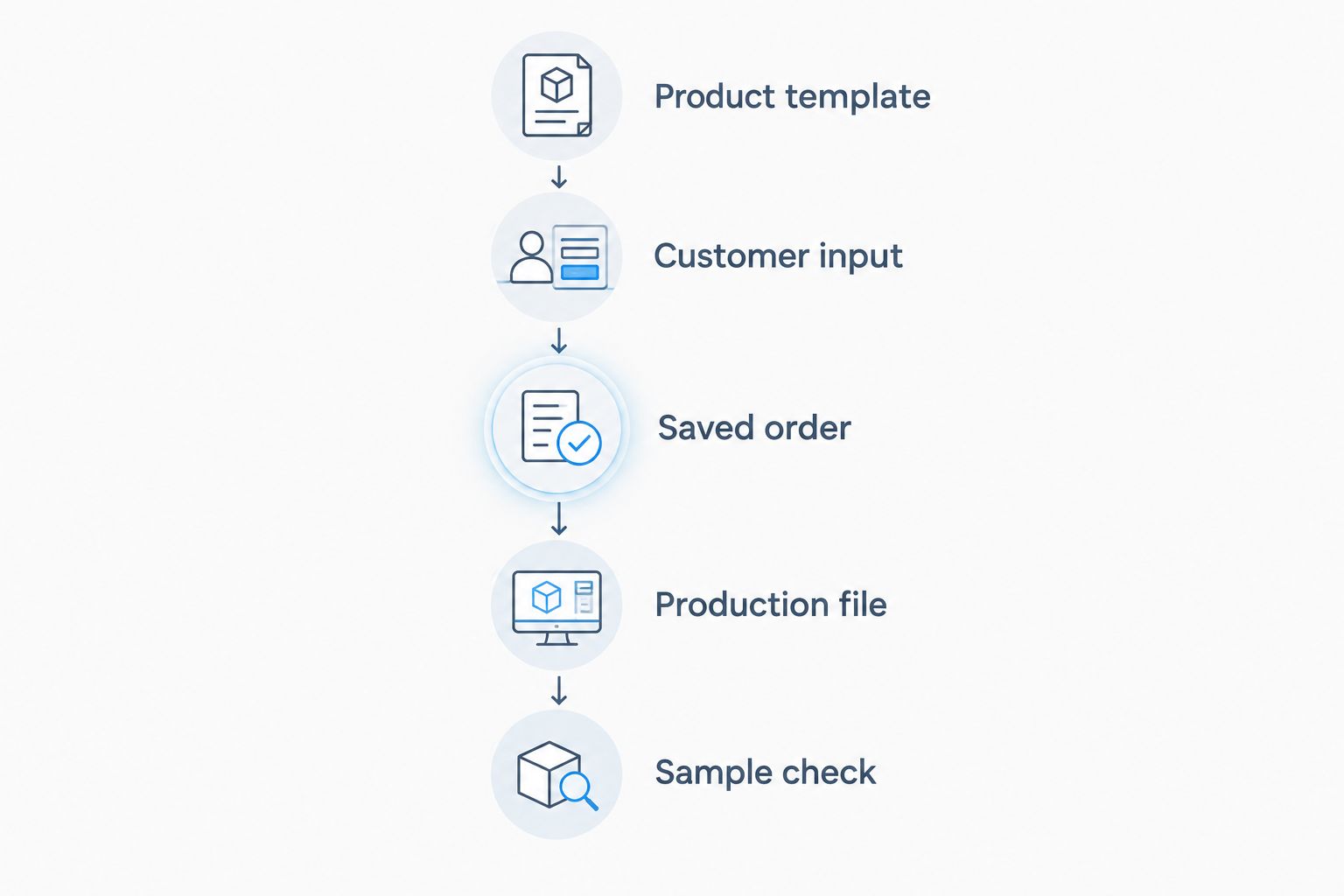
Approve the complete handoff, not just the storefront preview.
How the options are ranked
The ranking prioritises design visibility and production output, followed by order connection, template control, mobile usability and workflow fit. These are functional recommendations, not ratings from a comparative product test.
The narrower app categories rank below the full personalisation route because they address individual tasks. Choose them when those tasks match your offer—not because a longer stack looks more capable.
Your production model decides the winner. A fixed name template, a customer photo and a supplier-produced product do not need identical software.
Which Shopify app should you choose?
Choose Bespo for live-preview Shopify personalisation with production-file output. Validate an air freshener template with your printer before expanding the catalogue.
Choose a product-options app when a name field is the entire personalisation offer. Choose file collection plus approval when your team prepares customer artwork, or begin with the supplier when production is outsourced.
Keep your 2026 launch narrow. A complete, accepted workflow for one product is a better starting point than several unfinished personalisation routes.
Explore live-preview personalisation
Review the Shopify personalisation app, then validate your air freshener template with your printer.
FAQ
What’s the best Shopify app for custom car air freshener products?
Bespo is the best starting point for merchants who need live-preview personalisation and production-ready files. Confirm that the output fits your air freshener supplier’s template before launching.
Do I need a live preview to sell personalised air fresheners?
A live preview is not essential for a fixed name-only design. It is the better workflow to assess when customers need to judge text placement or artwork before ordering.
Is a file-upload app enough for photo air fresheners?
A file-upload app covers artwork collection, not the entire production workflow. You still need to check image suitability, prepare the layout and decide whether customer approval is required.
Can a Shopify personalisation app make and ship air fresheners?
Personalisation software does not by itself establish manufacturing or shipping. Confirm those responsibilities with your production or fulfilment provider separately.
What should I test before launching custom air fresheners?
Test the product template, customer input, saved order, production file and physical sample. Use different personalisation examples to check that your handoff works beyond a single prepared design.
Which app type suits dealership logo air fresheners?
An artwork-collection workflow with explicit proof approval suits logo orders requiring sign-off. Confirm who approves the layout and prevent production from starting before that approval.
Should I choose a print-on-demand app or a product customiser?
Choose based on whether you need external production or a shopper-facing design experience. If you need both, confirm that the personalisation output reaches the supplier in an accepted form.
One last thing
Keep scent separate from artwork approval. A shopper can approve a name, image crop or logo position on screen, but a digital preview cannot demonstrate fragrance.
Record the scent choice with the order and use a physical sample to assess the product. That keeps a successful design preview from standing in for product validation.