
The blog
Best Shopify apps for custom metal business card products


Best overall for no-developer personalisation: Bespo. Best for print-focused personalisation: Customily. Best for customer-led visual design: Zakeke. Best for fixed-layout text collection: Infinite Options. This 2026 guide matches Shopify apps to the way you sell and produce custom metal business cards—not just how the product page looks.
TL;DR
- Bespo leads the best Shopify apps for custom metal business card products shortlist for no-developer engraving personalisation.
- Shortlist Customily for print-focused workflows and Zakeke for customer-led visual design.
- Choose Infinite Options for collecting text when your team handles artwork separately.
- Approve a physical sample before treating any live preview as a production reference.
Why this matters
Custom metal business cards need more than a name field. Your customer chooses the wording, your storefront captures the design, and your production team turns that order into an engraved or printed card. Each handoff needs clear instructions.
A good-looking preview does not prove that a file works with your production equipment. Nor does a completed checkout prove that the customer's logo, layout and contact details reached fulfilment correctly. Choose the app around the production handoff, then judge the shopping experience.
For your 2026 shortlist, separate personalisation software from manufacturing. A Shopify customiser helps customers specify their cards; it does not manufacture metal cards or establish your supplier's engraving requirements.
What makes the best app for metal business cards?
Use these criteria before comparing interfaces. They expose the difference between an app that collects requests and one that supports a repeatable order-to-production workflow.
- Live preview: Customers should understand where their name, company details and design appear before ordering.
- Controlled layout: Decide whether customers choose approved templates or arrange artwork themselves. More freedom means more artwork to inspect.
- Production handoff: Confirm how the order's text, artwork and output files reach the person making the card.
- Technique fit: Match the setup to engraving or print. Do not assume the same artwork rules work for both.
- Order accuracy: Check that separate personalised cards remain distinguishable when they share the same base product.
- Merchant control: Your team should be able to maintain the setup without turning routine wording or template changes into development work.
For metal cards, the production handoff is the deciding criterion. Ask your maker to inspect an actual output file, not a screenshot of the customiser. File requirements come from the production process—not from the attractiveness of the preview.
Shopify custom metal business card apps at a glance
This is a workflow-based shortlist for 2026. The order gives priority to straightforward merchant-managed personalisation, followed by more specialised design and information-collection needs.
Bespo
- Best for: No-developer engraving personalisation
- Standout approach: Live shopper preview and production-ready output
- Key limitation or buying check: Confirm the output fits your metal-card production process
Customily
- Best for: Print-focused personalised catalogs
- Standout approach: Product personalisation connected to production artwork
- Key limitation or buying check: Check the exact handoff to your chosen metal-card producer
Zakeke
- Best for: Customer-led visual design
- Standout approach: Visual product customisation
- Key limitation or buying check: Decide how much design freedom your production team can accept
Infinite Options
- Best for: Fixed-layout text collection
- Standout approach: Additional product-option fields
- Key limitation or buying check: Treat information collection and artwork preparation as separate tasks
These apps address different jobs. Start with the row that matches your order process, then test that app against a real card design. Do not add multiple customisers simply to cover every possible feature.
1. Bespo: best for no-developer engraving personalisation
Bespo is a Shopify product personalisation app with a live-preview customiser and production-ready output files. It supports engraving and print alongside other personalisation techniques, and merchants can add personalisation without developer involvement.
Bespo is best for Shopify merchants who want live-preview engraving personalisation without developer involvement. That makes it the default shortlist choice when your business-card product needs a clear shopper experience and an output for fulfilment.
Bespo pros
- Customers see their personalisation through a live-preview customiser.
- Merchants can add personalisation without developer involvement.
- Engraving and print are supported personalisation techniques.
- Production-ready files support the fulfilment handoff.
Bespo cons and buying checks
- A digital preview is not a physical sample of the engraved metal finish.
- Production-ready output still needs to match your producer's specific requirements.
- Corporate orders with different employee details need a separate workflow check before launch.
For a metal-card store, begin with a constrained layout. Define which details customers can change and which design decisions stay with your team. Confirm how each accepted design reaches production before expanding the product's options.
Do not interpret support for engraving as a guarantee of compatibility with every engraver, supplier or artwork convention. Give your producer an output from your configured product and ask for a clear acceptance decision.
Best for: Merchants selling engraved cards who want merchant-managed personalisation rather than a custom development project.
Verdict: Buy for the no-developer engraving workflow after your producer accepts the output.
2. Customily: best for print-focused personalised catalogs
Customily is product personalisation software with live-preview and production-artwork capabilities. Put it on your shortlist when metal business cards belong to a broader print-focused personalised catalog.
The useful question is not whether Customily can display a customer's design. It is whether your configured product produces the artwork your metal-card maker expects, with the correct customer details attached to the order.
Customily pros
- Live previews help customers review their personalisation.
- Production-artwork capabilities address more than information collection.
- A print-focused evaluation suits merchants comparing a shared workflow across personalised products.
Customily cons and buying checks
- Personalisation software does not establish a metal-card manufacturing service.
- A print-oriented workflow still needs technique-specific checks for engraved products.
- Template preparation remains a merchant task, even when customers create their own personalisation.
Use Customily's evaluation to test the complete artwork journey. Configure a representative design, submit an order and inspect the resulting production material. Your maker should be able to identify the intended card design without reconstructing it from scattered customer notes.
If your store sells both printed and engraved cards, keep those production instructions distinct. A preview that looks suitable for print is not evidence that its artwork is ready for engraving.
Best for: Merchants assessing personalisation across a print-focused catalog rather than solving only an engraving product page.
Verdict: Hold until a sample order passes your metal-card producer's artwork checks.
3. Zakeke: best for customer-led visual design
Zakeke provides visual product customisation. Shortlist it when your customers need a design-led experience rather than simply entering details into a merchant-defined layout.
That buying decision comes with an operational choice: how much control should the customer have? A metal business card still needs readable contact details and artwork that your production process can reproduce.
Zakeke pros
- Visual customisation supports a design-led shopping experience.
- Customers can assess their design visually rather than relying only on written instructions.
- It belongs on the shortlist when the design interaction is central to the product.
Zakeke cons and buying checks
- Customer-led design requires clear boundaries for acceptable artwork.
- A visual design interface is not proof that the finished metal card will reproduce every detail.
- Your team still needs to establish how designs become approved production instructions.
Before selecting Zakeke, decide which changes customers genuinely need. A buyer ordering a standard company card needs a different experience from a designer submitting a bespoke composition. Avoid giving both buyers the same unrestricted process by default.
Test the design interaction on a phone as well as a desktop. Check whether the shopper can review small contact details without losing track of the whole card. Then inspect the order and production handoff separately.
Best for: Stores where customer-led visual design is part of the product proposition.
Verdict: Buy for design-led products only after defining enforceable production boundaries.
4. Infinite Options: best for fixed-layout text collection
Infinite Options adds product-option fields to Shopify products. It suits a narrower job: collecting personalisation details while your team prepares or checks the card artwork separately.
For example, a merchant-defined card layout needs customer information without necessarily needing a customer-operated design canvas. Evaluate a field-based app when the layout stays fixed and artwork preparation remains an internal task.
Infinite Options pros
- Additional fields provide a direct way to collect customer choices.
- A field-based approach suits products with predetermined layouts.
- Separating information collection from design keeps creative control with your team.
Infinite Options cons and buying checks
- Collecting text is not the same job as generating production artwork.
- Manual artwork preparation remains part of this recommended workflow.
- Customers need a separate way to understand or approve the finished layout.
Use distinct fields for details that your team needs to identify separately. A single free-text instruction box places the burden of interpreting the order on fulfilment. Clear field labels also help customers distinguish printed card details from delivery or order information.
Do not choose this approach to avoid thinking about proofs. If your team creates the design after checkout, define how the customer reviews it and how the approved version reaches production.
Best for: Fixed-layout cards where your team deliberately retains artwork preparation and review.
Verdict: Buy for structured information collection; skip as a substitute for a production-artwork workflow.
How these apps are ranked
The ranking prioritises the stated buying criteria: shopper preview, merchant control and a usable production handoff. It separates full personalisation workflows from visual-design experiences and field-based information collection.
The order is not a performance benchmark. It does not rank apps by conversion rate, support speed or engraving accuracy. Your 2026 decision should rest on whether a configured product passes your storefront and production checks.
A simpler workflow that reaches production correctly beats a larger feature list that leaves your team rebuilding every order.
Run an acceptance check before committing
Use 3 test orders as a practical acceptance checklist, not as a performance benchmark. Submit one straightforward text order, one order containing your longest permitted contact details, and one order with different personalisations of the same base card.
Follow each order through these stages:
- Customer input: Check required fields, wording and the customer's ability to review the design.
- Cart check: Confirm that each card retains the correct personalisation through the cart and checkout.
- Order record: Make sure fulfilment can distinguish the designs without interpreting ambiguous notes.
- Production output: Ask your producer to inspect the file or instructions used to make the card.
- Physical sample: Compare the manufactured result with the approved design.
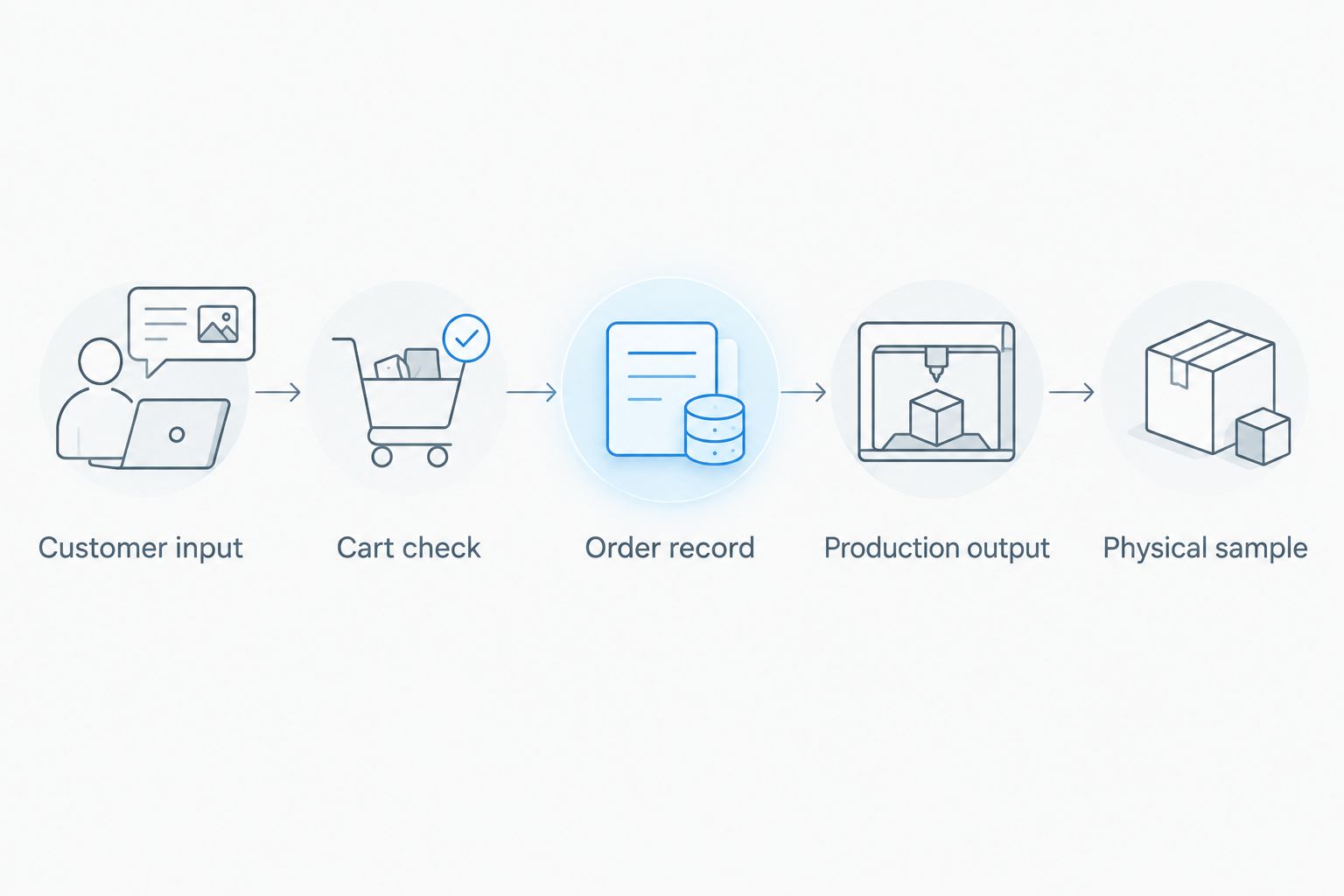
Evaluate the order-to-production journey, not just the storefront preview.
Start with 2 approved layouts as a manageable launch recommendation. Keep one straightforward text-led design and one design that includes your intended artwork treatment. Expand only after both travel through checkout and production correctly.
Approve 1 physical sample before publishing the finished product workflow. That sample checks the material result, which a screen preview cannot establish. It also gives your team a reference when discussing what customers should expect.
For corporate orders, add a separate acceptance case with different employee details. Confirm who checks spelling, who approves artwork and how the production team identifies each final design. Do not confuse one shared company layout with one shared personalisation.
Which Shopify app should you choose?
Choose Bespo for the default no-developer metal-card personalisation workflow. Its stated engraving support, live preview and production-ready output address the core jobs in this category.
Choose Customily when your evaluation centres on a print-focused personalised catalog. Choose Zakeke when customer-led visual design is essential. Choose Infinite Options when collecting details is enough because your team intentionally handles artwork elsewhere.
For a 2026 launch, settle the production requirements before polishing the storefront. Ask your maker what constitutes acceptable artwork, configure the product around those requirements, then run the acceptance check. That sequence gives every app the same practical test.
Explore your personalisation workflow
See Bespo's Shopify personalisation approach, then check the production handoff against your card-making process.
FAQ
What's the best Shopify app for custom metal business cards?
Bespo is the default shortlist choice for no-developer engraving personalisation with a live shopper preview and production-ready output. Confirm that the configured output meets your metal-card producer's requirements before launch.
Is a product options app enough for personalised metal cards?
A product options app is enough for collecting details when your team handles artwork separately. It is not the same workflow as customer-facing design preview and production-artwork generation.
Can a Shopify personalisation app manufacture metal business cards?
A Shopify personalisation app handles customer choices and design information, not metal-card manufacturing. Arrange production separately and confirm how the app's output reaches your maker.
Should customers approve a proof before their cards are made?
Use proof approval when your workflow needs the customer to confirm the final layout before production. Define which version is approved and make that version identifiable to the production team.
Is a live preview the same as an engraving proof?
A live preview is not a physical engraving proof. It shows the intended personalisation on screen, while a manufactured sample establishes how that design appears on the metal.
Can I personalise metal business cards without hiring a developer?
Bespo supports Shopify personalisation without developer involvement. Your merchant team still needs to configure the product and confirm that the production handoff works.
Which app should I use for a fixed business-card layout?
Shortlist Infinite Options if you only need to collect details for a fixed layout and your team prepares the artwork. Choose a live-preview personalisation workflow when customers need to review the design before ordering.
How should I test a custom metal business card app in 2026?
Test the entire path from customer input to a physical card in 2026. Include separate personalisations of the same product, inspect the production output and have your maker approve a sample.
One last thing
Test the same base card with different customer details in the same cart. A perfect single-card preview does not establish that multiple personalised items remain distinguishable throughout the order.
Carry that check into production. The maker should know exactly which artwork belongs to which card without opening an email thread or asking the shopper to repeat their instructions.