
The blog
Best Shopify apps for custom pet bowl products


Best overall for merchants managing their own custom pet bowl production: Bespo. Best for template-based print-on-demand personalisation: Customily. Best for layered pet illustrations: Teeinblue. Best for collecting a simple pet name: Infinite Options. This 2026 guide compares storefront personalisation tools, not bowl manufacturers.
TL;DR
- Bespo leads the best Shopify apps for custom pet bowl products shortlist for live previews and production-ready files.
- Customily suits template-based personalisation workflows; confirm the exact bowl supplier connection before launch.
- Teeinblue suits layered pet artwork; keep design choices tied to your production template.
- Infinite Options suits simple name collection, not a visual bowl-design experience.
Why this matters
A custom pet bowl order has two jobs to complete. Your shopper needs to specify the right name and design. Your production team needs instructions it can use without guessing.
Those jobs are different. A text field captures a name; a live preview shows its placement. A production file carries artwork into fulfilment; a supplier manufactures the bowl.
Choose the app around your production workflow, not around the number of options in its editor. For your 2026 shortlist, first decide whether you decorate bowls yourself, send artwork to a production partner, or use a print-on-demand service.
What makes the best custom pet bowl app?
Use these criteria before comparing names:
- Personalisation capture: Keep the pet name, selected design and bowl variant associated with the correct ordered item.
- Preview clarity: Show the shopper where the personalisation belongs. Make placement understandable on a phone.
- Production handoff: Match the resulting artwork or order instructions to your decorator's requirements.
- Design boundaries: Restrict choices to combinations you can actually produce. A screen preview is not permission to print anywhere.
- Setup ownership: Decide whether your merchant team can manage templates or needs design and technical support.
- Supplier fit: Check the exact bowl product and order route. A customiser and a manufacturing service solve different problems.
Do not give every criterion equal importance. For an engraved name-only bowl, reliable text capture matters more than a large artwork library. For a printed pet portrait, the artwork workflow needs more attention.
Custom pet bowl apps at a glance
Bespo
- Best for: Merchants managing bowl decoration and fulfilment
- Standout capability: Live-preview personalisation with production-ready file output
- Key limitation: You still need to define and validate the physical production process
Customily
- Best for: Template-based print-on-demand personalisation
- Standout capability: Personalisation templates, previews and production artwork
- Key limitation: Exact supplier and bowl workflow needs checking
Teeinblue
- Best for: Layered pet illustrations and design choices
- Standout capability: Artwork-based personalisation with live previews
- Key limitation: Artwork preparation adds work before launch
Infinite Options
- Best for: Simple pet-name collection
- Standout capability: Additional product option fields
- Key limitation: Option capture is not a visual artwork editor
The table separates use cases rather than declaring every app interchangeable. Start with the row that matches how your bowl gets made.
1. Bespo: best custom pet bowl app for merchant-led production
Bespo adds real-time product personalisation to Shopify without developer involvement. Shoppers get a live-preview customiser, and merchants receive production-ready files for fulfilment. Supported personalisation techniques include engraving and print.
That makes the app the default shortlist choice when you already control bowl sourcing and decoration. Use the preview to communicate the intended design, then validate the output against your production process.
Bespo pros:
- Live previews let shoppers see their personalisation before ordering.
- Production-ready files support the handoff from storefront to fulfilment.
- No-developer setup keeps storefront personalisation within the merchant team's remit.
- Engraving and print support fit different decoration workflows.
Bespo cons:
- Software setup does not establish safe or suitable decoration areas on a physical bowl.
- You still need to validate the generated file with your fulfilment process.
- A customer-facing preview does not replace a finished-product sample.
Best for: Shopify merchants that source bowls and manage decoration themselves or through an existing production partner.
Start with one bowl design and one decoration technique. Confirm how the preview relates to the actual marking area before extending the setup across your catalogue.
Verdict: Buy for merchant-led personalisation when live preview and production-file output are your main requirements.
2. Customily: best custom pet bowl app for template-based POD workflows
Customily provides product personalisation through templates, live previews and production artwork. It is a relevant shortlist option when you want customer inputs to become a repeatable design rather than a free-form production brief.
For a pet bowl, build your evaluation around the exact product you intend to fulfil. Check how customer text reaches the artwork and how that artwork reaches the production partner. Do not assume a general print-on-demand connection covers your specific bowl workflow.
Customily pros:
- Templates provide a repeatable structure for personalised designs.
- Live previews show shoppers the effect of their choices.
- Production artwork serves a different purpose from a storefront mockup.
Customily cons:
- Templates need preparation before you can evaluate a realistic bowl order.
- Supplier compatibility needs checking at the product and workflow level.
- A working preview alone does not prove that an order is ready for production.
Best for: Merchants building template-based personalised products around a print-on-demand production process.
In your 2026 evaluation, follow a completed design all the way to the production destination. Inspect the artwork there, not just inside the customiser.
Verdict: Buy for a template-based POD workflow after the exact bowl handoff passes your order test.
3. Teeinblue: best custom pet bowl app for layered pet artwork
Teeinblue supports artwork-based product personalisation with live previews and production-file generation. Its design-led approach fits a bowl concept that combines a pet name with selectable artwork elements.
Think in terms of a controlled composition. A pet illustration, name and decorative element need to occupy defined areas. Giving shoppers choices is useful only when every permitted combination remains producible.
Teeinblue pros:
- Artwork-based personalisation suits designs with several visual elements.
- Live previews make customer selections visible before ordering.
- Production-file generation supports a design-to-production workflow.
Teeinblue cons:
- Artwork preparation creates work beyond adding a name field.
- Each permitted combination needs checking against the bowl's decoration area.
- A detailed design editor adds unnecessary complexity to a name-only product.
Best for: Merchants selling illustration-led bowls with controlled artwork choices.
Keep the first template focused. Add another design choice only when it changes something shoppers need and your production team can deliver. Do not build a large editor just because the tool supports visual personalisation.
Verdict: Buy for layered pet designs; skip for a straightforward name-only bowl.
4. Infinite Options: best custom pet bowl app for simple name capture
Infinite Options adds product option fields to Shopify. It belongs on this shortlist when you need to collect a pet name or other straightforward order choices rather than generate a visual design.
This is the simpler option, not an equivalent substitute for a live-preview customiser. Choose it when your production team already has a fixed layout and needs the customer's text to complete that layout.
Infinite Options pros:
- Product option fields suit straightforward personalisation inputs.
- A fixed design avoids asking shoppers to arrange artwork.
- Simple input collection fits a production process driven by order instructions.
Infinite Options cons:
- Option fields do not provide the same experience as a visual design editor.
- Collecting text is not the same as generating production artwork.
- Your team needs a defined process for converting the captured name into the finished design.
Best for: Name-only bowls produced from a fixed layout with a manual artwork step.
Test whether the name remains clearly associated with the correct item throughout your order process. That matters more than adding extra decorative fields.
Verdict: Buy for simple name capture; skip when shoppers need a visual preview or production-file output.
How we ranked these apps
The 2026 ranking prioritises the path from customer input to a producible order. Live previews, production handoff and merchant setup come first for a general custom bowl workflow.
The lower positions serve narrower needs. Template-led POD, layered illustrations and simple text collection each get their own recommendation. This is a workflow-based shortlist, not a benchmark of app speed, support quality or sales results.
Test the bowl workflow before you launch
Use a small, deliberate acceptance test. Run 3 test orders for 1 bowl product before publishing the wider personalised range. These are recommended checks, not performance benchmarks.
Capture inputs
Place a name-only order using the simplest permitted design. Check the spelling, chosen bowl variant and decoration instructions in the order record.
Then use a longer name that challenges your intended layout. Set your text limit from the space your decorator approves, not from an arbitrary character count copied from another store.
Check preview
For a visual customiser, inspect the design on both desktop and mobile. The name should be legible, its position understandable and the chosen bowl image appropriate to the selection.
Use actual finished samples to explain what customers receive. A digital preview communicates design intent; it does not establish surface finish, engraving depth or print durability.
Place orders
Make the final test a cart containing 2 bowls with different pet names. Confirm that each personalised design stays attached to its own ordered item.
Change a bowl variant during the test. Check that the resulting personalisation still belongs to the product the customer has selected.
Inspect files
Open the output your production team will use. Compare its name, layout and intended decoration area with the order and shopper preview.
If your workflow needs manual artwork preparation, document that step instead. The person producing the bowl must know which order information is authoritative.
Approve samples
Produce a physical sample before treating the workflow as complete. Check the placement and readability against the template, then update the customer-facing explanation where needed.
Your 2026 launch decision should rest on this full order path. Passing the storefront check alone is not enough.
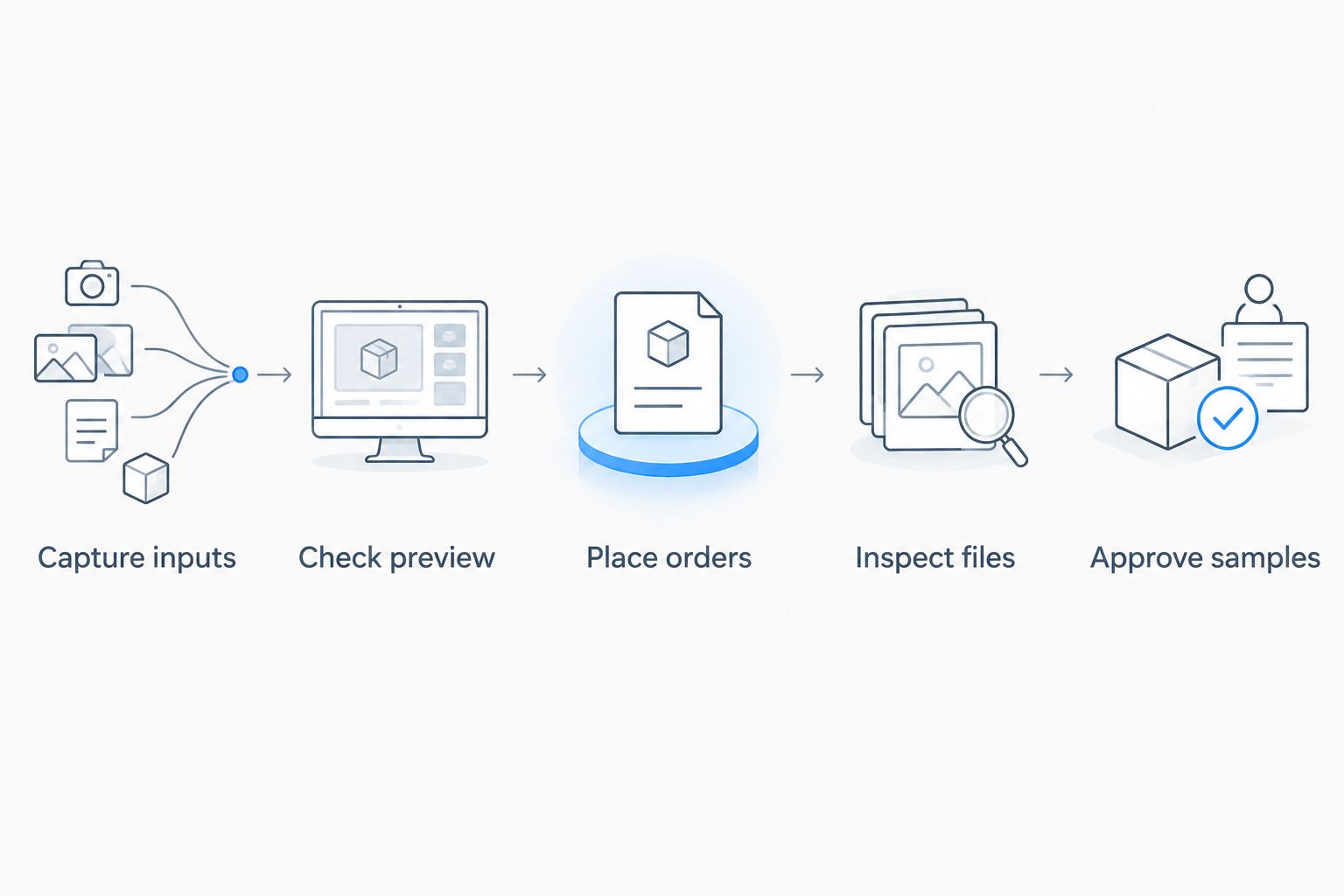
Validate the production handoff, not just the storefront preview.
If your decorator needs approval before production, define who approves the artwork and when production can begin. The guide to adding a proof approval step before printing Shopify orders covers that separate workflow.
Which custom pet bowl app should you choose?
Bespo is the best default for Shopify custom pet bowl merchants who need live previews and production-ready files without developer involvement. Choose it when you already have a production process to connect to storefront personalisation.
Choose Customily for a template-based POD workflow after confirming the exact supplier handoff. Choose Teeinblue for illustration-led designs with controlled visual choices. Choose Infinite Options when a fixed layout and captured pet name are enough.
Do not install several personalisation tools just to cover an unclear requirement. Write down what the shopper must choose and what the decorator must receive, then select the app that connects those tasks.
Start your personalisation setup
Add live-preview personalisation to Shopify and prepare files for fulfilment without developer involvement.
FAQ
What's the best Shopify app for custom pet bowls in 2026?
Choose a live-preview customiser with production-file output when you manage bowl decoration. Choose a simple options app when you only need to capture a name for a fixed layout.
Do I need a live preview for a personalised pet bowl?
Use a live preview when shoppers need to understand name placement or artwork choices. A fixed-layout name-only bowl can use text capture, provided the product page clearly explains the finished design.
Is a personalisation app the same as a print-on-demand supplier?
No. A personalisation app captures choices and can prepare artwork, while a print-on-demand supplier manufactures and fulfils products. Confirm the connection between those separate jobs.
Is Customily better than Infinite Options for pet bowls?
Customily fits visual, template-based personalisation; Infinite Options fits straightforward option capture. Choose according to whether your workflow requires a preview and production artwork or just the customer's text.
Which app should I shortlist for illustrated pet bowls?
Shortlist Teeinblue for artwork-based personalisation with live previews. Validate the template and resulting production file against the exact bowl and decoration process.
Can a Shopify app prove that a bowl's decoration is safe?
No. Software features do not establish material safety or decoration suitability. Obtain the relevant product and process information from your bowl supplier and decorator.
What should I test before selling personalised bowls?
Test name capture, preview accuracy, item-level order association and the production handoff. Include a cart with differently personalised bowls and approve a finished sample before launch.
One last thing
A bowl's interior and exterior are different production areas, not interchangeable design space. Tell your decorator exactly where personalisation belongs and obtain approval for that location before building the template.
Keep the same approved placement in your preview, production instructions and product explanation. For your 2026 launch, that agreement matters more than another font choice.