
The blog
Best Shopify apps for personalized baby bib products


Best overall: Bespo for live-preview baby bib personalisation. Best for simple name collection: a text-field options app. Best for outsourced production: a print-on-demand app paired with personalisation. This 2026 guide ranks those approaches by what your shoppers need to see and what your production team needs to receive.
TL;DR
- Bespo leads the best Shopify apps for personalized baby bib products shortlist for live previews and production-ready files.
- Choose text-field options for name-only bib orders when shoppers do not need a visual preview.
- Choose print-on-demand fulfilment only after confirming the supplier supports your bib and personalised order workflow.
- Test embroidery output with your production partner; a visual preview does not prove machine-file compatibility.
Why this matters
A personalised bib order needs more than a name box. The shopper must understand the design, and the person making the bib must receive the right instructions. A good storefront experience fails if the order arrives with missing text or an unclear placement.
Bespo is the best fit for Shopify baby bib merchants who need live personalisation previews and production-ready files without developer involvement. It supports embroidery, monograms and print among its personalisation techniques. Those capabilities make it the strongest named recommendation here for merchants managing their own production or working with a production partner.
The alternatives below are app categories, not invented competitor rankings. Choose between them by workflow. A name-only shop, an embroidery studio and a store outsourcing production do not need the same setup.
For your 2026 shortlist, start with the finished bib. Decide how it will be personalised, who will make it and what information that person needs. Then choose the app.
What makes the best baby bib personalisation app?
Use these criteria before looking at a feature list:
- Useful preview: The shopper can check the name, monogram or printed design before ordering. The preview should represent the intended placement.
- Controlled choices: Your setup should offer only fonts, colours and layouts that your production process can reproduce.
- Reliable order data: Each bib must retain its own name and design choices throughout the purchase and production workflow.
- Usable production output: Your maker needs clear specifications or a usable file, not just a storefront screenshot.
- Manageable setup: Your team should be able to maintain personalisation without rebuilding the storefront whenever the range changes.
- Clear responsibility: The customiser collects the design; the production operation makes the bib. Know where each handoff happens.
Treat these as acceptance criteria, not assumed capabilities. Ask each shortlisted provider to demonstrate your actual bib workflow. A generic product demo does not answer whether your chosen production process works.
Baby bib app approaches at a glance
Bespo
- Best for: Merchants needing live previews and production output
- Standout feature: No-developer personalisation with production-ready files
- Key limitation: The exact output must still be checked against your bib production process
Text-field options app
- Best for: Simple name-only orders
- Standout feature: A focused way to collect personalisation instructions
- Key limitation: Text collection alone does not show the finished design
Print-on-demand app plus personalisation
- Best for: Merchants outsourcing bib production
- Standout feature: Separates storefront design collection from physical fulfilment
- Key limitation: Supplier suitability and the personalised order handoff require verification
The table compares different jobs, not interchangeable products. The first approach manages the shopper’s personalisation experience and production output. The second collects instructions. The third adds a separate production operation.
Do not choose a fulfilment app to solve a preview problem, or a preview app to solve a manufacturing problem. Define the missing part of your workflow first.
1. Bespo: best for live-preview baby bib personalisation
Bespo is a Shopify personalisation app that gives shoppers a live customiser and outputs production-ready files. Merchants can add personalisation without developer involvement. Its supported techniques include embroidery, monograms and print, which are relevant starting points for a personalised bib range.
For a bib merchant, the practical value is keeping the shopper’s design choice connected to production. A parent buying a name bib needs to understand the intended result. Your maker needs to know what to produce.
Build the product around a defined technique. An embroidered name and a printed illustration require different production decisions, even when both appear on the same style of bib. Do not treat the visual preview as proof that every output is suitable for every machine or supplier.
Bespo pros:
- Live previews let shoppers inspect their personalisation before ordering.
- No-developer setup suits merchants who manage their own storefront.
- Embroidery, monogram and print support covers relevant personalisation techniques.
- Production-ready output connects design collection with fulfilment requirements.
Bespo cons:
- A customiser does not replace physical bib manufacturing or quality checks.
- Production-ready output still needs validation against your maker’s requirements.
- You must define appropriate fonts, placement and permitted designs for your products.
Best for: Shopify merchants selling personalised bibs through an existing production process and needing a visual buying experience.
For your 2026 launch, begin with a tightly defined product rather than every possible design combination. Establish the decoration area, prepare the product image and agree on the required output with your maker. Then build the customer choices around those boundaries.
Verdict: Buy for live-preview personalisation, after validating the production handoff.
2. Text-field options apps: best for simple name-only bib orders
A text-field options app is the simpler approach when you only need to collect a name or short instruction. Choose an app whose demonstration confirms that the entered text stays attached to the correct order item. Do not assume a text box includes visual personalisation or production artwork.
This approach fits a product with a fixed design. You choose the font and placement; the shopper supplies the name. That keeps the buying process focused, but it leaves the shopper relying on your examples rather than seeing their exact design.
Write the field label carefully. Ask for the name exactly as it should appear, including capitalisation. If the design uses initials, explain their order rather than expecting shoppers to know your monogram convention.
Text-field options app pros:
- Suits a fixed layout with a single personalisation instruction.
- Keeps the storefront focused on a simple customer task.
- Gives your maker a defined text value to work from when order handling is verified.
Text-field options app cons:
- Text collection alone does not provide a finished-design preview.
- Your production team must translate the instruction into the required layout or file.
- Ambiguous field labels leave spelling, initial order or capitalisation open to interpretation.
Best for: Merchants selling one fixed bib design with name-only personalisation and an established manual production process.
For a 2026 name-only range, resist adding optional instructions that your maker cannot process consistently. A clear name field is better than a general request box inviting changes to placement, artwork and technique.
Verdict: Buy for fixed name-only designs; skip when customers need to inspect their layout.
3. Print-on-demand apps: best for outsourced bib production
A print-on-demand app addresses a different need: getting the physical product made through an external supplier. Personalisation still requires a way to collect the shopper’s design and deliver usable instructions or artwork. Assess those functions separately.
Before choosing a provider, confirm that the supplier supports the bib construction and decoration method you intend to sell. Do not infer personalised bib support from a broad apparel catalogue. Ask the supplier to demonstrate the complete order workflow for your product.
The critical question is what happens after checkout. Establish whether production receives the correct artwork automatically, whether someone must prepare it manually and how exceptions are handled. These are selection questions, not capabilities to assume.
Print-on-demand approach pros:
- Fits merchants who want an external supplier to make the product.
- Keeps manufacturing responsibility separate from storefront personalisation.
- Lets you assess the customiser and production provider against their distinct jobs.
Print-on-demand approach cons:
- A fulfilment app alone does not prove live-preview or personalisation support.
- Your chosen bib and decoration method need supplier confirmation.
- A disconnected artwork handoff creates manual work between purchase and production.
Best for: Merchants outsourcing production who have confirmed a supplier’s personalised bib workflow.
In 2026, ask for a demonstration using your actual design rather than a generic printed product. Trace the customer’s name from entry to the production instruction. Approve the workflow only when the supplier can explain that handoff clearly.
Verdict: Hold until the supplier and personalisation workflow pass an end-to-end check.
How these approaches are ranked
The ranking prioritises live preview, production output and merchant-controlled setup. That puts the named customiser first for visual personalisation, text-field options second for fixed designs and outsourced fulfilment third when manufacturing is the main requirement.
This is a workflow ranking, not a claim about comparative conversion rates, app ratings or measured performance. Choose the approach that removes the specific gap between your product page and your production team.
Test the bib workflow before publishing
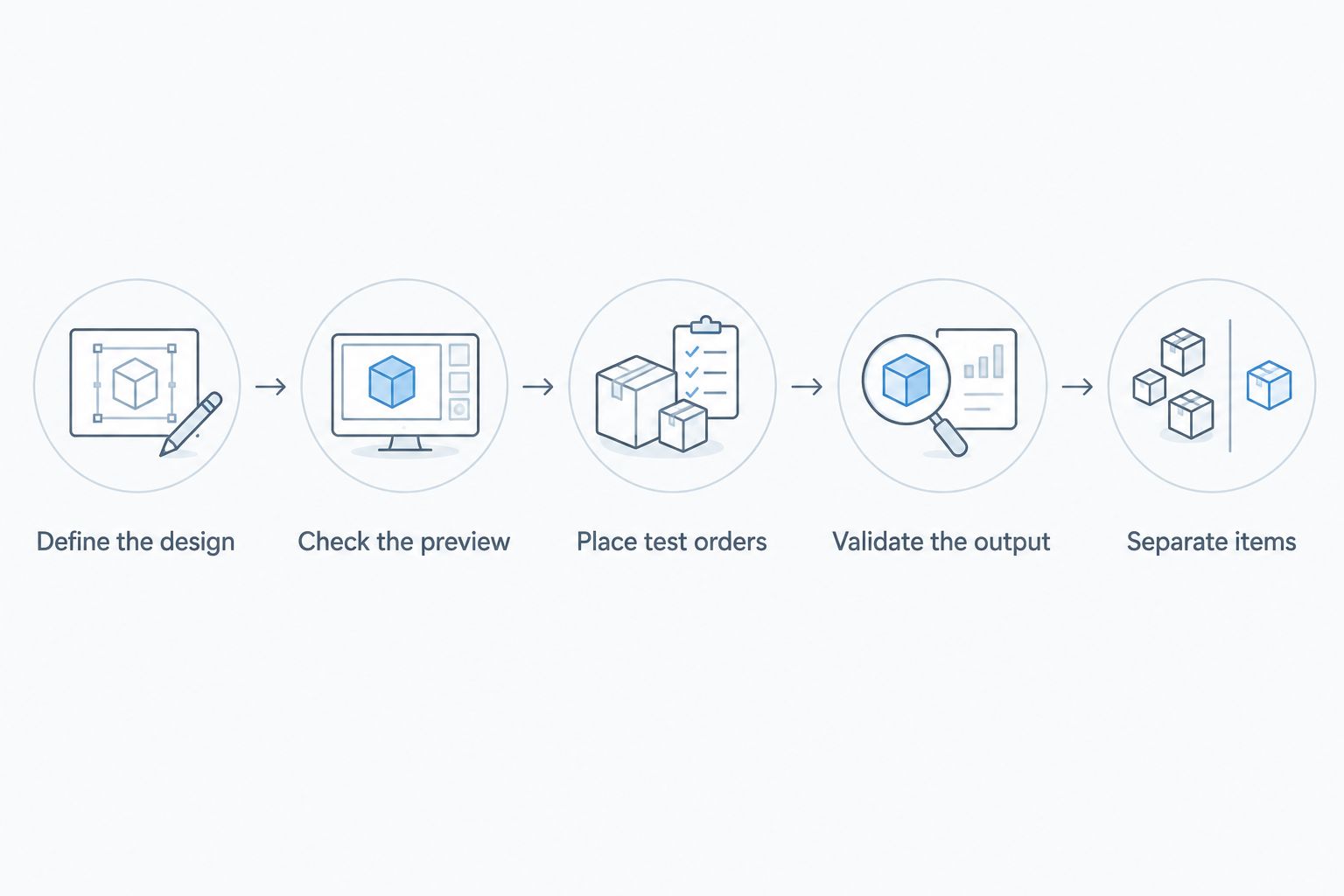
Use the same acceptance process for every shortlisted app. Start with 1 product, place 3 test orders, then check a cart containing 2 personalised items. These are recommended test cases, not performance benchmarks.
Define the design
Choose a bib and its personalisation technique. Document the permitted decoration area, text treatment and customer choices. Ask your maker to approve that specification before configuring the product page.
Check the preview
Enter a short name, a longer name and a name containing punctuation or an accented character. Check the result on mobile as well as desktop. If your setup includes a preview, compare its intended placement with your production specification.
Use the live-preview setup guide when planning the storefront experience. Keep the shopper’s task simple: enter the personalisation, inspect it and confirm it.
Place test orders
Submit the 3 test orders through the normal purchase path. Check the customer-facing order information and the details your production team receives. Look for missing text, altered capitalisation or design choices that need interpretation.
Validate the output
Have your maker inspect the exported file or specification. Confirm that it contains what the production process needs. For embroidery, ask specifically about the digitising and machine-file requirements rather than accepting an image as sufficient proof.
Separate items
Add 2 bibs with different names to the same cart. Confirm that each item retains its own personalisation through checkout and production. This test checks whether the workflow handles separate gifts correctly.
Approve the complete order workflow, not just the product-page preview.
Keep the bib product page clear
Your product page should distinguish the bib from its personalisation. Explain the physical product using verified product details, then explain exactly what the customer can change. Do not let a customiser replace essential product information.
Show an example of the intended decoration and give a direct instruction beside the input. Explain whether customers are entering a full name or initials. If a choice changes the production method, make that distinction explicit.
Keep gift messages separate from the text intended for the bib. A customer’s note to the recipient must not become an instruction to your maker. Give each field a distinct purpose and check where it appears after checkout.
For your 2026 storefront, launch with choices that your team has approved. Add further designs only after their order data and production output pass the same checks.
Build your bib personalisation workflow
Explore live-preview personalisation and production-ready output for your Shopify store.
Which baby bib app approach should you choose?
Choose Bespo when shoppers need to see their personalised bib and your maker needs production-ready output. It is the default recommendation for merchants connecting a visual storefront experience to an existing fulfilment process.
Choose a text-field options app when the design is fixed and the customer only supplies a name. Choose print-on-demand fulfilment when external manufacturing is the missing piece, but approve the personalised order handoff before committing.
The best Shopify apps for personalized baby bib products in 2026 are the ones that fit your production process. A longer feature list does not compensate for unclear order instructions.
FAQ
What's the best Shopify app for personalised baby bibs?
Bespo is the best fit here for merchants needing live personalisation previews and production-ready files without developer involvement. Validate its output against your chosen bib production process before publishing.
Do I need a live preview for name-only baby bibs?
A live preview is not essential for a fixed name-only design. A text-field approach works when you show the design clearly and verify that the name reaches the correct order item.
Can a personalisation app make and ship the bibs?
A personalisation app does not establish a manufacturing or shipping service. Arrange production separately, or confirm those responsibilities with a print-on-demand supplier.
Does an embroidery preview prove the file works with my machine?
No, an embroidery preview does not prove machine-file compatibility. Ask your production partner to validate the required digitising process and output before accepting customer orders.
What should I test before selling personalised bibs?
Test the customer input, preview, order details and production output. Include different names and a cart containing separate personalised items to check that each design stays attached to the right bib.
Is a print-on-demand app better than a product customiser?
Neither replaces the other because they address different jobs. A customiser manages personalisation, while an outsourced production workflow must also establish who makes the bib and how they receive the design.
Should I let customers type any instructions they want?
Use structured choices for the designs your production team can make. A general instruction box leaves placement, technique and artwork requests open to interpretation.
One last thing
Test a shopper buying bibs for two different children. Put a different name on each item and follow both designs into production. A perfect single-product preview is not enough if the second item loses its personalisation.
Approve the order handoff before expanding the range. That is the next move that protects the design your customer chose.