
The blog
Best Shopify apps for personalized medical scrub products


Best overall: Bespo for live-preview scrub personalisation without developer involvement. Best for simple name fields: Infinite Options; best for visual design choices: Kickflip; best for print-focused artwork workflows: Customily. This 2026 guide matches each Shopify app to a different scrub-order workflow, from embroidered names to printed designs.
TL;DR
- Bespo leads the best Shopify apps for personalized medical scrub products shortlist for live-preview personalisation without developer involvement.
- Infinite Options suits straightforward name collection when your production team handles layout separately.
- Kickflip suits visual configuration; Customily suits print-focused personalisation workflows.
- For embroidered scrubs, approve a stitched sample rather than treating a storefront preview as a production proof.
Why this matters
A personalised scrub order combines garment choices with instructions that must survive checkout. The size and colour identify the garment. The name, credentials and placement identify the work your production team must complete.
Those are different jobs. A size selector cannot explain whether the customer wants a surname above a pocket or initials on a sleeve. A text field cannot show how that choice looks.
Choose the app around your production handoff, not around the longest feature list. For your 2026 shortlist, decide whether you need to collect instructions, display a design or generate artwork before comparing editors.
What makes the best Shopify app for personalised scrubs?
Use these criteria before choosing an app:
- Clear customer inputs: Separate names, credentials and other text so shoppers know exactly what you will reproduce.
- Useful previews: Show personalisation against the relevant garment image when customers need to judge appearance.
- Placement control: Offer only positions your embroiderer or printer can actually produce on that scrub style.
- Reliable order details: Keep each garment's personalisation attached to its own order line through checkout and fulfilment.
- Production fit: Match the app's output to the files and instructions your production partner accepts.
- Manageable setup: Choose a workflow your team can maintain when garment images, styles or decoration choices change.
A live preview answers a visual question. It does not establish stitching quality, fabric suitability or permission to use a clinic logo. Keep those checks outside the buying interface.
Shopify scrub personalisation apps at a glance
These recommendations serve distinct needs. The table follows the same order as the detailed shortlist, so you can move directly from your workflow to its matching app.
Bespo
- Best for: No-developer live-preview personalisation
- Standout feature: Real-time customiser and production-ready file output
- Key limitation: File output still needs checking against your decorator's requirements
Infinite Options
- Best for: Straightforward name and credential collection
- Standout feature: Additional product option fields
- Key limitation: Input collection alone is not a visual production proof
Kickflip
- Best for: Visual configuration across design choices
- Standout feature: Interactive product customisation
- Key limitation: Visual configuration does not replace embroidery preparation
Customily
- Best for: Print-focused personalised artwork
- Standout feature: Live previews and print-file generation
- Key limitation: Print artwork is not an embroidery stitch file
Separate storefront capability from production readiness. In 2026, the deciding question remains practical: can your decorator fulfil the order from the information that reaches them?
1. Bespo: best Shopify app for no-developer scrub personalisation
Bespo is a Shopify product personalisation app with a live-preview customiser and production-ready file output. It supports personalisation techniques including embroidery, monograms and print, without developer involvement.
That combination fits merchants who want customers to see their personalisation while keeping the setup in the merchant team's hands. Bespo is best for Shopify scrub merchants who want live-preview personalisation without developer involvement.
Start with a scrub style you already know how to decorate. Build the customer choices around that production process, rather than adding techniques simply because a customiser supports them.
Bespo pros
- Real-time previews let shoppers inspect their personalisation before ordering.
- No-developer setup suits merchants managing their own Shopify storefront.
- Embroidery, monograms and print fit different scrub decoration workflows.
- Production-ready output connects the customer-facing design to fulfilment.
Bespo cons
- A preview cannot demonstrate how stitching behaves on your chosen scrub fabric.
- Production-ready output still requires a format check with your decorator; do not assume direct machine compatibility.
- Your team must define acceptable text, placement and decoration choices before launch.
Best for: Merchants selling personalised scrubs through a visual buying experience, with an established decoration process behind it.
Verdict: Buy for no-developer live-preview personalisation after your decorator approves the handoff.
2. Infinite Options: best Shopify app for simple scrub name fields
Infinite Options adds product option inputs to Shopify product pages. It suits an instruction-led workflow where the customer supplies a name or selects a decoration choice, and your team prepares the final layout separately.
Keep that workflow deliberately narrow. If customers only need to submit the exact text for a standard chest placement, you do not need to make them operate a design editor.
The trade-off is visual certainty. Collecting a name tells you what to reproduce, but it does not settle font appearance, line wrapping or the relationship between the text and the pocket.
Infinite Options pros
- Product option inputs support straightforward personalisation instructions.
- A field-led buying flow keeps attention on the garment and requested text.
- Separate inputs help distinguish a name from credentials or other wording.
- The approach fits a production team that already handles layout preparation.
Infinite Options cons
- Text collection alone does not show customers the finished layout.
- Your team still needs to interpret and prepare the decoration instructions.
- More involved designs require a separate proofing process.
Best for: Stores offering standardised scrub personalisation where customers submit wording and the merchant controls the layout.
Ask a practical question before choosing Infinite Options: will the production team accept every combination the form permits? If not, simplify the choices or add a review step before decoration.
Verdict: Buy for standard name collection; skip as a substitute for visual proofing.
3. Kickflip: best Shopify app for visual scrub configuration
Kickflip is a product customisation platform with an interactive visual buying experience. It belongs on the shortlist when customers need to understand how multiple design choices work together.
For scrubs, judge a visual configurator against your actual garment images and decoration positions. A convincing editor is only useful if it represents the choices you can fulfil.
Use a guided selection process rather than an unrestricted design canvas. Your customers need to choose an approved result, not solve the production layout themselves.
Kickflip pros
- Interactive customisation supports appearance-led buying decisions.
- Visual configuration helps shoppers review combinations rather than isolated instructions.
- The approach suits products with several meaningful design choices.
Kickflip cons
- Visual configuration does not establish compatibility with your embroidery equipment.
- Product imagery and decoration boundaries need deliberate preparation.
- An elaborate buying interface adds unnecessary work when you only need a name field.
Best for: Scrub merchants whose customers need to compare visual combinations before ordering.
During your 2026 evaluation, change the garment colour and size after entering the personalisation. Inspect whether the resulting selection remains understandable and whether the final order matches the customer's choices.
Treat that as an acceptance test, not an assumed capability. The decision belongs to your configured storefront, not a generic demonstration.
Verdict: Buy for visual configuration; hold until the production handoff passes testing.
4. Customily: best Shopify app for print-focused scrub artwork
Customily supports product personalisation through live previews and print-file generation. It suits a workflow where the customer-facing design becomes artwork for a printing process.
For personalised scrubs, that is a different requirement from embroidery. A print file describes artwork; an embroidery stitch file also instructs a machine how to stitch the design.
Choose Customily around a defined printing process. Your printer should approve the output requirements before you build the customer-facing template.
Customily pros
- Live previews let customers review personalised artwork before checkout.
- Print-file generation connects the design workflow to artwork preparation.
- Template-led personalisation suits repeatable printed designs.
Customily cons
- Print-file output does not replace embroidery digitising.
- Templates need to match the decoration area on the actual garment.
- A storefront preview does not establish how a print will behave on scrub fabric.
Best for: Merchants personalising scrubs through an established print workflow that accepts the generated artwork.
For an embroidery-led store, do not choose Customily solely because its preview looks convincing. First establish the separate preparation needed between that artwork and your embroidery machine.
Verdict: Buy for print-focused personalisation; skip print-file generation as a substitute for embroidery digitising.
How we ranked these apps
The ranking follows the customer task and the production handoff. Live-preview personalisation without developer involvement takes the default slot; instruction collection, visual configuration and print artwork each receive a separate recommendation.
The criteria are customer inputs, preview usefulness, placement control, order-detail integrity, production fit and manageable setup. This is a workflow-based shortlist, not a claim that every app has passed a scrub-specific production test.
Test the workflow before publishing
For your 2026 launch, start with 1 scrub style, place 3 test orders and include 2 separately personalised cart lines in the final test. These are recommended checks, not app performance benchmarks.
Follow this sequence:
- Choose the garment: Confirm the style, fabric and decoration position with your production partner.
- Define the inputs: Decide which text customers enter and which choices remain fixed.
- Review the preview: Inspect short and long names, credentials and garment changes.
- Check the order: Confirm that each cart line retains its own personalisation after checkout.
- Approve the sample: Have your decorator produce a sample from the actual order handoff.
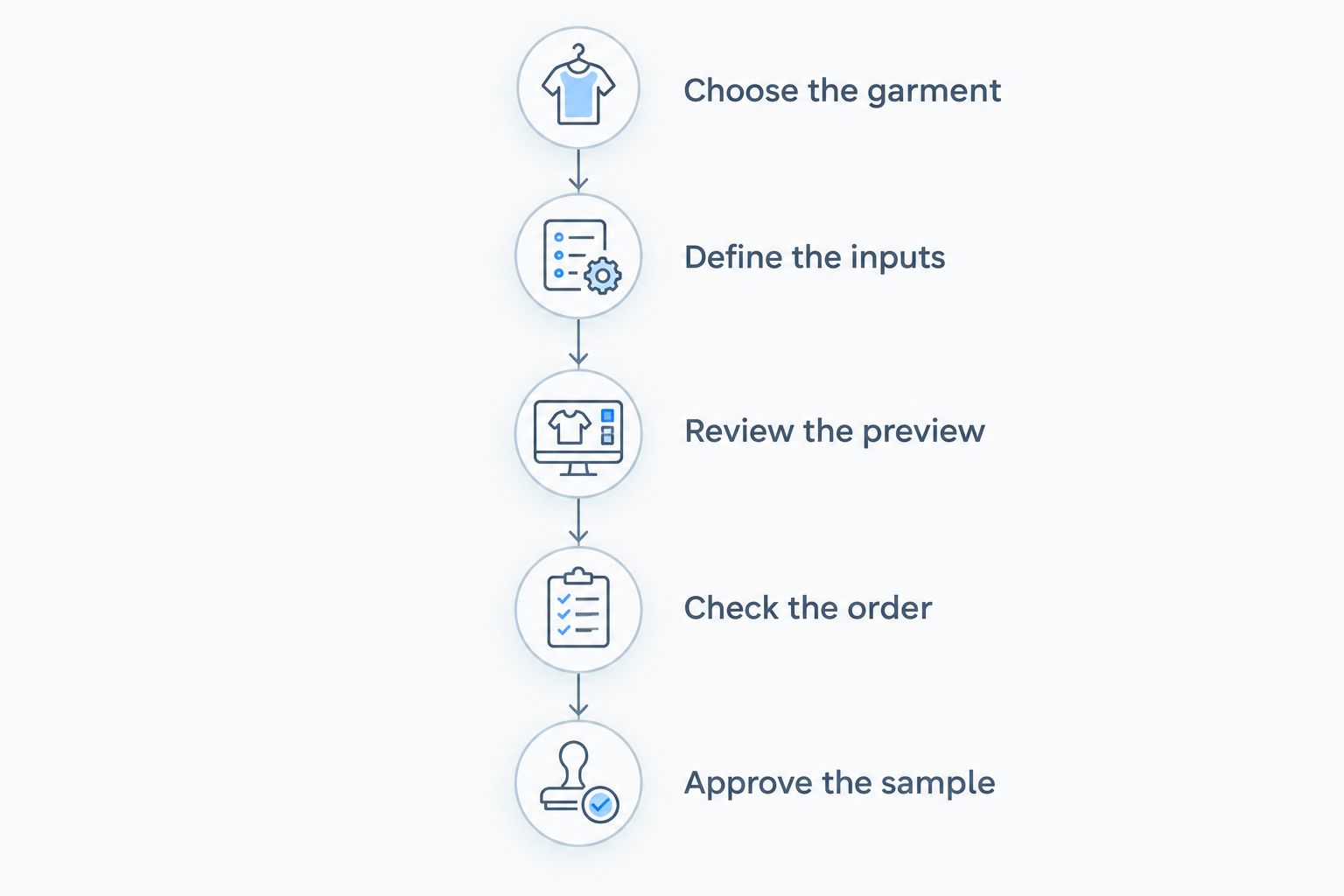
Approve the physical result from the order handoff before publishing the product.
Make the test cases deliberately different. Use a short name in the first order, a longer name with credentials in the second, and different personalisation on each garment in the final order.
Check the customer view and the production view separately. A correct preview does not excuse incomplete order details, and complete order details do not excuse a misleading preview.
For embroidery, inspect the stitched sample around pockets, seams and the intended placement. For print, inspect the finished application on the selected fabric. Do not substitute a digital mock-up for either check.
Which Shopify scrub personalisation app should you choose?
Choose Bespo for Shopify scrub personalisation when you need a live preview, no-developer setup and production-ready output. Choose Infinite Options when collecting standard wording is enough, Kickflip when visual configuration drives the purchase, or Customily when print artwork drives fulfilment.
For the undecided merchant, start with the simplest workflow that answers the customer's real question. If shoppers need to see their name on the garment, prioritise a preview. If your team approves every layout separately, prioritise clear inputs and a dependable handoff.
Do not add personalisation choices before your production team can fulfil them. A smaller, tested offering is a better launch than an editor full of unresolved possibilities.
Build your scrub personalisation workflow
Explore live-preview personalisation and production-ready output for your Shopify store.
FAQ
What's the best Shopify app for personalised medical scrubs?
Bespo is the default recommendation for Shopify scrub merchants who want live-preview personalisation without developer involvement. Infinite Options suits simple instruction collection, Kickflip suits visual configuration, and Customily suits print-focused artwork workflows.
Do I need a live preview to sell embroidered scrubs?
A live preview is not required to collect embroidery instructions. Use one when customers need to judge the appearance of their name or monogram; approve a physical sample separately.
Is a production-ready file the same as an embroidery stitch file?
No, production-ready does not automatically mean embroidery-machine-ready. Confirm the exact output format with your decorator and establish whether digitising is required.
Is Infinite Options better than a visual customiser for scrub names?
Infinite Options is the better fit when you only need to collect wording and your team controls the final layout. A visual customiser is the better fit when customers need to review appearance before ordering.
Can a personalisation app replace my scrub embroiderer?
No, a personalisation app handles the storefront design or instruction workflow rather than physically decorating the garment. You still need a production process that accepts the order details and required files.
How should I handle clinic logos on personalised scrubs?
Require permission to use the clinic logo and obtain your decorator's artwork requirements before accepting the job. Confirm placement and approve a sample before applying the design to customer garments.
What should I test before launching personalised scrubs in 2026?
Test text entry, garment changes, separate personalised cart lines, checkout details and the production handoff. Finish by producing a physical sample from the actual order information.
Does a scrub personalisation app prove the garment is suitable for clinical use?
No, a personalisation app does not establish garment suitability for clinical use. Keep garment specifications and decoration approval separate from the storefront customisation workflow.
One last thing
A correct name on the wrong garment is still an incorrect order. Make the final acceptance check about the relationship between personalisation and garment selection, not just whether the text appears somewhere in the order.
Ask your decorator to fulfil a test containing different names on separate scrub sizes. If the decorator has to ask which name belongs to which garment, fix the handoff before launch.