
The blog
Cancel a personalized order after production starts? 2026


Yes, a customer can ask to cancel a personalized order after production starts, but the request does not automatically stop production or entitle them to a refund. In 2026, the outcome depends on the applicable law, the terms shown at purchase, the reason for the request, and whether the item can still be stopped. Check the production status before you promise a cancellation or refund.
TL;DR
- Can a customer cancel a personalized order after production starts? They can ask, but cancellation is not automatic.
- In 2026, check applicable law, purchase terms and production status before deciding on a refund.
- Bespo is best for Shopify merchants who need clear shopper personalisation inputs and production-ready files, not automatic cancellation decisions.
- A proof approval step gives shoppers a chance to check details before production begins.
Can a customer cancel a personalized order after production starts?
A cancellation request and a cancellation you can fulfil are different things. First, establish what work has started. Then check the terms the customer saw at purchase, the applicable consumer rules, and whether the customer is cancelling by choice or reporting an error. Do not treat a customer-requested change of mind as the same issue as an item produced incorrectly.
Work has not started
- What you can check: Whether the order has been sent to production
- What you should tell the customer: Confirm whether you can stop it before committing to a refund.
A file or proof is being prepared
- What you can check: Whether work can pause without losing completed work
- What you should tell the customer: Explain which steps have begun and when you will confirm the outcome.
The item is being personalised
- What you can check: Whether the process can stop and whether the item can still be used
- What you should tell the customer: Do not promise that a cancellation request will halt production.
The item is complete or dispatched
- What you can check: Whether a cancellation, return or remedy applies
- What you should tell the customer: Explain the available process without calling every request a change of mind.
These are decision points, not a universal refund schedule. The production stage tells you what is operationally possible; it does not, on its own, settle the customer's legal rights. A store policy also cannot remove rights that applicable law protects.
If customers approve a design before work starts, make that boundary explicit in your workflow. A proof approval step before printing gives you a clearer record of what the shopper approved and when. Approval does not excuse an item that fails to match that approval.
Why this matters
A personalised order ties a specific customer's choices to a physical item. Once production begins, stopping the order involves more than changing its status in Shopify: someone must confirm whether the maker has seen the request and whether work has actually stopped. Never tell a customer their order is cancelled while production is still unconfirmed.
The opposite mistake is an automatic refusal. A customer reporting the wrong engraving, a damaged item or a design that differs from the approved proof is not simply asking to undo a purchase. Read the request before applying your change-of-mind policy. In 2026, a useful cancellation process separates the reason for the request from the stage of production.
What should you do when a cancellation request arrives?
- Record the request. Keep the order identifier, the customer's requested outcome and the time they contacted you. Save the personalisation details and any proof or approval relevant to the order.
- Check the reason. Is the shopper changing their mind, correcting text they supplied, or reporting that you made the item incorrectly? Those situations need separate decisions.
- Ask production to pause. Send a clear hold request to the person or fulfilment partner making the item. A message sent is not a stop confirmed; wait for confirmation.
- Verify the physical stage. Find out whether the file has only been prepared, the item has been worked on, or it is complete. Record what production tells you rather than inferring status from an order label.
- Check the purchase terms and applicable rules. Read the policy presented to the customer and assess whether a cancellation, refund or other remedy is required. Do not rely on a blanket personalised-items exception.
- Reply with a decision and the next action. Say whether production stopped, what happens to the order, and how you will handle any payment already taken. If you still need confirmation, give the customer an update rather than a final answer.
This sequence is a practical process, not a claim that every request has the same result. In 2026, the safest operational rule is simple: a request is pending until both the customer-facing decision and the production action are confirmed.
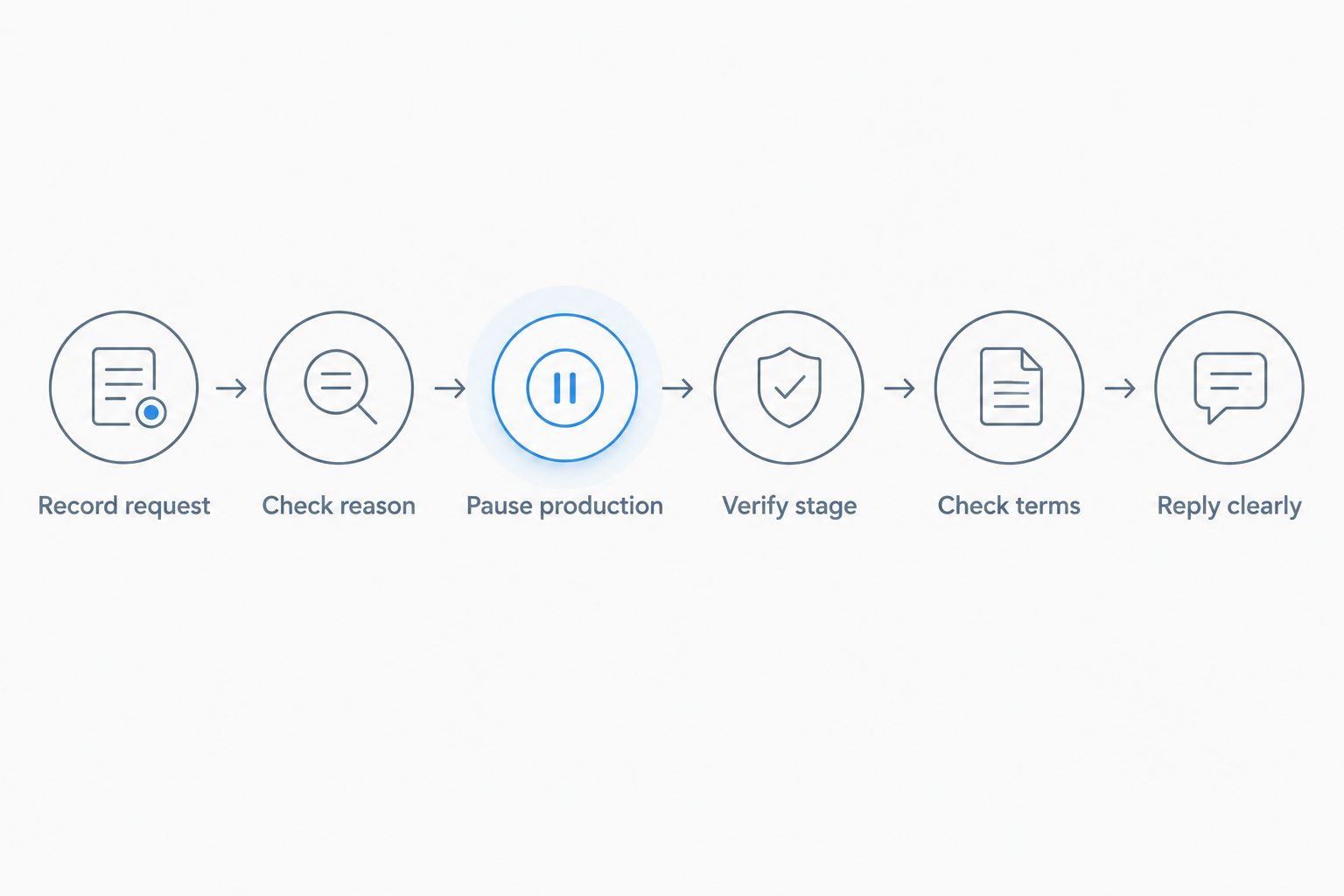
Confirm the production stage before giving the customer a final answer.
Which cancellation approach fits the order?
There are several possible outcomes, but none should be the default for every personalised purchase. Choose an approach after checking the request and the work already completed.
Stop and cancel
- Best for: Production has not begun or the maker confirms a stop
- Benefit: Prevents further work on an unwanted order
- Limitation: A store-status change alone does not confirm the maker has stopped.
Pause and review
- Best for: The stage is unclear or the customer reports a mistake
- Benefit: Gives you time to check files, approvals and the item
- Limitation: Requires an update to the customer while you investigate.
Continue production and explain the decision
- Best for: Work cannot be stopped and the request is a change of mind
- Benefit: Gives a clear account of the work already done
- Limitation: Must still comply with applicable law and the terms shown at purchase.
Correct or remedy the order
- Best for: The item is wrong, damaged or does not match what was agreed
- Benefit: Addresses the customer's actual complaint
- Limitation: Requires checking what went wrong, not just applying a cancellation label.
A pause is useful only when someone with control over production receives it. If a third party makes your products, identify who can confirm a hold before you publish a cancellation promise. Keep your internal status separate from the message the customer receives: a request can be under review even when no stop has been confirmed.
Why do cancellation outcomes vary?
- The reason for the request. A change of mind is different from a claim that the item is faulty or does not match the agreed design.
- The production stage. File preparation, work on the physical item and dispatch present different opportunities to stop an order.
- The point of approval. A saved proof and approval help establish what the customer agreed to; they do not settle every dispute.
- The terms shown at purchase. Customers need to know when changes or cancellations are accepted. A policy first revealed after an order is placed is a poor basis for a clear decision.
- The rules that apply to the sale. Consumer rights depend on where and how you sell. Do not assume a single final-sale statement covers every customer.
- The maker's response. An order marked cancelled in your store does not prove that a workshop or fulfilment partner has stopped making it.
These factors also explain why a single cancellation deadline can mislead shoppers. A more useful statement names the event that changes what you can do, such as confirmed production start, and tells customers how to reach you. Check that the statement matches your actual process before publishing it in 2026.
How should Shopify merchants make the decision visible?
Put the relevant terms where the shopper chooses personalisation and before they place the order. State how to request a correction or cancellation, when production begins in your process, and what happens if the finished item is wrong. Use plain language: a shopper should not have to decode an internal fulfilment status to understand the policy.
Keep the order's chosen text, design inputs and any approved proof available to the team handling the request. If you cannot compare the customer's choices with the production instructions, you cannot quickly determine whether a complaint concerns a shopper-entered error or an error in making the item. Clear inputs help you investigate; they do not replace a fair remedy decision.
Bespo is a Shopify personalisation app with a live preview for shoppers and production-ready files for fulfilment. For merchants selling engraved, embroidered or printed products, Bespo is best for keeping shopper choices connected to production instructions without developer involvement. Its role in this question is to help establish what was specified, not to determine whether a customer has a right to cancel.
That distinction matters in 2026. A shopper can preview a monogram and still contact you after ordering. A production-ready file can tell the maker what to produce, but you still need a separate process for receiving the request, confirming the physical stage and answering the customer. Do not describe a preview as approval unless your checkout process actually captures approval.
What should your cancellation policy say?
A useful policy answers the questions your team will face mid-order. Can shoppers request changes before production begins? How should they contact you? What happens when production is already underway? How will you address an item that is damaged or does not match the agreed personalisation? Keep change-of-mind requests separate from problems with the item.
Avoid a promise you cannot operate, such as an unconditional stop after a message is sent. Also avoid saying all personalised orders are non-refundable without accounting for applicable rights. If your production partner decides whether a stop is possible, say that you will confirm the status before giving a final answer. Review the wording against the places where customers actually encounter it, including the product page and order communications.
For 2026, use a response template that confirms receipt without prejudging the result: identify the order, restate the customer's request, say you are checking production, and explain when they will hear the decision. Replace that interim message with a specific outcome once the maker confirms the stage. This keeps an unanswered hold request from sounding like an approved cancellation.
Can the customer cancel if the item is already being made?
They can request cancellation, but you cannot assume the item can be stopped. Ask the maker whether work has begun and whether a stop is still possible. Then decide what you must offer under the applicable rules and the terms shown at purchase.
Does approving a proof remove a customer's rights?
No. An approved proof helps show what design the shopper accepted; it does not excuse damage, a production error or a failure to supply what was agreed. Compare the finished item with the approval before classifying the request as a change of mind.
Is cancelling a Shopify order the same as stopping production?
No. Changing an order's status does not by itself confirm that a maker or fulfilment partner has stopped working. Get an explicit production update before telling the shopper the item will not be made.
FAQ
Can a customer cancel a personalized order after production starts?
A customer can request cancellation after production starts, but the request does not automatically stop work or determine whether a refund is due. Check applicable law, purchase terms, the reason for the request and the confirmed production stage.
Can I refuse a cancellation because an order is personalised?
Do not refuse every request solely because the item is personalised. A change of mind and a complaint about an incorrect or damaged item require different responses, subject to the rules that apply to the sale.
What if the customer entered the wrong name for engraving?
Check whether production can still pause and compare the submitted text with any approved proof. Tell the customer what can be changed only after the maker confirms the stage.
What if we engraved the wrong name?
Treat a name engraved incorrectly against the agreed instructions as a product problem, not a routine change-of-mind cancellation. Check the order inputs and production file, then address the applicable remedy.
Does a live preview make a personalised order final sale?
No. A live preview helps a shopper review their choices, but it does not set the legal terms of a sale or excuse a production error. Keep your policy and approval process clear.
Should I refund a Shopify order before the maker confirms a stop?
Confirm the production status and assess the customer's rights before treating the request as resolved. A store refund action does not itself tell a maker to stop production.
Can I change a personalised order after production has begun?
Ask the maker whether the requested change is still possible before promising it. If work has already affected the item, explain the confirmed options rather than guessing from the Shopify order status.
One last thing
The first message you send after a cancellation request should confirm the request, not the cancellation. In 2026, that one wording choice keeps your customer update aligned with what production has actually confirmed. Build your process around a documented handoff between support and the maker, then publish terms that reflect it.