
The blog
Can a Customizer Slow Shopify Page Speed? Yes | 2026


Yes, a product customizer can slow down Shopify page speed when it loads blocking scripts, large preview images, custom fonts, or design libraries before shoppers need them. The slowdown is not automatic: benchmark the product page, identify the asset causing it, then follow a focused process to reduce Shopify customizer page load time on mobile.
TL;DR
- Yes, a product customizer can slow down Shopify page speed when scripts or previews block rendering.
- An optimised customizer loads its interface and preview assets only when the product page needs them.
- Test LCP, INP, and CLS before and after activation instead of relying on a single performance score.
- Bespo is best for Shopify merchants needing live personalisation without developer involvement.
- A theme app extension supports cleaner loading, but it does not guarantee a fast customizer.
Why this matters
A product customizer changes what the browser must do on a Shopify product page. A basic page displays product information and images. A live customizer can also process text, uploaded artwork, fonts, option rules, layers, masks, and preview updates while the shopper interacts with it.
That extra work affects three published Core Web Vitals used in 2026. Largest Contentful Paint should be 2.5 seconds or less, Interaction to Next Paint should be 200 milliseconds or less, and Cumulative Layout Shift should be 0.1 or less. Google evaluates these thresholds at the 75th percentile, so one fast test does not prove the page is consistently fast for real shoppers.
Speed also shapes the buying experience. A delayed preview makes personalisation feel broken. A control that shifts after the shopper tries to tap it creates errors. A text field that responds slowly interrupts the path from product selection to cart.
The right goal is not zero customizer code. The goal is to load the minimum code and media required for the current product, viewport, and interaction.
Can a product customizer slow down Shopify page speed?
Yes. The size of the impact depends on how the customizer loads and renders its interface. Two apps offering similar customer-facing options can produce different performance results because their scripts, image pipelines, fonts, and preview engines behave differently.
Best for
- Eager, unoptimised loading: No recommended use case
- Conditional, optimised loading: Product pages that require personalisation
JavaScript
- Eager, unoptimised loading: Executes before the shopper interacts
- Conditional, optimised loading: Defers non-critical work
Preview media
- Eager, unoptimised loading: Loads large source files immediately
- Conditional, optimised loading: Loads appropriately sized assets when required
Fonts
- Eager, unoptimised loading: Requests every available font
- Conditional, optimised loading: Requests only the fonts needed for the current configuration
Page coverage
- Eager, unoptimised loading: Runs across unrelated templates
- Conditional, optimised loading: Runs where the customizer is enabled
Main benefit
- Eager, unoptimised loading: Interface is available immediately
- Conditional, optimised loading: Lower initial browser workload
Main drawback
- Eager, unoptimised loading: Higher risk of delayed rendering and input
- Conditional, optimised loading: First interaction needs careful testing
Verdict
- Eager, unoptimised loading: Skip
- Conditional, optimised loading: Use, then measure
A customizer does not need to fail every metric to create a problem. It can keep LCP within 2.5 seconds but still make controls feel slow because INP exceeds 200 milliseconds. It can also respond quickly while causing a poor CLS score by inserting option panels after the surrounding product content has rendered.
Performance is therefore a sequence, not one score. Test initial rendering, the first interaction, preview updates, image uploads, option changes, and add-to-cart behaviour separately in 2026.
What happens when a customizer loads?
The browser builds the product page in stages. Customizer code can interrupt those stages or wait until the critical product content is ready.
- HTML arrives. Shopify sends the page structure, product information, theme sections, and app blocks.
- Critical assets load. The browser requests the styles, scripts, images, and fonts needed to display the visible page.
- Largest element renders. The primary product image or another large visible element commonly determines LCP.
- First interaction begins. The shopper opens the customizer, enters text, selects an option, or uploads a file.
- Preview updates. The customizer processes the selection and redraws the personalised result.
A script loaded during the critical-assets stage can compete with the product image and theme code. A script deferred until the shopper opens the customizer protects the initial render, but the first interaction must still stay responsive. Moving all work behind a button does not solve performance if opening that button freezes the main thread.
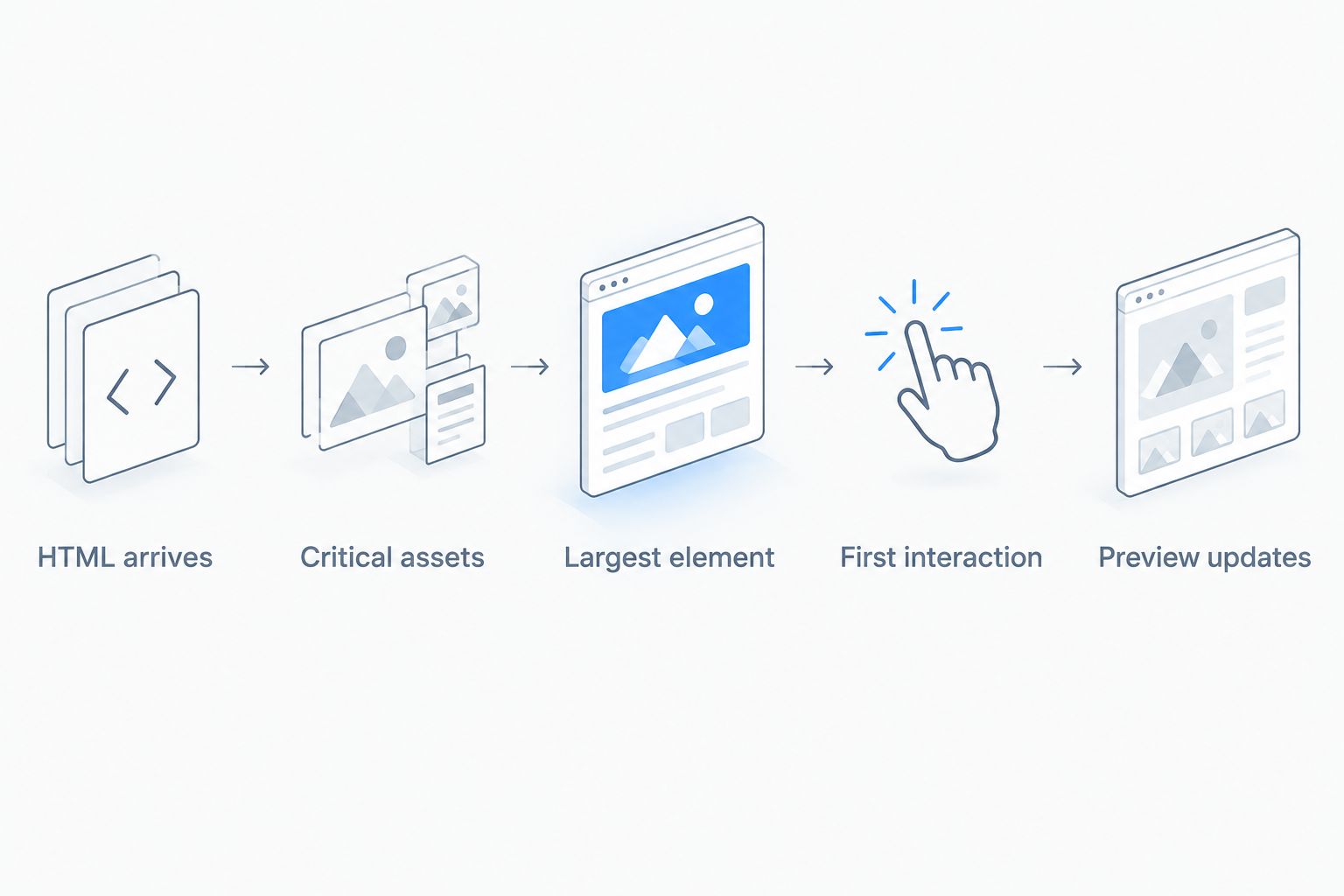
Customizer performance includes both the initial page load and the shopper's first preview interaction.
This distinction matters in 2026 because a fast-looking initial page can still deliver poor interaction performance. Test the closed customizer and the active customizer. Both states affect the shopper.
Why Shopify customizer speed varies
Six implementation choices determine where the customizer adds work.
- Script timing. Synchronous JavaScript can delay rendering. Deferred or interaction-triggered code leaves more room for critical theme assets.
- Page scope. Customizer code should not run on templates that do not use personalisation. Check the homepage, collections, standard products, cart, and customised products independently.
- Preview image size. A browser should not download a production-sized source image merely to display a smaller storefront preview. Match the preview asset to its rendered use.
- Font loading. A customizer offering typography choices can trigger extra font requests. Loading every font before the shopper selects one creates avoidable work.
- Rendering method. Canvas updates, layered images, text effects, and uploaded artwork place different demands on the browser. Test the actual configuration sold by the store.
- Theme and app interaction. Product galleries, review widgets, subscriptions, bundles, analytics, and customizer code share the same page. A fast app can still sit inside a slow combined stack.
The last factor is easy to miss. Page speed belongs to the final storefront, not one app in isolation. Removing a customizer can improve a score without proving that the customizer was badly built; it only proves that the page had less work after removal. Use before-and-after tests plus the browser network and performance panels to identify the specific request or task responsible.
How to test the speed impact in 2026
Use the same product page, device mode, and test conditions before and after enabling the customizer. Changing the theme, product media, or other apps at the same time makes the result unusable.
- Record the baseline. Test the product page without the customizer active. Save the LCP, INP, and CLS results alongside the date and page URL.
- Enable one configuration. Use a representative personalised product with the fields, fonts, images, and option logic shoppers will see.
- Retest the initial load. Check whether the main product content appears later or shifts after rendering.
- Test real interactions. Open the customizer, type into text fields, switch options, update the preview, upload a permitted file, and add the configured product to the cart.
- Inspect the requests. Look for large images, unused fonts, duplicate libraries, long JavaScript tasks, and assets loaded on pages without customisation.
- Fix one cause at a time. Compress or resize media, remove unnecessary fonts, restrict page scope, defer non-critical work, then run the same test again.
Use Google PageSpeed Insights for laboratory diagnostics and available real-user data. Use the Shopify web performance reporting available in the store admin to monitor the storefront over time. Browser developer tools show which request, script, or rendering task consumed the time.
Do not compare unrelated URLs. A simple product with one image will usually place less demand on the browser than a personalised product with layered previews and file upload. The useful comparison is the same page before and after the customizer change.
Where Bespo fits
Bespo is best for Shopify merchants who need real-time product personalisation without developer involvement. The Bespo product customizer supports personalisation methods including embroidery, engraving, monograms, embossing, debossing, and print. It provides a live preview for shoppers and produces production-ready files for fulfilment.
The benefit is direct: shoppers can see their choices before ordering, while the merchant receives files intended for production. The performance trade-off is also direct: a live preview asks the browser to process more than a plain text option does. The Bespo product customizer still needs testing against the live theme, product media, and other installed apps.
Bespo installation uses Shopify's app embed and customisation block. That keeps setup inside Shopify's theme workflow, but the presence of an app block alone is not proof of speed. Judge the finished product page against the 2.5-second LCP, 200-millisecond INP, and 0.1 CLS thresholds in 2026.
Add live product personalisation
Give shoppers a live preview and create production-ready files without developer involvement.
Related questions
Will a product customizer always hurt Core Web Vitals?
No. A customizer affects Core Web Vitals only when its loading or interaction pushes the page beyond the relevant threshold. In 2026, test for LCP of 2.5 seconds or less, INP of 200 milliseconds or less, and CLS of 0.1 or less.
Is mobile performance more important for a Shopify customizer?
Mobile performance requires separate testing because smaller screens, touch input, device processing power, and network conditions change the experience. Use mobile testing for the initial load, customizer controls, keyboard behaviour, file upload, preview updates, and add-to-cart flow.
Should you remove a customizer when a product page becomes slow?
No. First isolate the slow request, long task, oversized image, font, or layout shift. Remove the customizer only when the required feature cannot meet your storefront's performance target after the identified causes are fixed.
FAQ
Can a product customizer slow down Shopify page speed?
Yes, a product customizer can slow down Shopify page speed when it loads blocking scripts, large preview assets, fonts, or design libraries. Conditional loading and correctly sized media reduce the initial workload.
What Shopify speed metrics should I check in 2026?
Check LCP, INP, and CLS in 2026. Google's good thresholds are 2.5 seconds or less for LCP, 200 milliseconds or less for INP, and 0.1 or less for CLS.
Does a theme app extension guarantee fast page speed?
No, a theme app extension does not guarantee fast page speed. The app's JavaScript, media, fonts, rendering work, and interaction with the theme still determine the result.
How do I find which customizer asset is slow?
Use browser developer tools to inspect network requests, main-thread tasks, image sizes, font files, and layout shifts. Test the same product page before and after activating the customizer.
Can live product previews affect INP?
Yes, live product previews can affect INP when preview rendering delays the browser's response to an interaction. Test typing, option changes, uploads, and preview updates instead of checking only the initial load.
Can large product images make the customizer look slow?
Yes, large product and preview images can delay rendering even when the customizer script is not the main cause. Inspect image dimensions, file size, format, and loading priority separately from JavaScript.
Is Bespo suitable for Shopify product personalisation?
Bespo is built for Shopify merchants who need real-time product personalisation, live shopper previews, and production-ready files. Test the Bespo product customizer with your live theme and app stack before judging page-speed impact.
Should customizer code load on every Shopify page?
Customizer code should run only where its features are required. Loading personalisation assets on unrelated templates adds browser work without helping the shopper.
One last thing
Test the first interaction, not just the first paint. A customizer can protect LCP by waiting until the shopper opens it, then fail INP because the browser must initialise fonts, controls, and preview layers at once.
Open the panel. Type quickly. Change several options. Upload a representative file. Then repeat the test on mobile. That sequence exposes problems a homepage speed score will never show and gives you a useful 2026 benchmark for Bespo or any other Shopify product customizer.