
The blog
Can a Shopify Store Have Too Many Options? 2026 Answer


A Shopify store can absolutely have too many personalization options — the tipping point shows up as a stalled add-to-cart rate long before it shows up as a support ticket. The number that hurts isn't options in isolation, it's decisions per option: three color swatches feel like a menu, but three colors times four fonts times two engraving styles feels like homework. The cost most merchants miss isn't even choice fatigue, it's page speed — every extra dropdown, live-preview layer, and conditional field adds render time that can push a product page past Google's 2.5-second Largest Contentful Paint benchmark heading into 2026.
TL;DR
- Yes, a Shopify store can have too many personalization options once choices multiply into a decision tree shoppers won't finish.
- Cap live customization at three to four fields per product to protect completion rates in 2026.
- Conditional logic hides fields until they're relevant, cutting the visible choice count without removing capability.
- Extra live-preview layers slow page load — watch Google's 2.5-second LCP benchmark, not just the option count.
Why this matters
Merchants add personalization to lift average order value, and it works — until the customizer becomes the thing shoppers have to solve instead of the thing that sells them a gift. Hick's Law, the well-established psychology finding that decision time rises as choices increase, applies directly to a product page: every added field is another fork the shopper has to resolve before they can click "add to cart."
Tools like conditional logic solve this by hiding fields until a shopper's earlier choice makes them relevant — a monogram font picker only appears after they've typed initials, for example. That keeps the visible complexity low even when the underlying product supports a dozen combinations. The store that fails at personalization usually didn't add too many features; it just showed all of them at once.
Can a Shopify store have too many personalization options?
Yes — and the symptoms are consistent whether the product is a mug, a suit, or an engraved dog tag. The table below shows what each state looks like on an actual product page.
Too few options
- What it looks like: One generic dropdown, no live preview
- What happens to conversion: Shoppers can't picture the finished product and bounce to a competitor site
Right amount
- What it looks like: 3-4 fields (material, color, text, one add-on) with live preview
- What happens to conversion: Shoppers finish fast; add-ons lift AOV without adding friction
Too many options
- What it looks like: 6+ fields, nested menus, no live preview, slow load
- What happens to conversion: Shoppers abandon mid-form; support inbox fills with "which option do I pick" tickets
If you're unsure whether the added complexity is worth building at all, the honest answer differs by catalog size — read is a product configurator worth it for a small store before you add a fifth field just because a competitor has one.
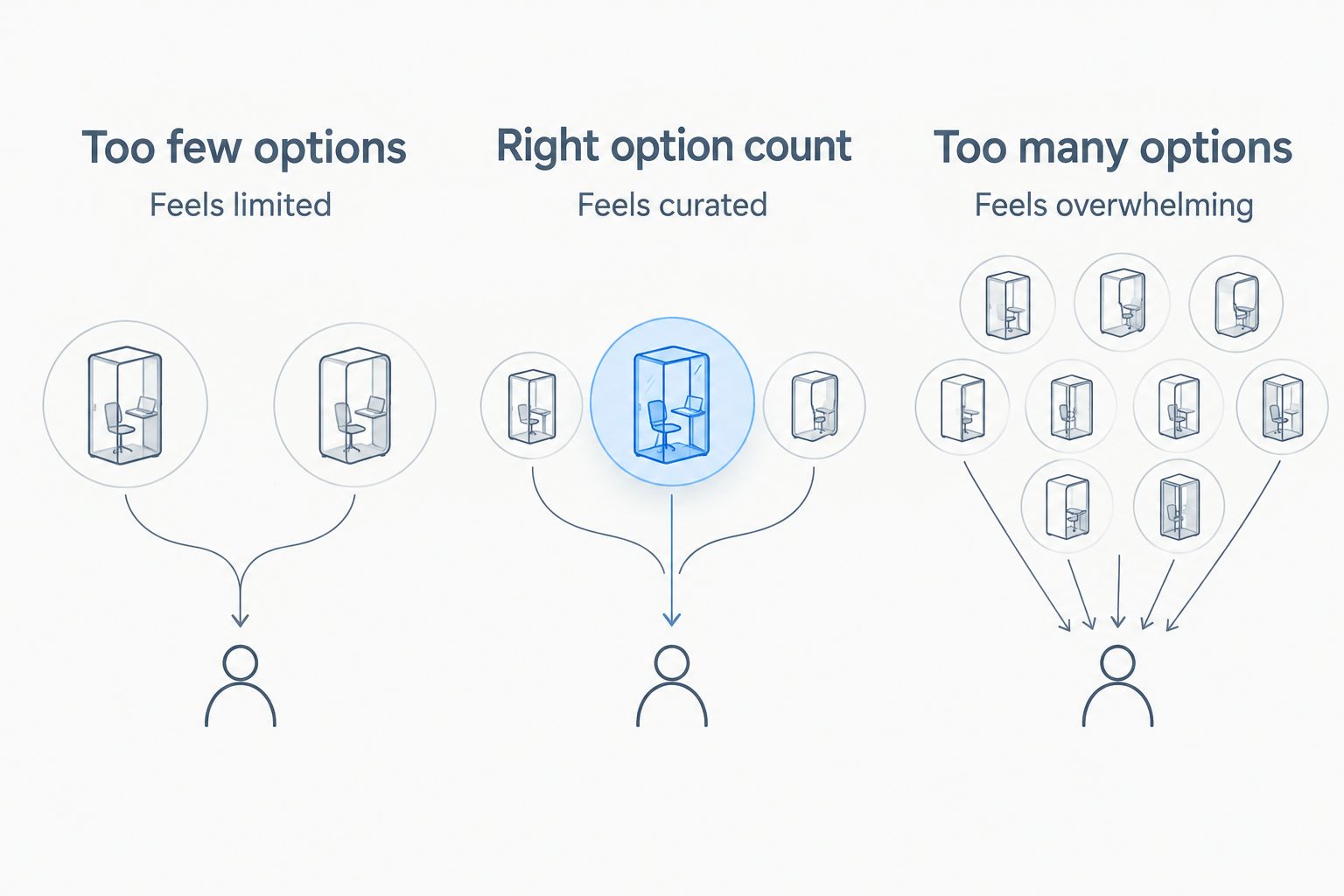
The middle column is where completion rates and AOV both hold up.
Why personalization overload varies from store to store
There's no single number that's right for every catalog. What pushes one store into overload barely registers for another, depending on a handful of factors:
- Catalog size — a 500-SKU catalog can absorb more shared option groups than a 10-product store, because the fields repeat across products instead of feeling bespoke to one page.
- Fulfillment complexity — engraving and embroidery carry production fields (thread color, placement) that shoppers never see but that still have to exist somewhere in the order data.
- Device mix — mobile shoppers tolerate fewer taps than desktop buyers; a five-field customizer that's fine on a laptop can feel enormous on a phone.
- Sequencing — options shown all at once read as a wall of dropdowns; the same options shown one step at a time read as a guided flow.
- Live preview speed — if the preview updates instantly, shoppers tolerate more fields because feedback feels immediate; a laggy or reload-based preview makes every extra field feel like a cost.
- Buyer type — B2B buyers filling out a quote request tolerate more fields than a D2C shopper buying a single gift on impulse.
How many personalization options should a Shopify store offer?
Most product pages hold up fine at three to four live-customization fields — material, color, text, and one optional add-on — before completion rates start dropping. Beyond that point, group remaining choices into a second step or hide them behind conditional logic so the first screen a shopper sees never shows more than a handful of decisions at once.
A Shopify product customizer built around sequencing rather than a single long form keeps the perceived option count low even on a product that technically supports ten or more combinations. That's the difference between a customizer that lifts AOV and one that just adds a wall of dropdowns above the add-to-cart button.
Does adding more customization options slow down a Shopify store?
Yes — each additional live-preview layer, font picker, or conditional field adds JavaScript that competes for the same render budget, and product pages that miss Google's 2.5-second LCP benchmark in 2026 tend to rank and convert worse than pages that clear it. This is separate from the choice-overload problem: a page can have exactly the right number of options and still load slowly if the underlying customizer app is heavy.
The fix isn't removing options, it's checking what's rendering them. A live-preview customizer that only loads the assets a given product actually needs avoids the bloat that comes from generic, one-size-fits-all customizer widgets.
Simplify personalization without cutting options
Bespo's live-preview product customizer builds conditional logic without a developer.
FAQ
Can a Shopify store have too many personalization options?
Yes, a Shopify store can have too many personalization options once the number of visible fields makes a shopper stop and think instead of click. Three to four fields per product is a workable ceiling before completion rates start slipping in 2026.
How many personalization options should a Shopify product page have?
Three to four live-customization fields per product page is the practical ceiling most stores land on. Additional choices can still exist behind conditional logic or a second step without adding to the visible count.
Does more customization increase or decrease Shopify conversion?
It depends entirely on how the options are presented, not how many exist. A well-sequenced customizer with three fields converts better than a flat six-field form, even though both technically offer personalization.
What's the sign a Shopify customizer has too many options?
Rising cart abandonment on the product page itself, paired with support tickets asking which option to choose, is the clearest sign. A slow-loading customizer that misses Google's 2.5-second LCP benchmark is the second most common signal.
Can conditional logic fix an overloaded Shopify customizer?
Yes, conditional logic hides fields until an earlier choice makes them relevant, which keeps the visible option count low even on products that support many combinations. It's the standard fix for overload without cutting real functionality.
Is a product configurator worth it for a small Shopify store?
It depends on catalog size and order volume — a small catalog often needs fewer fields and a simpler setup than a high-SKU store. The tradeoffs are different enough that they deserve their own comparison rather than a blanket yes or no.
Do personalization options slow down page speed on Shopify?
Each live-preview layer or conditional field adds JavaScript that competes for render time, and pages that miss the 2.5-second LCP benchmark tend to convert worse. The fix is a lighter customizer app, not fewer features.
One last thing
The stores that win at personalization in 2026 aren't the ones with the longest option list — they're the ones that make a ten-combination product feel like a three-decision purchase. Bespo's product personalization tools do that by sequencing fields and hiding anything that isn't relevant yet, so the shopper sees a short form even when the backend is handling embroidery placement, thread color, and a dozen SKU variants. Test your own customizer the way a first-time buyer would: if you can't finish a purchase on your phone in under a minute, cut a field before you add one.