
The blog
Rotating Personalized Subscription Boxes: Yes, in 2026


Yes, you can run a subscription box with rotating personalized products by keeping subscriber preferences separate from each cycle’s product and production instructions. The key condition: your subscription workflow must carry the correct personalization into every renewal order, and each new product needs its own approved template before fulfillment.
TL;DR
- Can you run a subscription box with rotating personalized products? Yes—validate personalization on renewal orders before launch.
- Keep saved subscriber preferences separate from product-specific templates and production files.
- Bespo supports Shopify product personalization; verify recurring-order data handling in your subscription setup.
- Start with saved names or initials, then add cycle-specific choices when the workflow is ready.
Can you run a subscription box with rotating personalized products?
Yes. Rotate the product, not the meaning of the customer’s saved choices. A subscriber’s initials can stay the same while the product, placement, and personalization technique change.
For example, a proposed box could alternate between a monogrammed textile and an engraved accessory. The initials belong to the subscriber; the embroidery layout and engraving layout belong to their respective products. Do not reuse the finished artwork simply because the text matches.
Use the guide to setting up personalization for Shopify subscription boxes alongside the checks below. Your launch decision should depend on the renewal order and production output—not just the initial checkout.
Choose an operating model before configuring the storefront:
Saved personalization
- Best for: Boxes that reuse a name or initials
- Main advantage: Subscribers do not need to re-enter unchanged details
- Main limitation: Each rotating product still needs compatible personalization rules
Fresh personalization each cycle
- Best for: Boxes with changing messages or designs
- Main advantage: Subscribers can tailor the current item
- Main limitation: You need an explicit response deadline and missing-response policy
Saved preferences with optional edits
- Best for: Boxes that combine consistency with choice
- Main advantage: Customers can keep familiar details or change them
- Main limitation: You must distinguish current-cycle edits from future defaults
Start with saved personalization when the same customer detail works across your planned products. Choose fresh input only when the product genuinely needs it. More choices mean more decisions to validate before production.
Why this matters
A recurring payment does not prove that a recurring order contains usable personalization. Treat billing, product selection, customer choices, and production instructions as separate responsibilities.
For your 2026 launch, define the handoff between them before publishing the subscription. Someone looking only at the production record should be able to identify the item, the personalization, and the approved output without searching customer emails.
The benefit is clear: subscribers can receive changing products without repeatedly entering unchanged details. The trade-off is equally clear: you must validate those details against a different product whenever the rotation changes.
Keep the customer preference reusable. Keep the production instruction specific. That distinction should shape your storefront, renewal checks, and fulfillment process.
Saved personalization: best for repeat names and initials
Saved personalization works when the customer’s chosen content remains useful across the rotation. A name or monogram is a practical starting point because the content can stay consistent while you change its presentation.
Store the exact customer-approved text. Preserve capitalization and the intended order of initials rather than asking production staff to interpret a loosely written note.
Then define how each product uses that content. A short engraving area and an embroidery placement need separate rules, even when they display the same name.
The advantage is a straightforward customer experience. The limitation is that a saved preference is not automatically suitable for every item you introduce.
Use saved personalization when your planned rotation supports the same input throughout. If a future product cannot accommodate that input, request a replacement choice or leave it out of the personalized rotation.
Fresh personalization: best for changing messages and designs
Fresh personalization fits a box where the customer chooses content for the current product rather than repeating a permanent preference. Think of a changing printed message or a product-specific engraving—not a promise about any particular app’s capabilities.
Show customers exactly which cycle they are editing. Explain when their choice becomes final and whether it changes future preferences.
This model gives customers more control over the current item. It also creates a dependency: production needs their response before it can proceed.
Do not silently substitute an old message when a subscriber misses the deadline. Publish your fallback rule before enrollment, then apply that rule consistently.
Choose fresh personalization only when you have a clear way to collect, approve, and attach each response to its intended order. A form submission without an order connection is not a complete workflow.
Saved preferences with optional edits: best for flexible boxes
A hybrid model keeps a default name or monogram while letting the subscriber change the current cycle’s content. It suits a rotation where most products share a common input but some benefit from a different message.
Make the scope of every edit explicit. Use clear wording such as current box only or future boxes, and record that choice with the update.
The advantage is flexibility without requiring a new response for every cycle. The limitation is version control: your team must know which preference applies to which order.
A customer changing their saved name should not accidentally rewrite the production instructions for an order already approved. Treat the profile update and the existing order as separate records.
Use the hybrid model only after your saved-preference workflow passes renewal testing. Add optional edits to a working process rather than using them to patch an unclear one.
How to set up the rotating personalization workflow
Build the workflow around the order your production team will receive. For a 2026 rollout, document each responsibility and test the full path before opening enrollment.
- Choose the model. Decide whether subscribers keep saved details, submit fresh content, or edit a default. State what happens when no new response arrives.
- Capture preferences. Collect the exact text the customer approves. Separate permanent preferences from choices intended only for the current box.
- Prepare the product. Define the current item’s technique, permitted input, placement, and preview. Validate the saved preference against that product rather than assuming it fits.
- Check the renewal. Inspect the generated recurring order. Confirm that it contains the intended product and the correct cycle-specific personalization before releasing it.
- Release production. Attach the approved instructions and relevant production file to the order. Hold unresolved records instead of asking fulfillment staff to guess.
The sequence matters. Preparing a preview before deciding where recurring personalization lives leaves you with a good storefront and an unfinished renewal process.
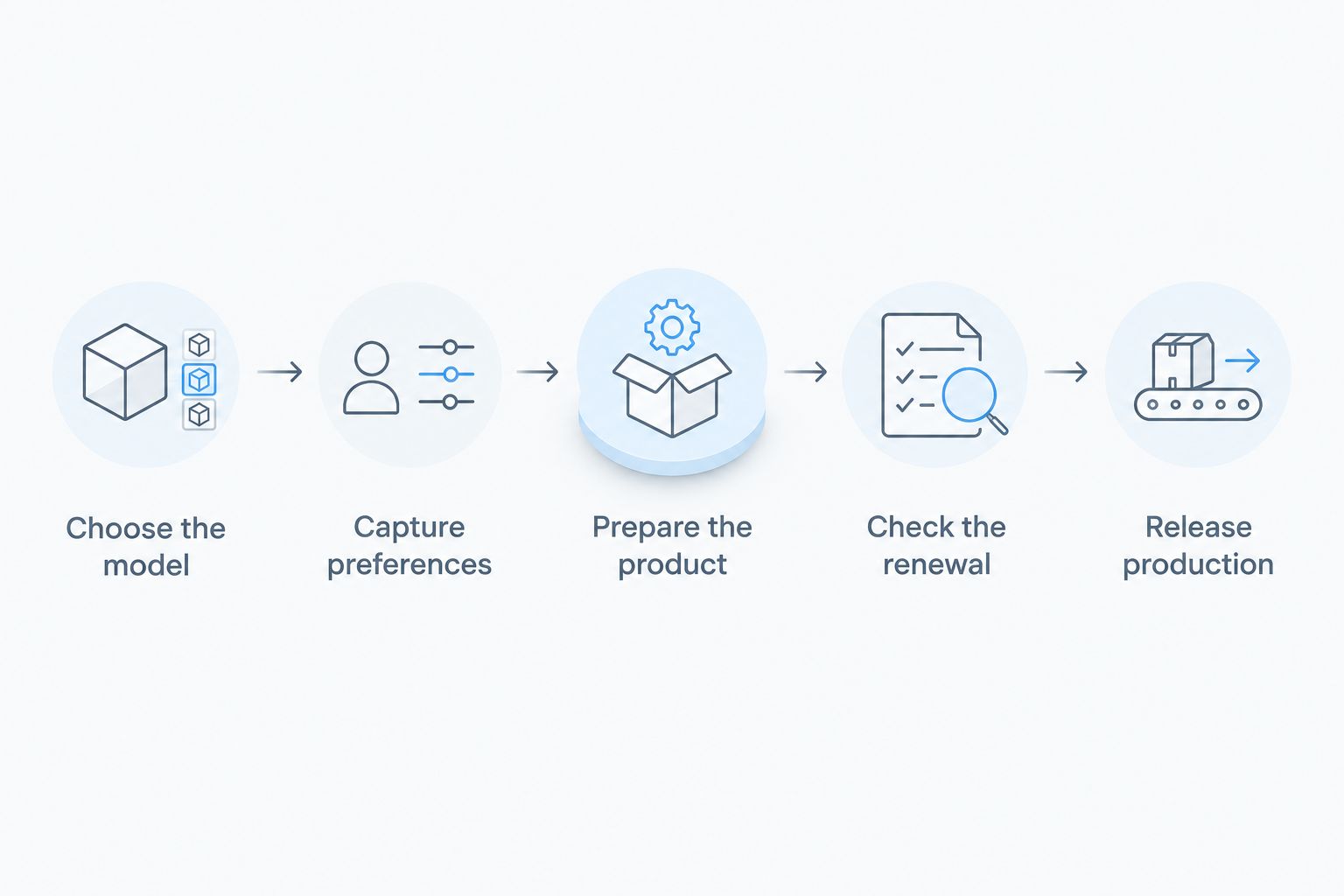
Check the renewal order before releasing personalized work to production.
Keep a usable record for every cycle
Define the information your team needs to produce the item. A practical order record should include:
- The subscriber and the intended cycle.
- The actual product being personalized.
- The exact approved name, initials, or message.
- The applicable technique and placement.
- The approved template or production-file reference.
- Any unresolved approval or customer-response status.
These are recommended workflow fields, not a claim that your current software stores them automatically. Check where each field lives and who can access it.
Do not make customer support the storage system for production decisions. If an email changes the approved text, update the relevant order record before work starts.
Where Bespo fits in a Shopify subscription box
Bespo is best for Shopify merchants who need live-preview product personalization without developer involvement. The app supports embroidery, engraving, monograms, embossing, debossing, and print, and outputs production-ready files for fulfillment.
Use Bespo for the product-personalization part of the storefront. Its stated scope covers shoppers customizing products and the resulting production output; keep recurring billing and rotating-order behavior as separate validation tasks.
Bespo’s Shopify product personalization gives shoppers a live preview of their choices. That is useful when the customer needs to approve how their text appears on an item rather than submitting text without visual context.
The limitation for this subscription use case is the boundary between storefront customization and future orders. Verify how your chosen subscription setup preserves, updates, and applies personalization on renewals. Do not treat a successful initial purchase as evidence that every later order works.
Why rotating personalization workflows vary
Your workflow depends on what changes between products. The supported personalization techniques create different preparation tasks, so define the rotation around inputs you can validate consistently.
- Personalization technique. Embroidery, engraving, and print require technique-specific production output. Match the file to the current process.
- Customer content. A recurring monogram needs a different collection policy from a fresh message for each cycle.
- Product layout. A new product needs its own placement and preview, even when it uses unchanged text.
- Approval scope. Decide whether customers approve reusable content, the current product presentation, or both.
- Fulfillment handoff. Ensure the team producing the item receives the current approved file rather than an earlier cycle’s output.
For your 2026 rotation plan, review these factors before adding a product. A new item is ready only when the saved or newly collected input can reach production in an unambiguous form.
What should you test before launch?
Test renewals, not just checkout. Your 2026 launch checklist should cover both the expected path and customer changes that affect the next box.
Run these checks in your own setup:
- Complete an initial purchase and inspect its personalization record.
- Generate a renewal and compare its content with the intended subscriber preference.
- Change the rotating product and inspect the new template and output.
- Edit a preference and verify whether it affects the current cycle, future cycles, or both.
- Skip a cycle and confirm that personalization stays attached to the intended order.
- Submit no fresh response and confirm that your published fallback rule applies.
- Reopen an earlier order and verify that its approved production instructions remain intact.
These are acceptance checks, not claims about specific subscription-app behavior. Record the actual result for your configuration.
Hold launch if any check leaves the producer guessing. Fix the data handoff before adding more products or more personalization choices.
Can customers change personalization before the next box?
Yes—if your workflow provides an edit route and defines when changes take effect. Tell customers whether an update applies to the next unapproved order or only to later cycles, and preserve the approved instructions for work already released.
Does every rotating product need a new preview?
Each different product needs an appropriate preview and personalization layout. Reuse customer-approved text where it fits, but validate placement and production output for the current item instead of recycling the previous product’s finished file.
Can you keep the next personalized product a surprise?
Yes—keep the product undisclosed while collecting reusable content such as a name or initials. If customers need to approve the current product’s appearance, decide what you will reveal for that approval and explain the policy before enrollment.
FAQ
Can you run a subscription box with rotating personalized products on Shopify?
Yes, if your workflow attaches the correct personalization to each recurring order and validates it against the current product. Test the renewal order and production output before launching.
Do subscribers need to personalize their box every time?
No, subscribers do not need to re-enter unchanged details when you use a saved-preference model. Collect fresh input when the current product needs different content.
Does a live preview prove that future subscription orders will work?
No, a live preview shows the shopper’s current customization, not the behavior of future renewal orders. Check recurring-order personalization separately.
Can Bespo personalize products for a Shopify subscription box?
Bespo provides Shopify product personalization with live previews and production-ready files. Verify how your subscription setup carries those choices into renewal orders and applies them to rotating products.
What happens if a subscriber does not submit their new message?
Apply the missing-response policy you published before enrollment. Do not invent a message or silently reuse earlier content unless the subscriber agreed to that fallback.
Can I reuse the same production file for every box?
Reuse a production file only when it is valid for the current product, technique, and approved content. A product rotation requires checking those conditions again.
Should personalization edits change orders already in production?
Keep approved production instructions separate from later profile edits. Route any request to change work already released through your defined approval process.
One last thing
Save the customer’s intention, not just the finished design. Initials are reusable information; an engraving layout is an instruction for a particular product.
For a 2026 launch, choose a rotation that shares a clear personalization input. Prove that the input survives a renewal, then introduce products with different layouts or techniques. That gives you a controlled starting point without asking subscribers or production staff to solve the workflow themselves.