
The blog
Can You Sell Personalized Products on Amazon? Yes | 2026


Yes. You can sell personalized products on Amazon through Amazon Custom, but it does not work like Shopify: Amazon controls eligibility and the customisation interface, while Shopify gives the merchant control through a storefront app in 2026.
TL;DR
- Yes, you can sell personalized products on Amazon through the Amazon Custom programme in 2026.
- Amazon Custom requires an eligible professional seller account, registration and merchant fulfilment.
- Shopify gives merchants more control over product options, live previews and production workflows.
- Bespo is best for Shopify merchants that need live personalisation and production-ready files without developer involvement.
Why this matters
Amazon Custom and Shopify can both collect names, images and configuration choices, but they solve different problems. Amazon Custom adds personalisation to products sold inside Amazon's marketplace. Shopify lets you build the personalisation journey inside a storefront you control.
That distinction affects approval, page design, fulfilment and product expansion. If you want to customise products on Shopify without hiring a developer, you can use an app instead of applying to a separate marketplace programme.
The right choice in 2026 depends on where customers discover you and how much control your production team needs. Amazon suits sellers prioritising its marketplace. Shopify suits merchants building a direct sales channel around personalised products.
Can you sell personalized products on Amazon like Shopify?
You can sell personalised products on both platforms, but the setup and ownership are different. Amazon Custom is a marketplace feature with eligibility rules. Shopify personalisation is configured through your store and the apps you install.
Best for
- Amazon Custom: Sellers targeting Amazon shoppers
- Shopify with a customiser app: Merchants building a direct storefront
Entry route
- Amazon Custom: Register for Amazon Custom
- Shopify with a customiser app: Install and configure an app
Seller account
- Amazon Custom: Eligible professional seller account
- Shopify with a customiser app: Shopify store
Product eligibility
- Amazon Custom: Supported Amazon categories
- Shopify with a customiser app: No separate personalisation category programme
Shopper interface
- Amazon Custom: Amazon's Customisation Tool
- Shopify with a customiser app: App interface inside the merchant's theme
Customisation modes
- Amazon Custom: Text, image and product configuration
- Shopify with a customiser app: Depends on the selected app
Fulfilment
- Amazon Custom: Merchant fulfilled
- Shopify with a customiser app: Chosen by the merchant
Main advantage
- Amazon Custom: Access to Amazon marketplace demand
- Shopify with a customiser app: Control over the customer and production journey
Main drawback
- Amazon Custom: Less control and programme restrictions
- Shopify with a customiser app: Merchant must attract traffic and manage the setup
Amazon Custom is best when Amazon is the primary sales channel; Shopify is best when personalisation is central to the brand and production workflow. That verdict applies in 2026 because the platforms still divide responsibility in fundamentally different ways.
Amazon provides the marketplace page, Customisation Tool and ordering environment. Shopify gives the merchant responsibility for the storefront, app configuration, product rules and fulfilment connections.
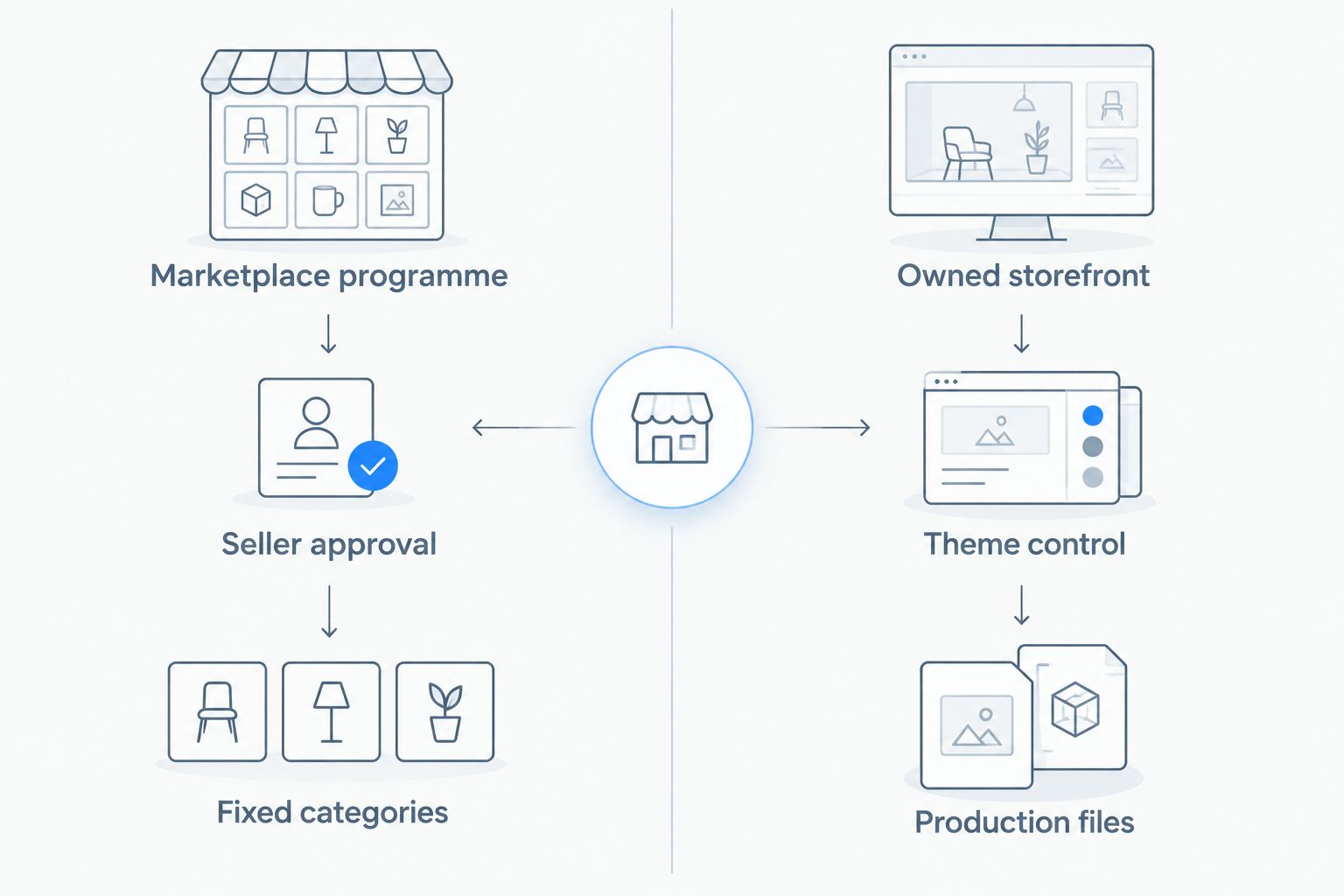
Amazon controls programme access; Shopify gives the merchant more control over setup and workflow.
How Amazon Custom works in 2026
Amazon Custom is not a text box that any seller can add to any existing listing. Sellers register for the programme, create an eligible product and configure the available choices using Amazon's tools.
1. Use an eligible professional seller account
Amazon Custom requires an eligible professional seller account. An individual seller account does not provide the programme access required to create Amazon Custom listings.
Account eligibility comes first. A product idea that fits the programme still cannot use Amazon Custom until the seller account meets Amazon's requirements.
2. Register for Amazon Custom
The seller registers for Amazon Custom through Seller Central. Amazon controls admission to the programme, so opening a standard seller account is not the final step.
This approval layer is one of the clearest differences from Shopify. A Shopify merchant can install a compatible app directly, while an Amazon seller must use Amazon's approved route.
3. Create an eligible custom product
Amazon limits Amazon Custom to supported product categories. Sellers cannot assume that every standard listing can become customisable, even when the underlying product can physically be engraved, printed or embroidered.
Check current category eligibility before building artwork templates or production processes. Amazon can update programme requirements, and the current Seller Central rules control what can be listed in 2026.
4. Configure the Customisation Tool
Amazon documents 3 principal forms of customisation: text, image and product configuration. Text can collect wording such as a name. Image customisation accepts customer artwork or photos. Product configuration presents selectable components or options.
The seller builds these choices within Amazon's system. This creates a consistent Amazon shopping experience, but it limits the seller's control over layout and interaction compared with an owned Shopify storefront.
5. Fulfil the personalised order
Amazon Custom orders are fulfilled by the merchant rather than Fulfilment by Amazon. The seller receives the order details, produces the personalised item and ships it under the applicable Amazon requirements.
That makes production accuracy critical. The listing must collect enough information for the team to produce the correct item without relying on an avoidable email exchange after checkout.
How Shopify personalisation works in 2026
Shopify does not run a separate programme equivalent to Amazon Custom. The merchant installs a product-personalisation app, configures options and places the app block on the relevant product page.
1. Choose the personalisation workflow
Start with what production needs. That could include text for engraving, initials for monogramming, an uploaded image for print or a combination of choices that determines the final design.
The workflow should collect only information that affects production. Extra fields slow the decision and create more order data for the team to review.
2. Configure the product options
A Shopify customiser can add text fields, image uploads, selection controls and conditional steps, depending on the app. The merchant decides which products use those controls instead of waiting for a marketplace category decision.
For merchants using Bespo, the stated setup is 5 minutes with zero developer involvement. The Bespo Shopify personalisation app supports real-time personalisation for embroidery, engraving, monograms, embossing, debossing and print.
3. Show the shopper a preview
A live preview lets the shopper see the effect of a name, image or selected option before ordering. This is especially useful when placement, spelling or visual balance affects the finished product.
Merchants can set up live preview for a Shopify product customiser as part of the product-page workflow. The preview remains inside the merchant's storefront rather than moving the shopper into a marketplace-controlled interface.
4. Send accurate data to production
The order must carry the exact selections the shopper approved. Bespo outputs production-ready files for fulfilment, connecting the storefront choice to the production task without requiring a developer-built handoff.
Bespo is best for Shopify merchants that need a live-preview customiser and production-ready output without building the system themselves. The trade-off is clear: Bespo is a Shopify app, so it does not replace Amazon Custom for listings sold on Amazon.
Build your Shopify personalisation flow
Add live previews and production-ready files without a developer.
What customers and production teams experience
On Amazon, the customer finds the product inside the Amazon marketplace and uses Amazon's Customisation Tool. The page follows Amazon's selling environment, which can reduce unfamiliarity for existing Amazon shoppers. The seller gives up control over the broader storefront journey in exchange for access to that environment.
On Shopify, the customer interacts with the merchant's theme and installed customiser. The merchant decides where the personalisation block appears, which information it requests and how the preview fits the product page.
The production team also receives different inputs. Amazon Custom sends the information collected through Amazon's tool. A Shopify workflow depends on the selected app; Bespo creates production-ready files from the shopper's personalisation choices.
Neither route removes the need for quality control. Names can be misspelled, uploaded images can be unsuitable and option combinations can exceed what production supports. Clear field labels, input limits and previews reduce ambiguity before an order reaches fulfilment.
Why selling personalised products varies by platform
The answer changes based on 6 practical factors:
- Seller eligibility: Amazon Custom requires a qualifying professional seller account and programme registration. Shopify apps are installed by the store merchant.
- Product category: Amazon controls which categories can enter Amazon Custom. Shopify has no separate personalisation category approval programme.
- Interface control: Amazon owns its Customisation Tool. Shopify merchants choose the app and control the surrounding product page.
- Preview requirements: A simple name field needs less visual feedback than an uploaded photograph, monogram or multi-part design.
- Production data: The selected system must pass complete, accurate instructions from checkout to the person or service producing the item.
- Traffic source: Amazon provides marketplace discovery. A Shopify merchant is responsible for bringing shoppers to the store.
Treat these as operating decisions, not feature-box comparisons. The strongest platform is the one that matches how shoppers find the product and how the order moves into production.
Can I sell the same personalised product on Amazon and Shopify?
Yes. You can sell the same underlying product through Amazon Custom and a Shopify store if each listing follows the relevant platform rules and your operation can fulfil both order streams correctly.
Do not assume one configuration transfers directly to the other. Amazon's Customisation Tool and a Shopify app use different option structures. Build a shared production specification first, then map each channel's customer inputs to that specification.
A 2026 multichannel setup also needs a clear source identifier on each order. Production staff should know whether an order came from Amazon or Shopify before checking its customisation data and shipping requirements.
Is Amazon Custom better than Shopify for personalised products?
Amazon Custom is better for sellers whose priority is reaching customers already shopping on Amazon. Its advantages are marketplace discovery and a familiar Amazon buying environment. Its disadvantages are programme approval, eligible-category limits, merchant fulfilment and reduced control over the customisation interface.
Shopify is better for merchants who want control over the storefront, preview and production workflow. Its advantages are flexibility and ownership of the shopping experience. Its disadvantages are that the merchant must generate traffic, choose an app and verify that the setup works across the active theme and production process.
There is no universal winner in 2026. Pick Amazon Custom for marketplace reach. Pick Shopify for control. Use both only when your team can keep product rules and production data consistent across 2 sales channels.
Do I need Amazon Custom if I already use Bespo on Shopify?
Yes, if you want customers to personalise an Amazon listing. Bespo handles personalisation inside a Shopify storefront; it does not turn a standard Amazon listing into an Amazon Custom listing.
Keep the roles separate. Use Amazon Custom for Amazon orders and the Bespo Shopify personalisation app for Shopify orders, then make sure both channels send production instructions your team can interpret consistently.
Can shoppers upload images on both platforms?
Yes, Amazon Custom supports image customisation, and Shopify apps can support customer uploads when that capability is included in the chosen app. The important question is what happens after upload: validate the file, show an accurate preview and pass the correct asset to production.
Image personalisation carries more production risk than a simple text field. Define acceptable artwork requirements and prevent the order from proceeding when the uploaded file cannot be used.
FAQ
Can you sell personalized products on Amazon in 2026?
Yes. Amazon Custom lets eligible professional sellers offer supported products with text, image or product-configuration choices in 2026.
Is Amazon Custom the same as Shopify personalisation?
No. Amazon Custom is an Amazon marketplace programme, while Shopify personalisation is added to a merchant-controlled storefront through an app.
Do I need approval to sell Amazon Custom products?
Yes. Sellers must register for Amazon Custom and meet Amazon's account and product eligibility requirements before creating custom listings.
Can Amazon fulfil personalised products for me?
Amazon Custom products are merchant fulfilled rather than fulfilled through Fulfilment by Amazon. The seller is responsible for producing and dispatching the customised order.
Can customers preview personalised products on Shopify?
Yes. A Shopify customiser can provide a live preview when that feature is supported and configured by the installed app.
Is Bespo for Amazon or Shopify?
Bespo is a Shopify product-personalisation app. It adds real-time customisation to Shopify storefronts and outputs production-ready files for fulfilment.
Should I sell personalised products on both Amazon and Shopify?
Use both when Amazon marketplace reach and Shopify storefront control each support your sales strategy. Keep option names and production specifications consistent across both channels.
Which platform gives me more control over personalisation?
Shopify gives the merchant more control over the product page, app and fulfilment workflow. Amazon controls the Amazon Custom programme and shopper interface.
One last thing
Build the production specification before building either listing. Define the required text, artwork, placement and selectable options once, then reproduce those rules inside Amazon Custom or your Shopify app.
This prevents the storefront from promising combinations production cannot deliver. In 2026, the best personalisation setup is not the one with the most fields; it is the one that sends complete, usable instructions with every order.