
The blog
Personalization ROI: When Do You Break Even? 2026


There is no fixed number of days to see ROI after adding personalization in 2026. You reach break-even when the extra contribution from personalized orders and documented operating savings cover the costs of adding and running it; installation time is not payback time.
TL;DR
- How long does it take to see ROI after adding personalization? Break-even starts when added contribution and verified savings cover costs.
- Bespo is best for Shopify merchants who need a live preview and production-ready files without a developer; measure its ROI using your own orders.
- Compare personalized products with a suitable non-personalized baseline, then subtract production and operating costs.
- A quick setup does not establish a payback date. Review contribution as orders accumulate.
Why this matters
A personalized product can bring in more revenue and still reduce profit if the added production work costs more than the order contributes. Revenue alone will not answer the ROI question. In 2026, the useful question is whether personalization improves contribution after its additional costs.
Bespo is a Shopify product personalization app for merchants who want shoppers to see a live preview and fulfillment teams to receive production-ready files. Those capabilities address the selling and production sides of the process. Neither, on its own, tells you when your store will break even.
That distinction matters when you choose what to measure. A buyer selecting embroidery, engraving, or a monogram creates an order you can count. Time spent correcting a file is harder to value, but it still affects the result if you record the work before and after launch. Treat both as evidence, not assumptions.
How long does it take to see ROI after adding personalization?
You see ROI when cumulative incremental contribution and verified savings exceed cumulative personalization costs. Without your store’s order, margin, and cost figures, no calendar estimate is credible. Use this sequence to find your own break-even point in 2026:
- Choose the product and baseline. Compare a personalized product with the closest suitable non-personalized product. Record the baseline period and keep the comparison consistent.
- Calculate contribution per completed order. Start with the order revenue attributable to the product. Subtract its product and fulfillment costs, including the work required to personalize it.
- Find the incremental contribution. Compare contribution from personalized orders with the contribution you would otherwise expect from the baseline. Do not count every personalized order as entirely new business.
- Record operating savings separately. Count reduced manual entry, proof correction, or rework only when you can identify the work and its cost on both sides of the comparison.
- Subtract the costs of the change. Include setup work, ongoing app costs, maintenance, and any extra production handling. Count costs in the period when they occur.
- Check cumulative results. The first point at which added contribution plus verified savings exceeds those costs is break-even. Continue tracking afterward to see whether the gain holds.
This is an order-economics test, not a promise about how fast a Shopify app pays for itself. A launch can be fast while the evidence takes longer to collect. The number of eligible orders, the difference in contribution, and the work required to fulfill them determine the result.
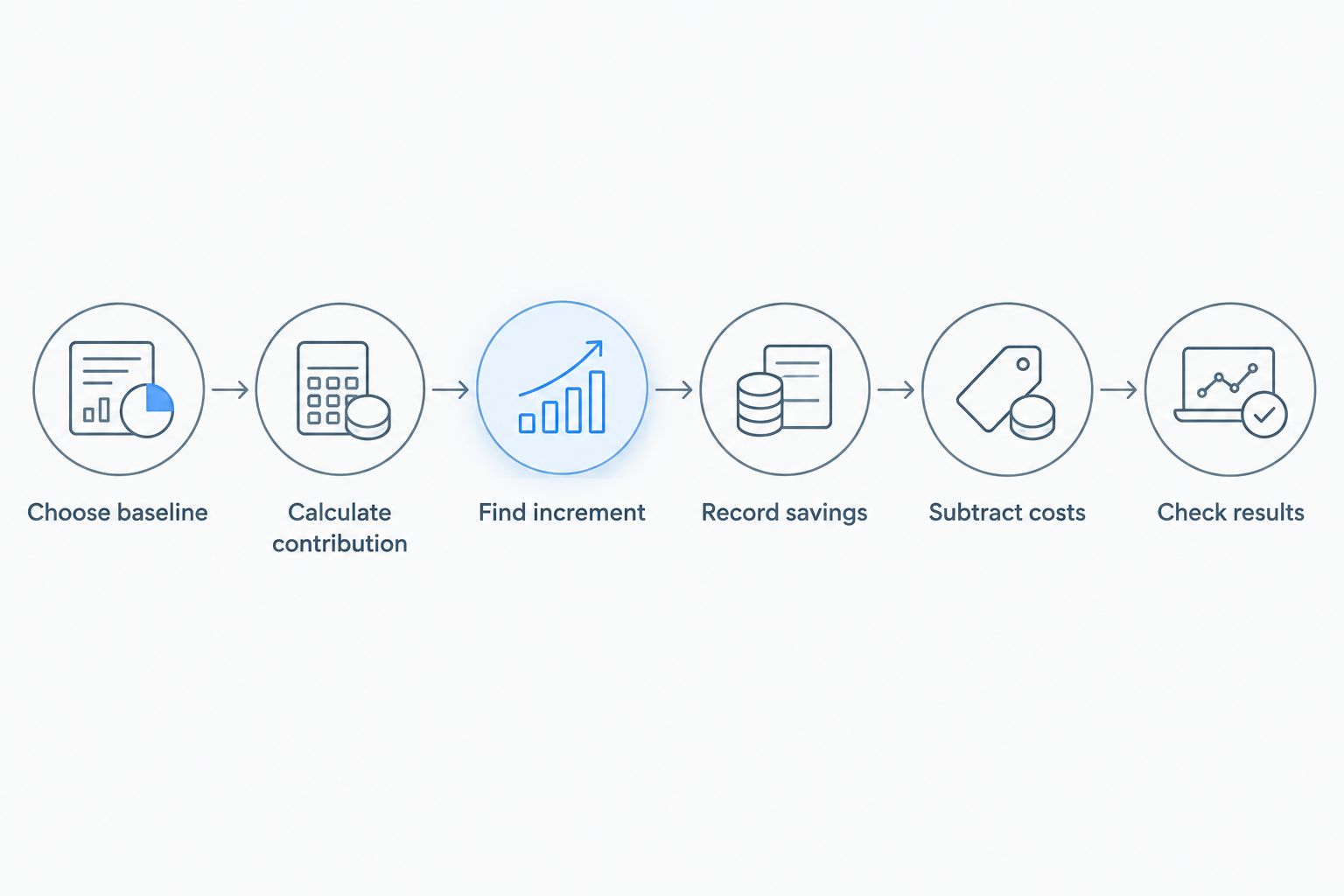
Break-even requires the full order economics, not sales revenue alone.
What should you count as a return?
Count additional contribution from orders, not an increase in average order value by itself. If buyers choose a personalized version instead of the standard version, the relevant gain is the difference in contribution between those outcomes. If personalization brings in an order that would not otherwise have happened, count that order’s contribution, but only when your comparison supports that conclusion.
Operational savings belong in the same calculation when they are documented. A production-ready file can change the amount of manual preparation a team does. Record the actual work saved and the cost of that work before adding it to ROI. Do not add a guessed saving for every order simply because the process feels faster.
What belongs in the cost column?
Include the app, the time spent configuring products, and the extra work attached to each personalized order. Materials, production handling, file checks, and corrections affect contribution when they differ from the standard product. Keep one-time setup costs separate from recurring costs so you can see both the break-even point and the result after launch.
The same rule applies to your baseline. If a standard product already requires artwork checks or manual order handling, do not assign all of that work to personalization. Count the additional cost or saving. Otherwise, the comparison makes personalization look better or worse than it is.
Which ROI measure answers your question?
Use contribution to decide whether personalization has paid back its costs. Use average order value and conversion to diagnose why the result changed. These measures answer different questions in 2026:
Incremental contribution
- What it tells you: What personalized orders add after relevant costs
- Useful for: Deciding whether the change pays
- Limitation: Needs a credible baseline
Average order value
- What it tells you: Whether completed orders contain more revenue
- Useful for: Spotting changes in order size
- Limitation: Excludes production and operating costs
Conversion rate
- What it tells you: Whether eligible visitors place orders
- Useful for: Checking purchase friction
- Limitation: Says nothing about margin per order
Manual work per order
- What it tells you: Whether the process requires less staff time
- Useful for: Checking an operational saving
- Limitation: Needs recorded work and a defensible cost
Best for the payback decision: incremental contribution. Its strength is that it accounts for the cost of fulfilling the sale; its weakness is that a poor baseline can distort the answer. Average order value is useful for spotting an upsell effect, but it cannot establish ROI. Conversion identifies friction, not profitability. Manual work can reveal a genuine saving, but only when you measure it.
Look at these measures together. Higher order value with lower contribution is not a win. Higher contribution per order also needs context if fewer visitors complete a purchase. For a deeper look at the revenue side, see how much personalization can add to average order value; keep your own cost data beside it.
Why personalization payback varies
No universal timeline survives the differences between Shopify stores. These are the drivers you can check in your own records:
- Eligible order volume. Break-even depends on how many completed orders can contribute toward the cost of the change. Count orders for the products you actually personalize, not all store orders.
- Incremental contribution per order. Compare what remains after the additional materials, labor, and fulfillment work. A larger order total is not automatically a larger contribution.
- Setup work. Product configuration and storefront checks consume time before the first eligible order. Include that work even when no developer is involved.
- Ongoing operating cost. Recurring app and maintenance costs continue after launch. A period that covers setup costs still needs to cover the costs that follow.
- Production errors and rework. Count a saving only when you can compare correction work before and after the change. Also count new errors introduced by the personalized workflow.
- Storefront conversion. A customizer that adds friction can offset a gain in contribution per completed order. Check visitor-to-order performance alongside order economics.
These drivers give you a useful diagnosis before they give you a date. If contribution is positive but cumulative ROI is still negative, check whether setup costs are the remaining gap. If contribution per order is weak, inspect production work before changing the storefront. If fewer visitors purchase, examine the buying experience rather than treating every lost sale as a production problem.
Add personalization to Shopify
Give shoppers a live preview and send production-ready files to fulfillment.
How should you test ROI without overstating it?
Start with a product whose standard and personalized versions have comparable buyers and fulfillment work. Write down what you will count before you launch. That prevents a strong-looking revenue result from changing the definition of success after the fact.
Keep the comparison at the product level. Storewide revenue can move for reasons unrelated to personalization, while a single campaign can change who reaches a product page. Record eligible traffic, completed orders, contribution, and correction work for the same products. If conditions change, describe the change rather than presenting the result as a clean before-and-after test.
Check the order details too. A live preview shows shoppers their choices, but the preview is not the finished item. Confirm that the personalization captured at checkout matches what fulfillment receives. An order that needs manual clarification has a different cost from an order that moves directly into production.
For Bespo, the relevant evaluation is specific: does its live-preview customizer help your shoppers complete eligible orders, and do its production-ready files reduce work in your fulfillment process? Bespo’s fit is strongest when both the storefront experience and the production handoff matter. Its limitation is the same as any app-based change: the app cannot make a low-contribution product profitable by itself.
Do not stop measuring at the first positive result. A run of completed orders can cover setup work while later rework changes the economics. Keep a cumulative view of contribution, savings, and costs in 2026, and check whether the result remains positive as order mix changes.
Can you see ROI immediately after launch?
You can see whether shoppers use the personalization options immediately after launch, but you cannot declare payback from usage alone. You need completed orders, their contribution, and the costs incurred to launch and fulfill them. Engagement is an early signal; cumulative contribution is the payback test.
The same applies to a fast installation. Bespo’s setup guidance describes installation in under 5 minutes, with no developer required. That describes getting the app installed, not the time needed to configure products, collect orders, or recover costs. Keep those milestones separate when reporting ROI.
Is higher average order value enough to prove ROI?
No. Higher average order value shows a change in revenue per completed order, while ROI depends on what remains after the relevant costs. A personalized product that needs extra preparation can raise order value without improving contribution.
Use the order-value change as a prompt to inspect the order. Did buyers select personalization on products they would have purchased anyway? Did the choice add production work? The answers determine whether the larger order moves you toward break-even.
Should you count time saved by production-ready files?
Yes, if you can document the time and its cost. Bespo outputs production-ready files for fulfillment, but that feature alone is not a quantified saving for your store. Compare the manual preparation and correction work attached to eligible orders before and after the workflow changes.
Count only work you actually avoid. If your team still reviews each file or handles new exceptions, include that time as well. The cleanest ROI calculation credits the net change in work, not the existence of an automated output.
FAQ
How long does it take to see ROI after adding personalization?
You see ROI when added contribution from personalized orders and verified savings exceed setup and ongoing costs. There is no defensible fixed timeline without your store’s order and cost data.
Can I calculate personalization ROI from sales alone?
No. Sales exclude the materials, labor, fulfillment, and operating costs that determine contribution. Compare personalized orders with a suitable baseline and subtract the additional costs.
Does a quick Shopify app setup mean faster payback?
No. Setup speed and payback measure different things. Payback depends on completed orders, incremental contribution, documented savings, and cumulative costs.
What is the best metric for personalization ROI?
Incremental contribution is the best starting point. It shows what personalized orders add after relevant costs; track conversion and manual work alongside it to explain changes.
Should I count fewer production errors as an ROI benefit?
Yes, when you record a measurable reduction in correction work or wasted inputs. Subtract any new errors introduced by the personalized workflow.
Does higher average order value mean personalization is profitable?
No. A larger order can require more production work. Check whether contribution rises after the extra costs are deducted.
How do I choose a baseline for personalized products?
Use the closest suitable non-personalized product and keep the comparison conditions consistent. Count only the contribution or savings attributable to the change.
One last thing
The fastest way to misread ROI is to credit personalization with the full value of every personalized order. Your store earns the difference it creates, not the revenue it relabels. In 2026, make that difference your break-even test before assigning a payback date.