
The blog
3D Configurator Cost: No Flat Price in 2026


A 3D product configurator has no defensible flat build price in 2026. Your final cost depends on the 3D assets, configuration rules, storefront integration, rendering method, testing scope, hosting and maintenance included in the quote. A low initial estimate is not comparable with a proposal that covers the full system after launch.
TL;DR
- A 3D product configurator has no flat 2026 price; scope and asset requirements determine the final cost.
- Custom development costs more than configured software because you fund design, engineering, testing and maintenance.
- Real-time 3D needs product models; live personalisation preview can use a simpler workflow.
- Bespo is best for Shopify merchants needing live personalisation and production-ready files without developer involvement.
Why this matters
The wrong comparison can put an unnecessary custom software project between you and launch. Before requesting quotes, decide whether you need true 3D geometry or simply need shoppers to preview text, monograms, engraving, embroidery, embossing or print on a product.
Those are different requirements. A true 3D configurator lets shoppers rotate a model and change its components, materials or finishes. A live-preview customiser can show personalisation on product imagery without recreating the whole item as an interactive model. This guide to adding a 3D product preview explains where that distinction affects a Shopify build.
In 2026, compare quotes by deliverables rather than the headline total. A proposal that excludes model creation, mobile testing or post-launch maintenance is not cheaper. It is incomplete.
How much does a 3D product configurator cost to build?
The cost is the sum of seven workstreams: discovery, interface design, 3D asset production, configuration logic, commerce integration, quality assurance and ongoing operation. Ask every supplier to separate those workstreams in the proposal. That gives you a comparison you can audit instead of a single figure you cannot interpret.
Live-preview Shopify app
- Best for: Text, monograms, engraving, embroidery, embossing and print
- Main cost driver: Product setup and subscription structure
- Main limitation: Does not automatically equal full 3D geometry
- Verdict: Buy when rotation and component assembly are unnecessary
Configurable 3D software
- Best for: Merchants with prepared models and repeatable product rules
- Main cost driver: Asset preparation and platform configuration
- Main limitation: Platform constraints can limit unusual workflows
- Verdict: Hold until the vendor proves your hardest use case
Custom 3D development
- Best for: Complex products, unusual logic and proprietary integrations
- Main cost driver: Engineering, rendering and maintenance scope
- Main limitation: Highest delivery risk and largest internal workload
- Verdict: Buy only when standard software cannot meet a documented requirement
The right 2026 budget is the lowest total cost that satisfies a written requirement list, not the smallest initial quote. If two proposals cover different assets, integrations or support periods, they are not competing bids.
Live-preview app: the lower-complexity route
Best for: Shopify merchants personalising an existing product with shopper-supplied text, artwork or predefined options.
A live-preview app avoids building a complete 3D scene when the buyer only needs to see where personalisation appears. The app still needs product images, personalisation areas, option rules and production settings, but it does not require every surface and component to exist as an interactive 3D model.
The advantage is speed. You remove model production, a custom rendering layer and much of the engineering work. The drawback is equally clear: if shoppers must rotate the item, swap structural components or inspect every angle, a two-dimensional preview will not satisfy the requirement.
Use this route when the purchase decision depends on personalisation placement rather than physical configuration. Buy when your core question is what the finished design looks like, not how the product is assembled.
Configurable 3D software: the middle route
Best for: Merchants that need genuine 3D interaction but can work within an existing platform.
Configured software replaces part of the engineering project with platform setup. You still need suitable 3D assets, variant logic, storefront styling, analytics and testing. The saving comes from not building the rendering engine and administration system from zero.
The main risk is fit. A platform can demonstrate material swaps in a sales presentation yet fail on your actual product rules, mobile storefront or cart data. Give every vendor the same difficult use case and require a working demonstration before selecting the platform.
Review the contract for model limits, rendering usage, integrations, data export and what happens when you add another product family. Hold until your real product logic works inside the platform, not just its demonstration catalog.
Custom 3D build: the highest-control route
Best for: Products with configuration logic or system integrations that existing software cannot support.
A custom build gives you control over the customer journey, rule engine, rendering behavior and data passed into production. It also makes you responsible for a larger software system. Discovery, interface work, frontend engineering, backend logic, rendering, analytics, accessibility, browser testing and deployment all become part of the scope.
Custom development also creates an ownership question. Confirm who owns the source code, models, textures, configuration data and deployment process. Confirm whether another developer can maintain the system if the original supplier becomes unavailable.
The downside is not just the initial cost. Every new product, storefront change and browser issue can create more engineering work. Buy only when a documented business requirement rules out both live-preview apps and configurable 3D software.
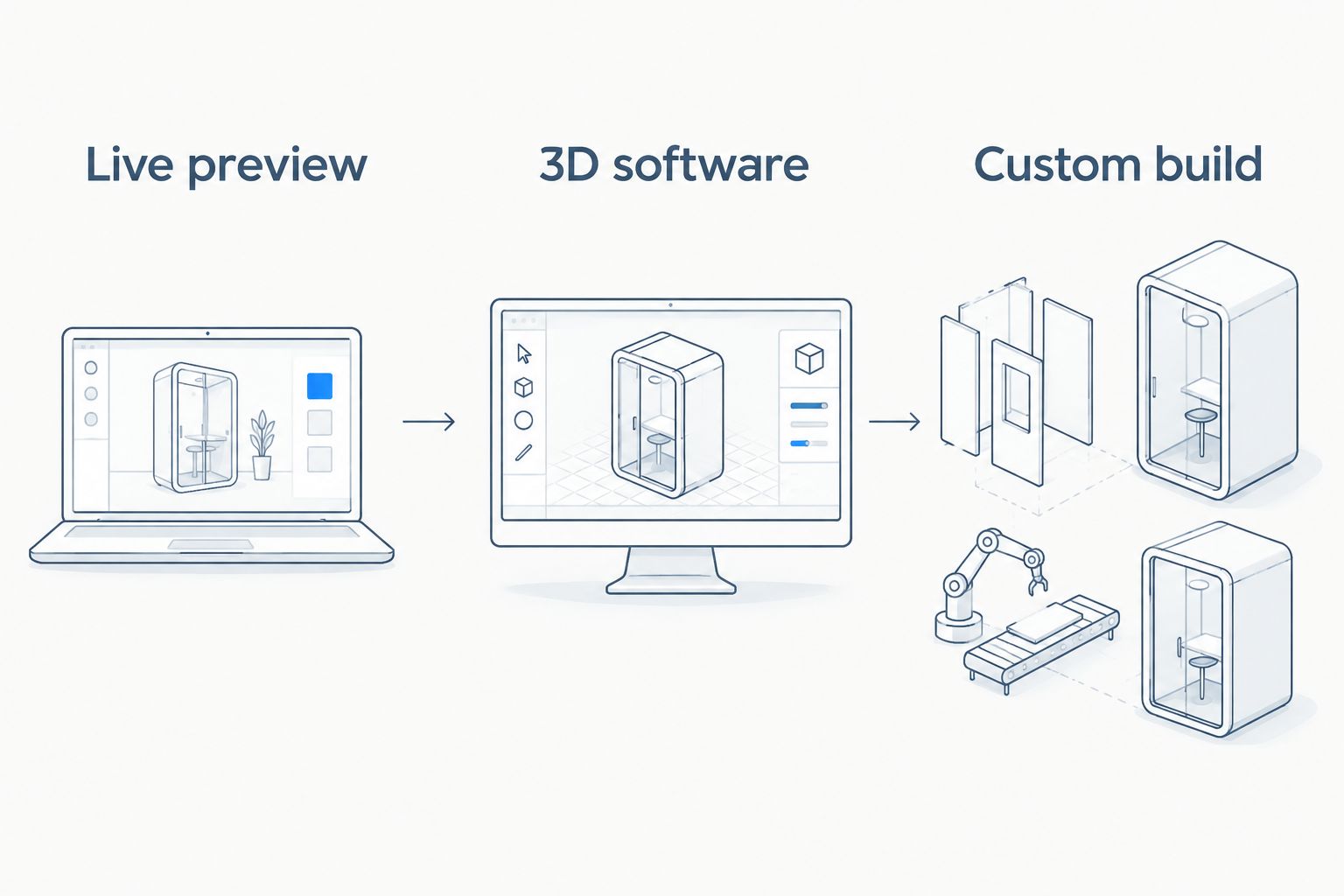
Choose the least complex route that still meets the buying experience and production requirements.
Why 3D product configurator cost varies
- 3D asset readiness: Existing computer-aided design files are not automatically storefront-ready. Models can require geometry cleanup, material work, compression and separate preparation for mobile rendering.
- Product-rule complexity: Simple color swaps need less logic than products with incompatible components, dependent choices or measurements that affect several parts.
- Rendering method: Browser-based real-time rendering has different engineering and hosting requirements from pre-rendered images or server-generated outputs.
- Catalog coverage: One product family is a different project from a catalog in which each family needs unique geometry, materials and rules.
- Commerce integration: Cart properties, variants, inventory, customer uploads, order records and production files must pass through the system correctly.
- Ownership and maintenance: A quote that includes documentation, monitoring and future updates covers more than a build handed over immediately after launch.
Each factor should appear as a named line item in a 2026 proposal. If the supplier cannot show where model preparation or integration testing sits in the scope, assume it is excluded until the contract says otherwise.
What should a configurator quote include?
Start with the product journey. List what shoppers can change, what they must see and what information must reach checkout and fulfilment. Then require the supplier to map each requirement to a deliverable.
A usable quote should state:
- Which products and variants are included.
- Who supplies or creates the 3D models and textures.
- Which devices, browsers and storefront themes will be tested.
- How configuration choices enter the Shopify cart and order record.
- Whether production files or specifications are generated.
- Who hosts the configurator and monitors failures.
- What documentation, training and maintenance are included.
Do not accept the phrase 3D integration as a complete scope. It does not tell you who prepares the models, how product rules are administered or whether order data reaches production. A strong developer brief for a Shopify customiser converts those questions into acceptance criteria before development starts.
Which costs get missed after launch?
The build quote is only part of the 2026 decision. A configurator must remain compatible with the storefront, product catalog and production process after deployment.
Budget planning should include:
- New model and texture preparation when products are added.
- Rule updates when options or compatible components change.
- Regression testing after theme, platform or browser updates.
- Rendering infrastructure and monitoring.
- Accessibility and mobile-performance fixes.
- Technical support when configurations fail to reach an order correctly.
- Documentation updates for the team managing the catalog.
Ask for the operating model in writing. Who receives an alert when rendering fails? Who corrects an invalid rule? How is a new product added? A configurator without named owners becomes an expensive sales demo instead of dependable commerce infrastructure.
How do you compare 3D configurator proposals?
Use the same requirement sheet for every supplier. Score each response against coverage, ownership, implementation workload, launch risk and ongoing operation. Do not let vendors replace missing answers with a polished demonstration.
Run one representative product through the complete journey: option selection, preview, cart, checkout, order record and production handoff. Include the hardest valid configuration and an invalid combination that the system must block. This exposes gaps in rule handling before they become change requests.
Also separate must-have requirements from later improvements. Rotation might be essential. AR placement might not be. A staged scope protects the launch from features that look impressive but do not change whether a shopper can configure and order the product correctly.
Is a 3D configurator worth it for a small Shopify store?
A 3D configurator is worth considering when shoppers cannot understand or validate the product through ordinary photography and option selectors. It is harder to justify when a live preview already answers the buyer's main question.
For a smaller 2026 store, start with the narrowest useful experience and validate customer use before commissioning custom rendering. The decision should follow product complexity, not store size alone.
Is a live-preview customiser cheaper than full 3D?
Yes. A live-preview customiser removes the work of producing interactive geometry and building or configuring a 3D rendering layer. It is the better fit when shoppers personalise a surface rather than assemble or reshape the product.
The trade-off is reduced spatial interaction. Buyers will not automatically be able to rotate the item or inspect structural changes from every side.
Can an existing 3D model be used in a web configurator?
An existing model is a starting asset, not proof that it is ready for the web. Geometry, materials, file size and component structure must suit browser rendering and the configuration rules.
Ask the supplier to assess a real model before approving the project. That assessment should identify cleanup, material and mobile-performance work rather than assuming the original design file can ship unchanged.
Where Bespo fits
Bespo is best for Shopify merchants who need real-time product personalisation and production-ready files without developer involvement. The Bespo Shopify personalisation app supports embroidery, engraving, monograms, embossing, debossing and print, with a live-preview customiser for shoppers.
That makes Bespo relevant when the job is personalising a product rather than building an interactive 3D model of every component. Setup takes under 5 minutes according to the supplied brand information. The limitation is scope: merchants requiring true 3D rotation, structural assembly or AR should document those needs and confirm them separately instead of treating every live-preview tool as a 3D engine.
Launch personalisation without custom code
Add live preview and production-ready personalisation files to a Shopify storefront.
FAQ
How much does a 3D product configurator cost in 2026?
A 3D product configurator has no reliable flat price in 2026. The final quote depends on model creation, product rules, rendering, integrations, testing, hosting and maintenance.
What is the biggest cost driver in a 3D configurator?
The biggest cost driver is usually the combined scope of 3D asset preparation and configuration logic. A large catalog with dependent options requires more modeling, rule setup and testing than a simple material swap.
Is custom development the only way to add a 3D configurator?
No. Existing 3D software can provide the rendering and administration layer, while a supplier configures the platform around your products. Custom development is justified when standard software cannot support a documented requirement.
Do I need 3D for Shopify product personalisation?
No. Text, monograms, engraving, embroidery, embossing and print can use a live-preview customiser when shoppers do not need to rotate or structurally reconfigure the product.
What should be included in a 3D configurator quote?
The quote should cover discovery, interface design, model preparation, product rules, commerce integration, testing, deployment, documentation and maintenance. It should also name who owns the code, models and configuration data.
Can a 3D configurator create production files?
A 3D configurator can create or pass production data only when that output is included in the system design. Confirm the required file format, validation rules and fulfilment handoff before approving the scope.
How can I reduce the cost of a configurator project?
Reduce the first scope to the products, views and rules required for a valid order. Reuse suitable assets, remove nonessential visual features and prove the complete order workflow before expanding the catalog.
Is Bespo a full 3D configurator?
Bespo is described as a Shopify personalisation app with real-time live preview and production-ready file output. Merchants needing full 3D geometry, rotation or AR should verify those requirements separately.
One last thing
Do not request a 3D configurator when the requirement is actually a better product preview. In 2026, the fastest route is to write down what the shopper must change, see and send to production, then choose the least complex system that completes that journey. Bespo fits the live-personalisation use case; a true 3D project should begin only after rotation, component logic or spatial viewing becomes a confirmed requirement.