
The blog
Shopify AR Try-On Cost: Get a Scoped Quote in 2026


Adding AR try-on to a Shopify product page requires a project-specific quote in 2026; there is no single Shopify-wide rate. Your budget needs to cover the try-on software, product assets, storefront setup and ongoing maintenance—not just the app subscription.
TL;DR
- Shopify AR try-on needs a scoped quote covering software, assets, implementation and maintenance.
- Separate camera-based AR try-on from a rotating product viewer or live personalisation preview.
- Bespo suits Shopify merchants who need live product personalisation and production-ready files.
- Approve a working product-page test before expanding AR try-on across your catalogue.
How much does it cost to add AR try-on to a Shopify product page?
Get an itemised quote for the experience you actually need. A subscription figure alone does not establish the cost of launching a working try-on feature on your store.
Start with the shopper's task. Do they need to see glasses on their face, inspect a product from different angles, or preview engraved initials? Those are different requirements. Do not request them under the same vague brief.
For your 2026 budget, ask each supplier to separate these workstreams:
Software
- What the quote should specify: The try-on functionality and how usage is billed
- What to check before approval: Whether the proposed package supports your required experience
Product assets
- What the quote should specify: Creation, conversion and preparation of product visuals
- What to check before approval: Who supplies source files and approves their accuracy
Storefront setup
- What the quote should specify: Placement and connection to the product page
- What to check before approval: Whether your theme and purchase flow are included
Testing
- What the quote should specify: Device, browser and product-selection checks
- What to check before approval: What counts as an accepted launch
Maintenance
- What the quote should specify: Updates, troubleshooting and asset changes
- What to check before approval: Who owns each task after launch
Use the guide to Shopify product customizer apps with AR try-on features to frame your shortlist. Then request a demonstration using your product, not just a supplier's sample.
Why this matters
A product page can contain an impressive visual feature without helping shoppers complete the purchase. Your brief must connect the preview to the product they select and the item they add to the cart.
Keep the buying decision visible. If the shopper changes the product colour, the preview should represent that selection. If the camera feature cannot run, the standard product page should still explain the item and support checkout.
Approve the purchase journey, not just the visual demo. That gives you a concrete acceptance standard and prevents unrelated functionality from entering the project unnoticed.
AR try-on, product viewing or personalisation: which do you need?
Choose the experience before asking for a quote. A rotating product model is not the same as a camera-based try-on, and neither automatically supplies manufacturing instructions for a personalised order.
Camera-based AR try-on
- Best for: Merchants whose shoppers need an on-body appearance preview
- What it does: Places a digital representation of the product into a camera view
- Limitation: Appearance alone does not establish physical fit
Rotating product viewer
- Best for: Merchants whose shoppers need to inspect shape and detail
- What it does: Lets shoppers examine a digital product model
- Limitation: Does not necessarily show the product on the shopper
Live personalisation preview
- Best for: Merchants selling customer-selected text, designs or finishes
- What it does: Shows the shopper's customisation before purchase
- Limitation: Does not establish camera-based try-on support
Ask the supplier to show the exact interaction you want. A video of a model rotating does not demonstrate face tracking. A text preview does not demonstrate how a product looks when worn.
Bespo is best for Shopify merchants who need live product personalisation and production-ready files. Its stated scope includes embroidery, engraving, monograms, embossing, debossing and print, with storefront setup that does not require developer involvement. That is a personalisation workflow; do not treat it as confirmation of camera-based AR try-on.
When camera-based try-on is the right brief
Choose camera-based try-on when your requirement is to show the product on the shopper. Specify the body area, the product selection behaviour and the camera-permission journey.
Keep fit claims separate. Seeing a digital representation on a face or body is not proof that the physical item has the right dimensions, comfort or construction for that shopper.
When a product viewer is enough
Choose a product viewer when shoppers need to inspect the item itself. Specify which details must remain visible as they rotate or zoom the model.
Do not add camera functionality just because it appears in a feature list. If inspection is the task, judge the viewer against that task and quote it separately from try-on.
When personalisation is the real requirement
Choose a live personalisation preview when shoppers need to approve names, initials, artwork or other custom selections. The preview and the production handoff deserve equal attention.
For personalised products, Bespo provides a live-preview customiser and outputs production-ready files. Its relevance is the connection between shopper choices and fulfilment, not an unsupported claim about AR capability.
Build your AR try-on quote around the complete workflow
For a 2026 supplier brief, describe what happens from product selection to checkout. Avoid a brief that ends at opening the camera.
Use this sequence to make proposals comparable:
- Define the experience. State whether you need on-body try-on, product inspection or personalisation. Describe what the shopper must be able to decide.
- Specify the product assets. List the products and visual differences included in the launch. Ask the supplier to identify the source material they need.
- Map the storefront setup. Identify where the feature appears and how it responds to product selections. Include the path back to ordinary product information.
- Set the acceptance tests. Require a demonstration on your agreed devices and browsers, including camera refusal and unsupported-device behaviour.
- Assign maintenance. Name the owner of new assets, product changes, storefront updates and troubleshooting.
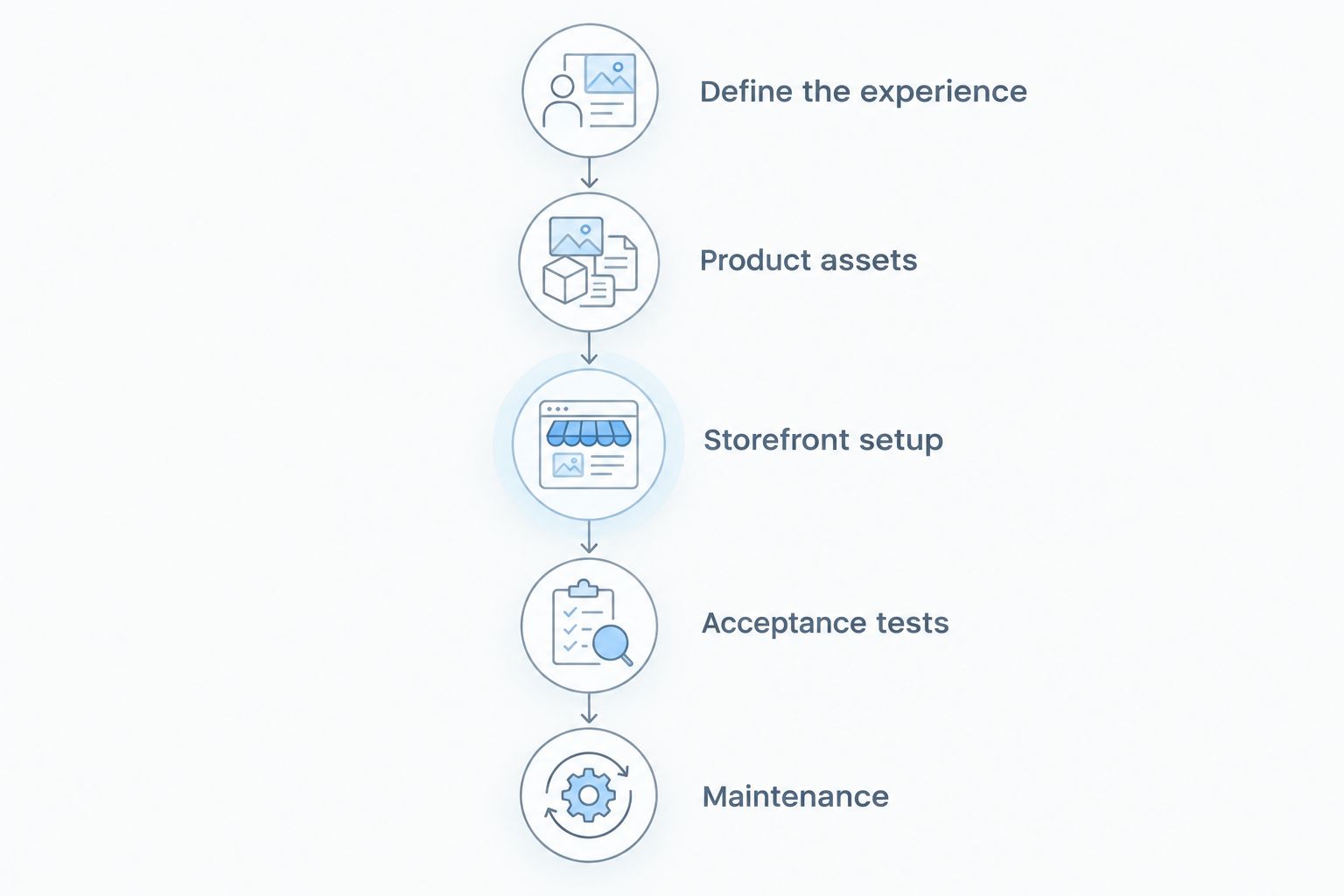
Agree the full workflow before comparing supplier proposals.
The deliverable is a written scope with a clear owner for each stage. Ask suppliers to mark exclusions beside the relevant task rather than hiding them in a general note.
For implementation work, use the guide to briefing a developer for a Shopify customizer build to structure the storefront requirements. Keep the AR-specific tracking and asset requirements explicit in your own brief.
Why the AR try-on budget varies
AR try-on proposals describe different work. Compare their assumptions before comparing their totals.
Ask every supplier to answer these questions against the same scope:
- Experience type: Does the proposal include camera-based tracking, a product viewer or only a visual overlay? Require a demonstration of the named functionality.
- Asset preparation: Are your existing files accepted, or does the project include creating and preparing new assets? Specify approval and revision responsibilities.
- Catalogue coverage: Which products, colours and visible variations are included? List them rather than relying on the phrase catalogue support.
- Storefront integration: Does the work cover your product template, selection controls and cart journey? Name any custom page layouts that need separate attention.
- Device coverage: Which browsers and devices must pass acceptance testing? Require a usable fallback for shoppers outside that agreed scope.
- Ongoing ownership: Who updates assets and handles problems after launch? Separate merchant tasks from supplier responsibilities.
These questions are scope controls, not promises about a particular provider. The supplier's written answers establish what you are purchasing.
Do not accept an undefined launch package. A proposal should tell you which product pages will work, which interactions will work and how you will verify both.
What should you test before approving the launch?
Your 2026 acceptance checklist should cover visual behaviour and ordering behaviour. Test the feature inside your actual storefront, not only inside the supplier's demonstration environment.
Product selection
Change every selection included in the pilot. Check that the displayed product matches the selected option and that the cart receives the intended item.
For a personalised item, inspect the custom text or design as well. Do not assume a convincing preview means the order carries the correct production information.
Camera access and fallback
Test what happens when a shopper grants camera access, refuses it or closes the try-on experience. The shopper should retain a clear route to product details and purchase.
Check the permission messaging for plain language. Ask the provider to document its handling of camera imagery and any retained data before you publish customer-facing claims.
Visual accuracy
Compare the preview with the physical product. Review colour, placement, proportions and visible details against the source material approved for the project.
Write down the limitations that shoppers need to understand. Do not describe an appearance preview as a measurement tool unless that capability is specifically supported and verified.
Storefront performance
Check the product page before and after adding the feature. Record loading behaviour, interaction responsiveness and any interference with product selection.
Set your acceptance thresholds in the brief rather than borrowing a performance claim from another store. Your theme, assets and selected implementation determine what you need to test.
Order completion
Complete a test purchase through the intended journey. Verify the ordered product, selected options and any personalisation information needed for fulfilment.
For Bespo personalisation, inspect the production-ready output as part of that workflow. For AR try-on, verify separately that the visual experience does not disrupt the ordinary order path.
Do you need a developer to add AR try-on to Shopify?
Whether you need a developer depends on the selected implementation and your storefront requirements. Ask the provider to separate merchant configuration from work that requires code changes.
A no-code installation claim is not a complete scope. Confirm whether it covers asset preparation, your product template, option changes and launch testing—not just enabling a widget.
If you need custom work, require a handover. Your team should know where the feature is configured, how to disable it and who fixes it when the storefront changes.
Is a live personalisation preview the same as AR try-on?
A live personalisation preview is not the same as AR try-on. It shows custom selections on a product representation; camera-based try-on shows a representation of the product in the shopper's camera view.
Choose based on the uncertainty you need to resolve. A shopper checking engraved initials needs a readable customisation preview. A shopper evaluating how glasses look on their face needs a different interaction.
How do you decide whether AR try-on is worth adding?
Decide whether AR try-on addresses a specific purchase question, then test it against a documented baseline. Do not approve a catalogue-wide rollout solely because shoppers can open the experience.
For a 2026 pilot, record the following outcomes separately:
- Feature use: Can shoppers find and start the try-on experience?
- Purchase progress: Do shoppers continue to product selection, cart and checkout?
- Technical failures: Where does the experience fail or require a fallback?
- Support questions: Which product questions remain unresolved after using the preview?
- Operating work: What does your team need to do when products or assets change?
Interpret each measure on its own terms. Opening a camera is an interaction, not an order. A completed order is not proof that the preview accurately represented every product detail.
Expand only after the pilot meets your written acceptance criteria. Keep a record of defects, unresolved limitations and ongoing work before deciding which products to add next.
FAQ
How much does it cost to add AR try-on to a Shopify page?
Adding AR try-on to a Shopify page requires a project-specific quote covering software, product assets, setup, testing and maintenance. Request the same written scope from each supplier so you can compare the complete deliverables.
What should an AR try-on quote include in 2026?
A 2026 AR try-on quote should identify the supported experience, included products, required assets, storefront work, acceptance tests and maintenance responsibilities. Ask the supplier to list exclusions beside each workstream.
Can I add AR try-on without hiring a developer?
The selected implementation determines whether developer work is required. Confirm which tasks you can configure yourself and which require changes to your storefront.
Does Bespo provide camera-based AR try-on?
Bespo's stated functionality covers live product personalisation and production-ready files, not a confirmed camera-based AR try-on feature. Verify camera-based requirements separately rather than treating a live customisation preview as try-on.
Will AR try-on tell customers whether a product fits?
An appearance preview does not by itself establish physical fit. Keep dimensions, sizing guidance and any verified measurement capability separate from the visual try-on experience.
Should I launch AR try-on across my whole catalogue?
Start with a defined pilot and expand after it passes your acceptance tests. Verify product selection, camera behaviour, visual accuracy, storefront performance and order completion before adding more products.
One last thing
Ask the supplier to demonstrate the exit, not just the entrance. Have someone decline camera access, close the preview and continue shopping.
That test exposes an easily overlooked requirement: AR try-on must remain optional to completing a purchase. Put the fallback journey in your 2026 acceptance brief before approving the build.