
The blog
Is It Worth Localizing a Shopify Customizer? Yes | 2026


Yes, localizing a Shopify customizer is worth it when you already sell to non-English-speaking customers and the customization steps affect what they order. Translate the fields shoppers use, then check that their choices reach your production workflow unchanged. If you have no evidence of demand in a target market, test one locale before translating every product.
TL;DR
- Is it worth localizing a Shopify customizer? Yes, when non-English shoppers already use your store and customization affects their order.
- Translate shopper-facing options and help text; keep production instructions clear for the team fulfilling the order.
- Test one locale and one product before expanding across the catalog.
- Bespo suits Shopify merchants who need live-preview personalization and production-ready files; verify its language support before choosing it for a localized store.
Why this matters
A translated product page is not a translated customization experience. A shopper can understand the product description and still get stuck at a field labelled in another language, choose the wrong option, or enter text without understanding where it will appear. That gap matters most when the order cannot be made correctly without the shopper's input.
Localization also reaches beyond the storefront. A translated choice needs to remain recognizable when the order reaches the person preparing artwork, checking a proof, or producing the item. If the shopper sees one meaning and the production team sees another, the interface has not solved the problem; it has moved it downstream. For a practical setup sequence, see how to translate a Shopify customizer for international stores.
In 2026, the decision is not whether every word on your store needs translating at once. It is whether a shopper in a target market can customize, review, and submit an order without guessing. Start with the parts of the journey that determine the finished product.
Is it worth localizing a Shopify customizer for non-English markets?
Yes, if non-English demand already exists and the customizer is necessary to complete the purchase. Start with a limited localization rather than a catalog-wide translation. If you cannot identify a target market or a product to test, leave the customizer as it is until you can.
Keep the current language
- Best for: Stores without a defined non-English market
- Advantage: No translation work before demand is clear
- Limitation: Shoppers who need another language must interpret the fields themselves
- Verdict: Hold until you identify a market to test
Localize one product and locale
- Best for: Stores with a clear target market and a manageable pilot product
- Advantage: Exposes confusing labels and handoff problems before wider rollout
- Limitation: Other products remain untranslated during the test
- Verdict: Start here
Localize the full catalog
- Best for: Stores with validated demand and a repeatable translation process
- Advantage: Gives shoppers a consistent experience across relevant products
- Limitation: Every option change requires translation and review across locales
- Verdict: Expand after the pilot works
A localized customizer should preserve the meaning of the order, not just replace English labels. Use this sequence for the first product:
- Choose one market. Name the language and the products that market's shoppers need to customize. A language choice without a relevant product is not a useful pilot.
- List every shopper-facing string. Include field labels, option names, instructions, validation messages, preview controls, and any text shown before the shopper submits the design.
- Separate interface text from customer input. Translate the instruction that asks for an engraved name. Do not translate the name the customer typed or silently alter its spelling.
- Check the preview. Confirm that translated instructions still make sense beside the live product preview and that shoppers can review the content they actually entered.
- Check the order handoff. Confirm that the production team can identify the selected option and reproduce the customer's intended text or artwork without interpreting a translated label from memory.
- Review the whole path on mobile. Work from the product page through customization, cart, and order details in the selected language. Fix unclear steps before adding another product.
The storefront and production views serve different readers. The shopper needs familiar instructions; the production team needs unambiguous specifications. Write down the meaning of each option before translation so both views refer to the same choice.
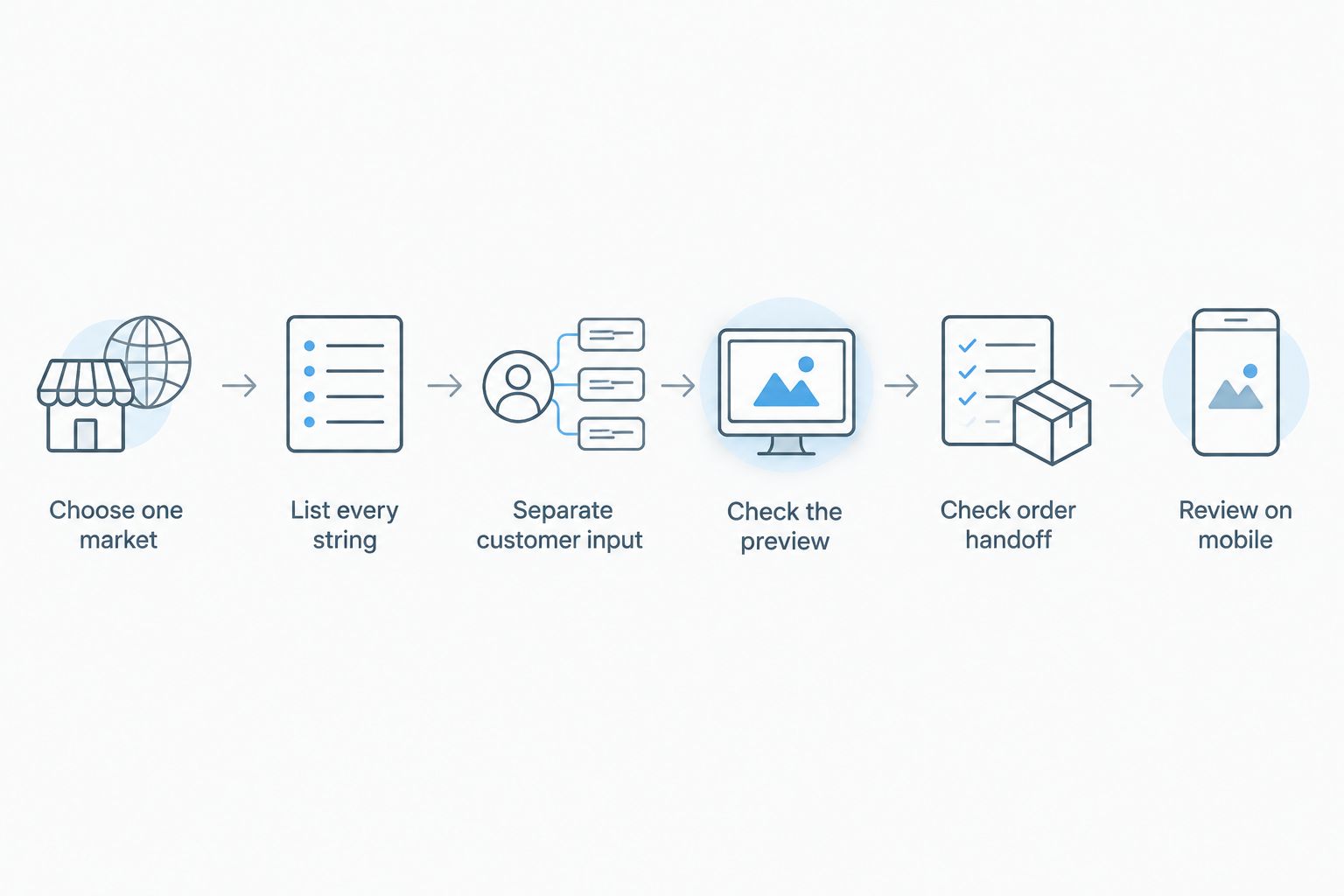
A translation is ready only when the shopper's choice remains clear through production.
A pilot is especially useful for personalization because the same label can appear in several places. An option might be named on the product page, summarized in the cart, and passed to production. Check each appearance. Translating the visible field but not its confirmation leaves the shopper with an avoidable moment of doubt.
What should you translate first?
Translate text that helps a shopper decide what to enter and confirm what they chose. That usually means field labels, option descriptions, placement instructions, error messages, and review text. Keep the customer's own text intact unless the customer changes it. A monogram, personal message, or uploaded design is order content, not interface copy.
Prioritize by consequence. An untranslated decorative heading is less likely to change the finished product than an unclear instruction about capitalization or placement. Likewise, a validation message matters when it blocks the shopper from completing customization. Walk through the product as a customer would and mark every point where misunderstanding changes the order.
Use plain, local language rather than a word-for-word translation when an option has a technical name. The shopper needs to know what the choice does. Your production team still needs a stable way to identify it. Those needs can be met with separate shopper-facing wording and internal production terminology, provided the connection between them stays clear.
Do not assume the live preview explains everything. A preview shows a result, but labels tell shoppers what they can change and what will be submitted. If the instruction and preview appear to disagree, correct the instruction before expanding to another locale.
Why the answer varies
The value of localization depends on the store and the order journey, not on language alone:
- Existing demand: A market with current shoppers or orders gives you a reason to test. Without a target market, a full translation has no clear priority.
- Complexity of the choices: A simple name field needs less explanation than a product with placement, style, and artwork choices. More decisions create more text to review.
- Dependence on written instructions: If shoppers must read the instructions to enter usable personalization, translation is central to completing the order correctly.
- Production handoff: If order details reach a separate production team, translated labels must still point to the correct specifications.
- Update frequency: Every new option or changed instruction creates translation work. Set ownership for those changes before expanding the catalog.
- Mobile experience: Longer translated labels need room beside controls and previews. Test the actual journey rather than approving strings in a spreadsheet.
None of these factors requires translating every product at once. They help you pick a pilot that reveals whether language is a barrier in a specific order journey. A product with clear personalization steps makes a better starting point than a catalog-wide launch with no end-to-end check.
Can Shopify's store language settings translate an app customizer?
Not by themselves. Your store's language settings and the text rendered by a customizer need separate checks; do not treat a translated theme as proof that an app interface is translated. Open the product in your target language and inspect every customization field, message, preview control, cart detail, and order record.
Before choosing or configuring an app, ask where its shopper-facing strings are managed and how localized choices appear in orders. Bespo is best for Shopify merchants seeking live-preview personalization and production-ready files without developer involvement, based on the supplied product description. Those facts do not establish which languages its customizer supports, so confirm that requirement against the current app setup before committing to a rollout.
A useful check is a complete sample order in the target language. Enter customer text, select the available options, review the preview, and inspect what the production team receives. If any step needs someone to guess what the shopper meant, that locale is not ready.
Should you translate customer-entered personalization?
No. Translate the instructions around customer-entered personalization, not the content the customer submits. An entered name, message, or design is part of the requested product; changing it can change the order.
This distinction also applies when a customer enters text in a language different from the store's display language. The interface should make clear what will be produced, while the submitted content remains visible for review. If production cannot handle a particular script or character, explain that restriction before the shopper completes the order rather than silently changing the input.
For 2026 localization plans, treat every validation rule as customer-facing copy. A rule that rejects an entry without a clear explanation creates a dead end. Show the shopper what needs changing, then verify that the corrected entry appears as intended in the preview and order details.
How do you know whether localization worked?
Compare the pilot product's customization journey before and after launch for the target market, then review actual order details for misunderstandings. Use the same product and market for a meaningful comparison; changing the offer at the same time makes the result harder to interpret.
Look beyond completed purchases. Check whether shoppers start and finish the customization flow, whether errors cluster around particular fields, and whether support or production teams have to clarify submitted choices. These checks tell you where to revise wording. They do not require a claim that translation alone caused every change in sales.
Keep a record of the strings you changed. When an option is renamed later, update its translations, preview text, and order handoff together. In 2026, the goal is a repeatable process: one source meaning, a clear shopper-facing version for each supported language, and an order record production can use.
Review your personalization setup
Explore live-preview personalization and production-ready files for Shopify.
FAQ
Is it worth localizing a Shopify customizer in 2026?
Yes, when non-English shoppers already use your store and language affects how they customize a product. Test one product and locale before expanding the catalog.
What part of a Shopify customizer should I translate first?
Start with field labels, instructions, option names, validation messages, and review text. These strings help shoppers enter and confirm the details that determine the finished product.
Will translating my Shopify theme translate my customizer too?
Do not assume it will. Check the customizer's shopper-facing text and order details in the target language separately from the theme.
Should I translate a customer's engraved message?
No. Translate the instructions and controls, but preserve the customer's submitted message as order content unless the customer edits it.
How can I test a localized product customizer?
Complete a sample order in the target language on mobile and inspect the preview, cart, and production details. Fix any step that requires guessing what the shopper selected.
Should I localize every personalized product at once?
No. Start with one relevant product in a defined market, then expand when its translated instructions and production handoff work end to end.
Does Bespo support the languages my store needs?
Confirm your required languages in Bespo's current app setup before rollout. The supplied product description establishes live-preview personalization and production-ready files, but not specific language support.
One last thing
The most revealing translation test is not whether a shopper can read the customizer. It is whether a person who did not watch the shopper use it can make the right product from the resulting order. Run that test before you call a locale finished. If the production instructions need an explanation, fix the handoff before sending more shoppers through it.
In 2026, a narrow launch with a clear order record beats a fully translated catalog that leaves production guessing. Make one product work from first field to final specification, then repeat the process for the next market.