
The blog
Print-on-demand app for yoga and pilates studios: complete 2026 guide


Yoga and pilates studios’ print-on-demand merchandising is selling studio-branded products made after purchase, with the aim of earning merchandise revenue without buying finished goods in advance. This 2026 guide separates product personalisation from physical fulfilment, then shows you how to build a Shopify workflow around class merchandise, instructor gifts and retreat orders.
TL;DR
- Choose a print on demand app for yoga and pilates studios by fulfilment needs, not preview features.
- Bespo is best for Shopify studios needing live-preview personalisation and production-ready files, rather than physical fulfilment.
- Start with a narrow catalogue and test the complete journey from customer choices to a finished sample.
- Keep studio merchandise, individual gifts and deadline-sensitive retreat orders on clearly defined workflows.
Why print-on-demand matters for yoga and pilates studios
Your merchandise workflow should fit around teaching, not create another front-desk job. Start by deciding whether you want to sell fixed studio designs or let members personalise each order. Those are different requirements.
A fixed-logo shirt needs a product listing and a production route. A named instructor gift also needs accurate customer input, an approved layout and a way to pass that information to the maker. A retreat order adds a deadline and potentially several recipients.
For apparel-specific planning, use the guide to print-on-demand for activewear and athletic apparel brands. Keep that product decision separate from your software decision.
In 2026, choose your setup around the work each order requires:
- Everyday studio merchandise: fixed artwork and straightforward product choices.
- Member personalisation: names or initials with a clear preview and production instructions.
- Instructor gifts: accurate recipient details and deliberate design approval.
- Retreat merchandise: artwork approval, recipient coordination and a confirmed delivery plan.
Print-on-demand describes when production happens. It does not establish who prints, who checks the artwork or who ships the parcel. Assign those responsibilities before you publish a product.
How to set up your studio merchandise workflow
Choose one buying occasion
Start manually. Ask members what they would actually use, write down requests and choose a single buying occasion before installing software. A short conversation after class is enough to begin; you do not need a complex research project.
For your first pilot, choose 1 product and 1 audience. These are launch limits, not industry benchmarks. They keep the test small enough to inspect every order.
A studio-logo tote for regular members and a personalised instructor gift answer different buying needs. Do not combine them into a product page with every possible design, recipient and occasion.
Write a plain-language brief: who buys, what they choose, what the maker receives and what counts as an acceptable finished result. That brief becomes your software checklist. Leave products outside the pilot until the first workflow works reliably.
- Name the buyer: member, instructor or retreat organiser.
- Choose one product suited to that occasion.
- Separate fixed studio artwork from customer-entered text.
- Record requests without treating interest as a completed sale.
- Define the sample approval criteria before accepting orders.
Confirm the production route
Contact your intended maker directly. Use a spreadsheet to record the product, decoration method, artwork requirements, delivery destinations and who handles problems. This manual check comes before any app comparison.
A print-on-demand fulfilment service and a local production partner are different options. Evaluate each against your actual product and order workflow, not a generic promise of automation.
For a yoga mat, ask how the decoration affects the finished surface and what care instructions apply. For apparel, inspect the fit and decorated area. Do not infer physical quality from an attractive storefront mock-up.
Approve a physical sample before promoting the product to members. Check the finished item against the artwork and the supplier’s stated requirements. Keep the approved sample as your reference for future orders.
Your 2026 production checklist should include these questions:
- Which products and decoration methods can the maker fulfil?
- What artwork format and placement instructions are required?
- Who verifies personalised text before production starts?
- Who communicates dispatch details to the customer?
- Who investigates defects, incorrect decoration or missing parcels?
Add personalisation only where it helps
You can validate a personalised concept manually by collecting the requested text and preparing a proof for the buyer. This exposes the work involved without assuming that an app solves every production task.
Once that process is clear, Bespo provides a faster storefront path: shoppers personalise products through a live-preview customiser, and the app outputs production-ready files for fulfilment. It supports techniques including print, embroidery, engraving, monograms, embossing and debossing, without developer involvement.
Bespo is best for Shopify studios that need live-preview personalisation and production-ready files. Its role is product personalisation; that is not evidence that it manufactures or ships your merchandise. Confirm the file handoff with your chosen production partner.
Keep the first template tightly controlled. A member adding a name to approved studio artwork needs fewer decisions than a designer building artwork from scratch. Limit customer choices to what the maker can reproduce.
- Offer personalisation only on products with a clear use case.
- Keep studio logos and approved artwork fixed.
- Define permitted text, placement and decoration choices.
- Check the output against the maker’s requirements.
- Retain a fixed-design route for buyers who do not need personalisation.
Map the order handoff
Build the handoff manually first. Create a sample order record that contains the product, selected variant, exact personalisation, artwork reference and delivery details. Then ask the person responsible for production to explain what they would do next.
Use four checkpoints: Capture choices, Check artwork, Release production and Confirm dispatch. Each checkpoint needs an owner. A generated file still needs to reach the right maker with the right order information.
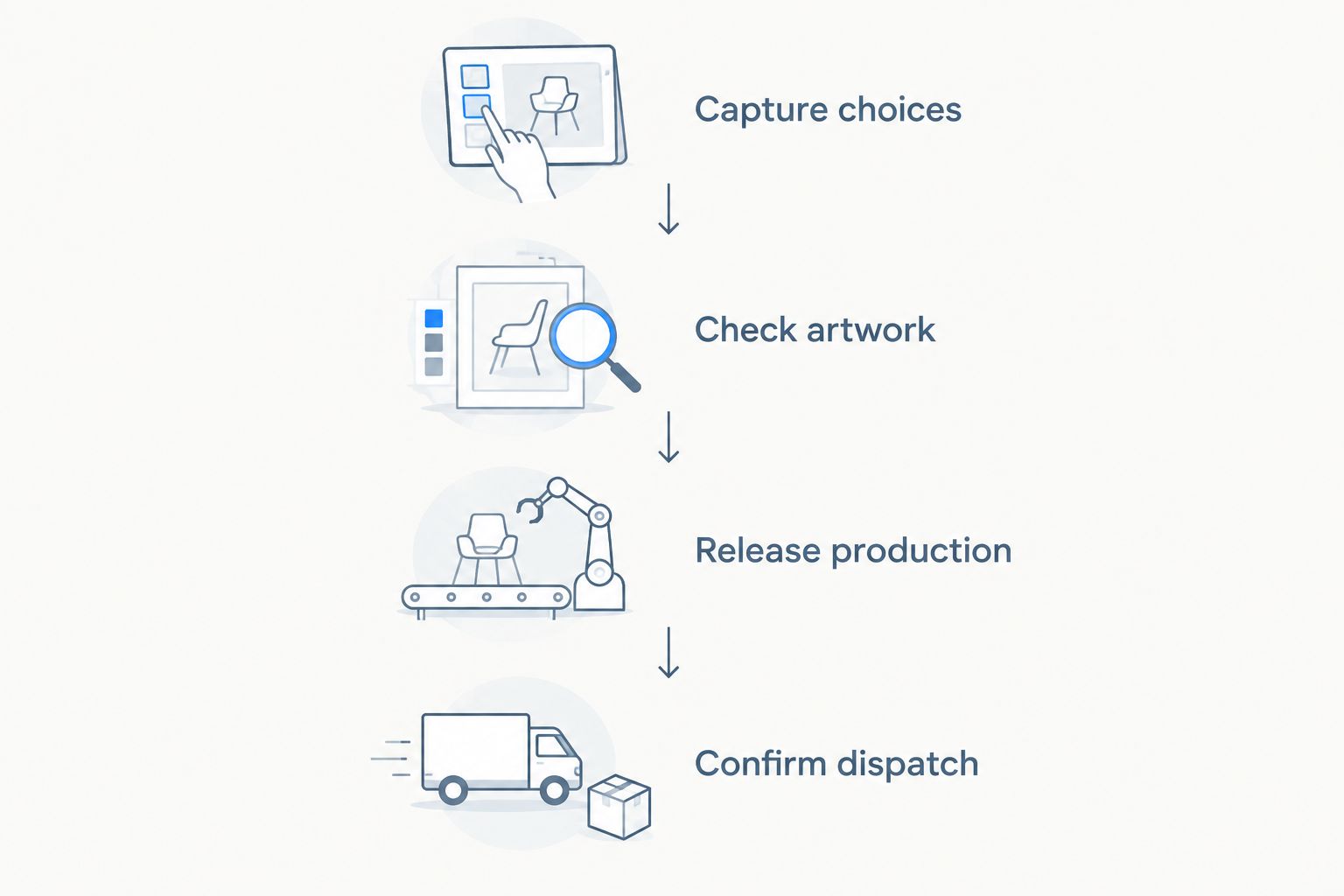
Assign an owner to each checkpoint before you accept personalised orders.
Check the handoff separately for individual purchases and group orders. A retreat organiser buying for several attendees needs recipient-level information; a total quantity alone does not tell the maker which name belongs on which item.
Do not announce automatic fulfilment until you have verified the complete route. A working product preview proves the storefront interaction, not the production connection.
- Keep personalisation attached to its order and product.
- Preserve exact spelling, including accents and capitalisation.
- Identify the artwork version approved for production.
- Name the person authorised to release the order.
- Record dispatch information against the original order.
Build a product page that answers studio questions
Draft the page in a document before configuring it in Shopify. Explain what the product is, what buyers can change and what happens after purchase. Remove any choice you cannot describe clearly.
For studio clothing, distinguish the garment selection from the decoration selection. A buyer should understand whether changing the colour changes the product, the artwork or both. Personalisation must not obscure the basic product decision.
For mats and other practice accessories, use verified product information from the maker. Do not describe a mat as suitable for a particular practice unless you have evidence for that claim. Decoration and suitability are separate questions.
If a product is tied to a retreat or workshop, publish only the timing information your fulfilment partner has confirmed. Avoid presenting a hoped-for arrival date as a commitment.
- Show the fixed studio design and editable area clearly.
- Explain exactly which customer choices affect the finished item.
- Include verified sizing, materials and care information.
- Describe the approval process when approval is required.
- Explain how customers report an error or request help.
Test the entire purchase journey
Test manually before introducing your store to members. Use the same product page, device and purchase route a customer will use. Inspect the resulting order information, not just the preview.
For the pilot, create 3 test orders: a fixed-design order, a personalised order and a deadline-sensitive group-order scenario. These are recommended test cases, not a performance claim. If your catalogue does not offer a group-order route, substitute a second personalised case with different text.
Include a longer name and a name containing an accent. The purpose is to expose layout or data-handling problems before they reach a paying customer.
Your 2026 launch gate is simple: the customer’s choices, order record, production file and finished sample must agree. If they differ, stop and repair that checkpoint rather than asking front-desk staff to compensate informally.
- Complete the journey on a phone as well as a desktop.
- Check whether required choices remain clear before purchase.
- Compare the preview with the recorded personalisation.
- Ask the maker to confirm the file is usable.
- Record any manual correction needed to complete fulfilment.
Measure results before expanding
Begin with a spreadsheet. Record completed merchandise orders, support requests, corrections and the work required to get each order into production. You need a baseline before you can judge whether software saves effort.
Set aside 7 days for the first review after launch. This is a suggested review interval, not a promised time to results. If you have too few completed orders to evaluate the process, keep the pilot narrow until you have actual evidence.
Separate fixed-design sales from personalised sales. Otherwise, a simple logo tote and a name-by-name instructor gift hide each other’s operational demands.
For your 2026 review, ask whether members completed the purchase unaided and whether staff had to repair their choices. Expand the catalogue only after the original product moves through the workflow consistently.
- Count completed orders by product and buying occasion.
- Track personalisation-related questions separately from general questions.
- Record corrections and their causes.
- Note staff time spent preparing production instructions.
- Add another product only when the pilot workflow is repeatable.
Compare your studio’s setup options
Choose the option that solves your current bottleneck. If members buy fixed studio artwork, start with a fixed-design workflow. If individual names create repeated proofing work, evaluate storefront personalisation.
These options describe different responsibilities. A personalisation app and a fulfilment service can occupy separate parts of the same workflow; they are not interchangeable purchases.
Manual proofs with a production partner
- Best for: Studios validating a personalised concept
- Practical advantage: Lets you inspect every design before building a storefront workflow
- Key limitation: Staff must prepare, check and transfer each order’s details
Fixed-design print-on-demand workflow
- Best for: Studios selling approved logo merchandise
- Practical advantage: Keeps customer choices focused on the underlying product
- Key limitation: Does not by itself provide individual name or monogram personalisation
Bespo personalisation app with a separate fulfilment route
- Best for: Shopify studios needing shopper previews and production-ready files
- Practical advantage: Provides real-time personalisation without developer involvement
- Key limitation: Physical production and shipping still need an assigned fulfilment route
Local maker with manual order coordination
- Best for: Studios wanting direct sample review and production discussion
- Practical advantage: Gives you a direct channel for checking artwork and finished results
- Key limitation: Order transfer and customer updates need a defined process
Before selecting an option, walk through a real studio order. Ask what happens when a buyer changes the name, chooses another product variant or needs several recipient-specific items. Require a clear answer at each handoff.
Common mistakes yoga and pilates studios make
Treating a customiser as a fulfilment service
A live preview shows customer choices. It does not establish who prints or ships the product. Assign manufacturing, artwork checking and dispatch separately, even when your storefront feels complete.
Launching retreat merchandise without a production plan
A retreat item has a use date, not just a customer preference. Confirm artwork approval, production responsibilities and the delivery plan before promoting it. Keep unresolved deadline-sensitive orders out of the ordinary production queue.
Offering unrestricted designs on practice products
Do not give customers editing freedom that your maker cannot reproduce. For mats, verify the decorated sample’s suitability with the supplier rather than assuming every print area or method is acceptable. For clothing, check placement on the actual garment.
Mixing group orders with individual checkout instructions
An organiser ordering gifts for instructors or retreat attendees needs a clear recipient-to-item mapping. A general order note is not a substitute for that record. Review every recipient’s text before releasing a group order.
Letting front-desk staff become the correction system
Staff should not have to reconstruct names from messages or guess which design a member approved. Capture the information where the purchase happens, keep it attached to the order and document exceptions. Fix recurring errors in the workflow, not through repeated conversations.
FAQ
What’s the best print on demand app for yoga and pilates studios?
The best choice depends on whether your studio needs physical fulfilment, shopper personalisation or both. Bespo fits Shopify studios needing live previews and production-ready personalisation files; physical production and shipping need a separate confirmed route.
Is a personalisation app the same as a print-on-demand supplier?
No. A personalisation app captures customer choices and prepares the design workflow, while a print-on-demand supplier makes products after purchase. Confirm who owns production and dispatch before launching.
Can my studio sell personalised merchandise without hiring a developer?
Yes, Shopify merchants can use Bespo to add real-time product personalisation without developer involvement. You still need to configure the product choices and verify the production handoff.
Should I start with yoga mats or studio clothing?
Start with the product whose sample and production route you can verify. Assess mats for their intended practice use and clothing for fit and decoration quality rather than choosing solely from a mock-up.
Do I need personalisation for ordinary studio-logo merchandise?
No, fixed studio-logo merchandise does not require customer-entered names or initials. Add personalisation when the buying occasion calls for individual details, such as instructor gifts.
How should I handle personalised retreat orders?
Create a recipient-level order record and confirm the production and delivery plan before accepting deadline-sensitive orders. Keep each recipient’s text linked to the correct product and approved artwork.
What should I check before launching my studio merchandise store?
Check that the customer’s choices, order record, production file and finished sample agree. Test the mobile purchase journey and assign an owner to artwork approval, production release and dispatch.
One last thing
Approve the first order as a production job, not a website feature. A polished preview is only useful when the maker receives the same design the customer selected.
Keep the approved sample beside the order record and production file. Compare them before expanding your 2026 catalogue. That small check gives you a concrete launch standard: what the member saw is what the studio can deliver.