
The blog
Product personalization for pet groomers: complete 2026 guide


Pet groomers’ product personalization is the customization of pet accessories with names, initials, or designs to sell products alongside grooming services. This 2026 guide covers choosing your first product, capturing customer choices, and preparing orders for production without turning the grooming desk into a design department.
TL;DR
- Product personalization for pet groomers starts with a repeatable product, clear name fields, and a checked production handoff.
- Shopify supports an online storefront; a live-preview customizer lets shoppers see their chosen personalization before ordering.
- Start with one pet accessory before expanding into embroidery, engraving, or print.
- Keep pet sizing, customer approval, and production instructions separate from grooming appointment records.
Why product personalization matters for pet groomers
Your personalization workflow must work around grooming appointments, not interrupt them. A pet name collected during a conversation still needs to reach the right product, design, and production file. Treat that transfer as an order process rather than a staff memory test.
Personalized accessories also require decisions that a grooming booking does not: product size, decoration placement, spelling, and collection arrangements. A booking record is not a complete product specification. Keep the merchandise order separate, even when the same customer buys both services and products.
For a focused starting point, review the guide to a Shopify product customizer for pet bandana accessory stores. Bandanas provide a useful example of how names, size choices, and decoration placement belong together on a product page.
Your 2026 priority is a dependable handoff, not a large personalized catalog. You need a workflow that preserves the customer's exact choices from the storefront to the person making the item. Measure the result with your own order records; do not assume personalization automatically increases sales.
How to set up product personalization for pet groomers
Choose one product you can fulfill consistently
Start manually. Write a product brief that identifies the blank item, personalization technique, decoration area, and production owner. Show a physical sample to your supplier or in-house maker before you build the customer-facing page.
Launch with 1 product in 2026. That is a recommended starting scope, not an industry benchmark. A narrow launch lets you check the full order process before adding different materials, techniques, or suppliers.
Choose a product because you can specify and make it reliably, not because it looks impressive in a digital mockup. An embroidered fabric accessory and an engraved tag need different production instructions. Do not combine them into one vague customization process.
- Identify the exact blank product and its size choices.
- Choose a technique your maker already handles.
- Mark the permitted decoration area on a sample.
- Document the supplier's actual file requirements.
- Assign responsibility for making and checking each order.
Define the choices customers can make
Use a paper order sheet or a basic document to map the fields before configuring software. Separate choices about the physical product from choices about its decoration. Size belongs to the product; a pet's name belongs to the personalization.
Ask only for information that changes the finished item. A dog's breed is not a substitute for the measurements required by the product supplier. Likewise, an appointment note about grooming preferences does not belong in the production instructions for a personalized accessory.
Set text limits from tested layouts and your maker's requirements. Do not copy a character limit from another store. A long name, an apostrophe, or a hyphen needs testing in the actual decoration area.
- Use a clearly labeled pet-name field.
- Keep product size separate from name entry.
- Offer only fonts your production process supports.
- Match color choices to your actual materials.
- Explain which punctuation and characters you accept.
- Show where the personalization will appear.
Add a live preview to your Shopify storefront
Build a manual mockup first. Use it to confirm what the customer needs to see: the correct product, the selected decoration area, and the entered text. This gives you a reference for checking the online experience.
Bespo provides Shopify product personalization with a live-preview customizer and production-ready files, without developer involvement. It supports embroidery, engraving, monograms, embossing, debossing, and print. Choose the technique that matches your maker's process rather than exposing every technique to shoppers.
Bespo is best for Shopify merchants who need live-preview product personalization and production-ready files without a developer. It is not a replacement for checking accessory fit, material suitability, or the finished physical item. Confirm that its output matches your fulfillment requirements before publishing.
For a grooming business, the useful outcome is a customer-approved design attached to a merchandise order. Keep appointment booking outside this setup unless you have separately verified how your booking workflow connects.
- Configure the product and personalization technique.
- Match the preview to the actual decoration area.
- Check short names, long names, and punctuation.
- Test the storefront on a phone and a desktop.
- Compare the output file with your maker's requirements.
Carry each customer's choices through the order
Test the handoff manually before treating it as complete. Place an order, inspect the order record, retrieve the production file, and compare both against what the shopper entered. The preview is only one part of the process.
Run 3 test orders: a simple name, the longest permitted name, and a name using supported punctuation. These are recommended test cases, not a claim about any app's performance. Include different product sizes where size changes the decoration area.
Use a fixed handoff sequence: Customer choices, Order record, Production file, Final check. Each stage must preserve the connection between the pet, the accessory, and the design. A maker should not need to search appointment notes to discover which name belongs on which item.
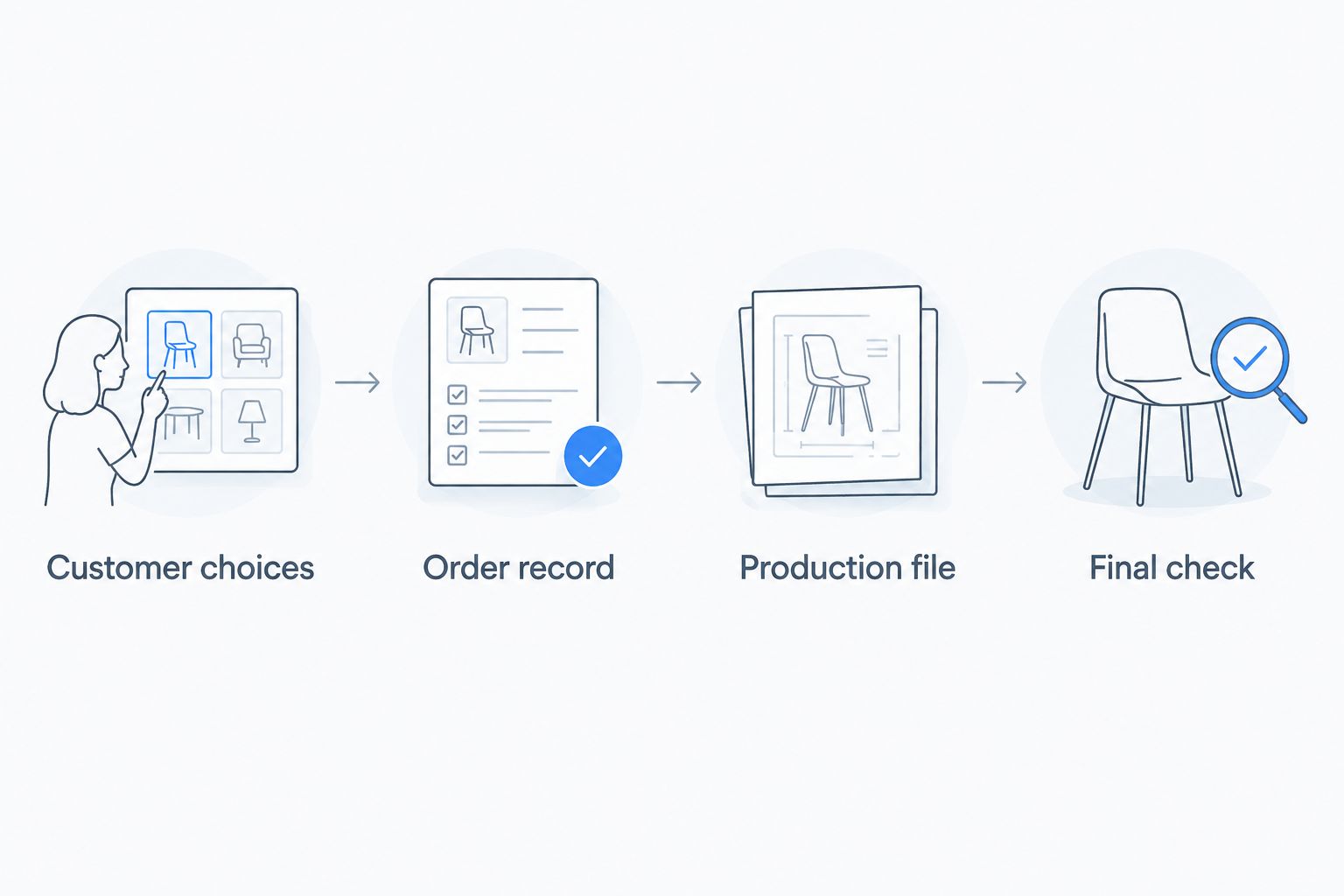
Keep each pet's product choices connected to the same order throughout production.
For households ordering accessories for several pets, inspect each item independently. Do not assume that names entered in one order share the same size, color, or decoration position.
- Customer choices: confirm text, size, color, and placement.
- Order record: keep each item's instructions identifiable.
- Production file: check that it matches the ordered design.
- Final check: compare the finished item with the order.
- Hold incomplete orders until the customer resolves the missing detail.
Separate approval from appointment collection
Begin with a written approval procedure. Decide what customers confirm before production and where that confirmation is recorded. An online preview helps show the design, but it does not determine your approval policy.
Make the product specification visible before the customer commits. Ask the customer to check the spelling and selected size. If your process includes a separate proof, explain when production starts and how you handle requested changes.
Do not promise that a personalized accessory will be ready at the next grooming appointment until the production schedule supports that promise. Grooming and merchandise have separate work queues. Collection instructions should reflect the merchandise order's confirmed status.
- State exactly what the customer is approving.
- Record approval against the merchandise order.
- Define the point after which changes require review.
- Keep collection arrangements separate from grooming reminders.
- Verify the finished item before confirming collection.
Write product pages that answer practical questions
Draft the product page in a plain document first. Lead with the item and what shoppers can personalize. Then explain fit, decoration placement, care information supplied by the manufacturer, and your actual order process.
Use sample names to demonstrate the layout without displaying a real customer's details. Do not turn a sample into a promise that every name fits identically. Show customers how longer names are handled in your tested design.
Keep your 2026 product pages tied to what you can produce now. Remove decoration choices you have not tested. Describe the actual technique rather than calling every personalized item a print, because embroidery and engraving require different expectations.
The product page should also make clear that ordering merchandise does not book a grooming appointment. That distinction matters when customers reach the store through your grooming business.
- Name the item and personalization technique clearly.
- Put sizing instructions beside the size selector.
- Describe the permitted decoration position.
- Explain your approval and correction process.
- Publish care guidance supported by the product supplier.
- Distinguish merchandise orders from service bookings.
Measure the workload before expanding
Use a spreadsheet and your order records first. Record paid personalized orders, corrections, production time, and remakes. Keep grooming-service revenue separate so merchandise results remain readable.
Review the launch every 7 days as a recommended working rhythm. Track time in minutes per order and record the reason for each correction. A name-entry problem needs a different fix from an incorrect product size or a missing production file.
Compare like with like. If you change the product, personalization choices, and production supplier together, you lose a clean view of what caused the difference. Make a specific change, document it, and review the affected orders.
Expand your 2026 catalog only after the existing handoff works reliably. Bespo's Shopify product personalization handles the storefront customizer and production-ready output; your own records establish whether the complete workflow saves your team time.
- Record paid merchandise orders separately from appointments.
- Measure staff handling time in minutes per order.
- Categorize spelling, sizing, and production corrections.
- Record remakes and their causes.
- Compare results before and after a documented change.
- Add another product only when its production requirements are clear.
Compare personalization options for pet groomers
Choose an approach based on the job you need to complete. A handwritten specification captures a request. A live preview shows a design. A production supplier makes the physical item. Those jobs overlap, but they are not interchangeable.
The simplest suitable workflow wins. If you only need to assess interest, a manual process gives you a starting point without configuring a full catalog. If you need shoppers to personalize products independently on Shopify, use a storefront workflow designed for that task.
Manual form and mockup
- Best for: Testing a narrowly defined personalized accessory
- Main benefit: Lets you define the process before configuring software
- Key limitation: Staff must transfer and check the details manually
Structured text-entry workflow
- Best for: Simple name-only requests with fixed placement
- Main benefit: Captures a specific instruction without a design editor
- Key limitation: Text entry alone does not show the finished design
Bespo live-preview customizer
- Best for: Shopify merchants offering visual product personalization
- Main benefit: Shows customer choices and outputs production-ready files without developer involvement
- Key limitation: Physical fit, material suitability, and production compatibility still need checking
Supplier-managed proof process
- Best for: Products whose maker must review the design
- Main benefit: Gives the maker a defined approval checkpoint
- Key limitation: Requires a separate handoff and customer approval process
Do not choose a workflow solely because it offers more choices. Choose the one that preserves the customer's specification and fits the person making the item. Test the entire journey, including corrections, before treating the setup as ready.
Common mistakes pet groomers make
Using the booking record as the merchandise order
A household can book several pets while buying an accessory for only one. Copying names from the appointment record creates ambiguity. Require the customer to specify the name and product size on each merchandise item.
Choosing accessory size from breed alone
Personalization does not establish fit. Use the product supplier's sizing method and make the customer's selected size explicit. Keep size confirmation separate from spelling approval so neither gets lost inside a general approval message.
Promising collection at the next grooming appointment
An appointment date is not a production deadline. Confirm the merchandise schedule before offering collection arrangements. If the item is not ready, communicate its actual status rather than letting the appointment reminder imply otherwise.
Publishing decoration options the maker has not tested
A digital preview is not a manufacturing test. Check sample output for the selected material, technique, placement, and lettering. Remove unsupported combinations instead of asking production staff to solve them after purchase.
Putting owner contact details on every pet accessory
An identification tag and a decorative bandana serve different purposes. Ask for contact details only when the chosen product requires them. Keep customer information needed for order communication out of decorative artwork unless the customer explicitly requests it.
FAQ
What's the best way for a pet groomer to start selling personalized products?
Start with one product and a documented order-to-production process. Confirm the decoration area, customer fields, supplier requirements, and final checks before expanding the catalog.
Do I need Shopify to use Bespo for pet product personalization?
Yes. Bespo is a Shopify product personalization app. It provides a live-preview customizer and production-ready files without developer involvement.
Is a live preview better than collecting a pet name in a form?
A live preview is better when the customer needs to see text placement and design choices before ordering. A text-entry form suits narrowly defined requests, but text entry alone does not display the finished design.
Can I personalize bandanas, tags, and other pet accessories?
You can offer personalization when the accessory's material, decoration area, and production method support it. Test each product with your maker rather than assuming one setup works for every accessory.
Does product personalization also manage grooming appointments?
Product personalization is a merchandise workflow, not an appointment-booking workflow. Keep booking information separate unless you have verified a connection between your systems.
How should I handle personalized orders for several pets?
Record the name, size, and design choices separately for each ordered item. Check every item against its own specification before production and collection.
How much does product personalization for pet groomers cost?
The total depends on your storefront software, blank products, decoration process, and staff handling. Check current software terms and supplier quotations, then record actual handling time and remake costs.
Will personalized pet products increase my sales?
Sales growth is not guaranteed. Compare paid merchandise orders, handling time, and remakes using your own records before deciding whether to expand.
One last thing
Test a household order, not just a single pet name. Ask a colleague to order accessories for different pets, with different sizes and spellings, then give the order to your maker without explaining it verbally.
If the maker cannot tell which design belongs to which item, fix the handoff before launch. For your 2026 setup, that test is more useful than adding another font: it checks whether the storefront produces instructions someone can actually use.