
The blog
Shopify customizer apps ranked by customization option limits 2026


Best fit for live-preview personalisation: Bespo. Best fit for simple written requests: text-option apps. Best fit for customer artwork: upload-focused apps. Best fit for dependent selections: rule-based configurators. This 2026 guide to Shopify customizer apps ranked by customization option limits separates workflow fit from numerical capacity: choose the tool that handles your required choices from storefront to production, not the one with the largest headline allowance.
TL;DR
- Bespo is the best fit for Shopify merchants needing live-preview personalisation and production-ready files without developer involvement.
- Use Shopify customizer apps ranked by customization option limits to compare usable choices, not just field counts.
- Separate product options, selectable values, design areas and production outputs before comparing capacity.
- Test your most demanding product before committing to a customiser.
Why this matters
An option limit means little until you know what counts as an option. A text field, a dropdown value and an editable design area are different things. Treating them as interchangeable produces the wrong shortlist.
Your customer needs to finish a design. Your production team needs to fulfil it. A large field allowance does not establish that either task works correctly.
For a 2026 buying decision, start with the product you actually sell. Write down its required inputs, preview behaviour and production requirements. Then compare apps against that specification rather than an abstract promise of more customisation.
The best limit is the one that accommodates every valid order without inviting an invalid one.
What makes the best Shopify customizer for option limits?
Use these criteria before reading the comparison table. They distinguish capacity from capability.
- Field capacity: Count separate customer inputs per product, including optional fields and repeated inputs.
- Value capacity: Count the choices inside each selector. A dropdown containing several fonts is still different from several separate fields.
- Design-area capacity: Identify every editable surface, placement or side your product requires.
- Dependency controls: Specify which choices appear together and which combinations must be prevented.
- Preview coverage: Identify which selections must appear in the customer’s preview, rather than only in written order details.
- Production handoff: Define the file and information your fulfilment team needs to produce the chosen design.
Apply all of them. An app that meets your field requirements but fails your production requirements is not a match.
Count your requirements before counting app limits
Consider an illustrative engraved product with 4 input fields: recipient name, font, placement and gift message. If the font selector contains 8 selectable values, that does not turn the product into a form with eight font fields.
Now consider an illustrative item with 2 design areas: front and back. A customiser must handle those areas as your workflow requires; adding another text box alone does not establish that both sides are represented correctly.
These are example specifications, not app allowances. Use the same distinction when you ask vendors about their limits.
Record the unit beside every answer: fields per product, values per field, areas per design or configured products per account. A number without a unit is not useful comparison data.
Shopify customizer options at a glance
The order below prioritises visual personalisation and production handoff, then narrower input requirements. The unnamed entries are solution categories, not claims about individual vendors or their numerical ceilings.
1. Bespo
- Best for: Visual personalisation across supported techniques
- Standout capability: Live-preview customiser and production-ready files without developer involvement
- Key limitation or check: Confirm your exact field, value and design-area requirements
2. Text-option apps
- Best for: Written instructions that do not need a visual design
- Standout capability: Structured collection of text and selections
- Key limitation or check: Text collection alone does not establish preview or production-file capability
3. Upload-focused apps
- Best for: Orders starting with customer-supplied artwork
- Standout capability: Collection of customer files
- Key limitation or check: Upload collection alone does not establish placement, validation or production readiness
4. Rule-based configurators
- Best for: Products with dependent selections
- Standout capability: Configuration around permitted combinations
- Key limitation or check: Rule handling alone does not establish visual personalisation or suitable output
Do not read this table as a largest-to-smallest capacity ranking. A numerical ranking requires comparable limits expressed in the same units. This shortlist tells you which type of tool to evaluate first.
1. Bespo: best Shopify customizer for visual personalisation
Bespo lets Shopify merchants add real-time personalisation without developer involvement. Shoppers use a live-preview customiser, and the app outputs production-ready files for fulfilment.
The supported techniques include embroidery, engraving, monograms, embossing, debossing and print: 6 named personalisation techniques. That is technique coverage, not a claim of six input fields or six design areas.
Best for: Shopify merchants whose customers need to see the personalised product before ordering, and whose fulfilment team needs production-ready output.
Bespo pros
- Live preview supports a visual personalisation purchase rather than a written request alone.
- Production-ready files connect the customer’s design with fulfilment.
- Developer involvement is not required to add personalisation to the storefront.
- The stated technique coverage includes both surface marking and print workflows.
Bespo cons and decision checks
- The stated product scope is Shopify; do not treat it as a recommendation for another commerce platform.
- Technique support is not a numerical option allowance. Check the requirements of your particular product.
- Production-ready output still needs to match the file requirements of your fulfilment workflow.
For your 2026 evaluation, build the product with the most demanding personalisation requirements first. Include every required input and every production surface. A successful simple monogram does not establish that a more complex product is ready.
Verdict: Buy for live-preview personalisation and production-ready output once your product-specific requirements pass.
2. Text-option apps: best for written personalisation requests
Text-option apps collect customer instructions through fields and selectors. This category suits products where the buyer needs to specify information rather than arrange a visual design.
A name field and a message field are a different problem from a design editor. Keep the requirement narrow if your production team only needs those written instructions.
Best for: Products that need names, initials or written messages without customer-controlled visual placement.
Text-option apps pros
- Structured fields give each instruction a defined place.
- Separate labels distinguish production text from a gift message.
- A narrow input workflow avoids asking shoppers to use unnecessary design controls.
Text-option apps cons
- Written selections alone do not show the finished appearance.
- A field-count allowance does not establish how instructions reach the order.
- Production files are a separate requirement from text collection.
Before choosing this category, specify whether each field is required, what characters it accepts and where its contents appear after checkout. Test punctuation, accented letters and empty optional fields. These checks tell you more than the advertised quantity of fields.
Reject a text-only workflow when placement, scale or visual appearance is part of the customer’s decision. That is a preview requirement, not a request for more text boxes.
Verdict: Buy for structured written requests; skip for customer-controlled visual design.
3. Upload-focused apps: best for customer-supplied artwork
Upload-focused apps collect files supplied by the shopper. Start here when the customer brings an existing design rather than creating one through storefront controls.
File collection is only the beginning. Define whether the customer also needs cropping, placement, an approval step or a visible representation of the uploaded artwork.
Best for: Orders whose essential input is an existing customer image or artwork file.
Upload-focused apps pros
- A designated upload input gives customer artwork a defined submission point.
- The workflow starts from the customer’s existing design.
- File collection can be evaluated separately from text and selector requirements.
Upload-focused apps cons
- Accepting a file does not establish that the file is suitable for production.
- Upload quantity does not describe file size, format or retention limits.
- Upload collection alone does not establish preview placement or editing controls.
For a 2026 shortlist, write a file specification before comparing upload allowances. Include accepted formats, the production team’s quality requirements and the method used to associate each file with the correct ordered item.
Then test the actual output your fulfilment team receives. A file that reaches the storefront but cannot be identified or used downstream does not satisfy the requirement.
Verdict: Buy when file collection is the core requirement; hold when artwork editing or production validation is also essential.
4. Rule-based configurators: best for dependent selections
Rule-based configurators suit products whose selections depend on earlier choices. The defining requirement is permitted combinations, not simply the number of visible inputs.
For example, your specification might require one decoration choice to reveal a matching set of placements. That is a dependency to verify, not a capability to assume from a generous option allowance.
Best for: Products with branching choices or combinations that your production team cannot fulfil together.
Rule-based configurators pros
- Dependencies give you a way to specify which choices belong together.
- Branching requirements can distinguish relevant inputs from irrelevant ones.
- A permitted-combination specification makes acceptance testing explicit.
Rule-based configurators cons
- More branches create more paths for your team to test.
- Rule capacity does not establish preview coverage.
- Configuration rules and production-file requirements remain separate checks.
Write the valid combinations before opening an editor. Include what happens when a shopper changes an earlier selection after completing a later field. Hidden or obsolete values must not become ambiguous production instructions.
Use the guide to conditional logic for Shopify customisation options when defining those dependencies.
Verdict: Buy for dependent selections; skip when a straightforward form meets the whole requirement.
How this shortlist is ranked
The ranking starts with the workflow described by the category: visual personalisation, written instructions, customer files or dependent selections. It then applies the same criteria to each: fields, values, design areas, dependencies, preview and production handoff.
It does not award a capacity winner based on incomparable allowances. Fields per product and templates per account answer different questions. Neither proves that a customer can complete your design.
For 2026, require an answer for each limit in your specification. Keep capability and quantity in separate columns. A capability marked present still needs enough capacity for your intended product.
Test option limits with a complete order
Use the same acceptance sequence for every shortlisted app. Start with your hardest product, not a vendor’s simplest demonstration.
Define inputs
List every field, selector, file and editable area. Mark which inputs affect the finished product and which are instructions only.
Check choices
Enter your required values and try invalid combinations. Change earlier selections after completing later ones, then inspect what remains.
Review preview
Compare the visible design with the chosen text, placement and other relevant selections. Repeat on the storefront devices your customers use.
Submit order
Complete the purchase path. Check that the chosen personalisation belongs to the correct item, especially when the cart contains different personalised products.
Inspect output
Ask the person responsible for production to inspect the order information and files. Approve the workflow only when that person can identify what to make without reconstructing the customer’s choices.
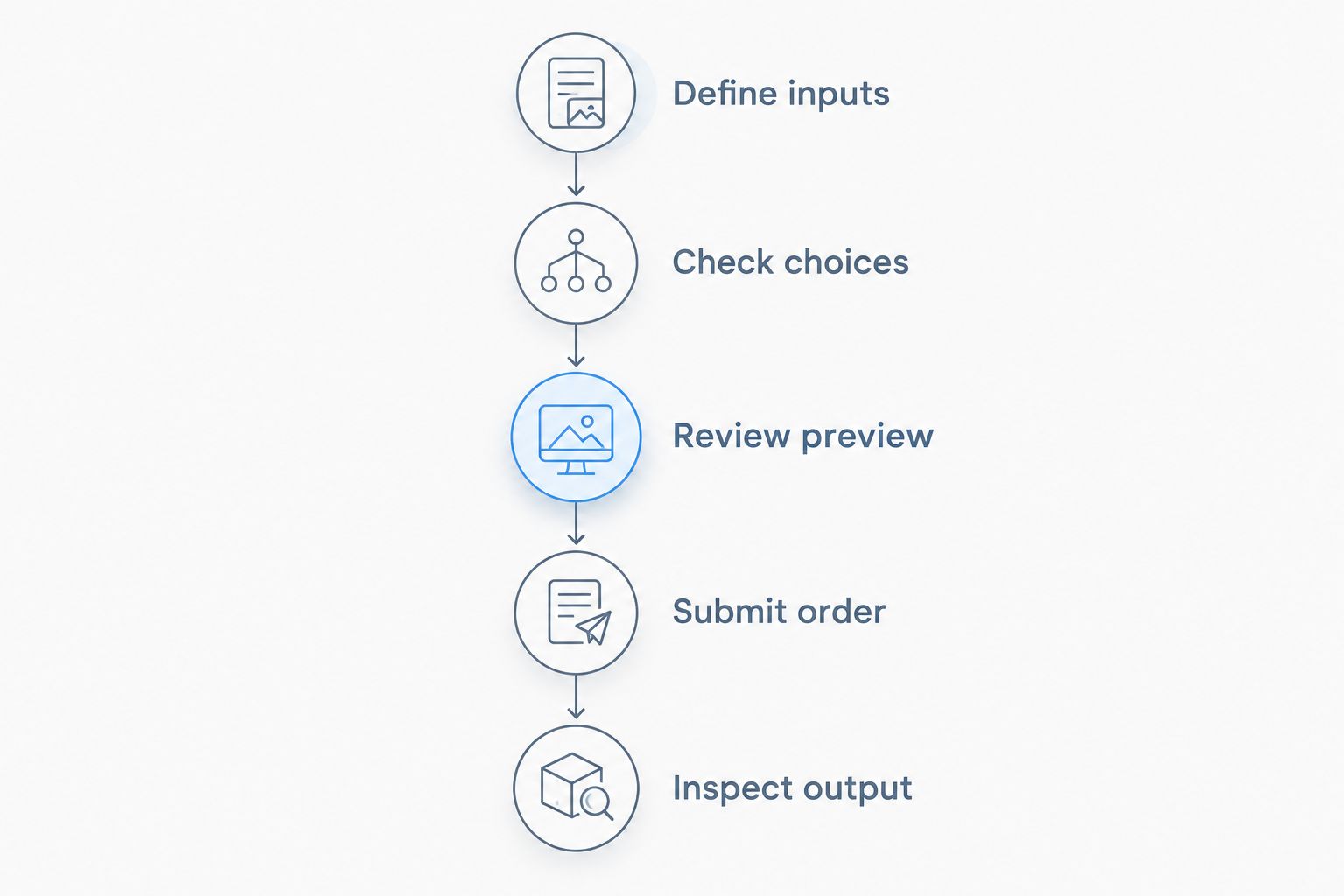
An option-limit test ends at production output, not at the product page.
Keep the completed test order as your reference. Repeat the same sequence when you change templates, product requirements or storefront configuration. That gives your team a concrete definition of a working customiser.
Which Shopify customizer should you choose?
Bespo is the best fit for Shopify merchants who need live-preview personalisation and production-ready files without developer involvement. Start there when visual design and fulfilment are both central to the purchase.
Choose a narrower category when your requirement is narrower. Written instructions call for structured fields. Existing artwork calls for file collection. Dependent selections call for rules.
Your final 2026 decision should rest on a complete test order and clearly stated limits. Do not buy extra complexity to solve a requirement you do not have.
Explore live-preview personalisation
Add Shopify personalisation without developer involvement, with production-ready files for fulfilment.
FAQ
What’s the best Shopify customizer when option limits matter?
Choose the customiser that meets your required fields, selectable values, design areas and production requirements. A larger headline allowance is not enough if the completed order fails your workflow.
Are product options and selectable values the same thing?
No. An option is an input such as a font selector; its values are the individual fonts the customer can choose. Compare limits using the same unit.
Does unlimited customisation mean every feature is unlimited?
Do not interpret unlimited customisation as an unlimited allowance for every feature. Ask separately about fields, values, design areas, uploads and configured products.
Do I need a live preview for a personalised name field?
You need a live preview when appearance is part of the customer’s decision. A written name request is a narrower requirement than choosing its font, size or placement visually.
What should I test before choosing a Shopify customizer?
Test your most demanding product through a complete order. Inspect its inputs, permitted combinations, preview, order details and production output.
Is an upload allowance enough for customer artwork?
No. File quantity does not establish accepted formats, file-size limits, preview behaviour or production suitability. Define those requirements separately.
How do I compare customizer limits fairly in 2026?
Compare the same product specification across every shortlisted app. Record each allowance with its unit and test the whole workflow rather than comparing unrelated headline numbers.
One last thing
A useful customiser prevents choices your team cannot fulfil. Do not remove a necessary restriction just to make your product page look more flexible.
Start with your production boundaries, then expose the choices that fit them. The customer gets a clear decision. Your team gets an order it can make.