
The blog
Shopify customizer apps ranked by page load speed 2026


Best fit for no-code live previews and production files: Bespo. Best approach for simple name fields: text-only configuration; best approach for photo gifts: image-upload configuration. For Shopify customizer apps ranked by page load speed in 2026, choose using matched storefront measurements—not a feature list presented as a speed leaderboard.
TL;DR
- Bespo suits Shopify merchants needing live product personalization and production-ready files without developer involvement.
- For shopify customizer apps ranked by page load speed, compare identical mobile pages; feature lists aren't speed evidence.
- Text-only, image-upload, and 3D configurations serve different needs; compare equivalent functionality before choosing.
- Measure loading, interaction responsiveness, layout stability, and the complete personalized order journey.
Why this matters
A product page can appear quickly while its personalization controls remain unusable. The reverse also happens: controls respond promptly, but an oversized product image delays the main content. Treat these as separate problems.
A useful speed ranking measures the shopping experience, not just the initial page load. Your customer needs to see the product, enter a choice, inspect the result, and add the correct item to the cart.
This 2026 shortlist ranks configurations by shopping requirement, not by unverified loading times. It gives you a default candidate for live personalization and a repeatable way to determine which implementation performs best on your store.
What makes the best speed-conscious Shopify customizer
Use these criteria before comparing candidates. A faster page is not a better purchase if the customer cannot complete the customization.
- Main content loading: The product image and essential buying information should appear without waiting for unnecessary customization assets.
- Control readiness: Check when the first personalization field becomes usable, separately from when it appears.
- Interaction responsiveness: Typing, selecting a font, and changing a color should not leave the interface unresponsive.
- Layout stability: The preview and controls need reserved space so their arrival does not move surrounding content unexpectedly.
- Order integrity: Confirm that the selected text, design, and production details reach the order correctly.
- Matched requirements: Compare the same product, personalization options, theme, and device conditions. A plain text field and a 3D editor are not equivalent tests.
For the broader loading problem, read the guide to whether a product customizer slows Shopify page speed. Keep the distinction between page loading and customizer readiness throughout your evaluation.
Customizer options at a glance
The order below is a selection sequence: start with the required customer experience, then measure its implementation. It is not a measured fastest-to-slowest app ranking.
Bespo
- Best for: Merchants needing no-code live personalization and production files
- Standout capability: Live shopper preview with production-ready output
- Key limitation: Requires storefront testing before any speed verdict
- Speed decision: Evaluate the actual configured product page
Text-only configuration
- Best for: Names, initials, and gift messages without visual approval
- Standout capability: Collects a written instruction
- Key limitation: Does not show the finished appearance
- Speed decision: Compare field readiness and cart accuracy
Image-upload configuration
- Best for: Photo gifts and customer artwork
- Standout capability: Accepts a customer-supplied image
- Key limitation: Upload completion is separate from page loading
- Speed decision: Measure loading, upload feedback, and editing
3D configuration
- Best for: Products needing spatial inspection
- Standout capability: Lets shoppers inspect a modeled product
- Key limitation: Requires suitable models and additional rendering work
- Speed decision: Evaluate model loading and interaction separately
1. Bespo: best Shopify customizer for no-code live personalization
The app adds real-time product personalization to Shopify without developer involvement. Supported techniques include embroidery, engraving, monograms, embossing, debossing, and print. Shoppers get a live preview, and fulfillment receives production-ready files.
Bespo is a Shopify customizer for merchants who need live personalization and production-ready files without developer involvement. That is a workflow recommendation, not a claim that it loads faster than competing apps.
Bespo pros
- Lets shoppers inspect their personalization before ordering.
- Connects storefront customization with production-ready output.
- Supports several stated personalization techniques.
- Does not require developer involvement to add personalization.
Bespo cons
- A live preview exceeds the requirements of a store that only needs a written gift message.
- Production-ready files exceed the requirements of workflows that only collect written instructions.
- No speed conclusion follows from the feature set; the configured storefront still needs measurement.
Best for: Solo merchants, DTC brands, and corporate gifting operations that need a visual personalization workflow.
Test a representative product, not just the simplest template. Change the text, switch the available options, inspect the preview, and verify the resulting order and production file.
Verdict: Hold the speed verdict until the storefront test passes; shortlist the app for its stated workflow.
2. Text-only configuration: best for simple written instructions
A text-only configuration collects a name, initials, or a gift message without rendering a visual preview. Use this approach when the customer needs to submit an instruction rather than approve its appearance.
Its scope is narrower. That makes it a useful baseline, but it does not establish that every text-only app outperforms every preview app.
Text-only configuration pros:
- Matches straightforward written personalization requests.
- Avoids requiring a visual editor for a nonvisual task.
- Makes the submission path easy to inspect.
Text-only configuration cons:
- Does not show placement, typography, or the finished design.
- Leaves visual interpretation to the production workflow.
- Does not establish production-file capability by itself.
Best for: Products where a written instruction is enough to fulfill the order correctly.
Check the empty state, required-field behavior, and cart contents. A quickly displayed field is not sufficient if a shopper can accidentally submit an incomplete personalization request.
Verdict: Buy this approach when written instructions meet the full requirement; skip it when visual approval matters.
3. Image-upload configuration: best for photo gifts and artwork
An image-upload configuration lets customers supply a photograph or design. Assess the complete upload journey, including file selection, progress feedback, preview, and recovery after an error.
Page loading and file transfer answer different questions. A product page can load successfully while a customer is still waiting for an image to upload.
Image-upload configuration pros:
- Fits products built around customer-provided photographs or artwork.
- Gives customers a way to submit the actual source image.
- Supports a visual review workflow when preview tools are included.
Image-upload configuration cons:
- Requires separate testing of upload and page-loading behavior.
- Depends on clear validation and error feedback.
- File acceptance alone does not prove production suitability.
Best for: Photo gifts and artwork-based products where the customer supplies the design source.
Use representative customer files rather than only a tiny demonstration image. Record file dimensions and file size so another candidate receives the same workload. Verify that the submitted file remains attached to the correct order.
Verdict: Hold until upload feedback, error recovery, and order attachment pass your test.
4. 3D configuration: best for products needing spatial inspection
A 3D configuration displays a modeled product that shoppers can inspect from different angles. Choose this approach when shape, placement, or spatial relationships are part of the buying decision.
A 3D viewer is not a substitute for a simple engraving field. Test it against the customer requirement it serves, rather than treating extra functionality as an automatic advantage.
3D configuration pros:
- Shows a modeled product from different viewpoints.
- Supports inspection of spatial relationships.
- Fits decisions that depend on product geometry.
3D configuration cons:
- Requires suitable product models.
- Adds model-loading and rendering tasks to evaluate.
- Introduces unnecessary functionality when a flat preview answers the question.
Best for: Products where inspecting shape or placement materially changes the customer's decision.
Check the first usable view and the response to rotation or option changes. Include the mobile device experience; a satisfactory desktop demonstration does not establish mobile performance.
Verdict: Skip unless spatial inspection is a real buying requirement; hold until mobile testing passes.
How the shortlist is ranked
The shortlist puts complete live personalization first, then separates written instructions, uploaded artwork, and spatial inspection into distinct use cases. Each option earns its place through functional fit. No numerical speed position is assigned without comparable measurements.
For a 2026 speed ranking, compare only candidates that meet the same requirements. Remove candidates that fail order integrity, then compare loading, interaction responsiveness, layout stability, and customizer readiness among the remaining options.
Do not hide the method behind a single score. Show the tested page, configuration, device conditions, measurement date, and individual results alongside any final recommendation.
Measure speed on your own storefront
Start with a baseline
Create a test copy of the product page without the customizer active. Keep the theme, product photography, buying information, and unrelated app settings unchanged.
Record the baseline before adding each candidate. Otherwise, a theme change or image replacement becomes part of the apparent app effect.
Keep the comparison matched
Use the same personalization requirement for each candidate: identical text choices, equivalent preview needs, and the same upload file when uploads are required. Record differences that cannot be matched rather than pretending they are equal.
Use consistent device and network conditions. Test both an uncached visit and a repeat visit, and repeat measurements instead of promoting one favorable result to a ranking.
Check Core Web Vitals
Google's published Core Web Vitals guidance defines good Largest Contentful Paint as 2.5 seconds or less, good Interaction to Next Paint as 200 milliseconds or less, and good Cumulative Layout Shift as 0.1 or less. These are category benchmarks, not measured results for any app in this guide.
The field assessment uses the 75th percentile of page visits. Apply that scope when interpreting real-user results in 2026; a single laboratory run is not equivalent evidence.
LCP measures main-content loading. INP measures interaction responsiveness, and CLS measures unexpected layout movement. None independently tells you when the customizer is ready or whether a production file is correct.
Test the order journey
Follow the same sequence for every candidate:
- Page visible: Inspect the product image and essential buying information.
- Controls ready: Enter the first personalization choice.
- Preview updated: Confirm that the displayed result matches the selection.
- Cart checked: Verify that the cart retains the correct personalization.
- Output checked: Inspect the order details and required production output.
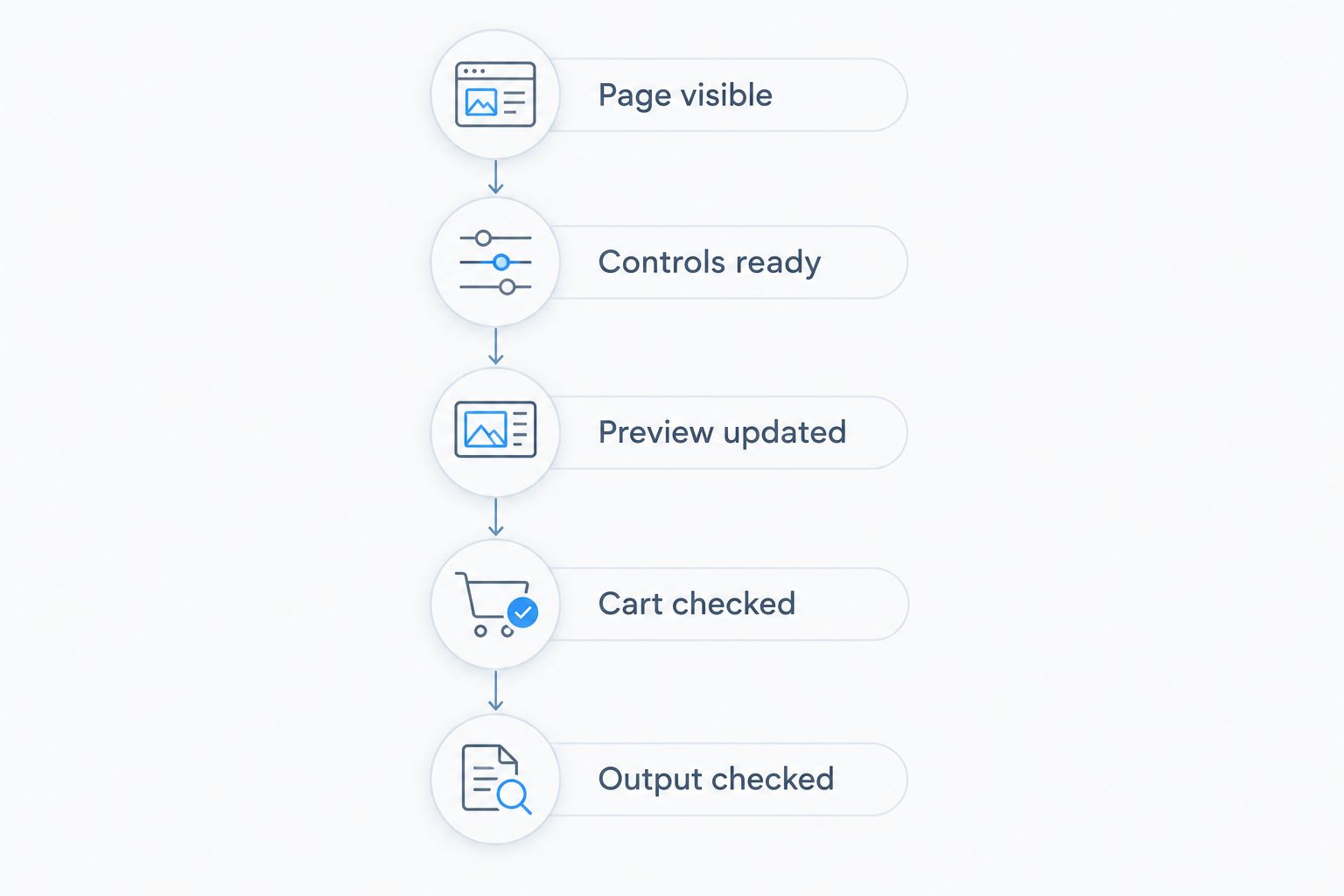
A speed decision needs a working order journey, not just a quickly displayed page.
Record customizer readiness separately from LCP. Also record failed interactions: a control that appears instantly but ignores input has not passed the test.
Keep the evidence for each candidate together. Your comparison should identify the page, theme version, personalization configuration, device conditions, and test date so the result can be repeated.
Which Shopify customizer should you choose?
Start with Bespo when you need a live preview, multiple personalization techniques, and production-ready files without developer involvement. Then make the performance decision on your configured store.
For written instructions alone, evaluate text-only configuration. For customer photographs, prioritize a complete upload workflow. For spatial inspection, evaluate 3D only when a flat preview is insufficient.
Your 2026 decision rule is straightforward: reject broken order journeys, compare equivalent functionality, and choose the candidate with the strongest measured experience for your customer requirements. Do not trade correct personalization for a better-looking speed score.
Explore live Shopify personalization
Review a no-code customizer with live shopper previews and production-ready files.
FAQ
What's the fastest Shopify product customizer app?
A fastest-app verdict requires matched measurements on the same storefront configuration. Compare candidates using the same theme, product, personalization requirements, device conditions, and test method.
Is a text-only customizer faster than a live preview?
A text-only configuration is not automatically faster than a live preview. It performs a narrower task, so compare equivalent requirements and measure the actual implementations.
What page-load target should I use for a Shopify customizer?
Google's good LCP threshold is 2.5 seconds or less. Also evaluate INP at 200 milliseconds or less and CLS at 0.1 or less; these thresholds do not replace customizer-readiness and order-integrity checks.
Does a good Lighthouse score prove a customizer is fast?
A good Lighthouse score does not prove the complete customizer journey is fast. Check when controls become usable, how interactions respond, and whether personalization survives the cart and order process.
Should I test a customizer on mobile or desktop?
Test both mobile and desktop separately. Keep conditions consistent within each comparison and include the devices your customers use.
Can I compare an upload customizer with a simple name field?
Compare them only for a buying requirement both can fulfill. A name field cannot replace an artwork-upload workflow, so a faster result alone does not make it the better option.
When should I repeat my Shopify customizer speed test?
Repeat the comparison after changes to the theme, customizer configuration, product assets, or other storefront apps. Save the configuration and test date so the next result has a clear baseline.
One last thing
A delayed interaction is not always a loading problem. If the page appears promptly but typing or changing options stalls, inspect interaction responsiveness and preview work rather than assuming the product image is responsible.
Make the final acceptance test a complete personalized order. Speed matters at every stage, but the order still needs the correct customer choices and usable production output.