
The blog
Shopify customizer apps ranked by template library size 2026


Best supported choice for no-code personalisation: Bespo. Best way to compare template libraries: count usable product setups, not fonts, clip art or colour variations. This 2026 guide ranks buying priorities and library approaches; a numerical app leaderboard requires dated, comparable template counts.
TL;DR
- Bespo is a strong Shopify customizer choice for merchants who need no-code personalisation, live previews and production-ready files.
- For shopify customizer apps ranked by template library size, compare complete product templates—not individual design assets.
- Ready-made design libraries suit artwork-led catalogues; product-specific templates suit controlled personalisation.
- Check template fit, editing requirements and production output before choosing a Shopify personalisation app.
What makes the best Shopify customizer template library?
The best template library gives you usable starting points for the products you actually sell. A large headline total does not establish that fit. Apply these criteria before comparing apps in 2026:
- Complete templates: Separate configured product setups from backgrounds, fonts, illustrations and mockups.
- Product fit: Check the personalisation area, product shape and shopper inputs against your catalogue.
- Technique fit: Assess print, engraving, embroidery or another technique separately. They are different production briefs.
- Editing effort: Identify everything you must change before publishing, including imagery, options and placement.
- Preview accuracy: Check that customer choices appear in the intended position on the selected product.
- Production output: Confirm that the finished order supplies what your fulfilment team needs.
Treat library size as a tie-breaker after these checks. An impressive collection is irrelevant when its templates do not match your production process.
Template library approaches at a glance
The order below ranks buying priorities, not verified app library totals. Bespo is the named app recommendation; the remaining entries describe library approaches to assess when comparing alternatives. They are not additional app recommendations.
Bespo
- Best for: No-code personalisation from storefront to fulfilment
- Standout feature: Live-preview customiser and production-ready files
- Key limitation: Technique support does not establish template library size
Ready-made design library
- Best for: Artwork-led gift catalogues
- Standout feature: Predefined designs as starting points
- Key limitation: Artwork still needs a suitable product setup
Merchant-built template library
- Best for: A controlled, brand-specific catalogue
- Standout feature: Templates built around your own product requirements
- Key limitation: Your team owns setup and maintenance
Product mockup library
- Best for: Assessing product presentation
- Standout feature: Images that show how products look
- Key limitation: Mockups alone do not establish personalisation or output capability
Do not read across these rows as if every approach measures the same thing. A design, a configured product and a mockup serve different jobs. Count each separately.
Why this matters
You are choosing a selling workflow, not collecting design assets. A template needs to connect what shoppers enter, what they see and what your production team receives. Judge those stages together.
For your 2026 shortlist, start with the hardest product you intend to launch. An engraved item with restricted text placement asks different questions from a printed item with customer artwork. A general library total hides that distinction.
Bespo is a strong Shopify customizer choice for merchants who need no-code personalisation, live previews and production-ready files. That recommendation rests on its stated workflow capabilities, not a claim that its template library is the largest.
1. Bespo: best Shopify customizer for no-code personalisation
Bespo lets Shopify merchants add real-time product personalisation without developer involvement. Its live-preview customiser lets shoppers see their choices, while production-ready files support fulfilment. Supported techniques include embroidery, engraving, monograms, embossing, debossing and print.
That makes the app relevant when your priority is connecting the storefront to production. Your evaluation still needs to cover the exact products and output requirements you intend to use. A supported technique is not proof of a ready-made template for every item.
Bespo pros:
- No developer involvement is required for the stated personalisation workflow.
- Live previews form part of the shopper experience.
- Production-ready files form part of the fulfilment workflow.
- The stated technique range includes both print and surface personalisation.
Bespo decision limits:
- Do not interpret its technique range as a template library count.
- Do not assume a production-ready file meets every supplier's requirements; check the intended output.
- Do not select it solely to maximise ready-made artwork; assess the relevant template workflow first.
Best for: Shopify merchants who want no-code personalisation with a live preview and fulfilment output.
For a 2026 buying decision, ask to see your product configured rather than relying on a generic demonstration. Follow a customer choice through to its production file. Verdict: Buy for the supported workflow, not an assumed library-size lead.
2. Ready-made design libraries: best for artwork-led catalogues
A ready-made design library supplies starting artwork rather than necessarily supplying a complete personalised product. Assess this approach when designs are central to your catalogue: gift illustrations, occasion layouts or decorative compositions, for example. Those are evaluation examples, not claims about a particular app's collection.
The distinction matters. A shopper-editable design must also work within the product's personalisation area and produce the correct output. Attractive artwork alone does not complete that setup.
Ready-made design library pros:
- Gives your team predefined compositions to assess.
- Supports a catalogue organised around visual themes.
- Makes artwork relevance a clear comparison criterion.
Ready-made design library cons:
- Artwork totals do not establish complete product-template totals.
- Designs need checking against your product dimensions and placement rules.
- Usage rights require review before commercial use.
Best for: Merchants whose product range depends on a broad selection of editable artwork.
Ask whether each counted entry is an independent layout or a variation of another design. Also ask what remains to be configured after selecting it. Verdict: Hold until artwork fit, usage rights and product setup are confirmed.
3. Merchant-built templates: best for a controlled catalogue
A merchant-built library starts with your product rules instead of a vendor's design collection. You define the allowed text, personalisation placement, product imagery and production requirements. Assess whether the app lets your team build and maintain that structure without unnecessary work.
This approach suits a focused catalogue with repeatable requirements. A useful template should preserve the product's boundaries while allowing the shopper's intended changes. Test reuse directly; do not assume an app supports duplication or shared settings.
Merchant-built template library pros:
- Keeps evaluation centred on your own products.
- Lets you define consistent personalisation requirements.
- Separates approved product setups from decorative assets.
Merchant-built template library cons:
- Your team must create and check the initial setups.
- Product changes require a maintenance process.
- Reuse depends on the app's actual editing capabilities.
Best for: Merchants with a focused range and clear production rules.
Ask someone who will manage the catalogue to perform the editing task. A demonstration by an expert does not answer whether your team can maintain it. Verdict: Buy this approach when catalogue control matters more than ready-made design breadth.
4. Product mockup libraries: best for assessing presentation
A product mockup shows how an item looks. It is not, by itself, proof that shoppers can personalise the product or that an app can generate production output. Keep mockup counts separate from configurable template counts throughout your comparison.
Assess this approach when product presentation is your main concern. Check whether the pictured personalisation area corresponds to the real item, then examine the underlying customer inputs. Presentation and configuration need separate approval.
Product mockup library pros:
- Provides product imagery to assess.
- Helps you compare the visibility of personalisation placement.
- Gives visual context for different product shapes.
Product mockup library cons:
- A mockup does not establish editing capability.
- Multiple views of the same product do not establish distinct templates.
- Product images do not establish production-file capability.
Best for: Merchants evaluating how personalised products appear on the storefront.
Treat mockups as presentation assets, not as the deciding evidence for a customizer purchase. Verdict: Skip mockup count as your main app-ranking metric.
How to compare template counts fairly
Use the same counting rule for every app in your 2026 shortlist. Otherwise, an asset collection competes with a configured-product library under the same label.
Define the unit
Write down what qualifies as a template before asking vendors for totals. For a product personalisation app, a useful definition is a reusable setup that connects customer inputs, a product preview and the required production output.
Keep decorative artwork, fonts and product photography in separate columns. These assets can be useful without qualifying as complete templates.
Check product fit
Choose 3 products for your evaluation: a straightforward text product, a placement-sensitive product and your most demanding planned item. This is a recommended test set, not a benchmark or a claim about any app.
For each product, record which templates fit and what requires editing. Count only the relevant setups when deciding which library serves your store best.
Inspect the preview
Test 2 text lengths: a short entry and the longest entry you intend to permit. Check the result on the product preview and review how the app handles the boundary.
Keep the same inputs across apps. Changing the test text between demonstrations makes the comparison less useful.
Verify production output
Place 1 test order for each finalist and inspect what reaches fulfilment. Ask your production team to confirm that the result contains the information and files required for that product.
Use this sequence consistently. It turns a library claim into a product-level buying decision.
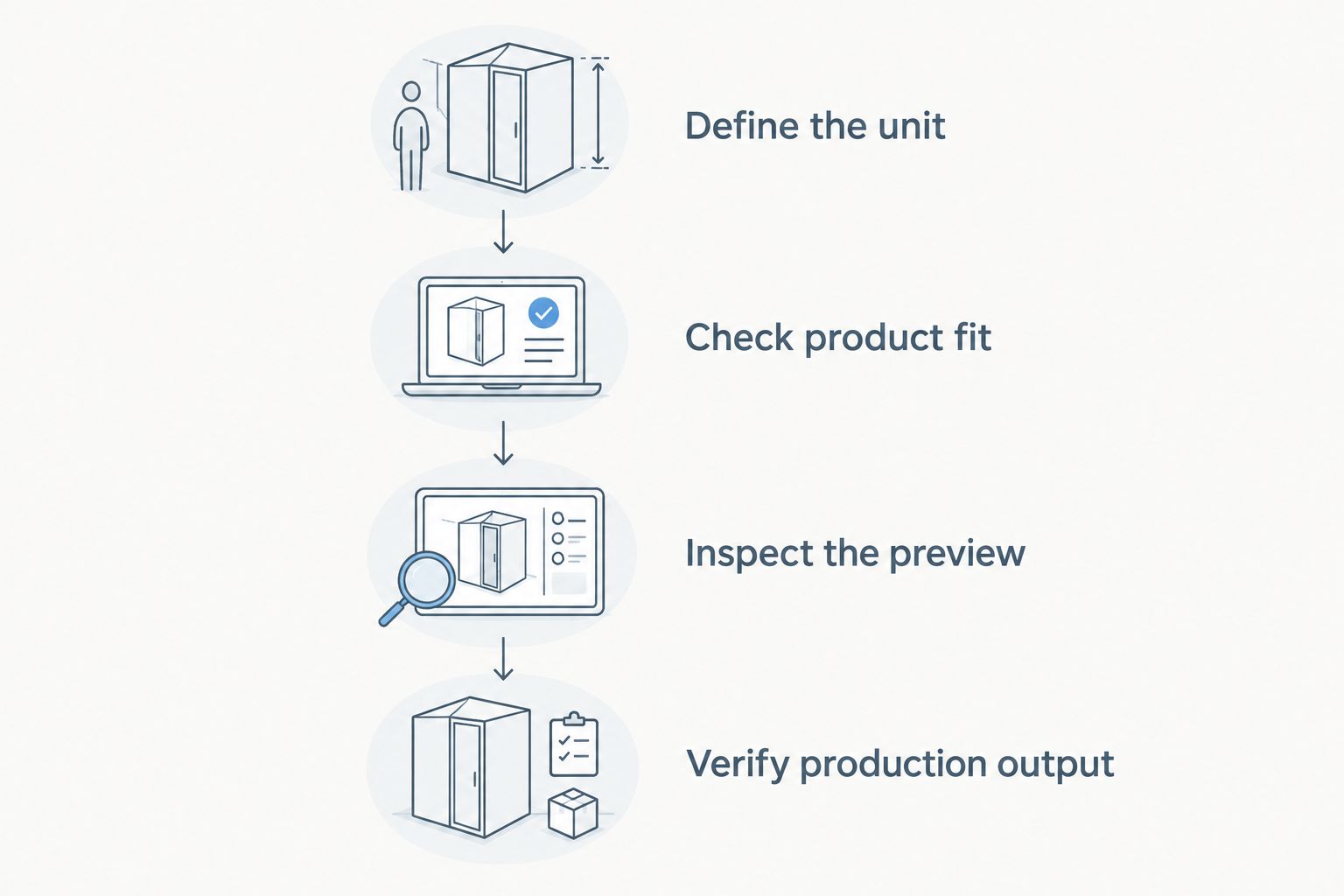
Approve the complete product workflow before comparing library totals.
Questions to ask before choosing an app
Ask for a dated answer with a defined scope. A 2026 library claim should identify what was counted, when it was counted and which collection it covers. A screenshot of a large number does not answer those questions.
- Does the total count complete templates, artwork assets or product images?
- Are colour variations counted as separate templates?
- Which entries match the products and techniques you intend to use?
- What must your team edit before publishing?
- What commercial usage rights apply to included designs?
- What happens to configured templates when product details change?
- Can your production team inspect an example output before you commit?
Record the answers alongside the demonstration result. Do not award extra credit for a total that uses a different definition from the other apps.
If you plan to offer shoppers a collection of starting designs, read the guide to adding a preset design library to a Shopify customizer. Keep that shopper-facing collection separate from the product setups your team maintains.
How we ranked
This ranking prioritises product fit, editing effort, preview behaviour and fulfilment requirements. Library volume comes after those criteria. It does not present estimated template totals or claim that the listed approaches are equivalent apps.
The named recommendation rests on stated capabilities. The library approaches explain what to assess when your priority shifts from no-code personalisation to artwork breadth, catalogue control or presentation.
Which Shopify customizer should you choose?
Choose Bespo when you need no-code Shopify personalisation with live previews and production-ready files. Then validate your actual products. Do not turn that workflow recommendation into a claim about template-library leadership.
If ready-made artwork is your deciding requirement, choose the app whose relevant designs and complete product setups pass your checks. For a focused catalogue, prioritise maintainable templates over a larger unrelated collection.
Your 2026 decision should finish with an approved product workflow, not just a library number.
FAQ
Which Shopify customizer app has the largest template library?
A largest-library verdict requires dated totals using the same definition of a template. Compare complete product setups separately from artwork, fonts and mockups before accepting a ranking.
Is Bespo a good choice for Shopify product personalisation?
Bespo is a strong choice for merchants who need no-code personalisation, live previews and production-ready files. Check your intended products and fulfilment requirements before choosing it.
What counts as a product personalisation template?
For this comparison, a product personalisation template is a reusable setup connecting customer inputs, a product preview and the required production output. Decorative assets and product images belong in separate counts.
Is a bigger template library always better?
No. Relevant templates that fit your products and production requirements matter more than a larger collection of unrelated assets.
How should I test a Shopify customizer template?
Test the template on your real product, enter short and maximum-permitted text, and inspect the resulting order output. Your production team should approve the output before you publish the product.
Are product mockups the same as customizer templates?
No. A mockup shows product presentation; it does not establish shopper editing capability or production-file output.
Can I add Shopify personalisation without a developer?
Yes. Bespo provides a no-developer personalisation workflow for Shopify, including a live-preview customiser and production-ready files.
One last thing
Ask the person who fulfils your orders to approve the template before launch. A polished preview answers the shopper's question; the production output must answer the maker's question too. Your best template is the one that satisfies both.