
The blog
Best Shopify apps for 3D-printed personalized products


Best overall for preview-led personalisation: Bespo. Best for interactive 3D viewing: Zakeke. Best for visual component choices: Kickflip. Best for simple text capture: Infinite Options. For 3D-printed personalised products in 2026, choose your Shopify app by what shoppers customise—and what your production team needs to make it.
TL;DR
- Bespo leads this shortlist for live-preview personalisation, not as a verified generator of printable 3D models.
- The best Shopify apps for 3D-printed personalized products separate product customisation from model generation.
- Shortlist Zakeke for interactive 3D viewing, Kickflip for visual configuration, and Infinite Options for simple fields.
- Require a complete order-to-production demonstration before committing to any app.
Why this matters
A personalised nameplate and a dimension-adjustable enclosure need different software. The nameplate captures text. The enclosure changes geometry. Both are 3D-printed products, but the storefront requirements differ.
A live preview is not a printable model. A shopper-facing image shows appearance; a manufacturing file defines what your printer will produce. Treat those as separate requirements throughout your app selection.
For your 2026 shortlist, start with the production handoff. Decide whether your team needs a name and selected colour, artwork to apply to an existing object, or a newly generated model. Then choose the storefront experience that supports that handoff.
What makes the best apps for 3D-printed personalisation
Use these criteria before comparing interfaces. A polished customiser does not prove that an order is ready for production.
- Input fit: The app must capture the choices your product needs: text, fixed options, artwork or dimensions. Do not buy a complex configurator for a single name field.
- Preview fit: Decide whether shoppers need to see text placement, component combinations or the object from different angles. These are distinct viewing requirements.
- Order integrity: Every personalised item needs its own details. Test whether two versions of the same product remain distinct through checkout.
- Manufacturing handoff: Ask for an actual export from a completed order. Confirm its format, contents and relationship to your modelling process.
- Production boundaries: Define what shoppers cannot change. Your manufacturing constraints should determine the permitted choices.
- Merchant workload: Include template preparation, model updates and order review in the decision. No-code storefront setup does not remove manufacturing work.
For a 2026 buying decision, give manufacturing handoff priority over visual effects. An attractive preview cannot repair missing order specifications.
Shopify personalisation apps at a glance
These are use-case rankings, not claims that every app generates print-ready geometry. Keep each app in its stated lane until a demonstration proves more.
Bespo
- Best for: Live-preview personalisation on an established product
- Standout feature: Shopper customiser and production-ready files for supported personalisation techniques
- Key limitation to assess: Confirm the output matches your 3D-printing workflow; do not assume model generation
Zakeke
- Best for: Products that need interactive 3D viewing
- Standout feature: 3D product configuration
- Key limitation to assess: Prove that the configured order reaches your modelling or manufacturing process correctly
Kickflip
- Best for: Products with visible component combinations
- Standout feature: Visual product configuration
- Key limitation to assess: Establish whether your requirement is appearance selection or actual geometry modification
Infinite Options
- Best for: Fixed products that need straightforward personalisation fields
- Standout feature: Additional product-option fields
- Key limitation to assess: Text capture alone does not provide a visual proof or manufacturing model
1. Bespo: best for preview-led personalisation
Bespo is a Shopify product personalisation app with a live-preview customiser and production-ready files for supported techniques. Its stated scope includes engraving, monograms, embossing, debossing and print, with no developer required for storefront personalisation.
Bespo is best for Shopify merchants who need live-preview personalisation on an established product, rather than a verified 3D-model generator. That distinction makes it relevant when you sell a fixed printed object with an additional personalisation step.
For example, assess it for a printed gift that receives an engraved name after printing. If the name changes the printed object's geometry instead, require a demonstration of the complete modelling handoff before selecting the app.
Pros:
- Gives shoppers a live preview of their personalisation.
- Supports several stated personalisation techniques within one app.
- Provides production-ready files for its supported workflows.
- Lets merchants add storefront personalisation without developer involvement.
Cons and fit boundaries:
- Supported personalisation output is not proof of STL or 3MF generation.
- A storefront preview does not establish that a customised object is printable.
- Your team still needs to validate the handoff to its manufacturing process.
Best for: Merchants personalising an established product design, particularly when decoration happens separately from 3D printing.
Verdict: Buy for a verified preview-and-personalisation workflow. Hold if your main requirement is automatic geometry generation.
2. Zakeke: best for interactive 3D viewing
Zakeke offers 3D product configuration. Put it on your shortlist when seeing the object from different angles is central to choosing the right design.
A configurable desk accessory illustrates the requirement: shoppers need to understand its shape and selected appearance. The buying question is whether interactive viewing helps them make a decision—not whether a rotating model looks impressive.
Ask the demonstration to follow a configured item through checkout. Then inspect what production receives. A visual configuration needs an explicit connection to the specifications your modelling team uses.
Zakeke pros:
- Relevant to a buying process built around 3D viewing.
- Lets you assess a configuration-led approach rather than a text-only form.
- Fits a shortlist where product appearance needs spatial explanation.
Zakeke cons and fit boundaries:
- A 3D viewing requirement introduces model-preparation work.
- Configuring a displayed model does not, by itself, prove manufacturing-file generation.
- A simple personalised label does not necessarily need an interactive 3D interface.
Best for: Products whose shape and appearance need explanation from multiple angles.
For the preview layer, use the guide to adding a 3D product preview to frame your implementation questions. Keep manufacturing validation separate.
Verdict: Buy when interactive viewing solves a real purchasing problem and the production handoff passes. Hold when model generation remains unproven.
3. Kickflip: best for visual component choices
Kickflip focuses on visual product configuration. Shortlist it when customers assemble an appearance from defined choices rather than submit an unrestricted design.
Consider a product with a selectable base, insert and colour combination. Your evaluation should show whether shoppers understand those choices and whether the resulting order identifies each component clearly.
Keep the distinction between components and dimensions explicit. Selecting an existing base is different from changing its width. If dimensions alter the printed geometry, ask for a separate demonstration of that process.
Kickflip pros:
- Relevant to products assembled from visible choices.
- Offers a visual configuration approach for comparing combinations.
- Fits an evaluation centred on shopper choice rather than manufacturing design.
Kickflip cons and fit boundaries:
- You need to prepare and maintain the visual choices you sell.
- Component selection is not evidence of parametric model generation.
- Every permitted combination still needs a manufacturing check.
Best for: Products built from predefined, visually distinct components.
Keep the demonstration focused. Ask the demonstrator to change one component, complete the purchase and show the production record. Repeat with a different combination to confirm the records remain distinct.
Verdict: Buy for a proven visual component-selection workflow. Skip when your only requirement is a name field.
4. Infinite Options: best for simple text capture
Infinite Options adds product-option fields to Shopify products. It belongs on the shortlist when shoppers need to submit straightforward personalisation information and your team handles the design work afterwards.
Think of a standard printed object with a customer name. If your operator enters that name into an existing modelling template, the storefront's job is accurate data capture—not model generation.
This is the simplest use-case slot in the list, not a claim about app costs. Judge it by whether the necessary information reaches the right item in the order.
Infinite Options pros:
- Matches a form-led personalisation workflow.
- Keeps the evaluation focused on collecting required information.
- Suits products that do not need a customer-facing visual proof.
Infinite Options cons and fit boundaries:
- Option fields alone do not show customers the finished design.
- Your production process must turn the submitted information into the finished object.
- An incorrect customer entry still needs a defined review process.
Best for: Fixed-design products with simple customer instructions and an operator-led modelling process.
Test repeated products carefully. Two personalised items must carry separate names, even when the base product is identical.
Verdict: Buy when accurate fields are enough. Skip when customers must approve a visual design before ordering.
The production handoff every app must pass
Before you commit in 2026, run the same complete workflow with each shortlisted app. Use your own product and production process. A generic demonstration is not a substitute.
Customer choices
Define the inputs you accept. Use clear field names and show the customer what each choice changes. Keep production-only decisions out of the buying interface.
Order record
Complete checkout and inspect the resulting record. Check the spelling, selected options and relationship between each personalised item and its specifications. Do not rely on the product-page preview alone.
Model preparation
Open the order information in the process your team actually uses. Establish who creates or modifies the model and how they identify its corresponding order. A manual modelling step is acceptable when it is deliberate and documented.
Print validation
Check the model in your normal preparation workflow before production. Confirm dimensions, geometry and personalisation placement. A visual proof approves appearance; manufacturing checks establish whether the model is suitable to print.
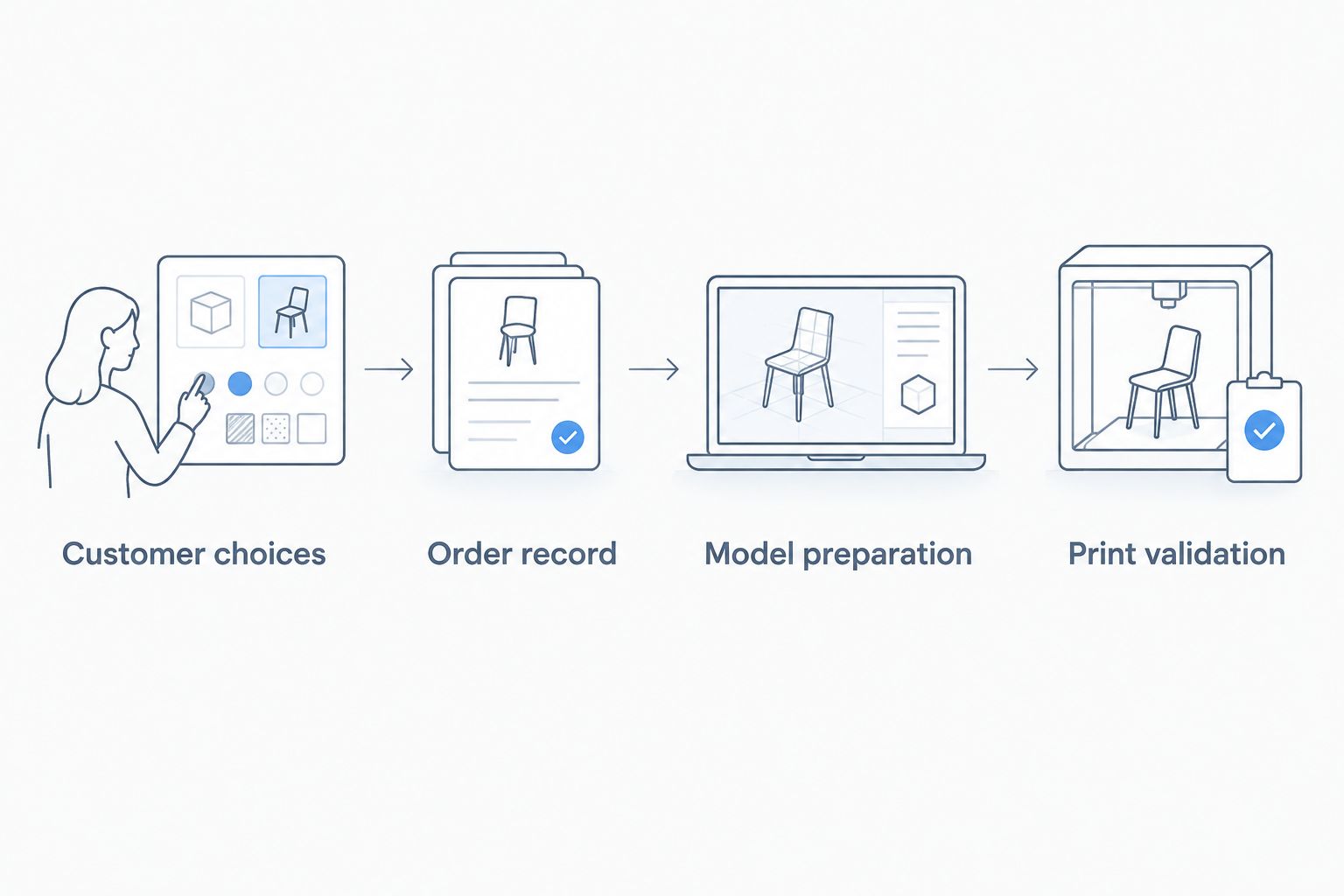
The storefront customiser handles only part of the path to a printable product.
Run 3 test orders before committing: a normal purchase, a purchase with 2 personalised items, and a corrected design. Produce 1 completed sample print from the resulting order information. These are acceptance-test recommendations, not performance claims.
For the corrected design, establish which version is approved. Your operator should not have to choose between conflicting instructions. Reject the workflow until the final production record is unambiguous.
How we ranked these Shopify apps
The 2026 ranking puts input fit and manufacturing handoff first, then matches each app to a distinct shopper experience. Live-preview personalisation, interactive 3D viewing, visual component choices and simple fields occupy separate slots.
This is a workflow-based shortlist, not a benchmark of speed, conversion or print quality. No app earns a manufacturing recommendation merely because it displays a personalised object.
Use the same product brief for every demonstration. Ask each provider to show the customer inputs, completed order and production output. Judge the workflow you see, not a feature name on a comparison sheet.
Which Shopify app should you choose?
Choose Bespo as the default for live-preview personalisation on an established product, after confirming the output fits your production process. Choose Zakeke when interactive 3D viewing is the central requirement. Choose Kickflip for predefined visual component combinations, or Infinite Options when accurate fields are enough.
If customers change dimensions or create new geometry, pause the app purchase. Define the model-generation requirement first. The best storefront interface is still the wrong choice when it leaves production without usable specifications.
For your 2026 launch, start with one product family. Prove its complete order-to-print workflow before extending the same setup across your catalogue.
FAQ
What's the best Shopify app for 3D-printed personalised products?
Bespo is the default shortlist choice for live-preview personalisation on an established product. If shoppers change the printed geometry, require a separate demonstration of model generation and the manufacturing handoff.
Can a Shopify personalisation app generate STL files?
Do not assume STL generation from a personalisation feature or a 3D preview. Ask the provider to export an actual customised order and show that file in your modelling and print-preparation workflow.
Is a 3D product preview the same as a print-ready model?
No. A product preview communicates appearance, while a manufacturing model supplies geometry for production. Validate the exported model separately from the customer-facing preview.
Is Zakeke better than Infinite Options for my store?
Zakeke belongs on the shortlist when interactive 3D viewing is the requirement; Infinite Options belongs there when straightforward fields are enough. Neither use-case label proves that the app generates a printable model.
Do I need a live preview for personalised nameplates?
Use a live preview when customers need to approve placement or appearance before buying. A field-led workflow is sufficient when your process handles design preparation and any required proof afterwards.
How do I test a personalisation app before choosing it?
Run a normal order, an order with separate personalised items and a corrected design through checkout. Inspect the production record and make a sample print from it before committing.
Can customers upload a model and have it printed automatically?
A file upload alone does not establish that a model is suitable for printing. Define file checks, manufacturing review and approval responsibilities before offering an upload-to-production workflow.
One last thing
Test the longest personalisation your product allows—not just the neat example used in the demonstration. Then inspect both the customer view and the finished sample.
Make the print before you approve the app. That single acceptance check connects the buying experience to the object you actually sell.