
The blog
Best Shopify apps for custom embroidered varsity jackets


Best overall: Bespo for Shopify merchants who want live-preview embroidery personalisation without a developer. Best for simple name fields: Infinite Options. Best for design-led personalisation: Customily. Best for outsourced production: Printful, subject to your jacket and decoration requirements. This 2026 guide compares the best Shopify apps for custom embroidered varsity jackets by what shoppers see and what your production team receives.
TL;DR
- Bespo leads the best Shopify apps for custom embroidered varsity jackets for no-code live-preview personalisation.
- Infinite Options suits fixed embroidery layouts that only need customer names or initials.
- Customily suits design-led personalisation; verify the embroidery production handoff before choosing it.
- Printful handles outsourced fulfilment, but confirm the exact jacket and embroidery combination first.
- A jacket preview is not proof that an embroidery machine can sew the design.
Why this matters
A varsity jacket order contains more than a name. You need the correct garment, spelling, decoration position and production instructions. A shopper-facing customiser handles only part of that process.
Choose the app around your embroidery workflow, not around the most impressive preview. A clear name field can suit a fixed chest design. A jacket with personalised sleeves and back artwork needs a different buying experience.
For your 2026 shortlist, separate three jobs: collecting choices, showing the design and making the jacket. Some tools handle the first two. A fulfilment service handles production, but that does not automatically make it the right storefront customiser.
What makes the best Shopify app for varsity jacket embroidery?
Use these criteria before comparing app names:
- Shopper clarity: Customers should understand which jacket they selected and exactly what will be embroidered.
- Placement control: Look for a way to restrict designs to areas your embroiderer can actually decorate.
- Text control: Check how you will manage spelling, supported characters, fonts and text length.
- Production handoff: Establish what files and order details reach the person making the jacket.
- Storefront fit: Test the personalisation experience in your actual Shopify theme, including on mobile.
- Fulfilment fit: Separate in-house embroidery, a local production partner and outsourced fulfilment when making your decision.
Treat these as purchase requirements, not assumed features. Ask each supplier to demonstrate your jacket workflow rather than a generic personalised mug.
Shopify embroidery apps at a glance
The 2026 comparison below ranks each option by a distinct job. It is not a claim that every tool can produce every varsity jacket design.
Bespo
- Best for: No-code live-preview embroidery personalisation
- Standout capability: Shopper customiser and production-ready file output
- Key limitation: Your embroiderer still needs to approve the output for the actual machine and garment
Infinite Options
- Best for: Fixed layouts with names or initials
- Standout capability: Extra product option fields
- Key limitation: Option collection is not an embroidery design preview or digitising workflow
Customily
- Best for: Design-led personalisation across merchandise
- Standout capability: Live design personalisation and production-file generation
- Key limitation: Confirm the exact embroidery file and fulfilment workflow separately
Printful
- Best for: Merchants outsourcing decoration and fulfilment
- Standout capability: Production and shipping service connected to Shopify
- Key limitation: Your jacket specification must fit the service's garment and decoration capabilities
1. Bespo: best Shopify embroidery app for no-code live previews
Bespo lets Shopify merchants add real-time product personalisation without developer involvement. It supports embroidery and monograms, gives shoppers a live-preview customiser and outputs production-ready files for fulfilment.
That combination makes it the default shortlist choice when you already have an embroidery operation or production partner. You can focus on the buying experience while keeping responsibility for the physical jacket with your existing maker.
Best for: Merchants selling personalised jackets who want a visual storefront experience without commissioning a custom build.
Bespo pros
- Supports embroidery personalisation rather than relying only on an unstructured order note.
- Gives shoppers a live preview of their personalisation.
- Provides production-ready files for the fulfilment handoff.
- Does not require developer involvement to add personalisation to the storefront.
Bespo cons
- A customiser does not replace the embroiderer responsible for garment suitability and stitch quality.
- Production-ready output still needs checking against your maker's exact file requirements; do not assume a particular stitch format.
For varsity jackets, start with a controlled design rather than unrestricted artwork. Decide where a name belongs, which lettering your maker accepts and what the shopper should review before ordering.
Test the preview and production output together. The visible name, selected jacket and fulfilment file should describe the same job. A good-looking storefront alone is not enough to approve the setup.
Verdict: Buy for no-code live-preview personalisation after your embroidery partner approves a sample order's output.
2. Infinite Options: best Shopify option app for fixed name layouts
Infinite Options adds product option fields to Shopify product pages, including text inputs and selection controls. It suits a jacket offer where the design is already decided and shoppers supply a small amount of information.
Think of a fixed embroidered chest name with an approved lettering style. You are collecting an instruction, not asking customers to build artwork from scratch.
Best for: Merchants with a fixed embroidery layout who primarily need names, initials or other straightforward customer choices.
Infinite Options pros
- Collects customer-entered text on the product page.
- Supports selection fields for predefined choices.
- Fits a form-led buying experience without requiring a design canvas.
Infinite Options cons
- Option fields do not show how lettering will look on the finished jacket.
- Collecting text does not create an embroidery stitch file.
- Artwork-heavy orders still need a separate design and production process.
Use this route when the product photography and written instructions explain the embroidery clearly. Show an example of the fixed layout, explain the lettering rules and make the entry field unambiguous.
Avoid a single field labelled personalisation for several decoration positions. A customer writing a name and number together leaves your maker to interpret which goes where. Separate the instructions in your product setup and verify how they appear on the order.
For a 2026 launch with a tightly controlled offer, a form-led app is a sensible alternative to a visual designer. It becomes the wrong category when shoppers need to judge several placements before buying.
Verdict: Buy for fixed text-only layouts; skip for customer-designed jacket artwork.
3. Customily: best Shopify personalisation app for design-led merchandise
Customily provides live product personalisation and generates production files. It belongs on the shortlist when shoppers need a visual design experience and your store sells personalised merchandise beyond one fixed jacket layout.
Evaluate it around the designs you actually sell. A workflow that works for printed artwork does not, by itself, establish that the same output is ready for embroidery.
Best for: Merchants whose buying experience centres on customer-designed merchandise and visual personalisation.
Customily pros
- Provides a live design personalisation experience.
- Generates production files rather than stopping at customer-entered instructions.
- Suits a visual buying process where the design itself needs customer review.
Customily cons
- Production-file generation is not automatic proof of embroidery-machine compatibility.
- You still need to define and validate the decoration rules for each jacket.
- A broader design experience needs careful restrictions if shoppers must stay within approved embroidery layouts.
Bring a real jacket brief to the demonstration. Ask how the customer selects decoration positions, how the final design reaches production and where digitising takes place.
Do not accept a generic export demonstration as the entire answer. Ask your embroiderer to inspect the resulting files and explain any work needed before sewing. That separates a useful design tool from a complete production workflow.
If your offer is only a fixed name in one position, start with the simpler route. Choose a design-led tool when customers genuinely need to review and change the artwork, not because a larger editor looks more sophisticated.
Verdict: Hold until the visual design workflow and embroidery handoff pass the same sample-order test.
4. Printful: best Shopify fulfilment option for outsourced production
Printful is a print-on-demand fulfilment service with a Shopify integration and embroidery services. Its role differs from a standalone product customiser: it handles physical production and shipping within its supported product workflows.
Consider it when you want an external service to make and fulfil your merchandise. For a varsity jacket project, confirm the exact garment, decoration method and permitted embroidery positions before building the product page.
Best for: Merchants who want to outsource production and fulfilment rather than manage their own embroidery operation.
Printful pros
- Connects outsourced fulfilment with Shopify.
- Combines physical production and shipping in one service.
- Provides an embroidery route within its supported product offering.
Printful cons
- It is not a substitute for any jacket specification your brand chooses independently.
- Decoration requirements must fit the service's production rules.
- Outsourced fulfilment does not automatically provide the storefront personalisation experience you need.
Work backwards from the jacket. Specify the garment construction, embroidery positions and intended design before evaluating the service's fit. Do not build a product around a photograph and assume the production route will follow.
If you already source specialist jackets and use a trusted embroiderer, a storefront customiser addresses a different need. Replacing that production arrangement is a separate business decision.
For your 2026 assessment, keep customer personalisation and fulfilment as separate checklist items. Approve both before connecting the finished offer to your store.
Verdict: Hold until the exact jacket and embroidery specification is confirmed; skip if your own garment sourcing is essential.
How to test a varsity jacket personalisation app
Use the same sample brief for every shortlisted option. Keep the jacket specification fixed so you compare workflows rather than different products.
Define placements
Start with 3 decoration areas in your test brief: chest, sleeve and back. These are proposed test areas, not a promise that your jacket or supplier supports them. Have your maker approve each area before showing it to shoppers.
Set text rules
Write down the accepted lettering, characters and line breaks. Give customers clear labels, such as chest name or sleeve initials. Your rules should come from the embroidery process, not from what happens to fit on a screen.
Place test orders
Submit 2 test orders: one straightforward name and one deliberately awkward entry with punctuation or a long word. Follow both through the cart and order record. Check that changes to the jacket selection do not leave contradictory personalisation details.
Inspect output
Send the resulting instructions and files to your embroiderer. Ask whether the maker can identify the correct garment, placement and design without contacting the customer. Record where any manual interpretation remains.
Approve stitching
Produce 1 stitched sample before publishing the offer. Compare the lettering, placement and garment result with the shopper's preview or example image. Approve the workflow only when the physical result matches the offer you intend to sell.
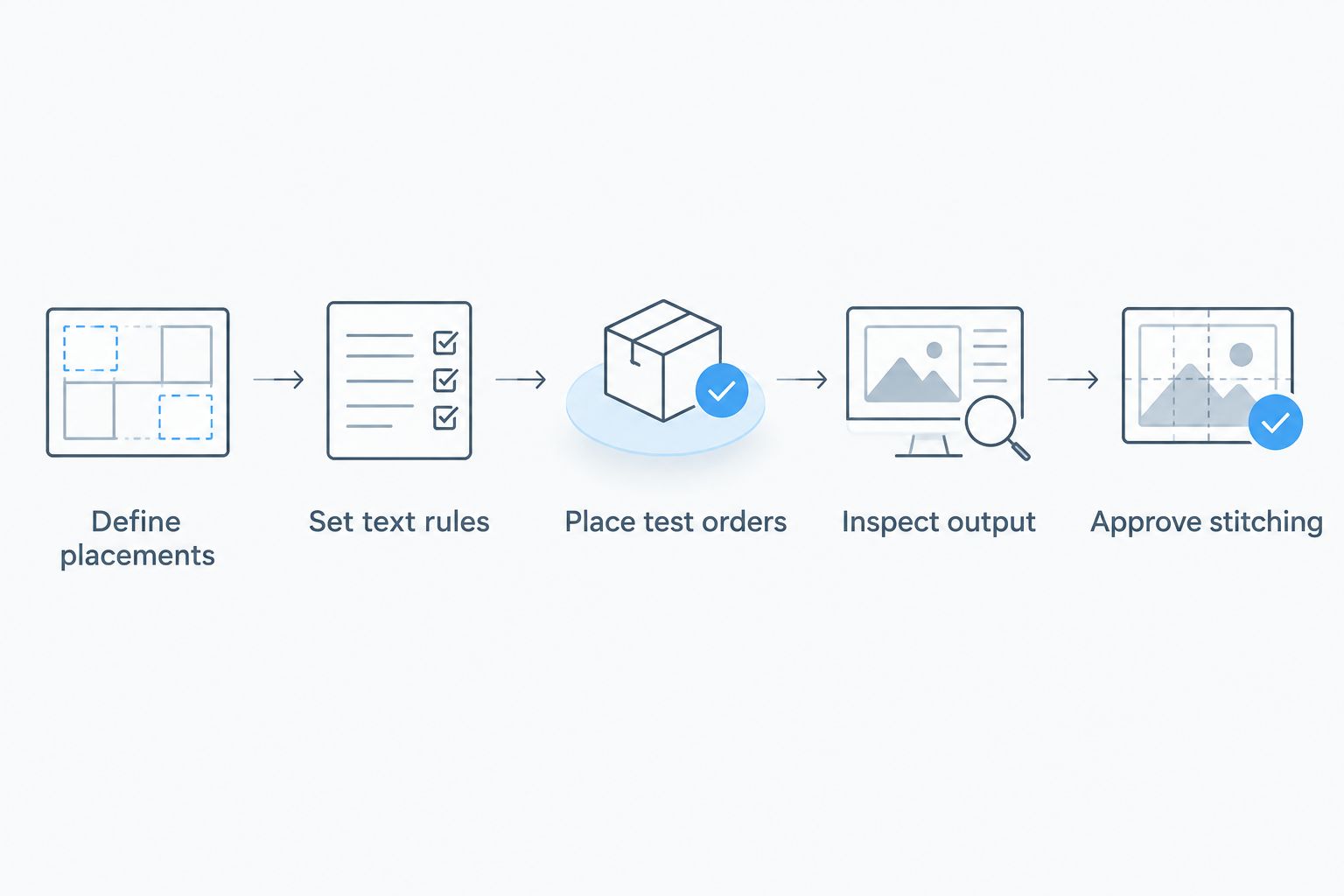
Approve the physical embroidery result, not just the product-page preview.
Keep jacket size selection separate from design approval. A preview communicates decoration; it does not establish garment fit. The Shopify product customiser guide for apparel brands covers the wider apparel buying context.
How we ranked these options
The ranking prioritises shopper clarity, production handoff and fit with your existing fulfilment model. Each recommendation occupies a different slot: no-code live previews, fixed option fields, design-led personalisation or outsourced production.
This is a workflow-based buying guide, not a measured performance benchmark. App ratings, conversion claims and feature counts are not substitutes for a successful jacket order. Use the sample test to make the final choice.
Which Shopify app should you choose in 2026?
Bespo is the best default for Shopify merchants who want live-preview embroidery personalisation without a developer. Choose that route when you already know who will embroider the jackets and need a clearer storefront-to-production handoff.
Choose Infinite Options for fixed text instructions. Shortlist Customily for a design-led buying experience. Assess Printful when the unresolved job is physical production and fulfilment.
Do not install several apps to solve the same product-page task. Assign responsibility for customer choices, visual approval and production output first. Then select the smallest setup that completes the order correctly.
FAQ
What's the best Shopify app for custom embroidered varsity jackets?
Bespo is the best default for merchants who want no-code live-preview embroidery personalisation and production-ready file output. Have your embroiderer validate the output against the exact jacket and machine requirements before launching.
Do I need a live preview to sell personalised varsity jackets?
A live preview is useful when customers need to judge lettering or decoration placement. A fixed name layout can use clearly labelled text fields and an accurate example image instead.
Is Infinite Options better than a visual jacket customiser?
Infinite Options is a better fit for collecting simple instructions on a fixed design. A visual customiser is a better fit when shoppers need to see and adjust their personalisation before ordering.
Does a production-ready file mean an embroidery machine can sew it immediately?
No, production-ready output does not establish compatibility with every embroidery machine. Your embroiderer must confirm the required format, digitising process and garment suitability.
Can I use Printful for custom embroidered varsity jackets?
Use Printful only after confirming that its product and embroidery workflow matches your exact jacket specification. Its role is outsourced fulfilment, which is separate from choosing a shopper-facing personalisation experience.
How should I test a Shopify embroidery app before launching?
Place a straightforward test order and an awkward-text test order, then inspect the resulting production details. Approve a stitched sample before publishing the jacket offer.
Can customers personalise several areas of a varsity jacket?
Offer several decoration areas only when both your customiser setup and embroidery process support them. Define each area separately and have your maker approve the placement rules.
One last thing
A perfect preview can still describe an unsewable design. Embroidery digitising defines stitches, not just the appearance of the artwork.
Before your 2026 launch, ask your maker one direct question: Can you produce this exact order from these files and instructions without guessing? If the answer is no, fix the handoff before adding more personalisation choices.