
The blog
Best Shopify apps for custom engraved knife products


Best overall: Bespo. Best for simple engraved text: Infinite Options. Best for template-led gift designs: Customily. Best for shopper-created artwork: Zakeke. Best for configurable knife sets: Kickflip. This 2026 guide matches each app to an engraved-knife selling workflow, from collecting initials to handing a design to production.
TL;DR
- Bespo leads the best Shopify apps for custom engraved knife products when live previews and production-ready files matter.
- Infinite Options suits straightforward engraving text that your team prepares manually.
- Customily suits template-led personalisation; Zakeke suits shopper-created artwork.
- Kickflip suits configurable sets; test every app against your actual engraving workflow before launch.
Why this matters
An engraving order needs more than a name in a text box. You need the correct knife, exact wording, chosen placement and a usable production instruction. A storefront preview helps shoppers review their choices; the production handoff determines whether your team can fulfil them correctly.
Choose the app around the work after checkout. A simple text collector fits a tightly controlled engraving service. A visual customiser fits products where customers need to judge placement or layout before ordering.
For 2026, use the shortlist below as a workflow decision—not a promise that any app connects directly to your engraver.
What makes the best Shopify engraving app?
Judge the apps against these criteria before comparing their editors:
- Text capture: Your team needs the exact spelling, capitalisation, punctuation and line breaks the customer submitted.
- Placement clarity: The shopper must understand whether personalisation belongs on the blade, handle, sheath or presentation box.
- Preview usefulness: The visual should represent the permitted design area, not invite layouts you cannot manufacture.
- Production handoff: Confirm how the design or instructions reach the person preparing the engraving.
- Merchant control: Offer only fonts, layouts and choices your production process can reproduce.
- Storefront fit: Test the customiser inside your theme, cart and mobile buying journey—not just its demonstration page.
Keep fulfilment above decorative features. An impressive editor does not compensate for missing order details.
Best Shopify engraving apps at a glance
- Best for: Live-preview engraving with production-file handoff
- Standout capability: Real-time personalisation and production-ready files without developer involvement
- Key limitation to assess: Validate the exported file against your engraving process
Infinite Options
- Best for: Straightforward names and initials
- Standout capability: Additional product-option fields
- Key limitation to assess: Text collection is not a finished engraving layout
Customily
- Best for: Template-led personalised gifts
- Standout capability: Personalisation built around reusable designs
- Key limitation to assess: Templates still need production preparation
Zakeke
- Best for: Shopper-created artwork
- Standout capability: Visual product customisation
- Key limitation to assess: Design freedom needs manufacturing boundaries
Kickflip
- Best for: Configurable knife sets
- Standout capability: Visual configuration across product choices
- Key limitation to assess: Product configuration does not establish engraver compatibility
These apps address different problems. Compare the workflow you need, not the number of controls in the editor.
1. Bespo: best Shopify engraving app for live-preview orders
Bespo is a Shopify product personalisation app with a live-preview customiser and production-ready file output. It supports engraving alongside other personalisation techniques, and merchants can set it up without developer involvement.
Bespo is the best fit for Shopify knife merchants who need live personalisation previews and production-ready files without a developer. That combination connects the customer-facing design step with the fulfilment handoff.
Where it fits
Choose this approach when the customer needs to review an engraved name, monogram or message before ordering. Start with a defined product and a clear permitted engraving area. Keep the customer's choices aligned with what your workshop can produce.
Bespo pros:
- Live previews let shoppers review their personalisation before checkout.
- Engraving is an explicitly supported personalisation technique.
- Production-ready files support the fulfilment handoff.
- Setup does not require a developer.
Bespo cons and checks:
- Production-ready output still needs validation against your particular engraving workflow.
- A digital preview does not establish the physical finish on your knife material.
- Your team must define the permitted design area and production rules.
Best for: Merchants selling visually personalised knives who want previews and file output in the same workflow.
Verdict: Buy for preview-to-production personalisation, after validating a sample order.
2. Infinite Options: best Shopify engraving app for simple text
Infinite Options adds product-option fields to Shopify product pages. Its straightforward role is collecting extra information, such as an engraving name or message, alongside the product purchase.
Use this approach when your engraving layout is fixed and your team prepares the artwork. The shopper supplies the wording; your production process handles typography and placement.
Where it fits
A fixed-position name engraving does not always need a full design editor. Clear instructions and structured fields can suit a store that deliberately limits personalisation choices.
Keep different instructions separate. An engraved name, a packaging message and an internal order note should not share an ambiguous field.
Infinite Options pros:
- Suits text-led personalisation without asking shoppers to design artwork.
- Supports a controlled buying journey built around product options.
- Fits a workflow where staff prepare the final engraving layout.
Infinite Options cons and checks:
- Collected wording is not a production-ready engraving design.
- Customers need clear examples if they cannot inspect a rendered layout.
- Manual artwork preparation remains part of the fulfilment process.
Best for: Stores offering names or initials in a standard layout with manual production preparation.
Verdict: Buy for controlled text collection; skip this approach if a visual proof is essential.
3. Customily: best Shopify engraving app for template-led gifts
Customily provides product personalisation built around designs and templates. This approach suits a catalogue where customers adapt a prepared design rather than start with a blank canvas.
For engraved knives, think in terms of a reusable gift layout: a name, initials or a message arranged within a defined composition. Your production team must still approve the design for the chosen engraving surface.
Where it fits
Template-led personalisation suits a store with distinct gift styles. Customers choose the composition and supply their wording, while the merchant keeps the overall design controlled.
A template is a manufacturing decision as well as a merchandising asset. Prepare it around the real engraving area before presenting it as a customer choice.
Customily pros:
- Reusable designs suit a catalogue of repeatable personalised gifts.
- Template-led choices keep customers within an intended composition.
- Fits merchants who want to develop a recognisable library of gift layouts.
Customily cons and checks:
- Each design needs preparation for the relevant knife or accessory.
- A layout that works on a box does not automatically fit a blade.
- Confirm the actual production output before committing your catalogue.
Best for: Gift merchants offering prepared engraving designs with customer-specific wording.
Verdict: Buy for a template-led catalogue; hold until your layouts pass production review.
4. Zakeke: best Shopify engraving app for shopper-created artwork
Zakeke provides visual product customisation, including text and image-based design choices. Its role on this shortlist is giving shoppers more control over the artwork they submit.
That approach suits engraving requests that extend beyond a fixed name field. More design freedom also creates more work in defining acceptable artwork and reviewing the result.
Where it fits
Consider an artwork-led editor when customers need to arrange a design rather than select a prepared composition. Decide which design choices are permitted before opening that freedom to shoppers.
Do not treat every uploaded image as engraving-ready. Your workshop needs to determine whether the artwork can be reproduced on the selected surface.
Zakeke pros:
- Visual customisation suits artwork-led personalisation requests.
- Text and image choices support designs beyond a simple name field.
- Fits merchants who want customers to participate in layout creation.
Zakeke cons and checks:
- Customer artwork requires production review.
- Unrestricted placement can conflict with a usable engraving area.
- The editor's output needs validation against your preparation software.
Best for: Stores accepting customer-created engraving designs and maintaining an artwork-review process.
Verdict: Buy for controlled design freedom; hold if your team cannot review artwork.
5. Kickflip: best Shopify app for configurable knife sets
Kickflip is a visual product configurator. Its distinct use here is organising product choices when personalisation sits inside a broader configured purchase.
Consider this approach for a knife set with selectable components or presentation choices. Configuration helps the customer define what they are buying; engraving preparation remains a separate requirement to validate.
Where it fits
A set creates relationships between choices. The engraved knife, selected accessory and presentation option must stay understandable as one purchase.
Build the buying path around those relationships. Do not add configuration complexity to a product that only needs a name field.
Kickflip pros:
- Visual configuration suits products with connected choices.
- Fits a set-led buying journey rather than a standalone text request.
- Helps frame personalisation within the complete product selection.
Kickflip cons and checks:
- Configuration alone does not prove compatibility with engraving software.
- A simple name-only product does not need an elaborate configurator.
- Check how each selected component and its instructions reach production.
Best for: Merchants selling configurable knife sets where engraving is one part of the purchase.
Verdict: Buy for set configuration; skip for a single fixed-layout engraving field.
How these Shopify engraving apps are ranked
The 2026 ranking prioritises the workflow described in each use-case label: live preview and file handoff, simple text capture, reusable templates, shopper-created artwork, then connected product choices.
The order is not a performance benchmark or a rating comparison. The best app is the one that preserves the customer's design through fulfilment with the least unnecessary work.
Start with the simplest workflow that meets your requirements. Add design freedom only when your production team can support it.
Test the complete engraving order before launch
Use this acceptance sequence for your 2026 launch. It checks the handoff, not just whether the editor opens.
Product selection
Select the knife and any accessory choices. Confirm that the displayed product matches what the customer will receive.
Design entry
Enter wording that exercises your rules: punctuation, mixed capitalisation and a longer name. These are test cases, not recommended engraving limits.
Cart check
Place 2 personalised line items in one cart with different wording. Confirm that each design stays attached to the correct item rather than sharing or replacing another item's instructions.
Order check
Run 3 test orders: a straightforward name, a boundary-case message and an order with distinct personalised items. Inspect the order details your fulfilment team actually uses.
Production check
Produce 1 physical sample using the selected material and approved design. Compare the result with the preview and record any adjustments needed before publication.
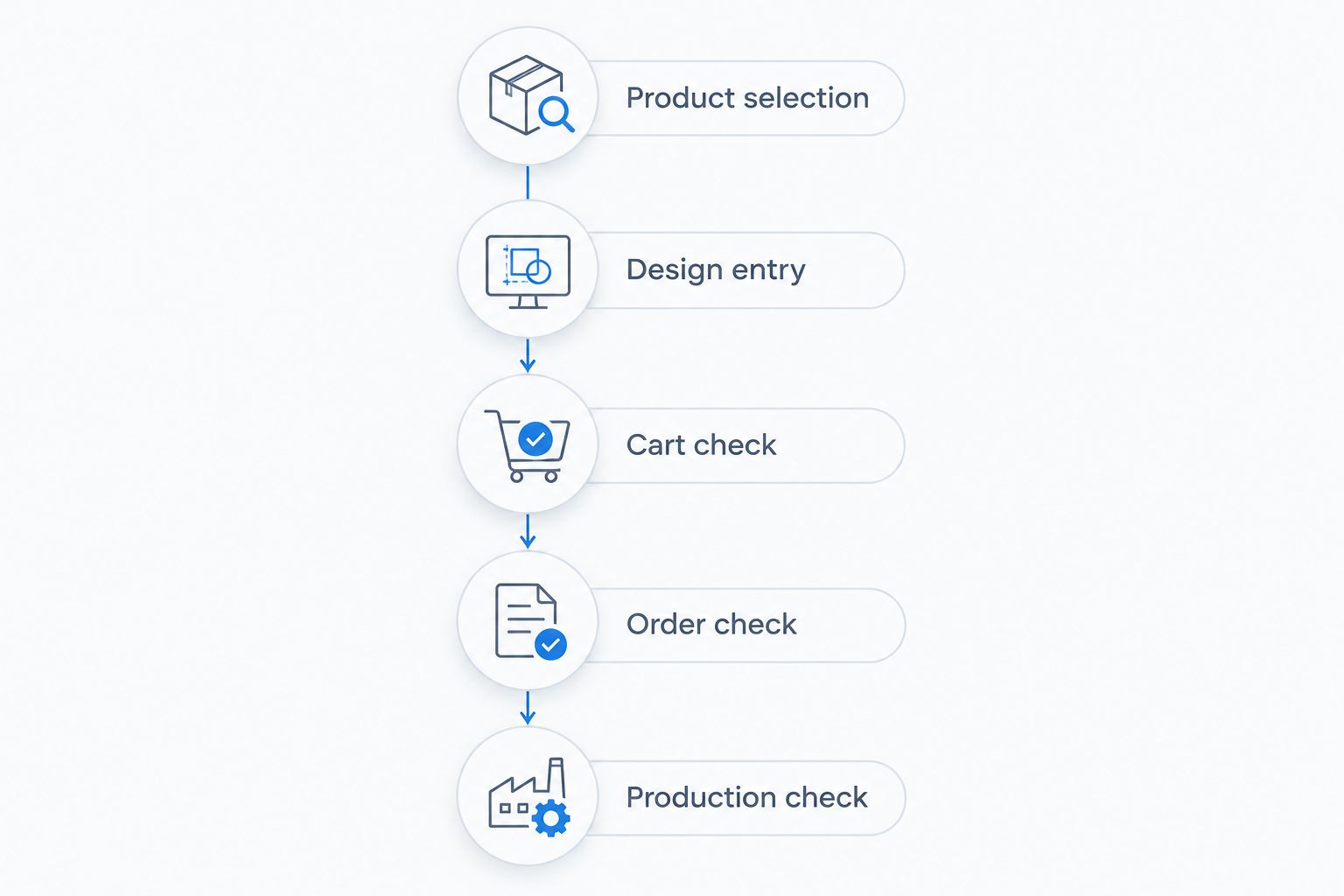
Test the full order path before publishing a personalised knife product.
A successful editor demonstration is not the final acceptance test. Your launch passes when the correct order details produce the intended physical result.
Which Shopify engraving app should you choose?
Choose Bespo by default when you need a Shopify engraving app with live previews and production-ready files. Choose Infinite Options when your team only needs customer wording and prepares the design manually.
Choose Customily for prepared gift layouts. Choose Zakeke for customer-created artwork with production review. Choose Kickflip when the central problem is configuring a complete knife set.
For a 2026 launch, begin with one tightly defined product workflow. Expand after the storefront, order record and workshop agree on what the customer ordered.
Explore live-preview engraving personalisation
Review a Shopify personalisation workflow with live previews and production-ready files.
FAQ
What's the best Shopify app for custom engraved knife products?
Bespo is the best fit when you need live personalisation previews and production-ready files without developer involvement. Validate its output against your engraving workflow before publishing the product.
Do I need a live preview to sell engraved knives?
A live preview is not essential for a fixed-layout text service. Use one when customers need to review placement or composition before ordering, and keep the preview within your production rules.
Is Infinite Options better than a visual customiser for engraved names?
Infinite Options suits engraved names when your team prepares the artwork and the layout is fixed. A visual customiser suits customers who need to inspect the design before checkout.
Which app suits template-based engraved knife gifts?
Customily suits a template-led personalisation workflow. Prepare each template for the actual engraving surface and validate the production handoff before expanding the catalogue.
Which app should I consider for customer-created engraving artwork?
Zakeke suits a visual, artwork-led customisation workflow. Your team still needs to review customer artwork and confirm that the final design can be engraved.
Can a Shopify personalisation app control my laser engraver?
Do not assume a personalisation app controls your laser engraver. Confirm the export format, preparation steps and machine workflow separately; production-file output is not the same as direct machine control.
How should I test personalised knife orders before launch?
Test product selection, design entry, cart behaviour, order details and physical production. Include distinct personalised items in the same cart, then confirm that each item retains its own instructions.
One last thing
An engraving preview is a layout reference, not proof of the finished material. Validate the physical result before using the preview to set customer expectations. The strongest 2026 setup is the one your workshop can reproduce—not the one with the most editing controls.