
The blog
Best Shopify apps for custom phone grip products


Best overall for live previews and production files: Bespo. Best for template-led personalisation: Customily. Best for personalised print-on-demand artwork: Teeinblue. Best for simple text entry: Infinite Options. This 2026 guide compares the apps by what your custom phone grip workflow needs—not by how many features appear on a listing.
TL;DR
- Bespo leads the best Shopify apps for custom phone grip products shortlist for live previews and production-ready files.
- Customily suits template-led personalisation; Teeinblue suits personalised print-on-demand artwork.
- Infinite Options suits simple text collection, not a visual design workflow.
- Confirm your phone grip supplier’s artwork requirements before choosing a Shopify product customiser.
Why this matters
A custom phone grip needs more than a box for a customer’s name. You need a design that fits the decoration area, an order that preserves the customer’s choices, and artwork your producer can use.
Those are separate jobs. A product options app collects instructions. A visual customiser shows the design. A fulfilment service makes and ships the physical product. Choose the missing part of your workflow, not an app that solves a different problem.
For your 2026 shortlist, separate shopper personalisation from merchant-designed merchandise. Selling a fixed logo design does not require the same tools as letting every shopper create a different grip.
What makes the best app for custom phone grips?
Use these criteria before comparing names. Your printer’s requirements should decide which features matter.
- Decoration-area control: Check whether you can represent the grip’s actual printable shape and keep important artwork inside it.
- Useful previews: The preview should communicate the selected design, not just display a generic product image beside the form.
- Production handoff: Check the output against your producer’s accepted file formats, dimensions, and artwork rules.
- Order separation: Two grips with different names must remain distinguishable throughout the order and production process.
- Mobile editing: Test text entry, selection controls, preview visibility, and cart behaviour on your storefront.
- Setup ownership: Decide whether your team needs merchant-managed templates or has someone available to maintain a more involved configuration.
Do not treat a feature checkbox as proof that the whole workflow works. A live preview and a printable file must describe the same customer-approved design.
Custom phone grip apps at a glance
This comparison ranks distinct use cases. It does not certify a particular phone grip supplier connection or a finished production setup.
Bespo
- Best for: Merchant-managed visual personalisation
- Standout feature: Live previews and production-ready file output without developer involvement
- Key limitation: Your grip template and producer’s requirements still need validation
Customily
- Best for: Repeatable, template-led designs
- Standout feature: Personalisation templates with visual previews
- Key limitation: Template preparation is part of the job
Teeinblue
- Best for: Personalised print-on-demand artwork
- Standout feature: Artwork personalisation built around a print-on-demand workflow
- Key limitation: Artwork configuration does not establish phone grip fulfilment compatibility
Infinite Options
- Best for: Simple names and instructions
- Standout feature: Additional product option fields
- Key limitation: Option collection is not a live artwork editor
1. Bespo: best Shopify customiser for merchant-managed previews
Bespo adds real-time product personalisation to Shopify without developer involvement. Shoppers use a live-preview customiser, and the app outputs production-ready files for fulfilment. Its supported techniques include print and engraving, alongside other personalisation methods.
Bespo is the best Shopify product personalisation choice here for merchants who need live previews and production-ready files without a developer. For phone grips, build the configuration around the decoration technique your producer actually uses.
Start with a constrained design. A short name or initials on a defined area is easier to validate than an open-ended editor with unrestricted placement. Add choices only after the preview and output pass the same production check.
Bespo pros:
- Combines shopper-facing previews with production file output.
- Supports merchant setup without developer involvement.
- Covers multiple personalisation techniques, including print and engraving.
- Serves Shopify merchants from solo stores to corporate gifting operations.
Bespo cons:
- You still need to define a suitable phone grip design and decoration area.
- Production-ready output does not remove the need to check your producer’s file requirements.
- A storefront customiser does not replace the physical manufacturing process.
Best for: Merchants who already have a production route and need shoppers to see their personalisation before ordering.
For a 2026 launch, keep the first configuration focused. Confirm the final artwork with your producer before expanding the product range or adding more design choices.
Verdict: Buy for a no-developer preview-to-production workflow; validate the grip template before publishing.
2. Customily: best Shopify customiser for template-led designs
Customily is a product personalisation app built around configurable designs and visual previews. It suits a workflow where you prepare the artwork structure, then let shoppers change the permitted elements.
Think of a phone grip collection with a consistent layout. The customer changes a name or design choice while the underlying composition stays controlled. That is a different requirement from giving shoppers unrestricted design freedom.
The value of a template is repeatability. Your team defines the intended layout once, then checks that the permitted customer inputs still produce acceptable artwork. The template needs preparation; it does not remove that work.
Customily pros:
- Fits repeatable personalised designs.
- Gives shoppers a visual view of their personalisation.
- Supports a template-led approach rather than relying only on written instructions.
Customily cons:
- You need to prepare and maintain the underlying designs.
- A template that looks right on another product still needs adaptation for a phone grip.
- You must confirm the production handoff against your own fulfilment workflow.
Best for: Merchants building a collection of controlled layouts with customer-specific changes.
Include a long name and a short name in your evaluation. Both should remain readable inside the actual decoration area. Do not approve a template based only on the sample text used when you created it.
For your 2026 comparison, ask for a demonstration using your artwork and product shape. A generic demo proves the app can personalise a product, not that your phone grip configuration is ready.
Verdict: Buy for template-led collections; hold until the actual grip artwork passes production review.
3. Teeinblue: best Shopify app for personalised POD artwork
Teeinblue focuses on product personalisation for print-on-demand workflows. Its artwork personalisation and preview tools make it relevant when each order needs a customer-specific design.
This use case begins with variable artwork. A shopper changes the permitted elements, and your production process needs the corresponding personalised result. That differs from publishing a fixed design to a supplier’s catalogue.
Keep the artwork layer separate from the fulfilment decision. Selecting a personalisation app does not establish that a supplier can manufacture your chosen phone grip or accept the resulting files through your intended process.
Teeinblue pros:
- Focuses on personalised print-on-demand artwork.
- Gives shoppers a preview of their configured design.
- Fits stores that organise personalisation around prepared artwork.
Teeinblue cons:
- Artwork configuration takes preparation.
- A print-on-demand focus does not confirm support for your particular phone grip workflow.
- You still need to validate the connection between the order, artwork, and producer.
Best for: Merchants whose main requirement is generating personalised artwork for a print-on-demand production route.
Test the design you actually intend to sell. Include the physical product selection and its artwork requirements in the evaluation, rather than stopping at the storefront preview.
In 2026, choose a print-on-demand workflow by tracing a complete order. The important question is whether your producer receives the correct personalised artwork—not whether the storefront editor looks convincing.
Verdict: Buy for personalised POD artwork; wait until the phone grip production handoff is demonstrated.
4. Infinite Options: best Shopify app for simple text collection
Infinite Options adds product option fields to Shopify. It fits a straightforward process where shoppers submit names, initials, or instructions and your team handles the artwork separately.
Choose this route when a visual editor is unnecessary. For example, a fixed-layout grip with a customer name can use an instruction-led workflow if your team prepares the final design and manages any required approval.
The distinction is important: collecting a name is not the same as showing that name on the product. Your product copy must explain what shoppers are submitting and how the design will be confirmed.
Infinite Options pros:
- Fits simple product option collection.
- Keeps an instruction-led workflow separate from artwork editing.
- Suits fixed designs where customer input is limited.
Infinite Options cons:
- Product option fields are not a live artwork preview.
- You need a separate process to prepare production artwork.
- Written instructions alone do not confirm that a design fits the decoration area.
Best for: Merchants who want to collect text while retaining manual control over design preparation.
Set expectations directly on the product page. If your process includes a proof, explain the approval step. If it does not, show representative examples and define what customers can change.
Verdict: Buy for simple instruction collection; skip when shoppers need a visual design editor.
How the shortlist is ranked
The order follows the criteria above: useful previews, production handoff, controlled inputs, order separation, mobile editing, and setup ownership. Each app occupies a different primary use case.
The ranking prioritises completing the personalisation workflow over collecting the longest feature list. It is a use-case comparison, not a measured speed test or a supplier compatibility certification.
Validate the phone grip workflow before launch
Use the same acceptance process for every candidate. The app should pass your storefront and production checks before it becomes part of your 2026 product launch.
Define the decoration area
Ask your producer for the actual artwork specification. Build around the printable or engravable area, not the apparent size of the product photograph.
Check the shape, orientation, and any required margins. Do not borrow dimensions from another phone accessory or assume every grip uses the same template.
Configure the design
Start with the smallest set of choices that delivers the intended product. Decide which elements customers can edit and which parts of the layout stay fixed.
For customer artwork, define acceptable files before inviting submissions. Your file upload validation process should follow production requirements, not just whether a file opens successfully.
Place test orders
Run 3 test orders as an acceptance checklist, not a performance benchmark. Use one short name, one long name, and one intentionally invalid submission to check your rules.
Include 2 different designs in one order. Confirm that each design remains attached to the correct item when your team reviews the order and prepares production.
Inspect the output
Compare the customer’s chosen design with the production artwork. Check text, orientation, placement, and product selection together.
Ask your producer to review 1 physical sample before opening the workflow to customers. A correct-looking preview is not a substitute for checking the decorated product.
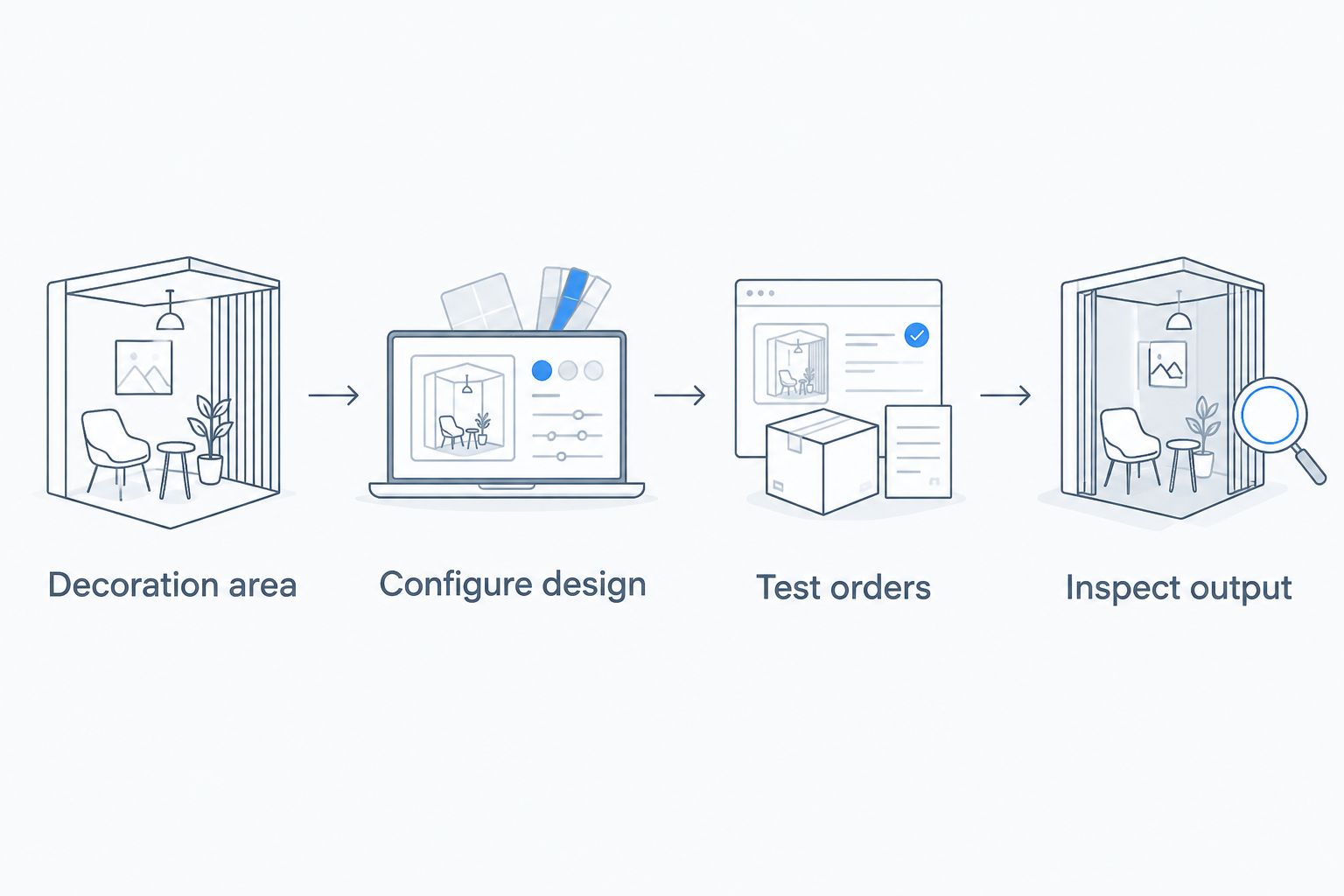
Validate the product and its artwork together before launch.
Check the packing handoff
Keep the personalised design identifiable through packing. A batch of similar grips needs clear item-to-order matching after decoration, not just during artwork preparation.
When planning custom mailer boxes, choose a layout around the actual grip, any insert, and the packing process. Packaging decisions belong after the product specification is settled; they cannot correct an artwork mismatch.
For corporate orders, distinguish a shared logo from individual recipient personalisation. A common design across a batch and different names on every item need different checking procedures. Decide which workflow you are selling before building the product page.
Which app should you choose?
Choose Bespo for Shopify product personalisation when your priority is live previews, production-ready files, and setup without developer involvement. That is the default for a merchant who already knows how the grips will be made.
Choose Customily for a template-led collection. Choose Teeinblue when personalised POD artwork is the central requirement. Choose Infinite Options when you only need customer instructions and will prepare the design separately.
Do not install multiple editors to cover an unclear brief. Write down the decoration method, editable elements, artwork destination, and approval process first. Then choose the app that covers that defined workflow.
FAQ
What are the best Shopify apps for custom phone grip products?
Bespo leads this shortlist for live previews and production-ready files without developer involvement. Customily suits template-led designs, Teeinblue suits personalised POD artwork, and Infinite Options suits simple text collection.
Is a product options app enough for personalised phone grips?
A product options app is enough when you only need to collect instructions and will prepare artwork separately. Choose a visual customiser when shoppers need to see their design before ordering.
Does a Shopify personalisation app manufacture phone grips?
Personalisation software and physical manufacturing are separate parts of the workflow. Confirm who makes the grips and how that producer receives the personalised artwork.
Is Bespo suitable for merchants without a developer?
Bespo lets Shopify merchants add real-time product personalisation without developer involvement. You still need to configure your product and validate the resulting files against your producer’s requirements.
Can customers personalise phone grips with their own photos?
Photo personalisation requires a workflow that accepts customer images and prepares them for the grip’s decoration area. Confirm image handling, cropping, preview behaviour, and production output for the app you select.
What should I test before selling personalised phone grips?
Test customer input, the preview, cart details, order separation, and final production artwork. Include different designs within the same order and inspect a physical sample.
Is a live preview the same as a production proof?
A live preview is a shopper-facing representation, not automatically a production approval. Validate the output and define whether your producer or customer must approve a separate proof.
One last thing
Test two different personalisations of the same grip in the same cart. A single-item test does not exercise the separation your production team needs when similar products carry different designs.
Trace both items through the order and artwork handoff. If your team cannot identify which design belongs to which grip without interpreting a note, fix that process before launch. This check earns its place ahead of adding another font or design option.