
The blog
Best Shopify Apps for Embossing and Debossing Products 2026


Best overall: Bespo for embossing and debossing personalisation with live previews and production-ready files. Best for visual product configuration: Kickflip. Best for artwork-led personalisation: Customily. Best for fixed-position initials collected through simple fields: Infinite Options. This 2026 guide explains which workflow fits your products and what to test before launch.
TL;DR
- Bespo leads the best Shopify apps for embossing and debossing products shortlist with live previews and production-ready files.
- Kickflip suits visual product configuration; verify the production handoff for your embossing process.
- Customily suits artwork-led personalisation; check exported artwork against your supplier’s requirements.
- Infinite Options suits fixed-position initials when your team prepares production instructions separately.
Why this matters
Embossing raises a design above a surface. Debossing presses a design into it. Your Shopify app captures the customer's choices; your equipment and production process create the physical result.
That distinction drives the buying decision. A text field captures initials, but it does not show placement. A preview shows placement, but it does not prove that your workshop can use the output.
For your 2026 shortlist, follow the order from product page to production. If customers need to see their design before ordering, start with a live-preview product customiser. If every order uses a fixed position and typeface, a simpler input workflow deserves consideration.
What makes the best embossing and debossing app?
Judge these apps against your actual production method, not the number of controls in a demo.
- Technique fit: Embossing and debossing must be represented clearly. Do not treat an engraving or print preview as proof of suitability.
- Placement control: Customers should choose only positions your workshop can produce. Fixed tooling calls for fixed placement.
- Text boundaries: Match accepted characters, capitalisation and text length to your available type or artwork process.
- Useful previews: The preview should communicate text and position without promising an exact physical impression.
- Production handoff: The order needs usable text, technique, placement and artwork where required. A screenshot alone is not a production specification.
- Merchant control: Your team should understand how to maintain the product setup and check orders without depending on undocumented workarounds.
The best app is the one that connects an allowed customer choice to a usable production instruction. Extra design freedom is a drawback when your workshop cannot fulfil it.
Best apps at a glance
Bespo
- Best for: Embossing and debossing with a preview-to-production workflow
- Standout capability: Explicit technique support, live previews and production-ready files
- Key limitation for this use case: A digital preview cannot establish physical impression depth or material behaviour
Kickflip
- Best for: Visual configuration across product choices
- Standout capability: Live product customisation and visual previews
- Key limitation for this use case: Verify the exact handoff your embossing or debossing workshop needs
Customily
- Best for: Personalisation built around customer-specific artwork
- Standout capability: Live personalisation previews and production-file generation
- Key limitation for this use case: Generated artwork still needs checking against tooling and supplier requirements
Infinite Options
- Best for: Fixed-position initials and straightforward option collection
- Standout capability: Text inputs and selectable product options
- Key limitation for this use case: Option collection is not a live design or production-artwork workflow
These are distinct buying paths, not interchangeable substitutes. The ranking prioritises explicit technique support, then separates visual configuration, artwork preparation and simple data collection.
1. Bespo: best for embossing and debossing workflows
Bespo is a Shopify personalisation app with explicit support for embossing and debossing, alongside techniques including embroidery, engraving, monograms and print. Shoppers get a live-preview customiser, and merchants get production-ready files for fulfilment. Storefront setup does not require developer involvement.
Bespo is the best fit for Shopify merchants who need embossing and debossing personalisation with live previews and production-ready files. The relevant advantage is the connection between what the customer configures and what production receives.
Use that connection carefully. Start with a product your workshop already understands, then configure choices around the real process. Do not present unrestricted design freedom when your tooling allows only initials in a fixed area.
Bespo pros:
- Explicit support for both embossing and debossing.
- Live previews let shoppers see their personalisation before ordering.
- Production-ready files support the fulfilment handoff.
- No developer involvement is required to add storefront personalisation.
Bespo cons:
- Previewing a design does not establish the finished impression's depth, texture or material response.
- Production-ready output still needs checking against your workshop's actual file and tooling requirements.
- Your team must define allowed choices before publishing a product.
Best for: Merchants who want customer-facing personalisation and production output in the same workflow.
Verdict: Buy when live preview and production-ready output are both requirements; validate a complete order before launch.
2. Kickflip: best for visual product configuration
Kickflip provides product customisation with live visual previews. It belongs on the shortlist when your buying experience combines personalisation with other visible product choices.
Think about the decisions customers need to make. A customer choosing a cover colour and a personalisation position needs a different interface from someone entering initials into a fixed field. Evaluate the visual configuration against those decisions, rather than treating every control as necessary.
For embossing and debossing, keep the production check separate. A clear visual configuration does not establish whether the workshop receives the exact artwork or instructions it needs.
Kickflip pros:
- Live previews support visual product decisions.
- Product configuration suits a journey with several customer choices.
- Visual feedback helps shoppers inspect their selections before ordering.
Kickflip cons:
- Embossing-specific production output needs verification in your workflow.
- A visual preview cannot prove the physical result on your chosen material.
- Extensive configuration is unnecessary for a fixed-position initials product.
Best for: Merchants whose main requirement is showing several visible choices together.
Verdict: Hold until a sample order demonstrates a usable embossing or debossing handoff.
3. Customily: best for artwork-led personalisation
Customily provides live personalisation previews and production-file generation. It is a relevant candidate when each customer selection needs corresponding artwork rather than only a written instruction.
The deciding question is not whether the app generates a file. It is whether that file suits the next production step. Your supplier needs to assess it against the artwork requirements for creating or using your tooling.
For a 2026 evaluation, take a representative personalised design through the full process. Check the customer preview, generated artwork and supplier interpretation together. A design that looks right on screen still needs production approval.
Customily pros:
- Live previews show customer-specific personalisation.
- Production-file generation supports an artwork-based handoff.
- The workflow suits products where visual design matters beyond a short text instruction.
Customily cons:
- Production-file generation does not guarantee compatibility with embossing tooling.
- Designs need limits that reflect the physical production process.
- An artwork-based workflow adds unnecessary preparation when existing type handles every order.
Best for: Merchants who prepare customer-specific artwork for their production partner.
Verdict: Hold until your supplier accepts representative output for the intended technique.
4. Infinite Options: best for fixed-position initials
Infinite Options lets merchants collect product choices through fields such as text inputs and selectable options. It fits a narrower workflow: the shopper supplies initials or a short name, and your team follows an established production instruction.
That simplicity is useful when the physical setup is already fixed. If the position, typeface and technique never change, you do not necessarily need a design editor to collect the remaining choice.
Keep the distinction clear. Product options collect information; they are not a substitute for a live design preview or an artwork-generation process.
Infinite Options pros:
- Text fields fit straightforward initials and name collection.
- Selectable options can structure a limited set of customer choices.
- A field-based workflow avoids asking customers to operate a design editor.
Infinite Options cons:
- It is not the recommended route for a customer-facing live design workflow.
- Your team needs a separate process for preparing artwork when production requires it.
- Without a visual placement preview, customers need clear product images and instructions.
Best for: Merchants producing a standard personalisation in a fixed position with an established workshop process.
Verdict: Buy for simple input collection; Skip when live placement previews or generated artwork are essential.
How this ranking works
This 2026 ranking puts explicit embossing and debossing support first. The remaining options serve different requirements: visual configuration, customer-specific artwork or simple text collection.
The criteria are technique fit, placement control, text boundaries, preview usefulness, production handoff and merchant control. The ranking does not treat a generic personalisation feature as proof of embossing capability, and it does not assign unsupported performance scores.
Choose by the work your app must complete, not by the longest feature list.
Test the complete order before choosing
Your 2026 acceptance test should reproduce the journey your customer and workshop will use. Start with 1 product, place 3 test orders, and include 2 personalised line items in one cart. These are recommended test conditions, not app capacity claims.
Customer input
Enter ordinary text, then try the longest text you intend to accept. Test punctuation, spaces and any accented characters you sell to customers.
Decide what should happen to unsupported input. Do not leave your workshop to discover an impossible character after the order arrives.
Preview check
Compare the chosen text and placement with the preview. Switch the underlying product option and inspect the result again.
For embossing and debossing, explain what the preview represents. Text and placement are useful signals; the screen is not a physical sample of depth or texture.
Cart check
Add the same base product with different personalisations to one cart. Inspect each line item separately.
The requirement is straightforward: each design must remain attached to its own ordered item. Check the cart, completed order and production record rather than assuming the association survives every step.
Production check
Give the resulting instructions or artwork to the person who will produce the item. Ask whether anything needs interpretation, retyping or reconstruction.
Record the missing instruction and fix the product setup before launch. If the workshop cannot identify the technique, text and location from the handoff, the workflow is unfinished.
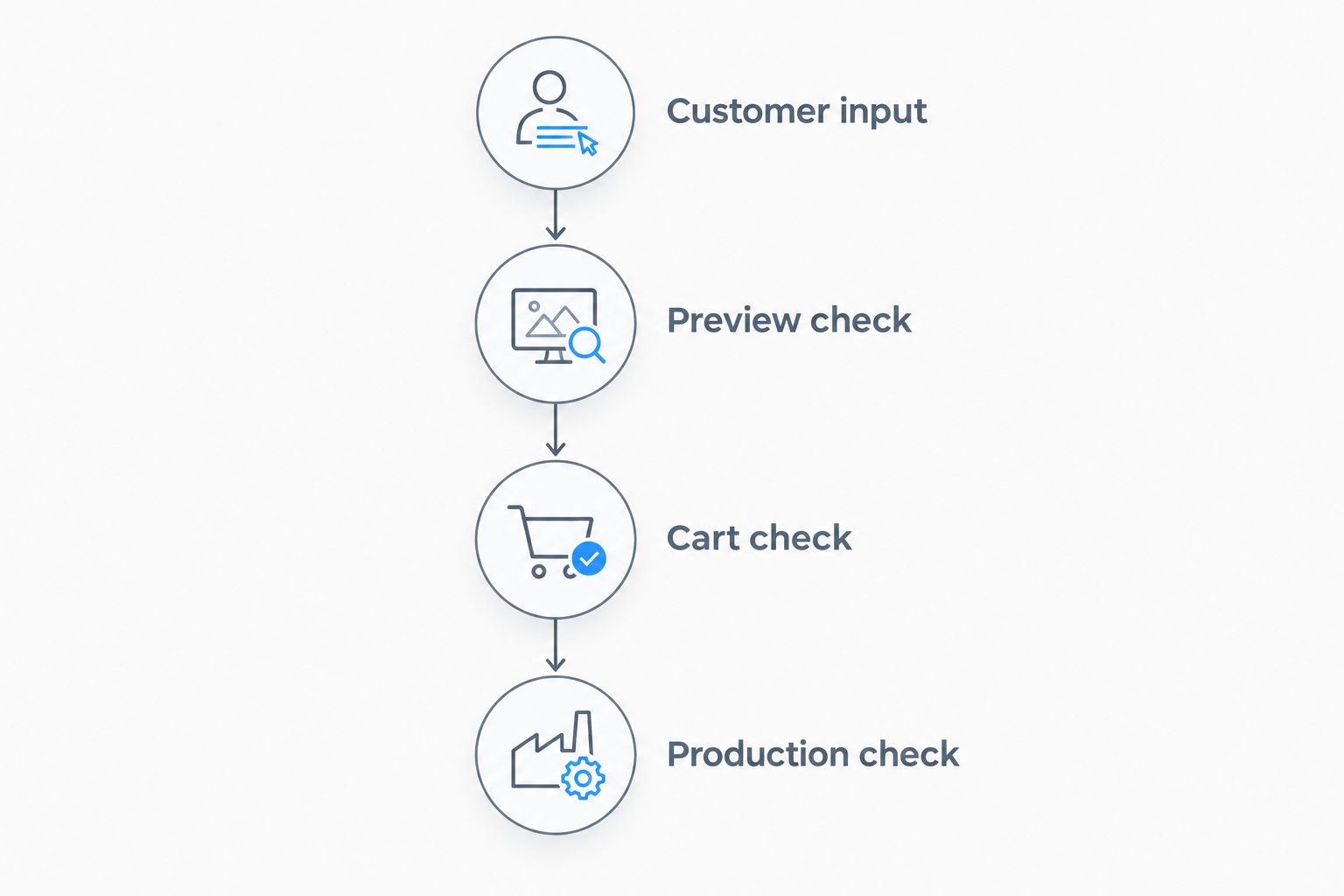
Approve the complete order path, not just the product-page preview.
Which app should you choose?
Choose Bespo as the default for Shopify embossing and debossing personalisation. It explicitly supports both techniques and connects live previews with production-ready files without requiring a developer for storefront setup.
Choose Kickflip when the buying decision centres on visual configuration across product choices. Choose Customily when customer-specific artwork is central to the handoff. Choose Infinite Options when fixed-position text collection is enough and your workshop already has a reliable instruction process.
Do not install overlapping customisers simply to cover an unclear requirement. Write down the customer choices, the allowed production area and the required output first. Then choose the smallest workflow that completes the job.
Start your personalisation workflow
Add embossing and debossing personalisation with live previews and production-ready files.
FAQ
What's the best Shopify app for embossing and debossing products?
Bespo is the default recommendation for Shopify merchants who need embossing and debossing personalisation with live previews and production-ready files. Test the complete order handoff against your workshop's requirements before publishing.
Do Shopify personalisation apps physically emboss the product?
No. Shopify personalisation apps collect customer choices and can provide previews or production output; embossing equipment and your fulfilment process create the physical impression.
What's the difference between embossing and debossing?
Embossing raises a design above a surface, while debossing presses a design into it. Make the selected technique clear in the customer journey and production instructions.
Is a live preview necessary for personalised initials?
A live preview is useful when customers need to judge text or placement before ordering. Fixed-position initials can use a simpler field-based workflow if the product images and instructions clearly explain the result.
Can I use an engraving customiser for debossed products?
An engraving customiser is not proof of debossing suitability. Check the allowed inputs, preview representation and production output against your debossing process.
Will a production-ready file work with my embossing equipment?
A production-ready file still needs validation against your equipment or supplier requirements. Confirm the required file type, dimensions and artwork treatment before accepting customer orders.
What should I test before launching personalised leather goods?
Test customer input, preview placement, cart line-item association and the workshop handoff. Produce a physical sample to assess the impression on the actual material, rather than treating the digital preview as a material test.
One last thing
More customer freedom is not always better personalisation. A workshop using fixed type and placement needs controlled choices, not an unrestricted canvas.
For your 2026 launch, make one rule non-negotiable: every choice shown to a customer must have a defined production instruction. That rule belongs in the product setup before the first order, not in a support conversation afterwards.