
The blog
Best Shopify apps for personalized holiday stocking products


Best overall: Bespo for live-preview stocking personalisation and production-ready files. Best for artwork-led gift collections: Customily; best for print-focused designs: Teeinblue; best for straightforward name capture: Infinite Options—this 2026 guide matches each app to a different stocking workflow.
TL;DR
- Bespo leads the best Shopify apps for personalized holiday stocking products when you need live previews and production-ready files.
- Customily suits artwork-led stocking collections; test its output against your actual production process.
- Teeinblue suits print-focused personalisation; validate the complete design-to-order workflow before launch.
- Infinite Options suits simple name capture, not a visual design approval workflow.
Why this matters
A personalised stocking order needs more than a name box. You need the correct stocking, the correct spelling and clear instructions for whoever makes it. A customer buying matching stockings also needs each name attached to the right item.
For your 2026 holiday collection, choose around the production handoff—not the longest feature list. A live preview answers a shopper's design question. An order record answers your fulfilment team's production question. Your setup needs both answers to agree.
Bespo is the best Shopify stocking personalisation app here for merchants who need live previews and production-ready files without developer involvement. Choose a simpler options app only when your production team can work directly from the captured text.
What makes the best stocking personalisation app
Use these criteria before comparing apps. Decide which requirements are essential for your stockings and which would only add extra configuration.
- Accurate preview: Names and initials belong in the actual personalisation area, not across an unrestricted product image.
- Per-item identity: Each stocking needs its own design instructions, including when shoppers choose the same base product twice.
- Usable production output: Your maker needs readable order details or files that fit the production process.
- Technique fit: Printed artwork and embroidered names need different checks. A convincing screen preview does not establish stitch quality.
- Mobile usability: Customers need to enter names, inspect the result and edit choices without losing their work.
- Manageable setup: You need templates and controls your team can maintain throughout the holiday collection.
Treat a failure in the first three criteria as a reason to pause. More fonts do not compensate for a name disappearing between the product page and production.
Best Shopify stocking apps at a glance
Bespo
- Best for: Merchants needing preview-to-production personalisation
- Standout capability: Live-preview customiser and production-ready files without developer involvement
- Key limitation: Physical output still needs a technique-specific sample check
Customily
- Best for: Artwork-led stocking gift collections
- Standout capability: Product personalisation with live previews and design-file generation
- Key limitation: Template configuration needs to match your maker's requirements
Teeinblue
- Best for: Print-focused personalised stocking designs
- Standout capability: Personalised artwork previews and print-file workflows
- Key limitation: Print-design suitability does not establish embroidery suitability
Infinite Options
- Best for: Simple name or initial capture
- Standout capability: Additional product-option fields
- Key limitation: Option capture is not a live-preview production workflow
These are distinct buying routes, not interchangeable tools. Start with the row that matches what your production team needs to receive, then test the shopper experience.
1. Bespo: best stocking app for preview-to-production workflows
Bespo adds real-time product personalisation to Shopify without developer involvement. Shoppers use a live-preview customiser, and the app outputs production-ready files for fulfilment. Its supported personalisation techniques include embroidery and print, making it relevant to different stocking production methods.
For a stocking collection, the useful connection is between what the shopper sees and what the maker receives. Configure the personalisation around your actual product. A name placed on a narrow cuff requires a different template from artwork printed across the stocking body.
Bespo pros:
- Live previews let shoppers inspect their personalisation before ordering.
- Production-ready files provide an output for fulfilment, beyond a text request.
- No developer involvement is required to add the personalisation experience.
- Embroidery and print are among its supported techniques.
Bespo cons:
- You still need to define the permitted design area and product-specific choices.
- A production-ready file does not replace checking the finished physical sample with your maker.
Best for: Shopify merchants who want shopper previews and a file-based production handoff, whether the store is run by one person or a larger team.
For your 2026 launch, configure one stocking before expanding the collection. Check the name placement, inspect the output and make a sample using the intended production method. Do not treat a successful app installation as a completed product setup.
Verdict: Buy for preview-to-production personalisation; approve a physical sample before launch.
2. Customily: best stocking app for artwork-led gift collections
Customily is a product personalisation platform with live previews and design-file generation. It is a relevant choice when the stocking design involves customer text within a broader artwork template, rather than a name field alone.
Use an artwork-led workflow when your offer depends on a designed composition. For example, a printed stocking might combine a name with decorative artwork. Keep the editable area distinct from the fixed design so the customer knows exactly what they are changing.
Customily pros:
- Live previews support visual inspection of personalised designs.
- Design-file generation suits workflows that require personalised artwork output.
- Template-based personalisation supports a defined design rather than an unrestricted request.
Customily cons:
- Artwork templates need configuration and visual checking before publication.
- You must verify that the generated output meets your maker's file requirements; a preview alone is insufficient.
Best for: Merchants whose stocking collection centres on personalised artwork and coordinated gift designs.
Ask your maker to review a representative output before building the entire range. Inspect text placement, the editable design area and the relationship between the preview and the exported artwork. Keep seasonal decoration separate from customer-entered information in your production instructions.
Verdict: Buy for artwork-led collections once the template and output pass your production check.
3. Teeinblue: best stocking app for print-focused designs
Teeinblue supports personalised product artwork, previews and print-file generation. Its relevant use case is a stocking with a printed design that changes according to the shopper's choices.
Choose this route when the printed composition drives the product. Your acceptance test should follow the design from customer input through to the file used for printing—not stop at a good-looking product page.
Teeinblue pros:
- Personalised artwork previews make design choices visible to shoppers.
- Print-file generation supports a file-based printing workflow.
- Artwork personalisation fits products where text forms part of a larger printed design.
Teeinblue cons:
- A print-focused workflow does not establish compatibility with your embroidery process.
- Artwork configuration and output inspection remain part of the merchant's launch work.
Best for: Stores selling stockings with personalised printed artwork rather than primarily stitched names.
For a 2026 printed collection, ask your printer to approve the design boundaries and file requirements first. Build the customer-facing template around those requirements. Reversing that order creates avoidable redesign work if the attractive preview cannot be produced as shown.
Verdict: Buy for print-focused stockings; hold for embroidery until the complete production workflow is verified.
4. Infinite Options: best stocking app for simple name capture
Infinite Options adds product-option fields to Shopify products. It suits a straightforward workflow where customers provide names or initials and your team makes the stockings from those instructions.
This is a different job from visual customisation. If you offer one fixed lettering style and placement, capturing the correct name can be enough. If customers need to judge several design combinations, a field-only approach leaves the visual decision unresolved.
Infinite Options pros:
- Additional fields suit straightforward personalisation requests.
- A fixed-design product can use a simpler customer input flow.
- Text-based instructions fit a manual production process that does not require generated artwork.
Infinite Options cons:
- Option capture does not provide the visual approval experience of a live customiser.
- Your team needs a separate process if production requires artwork or embroidery preparation.
- Customers choosing visual combinations need clear examples outside the input fields.
Best for: Merchants offering a tightly defined stocking design and manually handling name-based production instructions.
Keep the product page explicit. Explain the permitted lettering style, placement and spelling responsibility. Test whether each stocking's text remains identifiable when a customer adds several personalised items to one order.
Verdict: Buy for fixed-design name capture; skip when live design approval is essential.
Test the stocking workflow before choosing
Run the same acceptance check for every app you shortlist. Use your actual stocking product, your intended production method and the order view your team will use.
Product template
Define where the personalisation belongs. Separate the stocking's base choices from the customer's name or initials. For embroidered cuffs, use your maker's approved lettering and placement requirements rather than inventing a universal character limit.
Shopper preview
Enter a short name, a longer name and text containing an accented letter. Inspect the result on mobile and desktop. If your store offers monograms, explain the initial order beside the field; the guide to setting up monogramming on Shopify product pages covers that separate setup task.
Order record
Place a test order and inspect the saved personalisation. Check the exact spelling, selected base product and any design choices your maker needs. Repeat with two differently personalised stockings based on the same product.
Production file
Open the output in the actual production workflow. Ask the maker to inspect dimensions, placement and any technique-specific preparation. For a text-field app, substitute the written production instructions for this file check.
Physical sample
Make the sample. Compare the finished name placement with the customer's selection and preview. Approve the product only when the shopper-facing design and production result agree within your own documented standards.
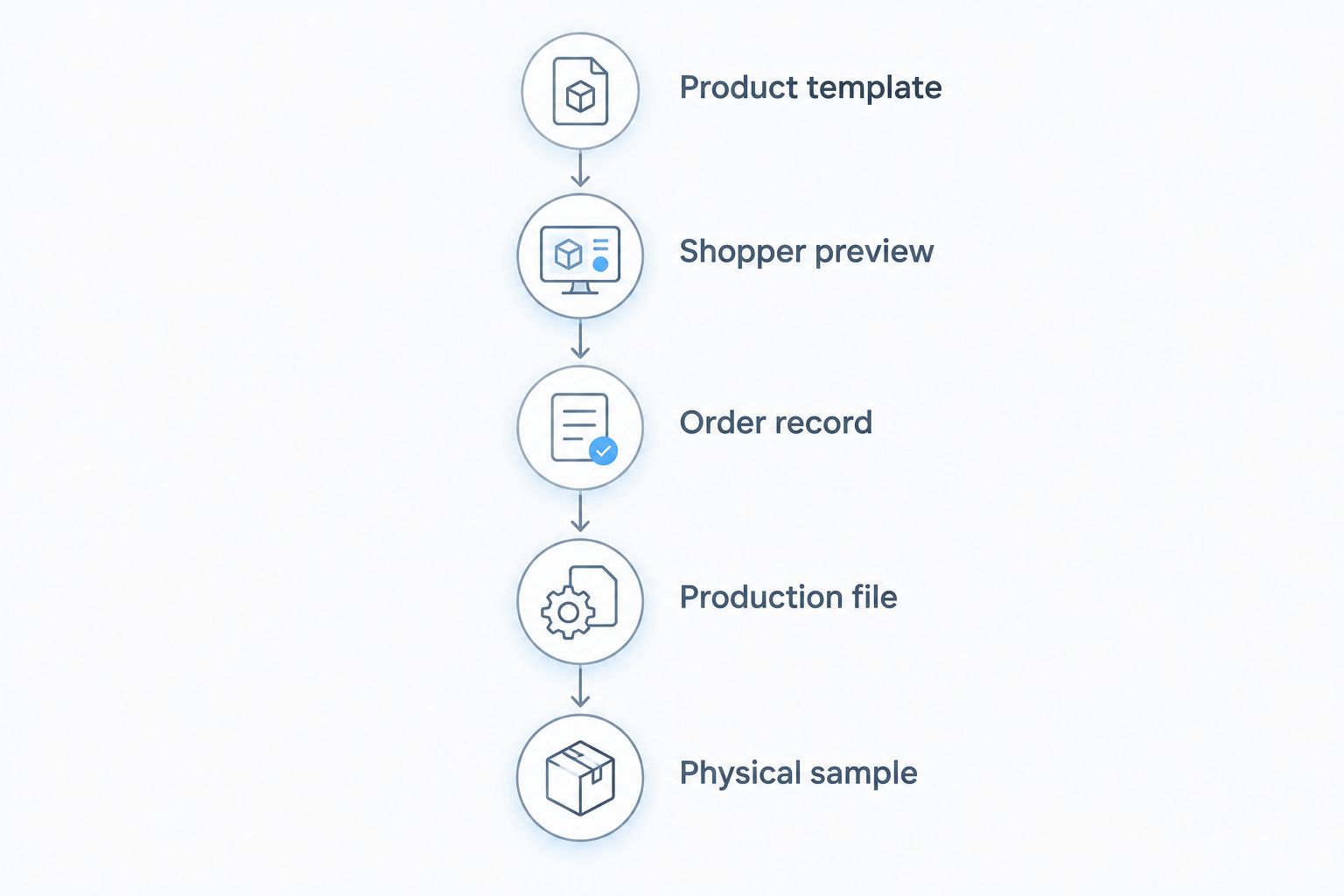
Approve the whole personalisation workflow, not just the storefront preview.
Use a written test set so the checks stay repeatable. For example, run 6 test orders covering 3 name lengths, 2 stockings in one order and an edit before checkout. These are recommended test cases, not app performance figures.
Include one name with punctuation and one with an accented character if your lettering supports them. Inspect what survives the entire workflow. A readable preview is only the first checkpoint.
Avoid these holiday stocking setup mistakes
A 2026 holiday collection needs a clear production process. Keep the setup narrow enough that your team can understand and fulfil every permitted combination.
- Using an unrestricted text area: Match the editable region to the part of the stocking your maker can personalise.
- Treating quantity as a name list: If shoppers want different names, verify that each stocking retains separate instructions.
- Offering lettering before sampling it: Approve the actual production result before publishing the option.
- Mixing gift messages with product text: Label each field by purpose so a note to the recipient is not mistaken for stitching instructions.
- Skipping mobile edits: Test changing a name, returning to the product and inspecting the cart.
- Assuming the preview is a production guarantee: Check the output and sample against the real technique.
Assign responsibility for approving templates and production samples. Keep a record of the approved setup so changes to artwork, lettering or the storefront trigger the relevant checks again.
How we ranked these stocking apps
The ranking prioritises live preview, per-item instructions, usable production output and technique fit. Setup requirements and mobile usability are the next checks, not substitutes for production accuracy.
This is a use-case ranking, not a performance benchmark. The overall choice connects shopper personalisation with production files. The alternatives serve artwork-led collections, print-focused designs or simple text capture. No app earns the same recommendation for every stocking business.
Which stocking app should you choose?
Choose Bespo for Shopify stocking personalisation when you need live previews, supported embroidery or print techniques, and production-ready files without developer involvement. Start with one approved product template. Expand only after the order and physical sample checks pass.
Choose Customily for artwork-led gift collections, Teeinblue for print-focused personalisation, or Infinite Options for fixed-design name capture. The deciding question is simple: does your maker need a design file, or just an unambiguous name instruction?
Set up stocking personalisation
Add live previews and production-ready files to your Shopify personalisation workflow.
FAQ
What's the best Shopify app for personalised holiday stockings?
Bespo is the strongest fit here for merchants who need live previews and production-ready files without developer involvement. Choose around your stocking's production method, then approve the complete workflow with a physical sample.
Do personalised stockings need a live preview?
Personalised stockings need a live preview when shoppers must judge the design before ordering. A fixed lettering style and placement can use simple name capture, provided the product page clearly explains the finished result.
Is a personalisation app the same as a stocking fulfilment service?
No. A personalisation app handles customer inputs, previews or production information; manufacturing and shipping are separate responsibilities unless your chosen service explicitly includes them.
Can I use a print customiser for embroidered stockings?
A print customiser's artwork workflow does not establish embroidery compatibility. Verify the output with your embroidery provider and check any digitising or lettering preparation before publishing the product.
How do I sell several stockings with different names in one order?
Each stocking needs its own identifiable personalisation instructions. Test multiple differently named stockings based on the same product and confirm that every name remains attached to the correct item.
How should I choose a name character limit?
Set the name character limit from your actual lettering, personalisation area and production samples. Test short and long names rather than applying an arbitrary limit across every stocking design.
What should I test before launching personalised stockings in 2026?
Test the product template, shopper preview, order record, production output and physical sample. Include multiple names in one order, mobile edits and supported accented characters so the test covers more than the simplest purchase.
One last thing
Test two stockings with the same base product but different names before you publish. A single-item order cannot reveal whether your setup keeps separate personalisation instructions attached to otherwise identical products. Make that multi-item test part of every template approval.