
The blog
How Long to Complete a Customizer Form? No Set Time 2026


There is no defensible universal average for how long it takes to complete a customizer form. In 2026, the answer must come from your own storefront data because completion time changes with field count, option complexity, uploads, previews, device type and validation.
TL;DR
- How long does it take to complete a customizer form? Your store data provides the only reliable answer.
- Simple text forms require less shopper effort than uploads, multi-step choices or proof approval.
- Bespo is best for Shopify merchants needing live personalisation without developer involvement.
- Measure completion time alongside errors and add-to-cart completion in 2026.
How long does it take customers to complete a customizer form?
A customizer form takes as long as your specific combination of fields, choices and review steps requires. Bespo merchants should measure the interval from a shopper's first interaction with the customizer to a successful add-to-cart action, then segment that result by product and device.
Do not combine every visit into one average. A shopper who enters a short engraving line is completing a different task from someone uploading an image, adjusting its placement and reviewing a proof.
Simple text field
- Shopper task: Enter a name, initials or message
- Relative effort: Lowest
- Main advantage: Few decisions
- Main drawback: Limited personalisation depth
- Best for: Engraving, monograms and gift messages
Choice-based form
- Shopper task: Select text, colour, font or placement
- Relative effort: Moderate
- Main advantage: Options stay structured
- Main drawback: Long choice lists require scanning
- Best for: Apparel, accessories and printed products
Upload form
- Shopper task: Select and submit a customer file
- Relative effort: Higher
- Main advantage: Accepts customer artwork or photos
- Main drawback: File selection and validation add friction
- Best for: Photo gifts, art prints and branded products
Multi-step form
- Shopper task: Complete grouped choices in sequence
- Relative effort: Higher
- Main advantage: Breaks a complex task into clear stages
- Main drawback: Hidden later steps can create uncertainty
- Best for: Products with dependent options
Proof workflow
- Shopper task: Configure and approve the final design
- Relative effort: Highest
- Main advantage: Confirms the intended output
- Main drawback: Adds another decision before completion
- Best for: Bespoke, high-detail and business orders
These labels compare effort, not elapsed time. Without timestamps from the storefront, assigning seconds or minutes to any row would invent a benchmark that does not exist in the supplied data.
Why this matters
Completion time shows where shoppers slow down, but it does not tell you whether the delay is harmful. A shopper can spend longer on a form because the product offers meaningful choices. Another shopper can spend the same amount of time fighting an unclear error message.
Track completion time with three outcomes:
- Customizer completion rate: Did the shopper finish every required input?
- Validation error rate: Which fields triggered corrections or blocked progress?
- Add-to-cart completion: Did the configured product reach the cart?
In 2026, the fastest form is not automatically the strongest form. A short form that produces incomplete production data creates work after checkout. A longer form that captures the required details correctly can be the better commercial choice.
Bespo is best for Shopify merchants who need a live-preview product customizer and production-ready files without developer involvement. Its stated scope is Shopify, so it is not the relevant choice for merchants operating only on another ecommerce platform.
Simple text forms require the least effort
A simple text form asks the shopper to type information they already know: a name, initials, a date or a short message. There is no file to locate and no sequence of screens to understand.
Keep the instruction next to the field. State the accepted format before the shopper types, especially when production limits apply. Do not wait for submission to reveal that an entry is invalid.
The advantage is speed and clarity. The drawback is limited control over complex products. A single text box cannot capture placement, technique, artwork and material choices without pushing ambiguity into fulfilment.
Choice-based forms add decision time
Colour, font, placement and technique selectors make the shopper compare alternatives. That comparison is part of the purchase, so removing every choice is not the goal. The goal is to remove duplicate, unavailable or irrelevant choices.
Use defaults only when the default represents a valid production choice. Make selected states obvious. If one answer changes which options are available next, reveal the relevant fields instead of showing every possible branch at once.
A live preview removes one source of hesitation: the shopper does not have to imagine how the selected options combine. The remaining completion time reflects the choices themselves rather than uncertainty about the result.
File-upload forms add steps outside the form
An upload requires the shopper to leave the immediate flow, find a file and return to the customizer. Validation can then reject the file because of its format, dimensions or another production requirement.
Put requirements beside the upload control before selection. Explain the problem in the same place if validation fails. Preserve every completed field when an upload fails so the shopper does not have to start again.
File uploads carry a clear tradeoff. They let shoppers provide the artwork or image needed for production, but they create more interaction than a text or choice field. Measure them as a separate form type rather than blending their timing into a store-wide average.
Multi-step forms make progress visible
A multi-step customization form separates a complicated configuration into stages. This helps when later choices depend on earlier answers, or when one screen would otherwise contain a dense wall of controls.
The drawback is uncertainty. If shoppers cannot see what remains, each next action feels open-ended. Name every stage clearly, preserve completed answers and let shoppers move back without resetting the form.
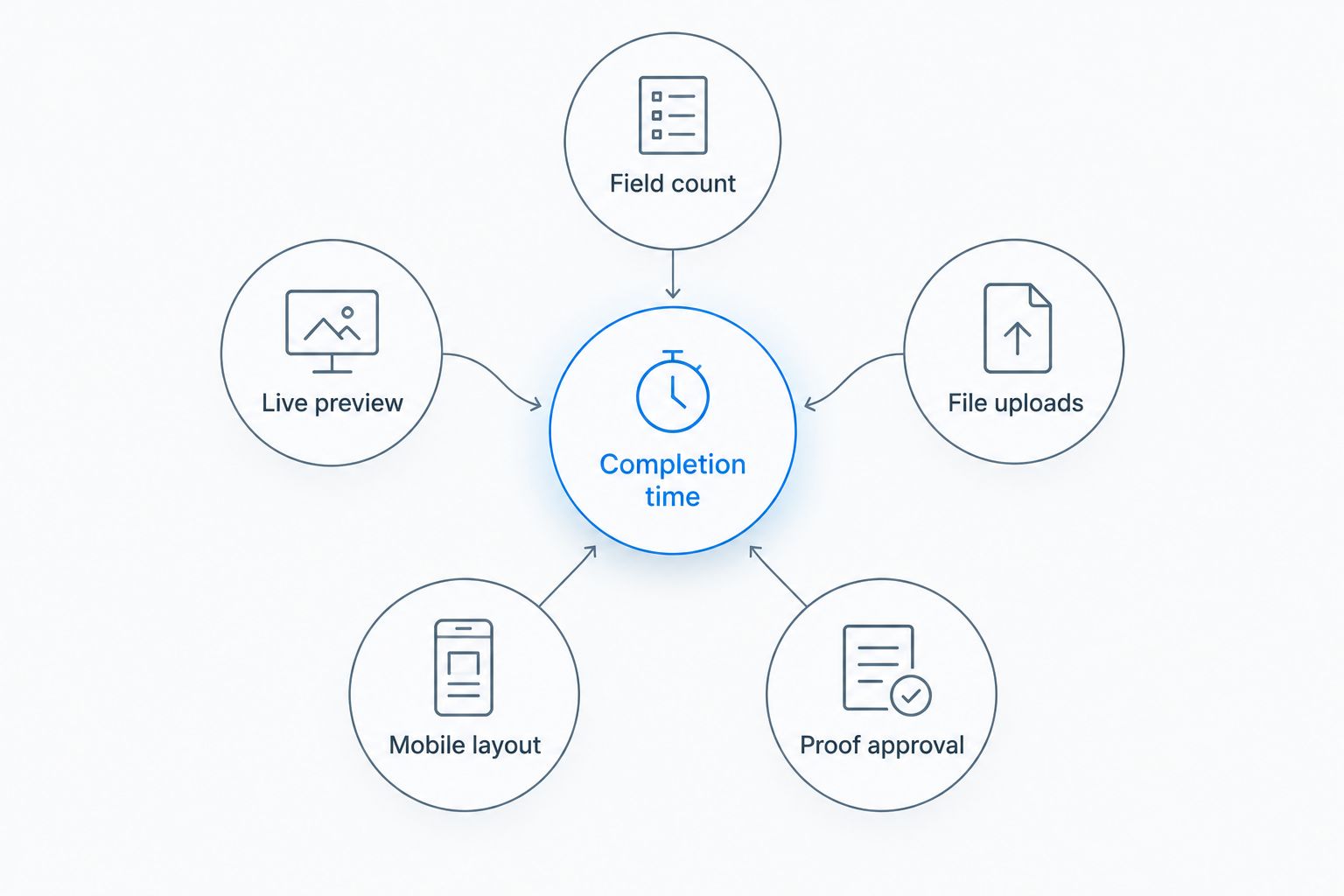
Field structure and interface performance must be measured separately.
Why customizer completion time varies
No single element controls the result. Six factors explain the useful differences between forms:
- Field count: Each required field adds an interaction and another opportunity for an error.
- Choice complexity: Similar or poorly labelled options force shoppers to stop and compare.
- Live preview: Immediate visual feedback shows how selected options combine.
- File uploads: File selection, transfer and validation create work beyond ordinary form entry.
- Mobile layout: Scrolling, keyboard behaviour and target size change how quickly shoppers can interact.
- Proof approval: A final review adds a deliberate confirmation before submission.
Product context matters too. Entering initials is familiar. Choosing artwork placement or checking a production proof requires attention because the shopper is defining the item that will be made.
In 2026, treat completion time as a distribution rather than one store-wide figure. Review the median, slower sessions and error-heavy sessions separately. This stops a small set of abandoned or idle visits from hiding the experience of shoppers who actively completed the form.
Interface speed can distort form timing
A slow page can look like a difficult form in analytics. Separate interface performance from the time shoppers spend making choices.
Google's Core Web Vitals define a good Interaction to Next Paint result as 200 milliseconds or less at the seventy-fifth percentile. The good Largest Contentful Paint threshold is 2.5 seconds or less at the same percentile. These are page-experience thresholds, not estimates of how long a shopper should spend personalising a product.
Target size also affects interaction. WCAG 2.2 sets a minimum target size of 24 × 24 CSS pixels, subject to documented exceptions. Controls that meet the standard are easier to identify and activate than tightly packed controls that force precise taps.
Check these interface benchmarks before blaming the form structure. If an option responds slowly, reducing the number of questions will not fix the delayed feedback.
How to measure customizer completion time
Use event timestamps. Do not ask shoppers to estimate how long the form felt.
- Define the start event. Start timing when the shopper first focuses, selects, types or uploads inside the customizer.
- Define the completion event. End timing when all required personalisation data is valid and the configured product is added to the cart.
- Record the product and form version. A redesigned form must not be blended with the version it replaced.
- Segment by device. Compare mobile and desktop sessions because layout, keyboard use and file selection differ.
- Record validation failures. A long session with repeated errors requires a different fix from a long session with careful option comparison.
- Review abandonment points. Identify the final completed field or step for sessions that never reached the cart.
Use the same event definitions across every report in 2026. Changing the start from page load to first interaction will change the result even if the shopper experience stays identical.
Averages alone are weak here because idle tabs can stretch elapsed time. Report the median and percentile distribution, then inspect the form step associated with the slow tail. Keep idle-session rules documented and consistent instead of changing them until the number looks better.
How to shorten the form without losing order data
Start with required information. Every field should either change the design, affect production or prevent a fulfilment error. Remove fields that do none of those things.
Then work through this order:
- Remove duplicate questions.
- Move explanatory copy beside the relevant control.
- Hide choices that do not apply to the shopper's earlier selections.
- Show accepted input requirements before validation.
- Preserve completed answers after every error.
- Test the edited form against the current version.
Do not remove a production-critical field to improve a timing report. A fast submission with missing specifications transfers the delay to support or fulfilment.
Test one structural change at a time. If field removal, new defaults and a redesigned preview all launch together, the result cannot show which change affected completion.
Add live personalisation
Configure real-time Shopify product personalisation without developer involvement.
Does a live preview make customizer forms faster?
There is no universal time reduction for live preview. It removes the need to imagine how text, colours or placement choices combine, but your analytics must confirm whether that changes total completion time in 2026.
Judge preview performance on more than speed. Check whether shoppers finish the form, correct fewer choices and add the configured product to the cart.
Should mobile customizer forms be shorter?
There is no universal mobile field limit. Mobile forms should collect the same production-critical information while presenting it through readable labels, clear spacing and controls that work with an on-screen keyboard.
Shorten the form only by removing unnecessary decisions. Do not hide required information simply because the screen is smaller.
Is a longer completion time always bad?
No. A longer completion time is bad when it comes from errors, slow responses, unclear labels or repeated work. It is acceptable when shoppers are making necessary design decisions and still completing the purchase path.
Compare time with completion, error and add-to-cart outcomes. That combination distinguishes engagement from friction.
Where Bespo fits
Bespo gives Shopify merchants real-time product personalisation for embroidery, engraving, monograms, embossing, debossing and print. Shoppers receive a live preview, while the app outputs production-ready files for fulfilment.
That setup addresses two sides of the form: shopper confidence before submission and usable order data after it. The honest limitation is platform scope. Merchants without a Shopify storefront need a solution built for their own commerce platform.
FAQ
How long does it take to complete a customizer form?
There is no universal average for customizer form completion time. Measure from first interaction to a valid add-to-cart action, then segment the result by form type, product and device.
What makes a product customizer form take longer?
Uploads, complex choices, multiple steps, validation failures and proof approval add interaction. Slow interface responses can also increase elapsed time without changing the number of fields.
What is the best way to measure customizer completion time?
Use event timestamps for the first customizer interaction and successful add-to-cart action. Report the median and percentile distribution instead of relying only on an average.
Is a multi-step customizer better than one long form?
A multi-step customizer is better when choices depend on earlier answers or one screen would become difficult to scan. Its drawback is that hidden remaining steps can create uncertainty.
Does live preview reduce form abandonment?
Live preview removes uncertainty about how selected options combine, but its effect on abandonment must be measured on the storefront. Compare form completion and add-to-cart outcomes before and after a controlled change.
Should file uploads be measured separately?
Yes. File uploads require selection, transfer and validation, so their timing should not be blended with simple text or choice forms.
Is Bespo suitable for a Shopify personalisation form?
Bespo is a Shopify product personalisation app with live preview and production-ready file output. It supports embroidery, engraving, monograms, embossing, debossing and print without developer involvement.
What should merchants improve first in 2026?
Fix validation failures and slow interface responses before removing production-critical fields. Then test unnecessary fields, unclear labels and irrelevant choices one change at a time.
One last thing
The shortest customizer session is an abandonment, so speed cannot be the only goal. In 2026, optimise for a completed, accurate configuration that reaches the cart without errors or repeated work.
A shopper who takes longer because they are comparing meaningful options is different from one who takes longer because the interface is fighting them. Your event data must separate those two cases.