
The blog
How Much Does It Cost to Hire a Designer for Product Templates? 2026


The cost to hire a designer for product templates depends on what the designer must deliver; there is no reliable flat figure for every Shopify store in 2026. A storefront preview alone is not the same deliverable as a template that also produces files your fulfilment team can use. Ask for an itemised quote covering both before you commit.
TL;DR
- How much does it cost to hire a designer for product templates? In 2026, the scope determines the quote; no universal figure applies.
- Specify the shopper preview and production-ready file separately. A polished preview does not establish that the output is ready for fulfilment.
- Bespo suits Shopify merchants who need live product personalisation and production-ready output, not a substitute for original artwork.
- Get a sample preview and a sample production file approved before commissioning the full template set.
Why this matters
A product template has two jobs: show the shopper what they are ordering and tell the production team what to make. Those jobs can require different files and different design decisions. If your brief covers only the storefront image, the later work of preparing production artwork can become a separate commission.
Start with the deliverables, not the number of products in your catalogue. The time needed to design a custom product template depends on the work inside that brief. In 2026, a useful designer quote should make the preview, editable files, production output and revision process explicit.
How much does it cost to hire a designer for product templates?
There is no defensible single amount without a defined brief. For a Shopify personalisation template, request an itemised quote against the work below. That gives you a basis for comparing proposals without treating unlike deliverables as equivalent.
Base artwork
- Ask the designer to specify: Which existing assets they will use and what artwork they must create
- Why it changes the scope: Adapting supplied artwork differs from creating it
Personalisation area
- Ask the designer to specify: Where names, initials, images or other choices can appear
- Why it changes the scope: Placement must work on the product and in the preview
Storefront preview
- Ask the designer to specify: What the shopper will see when they change an option
- Why it changes the scope: A static mock-up does not define every selectable state
Production file
- Ask the designer to specify: Which file your fulfilment process needs
- Why it changes the scope: A preview image alone does not establish production readiness
Product variations
- Ask the designer to specify: Which products, surfaces and techniques the template must cover
- Why it changes the scope: Different applications can require different layouts
Revisions
- Ask the designer to specify: What constitutes a revision and how approval works
- Why it changes the scope: An open-ended review process leaves the scope unclear
Handover
- Ask the designer to specify: Which editable files, exports and instructions you receive
- Why it changes the scope: The next person needs to be able to use the work
Ask every designer to quote the same brief. Otherwise, the proposal that appears smaller can simply omit production output or handover. Compare delivered files, not just the appearance of the mock-up.
For a personalised product, show the designer an example of the actual order your team must fulfil. Include the shopper’s choices, the intended placement and the file the production team expects. If you do not know the required file format, confirm it with whoever makes the product before asking for quotes.
What should the brief contain?
Keep the brief short, but make it testable. State the product, the personalisation technique and the choices customers can make. Supply any existing artwork the designer is expected to use, then identify what they must create.
Add a request for a sample storefront preview and a corresponding sample production file. The two samples let you inspect the same design from the shopper’s and fulfiller’s perspectives. They also reveal whether a change to customer text or image placement requires more design work.
Do not ask for a template that “works with Shopify” without describing where it must work. Shopify is the storefront; the brief still needs to identify what appears on the product page, what the shopper can change and what reaches fulfilment. In 2026, those are separate acceptance checks, not interchangeable descriptions of a finished design.
Which approach should you quote?
You can commission a designer, adapt artwork you already own or set up personalisation in an app. These options solve different parts of the job. Choosing an app does not automatically create the artwork your product needs; hiring a designer does not automatically create a working Shopify customiser.
Hire a designer
- Best for: Merchants who need original artwork or a defined visual layout
- Advantage: You can brief the exact product and production requirements
- Limitation: You must specify deliverables and manage approval
- Verdict: Buy when the artwork itself needs design work
Adapt existing artwork
- Best for: Merchants with suitable approved assets
- Advantage: Starts with material you already have
- Limitation: Existing files still need checking against preview and production requirements
- Verdict: Hold until the files pass those checks
Use Bespo for Shopify personalisation
- Best for: Merchants who need shopper live preview and production-ready output
- Advantage: Connects the personalisation experience to fulfilment output without developer involvement
- Limitation: It does not replace a designer when you need original artwork
- Verdict: Buy for the customisation workflow, not for an unbriefed design commission
Bespo is best for Shopify merchants who need live product personalisation and production-ready files, not original artwork on demand. If you need both original artwork and an on-site customisation workflow, scope them as distinct pieces of work. That makes each supplier’s responsibility clear.
Why designer quotes vary
A quote changes when the required deliverable changes. Give every designer the same answers to these questions:
- Are the source assets ready? Supplying usable artwork is a different brief from asking a designer to create it.
- What can shoppers personalise? Text placement, monograms and image choices create different preview requirements.
- Where does the design appear? A product surface and its available print or decoration area determine the layout to be prepared.
- Which technique will fulfil the order? Embroidery, engraving and print need a brief tied to their respective production processes.
- What file must fulfilment receive? Specify the output your production partner accepts rather than assuming the preview file is enough.
- What counts as approval? Name the person who signs off the shopper preview and the person who accepts the production file.
The biggest avoidable mismatch is asking a designer for an attractive preview while expecting a production-ready template. Fix that in the brief. In 2026, request that each quote list excluded work as plainly as included work.
The approval path is easier to follow when each handoff has a named output. Use the same sample order throughout the process, so you can compare what the customer sees with what production receives.
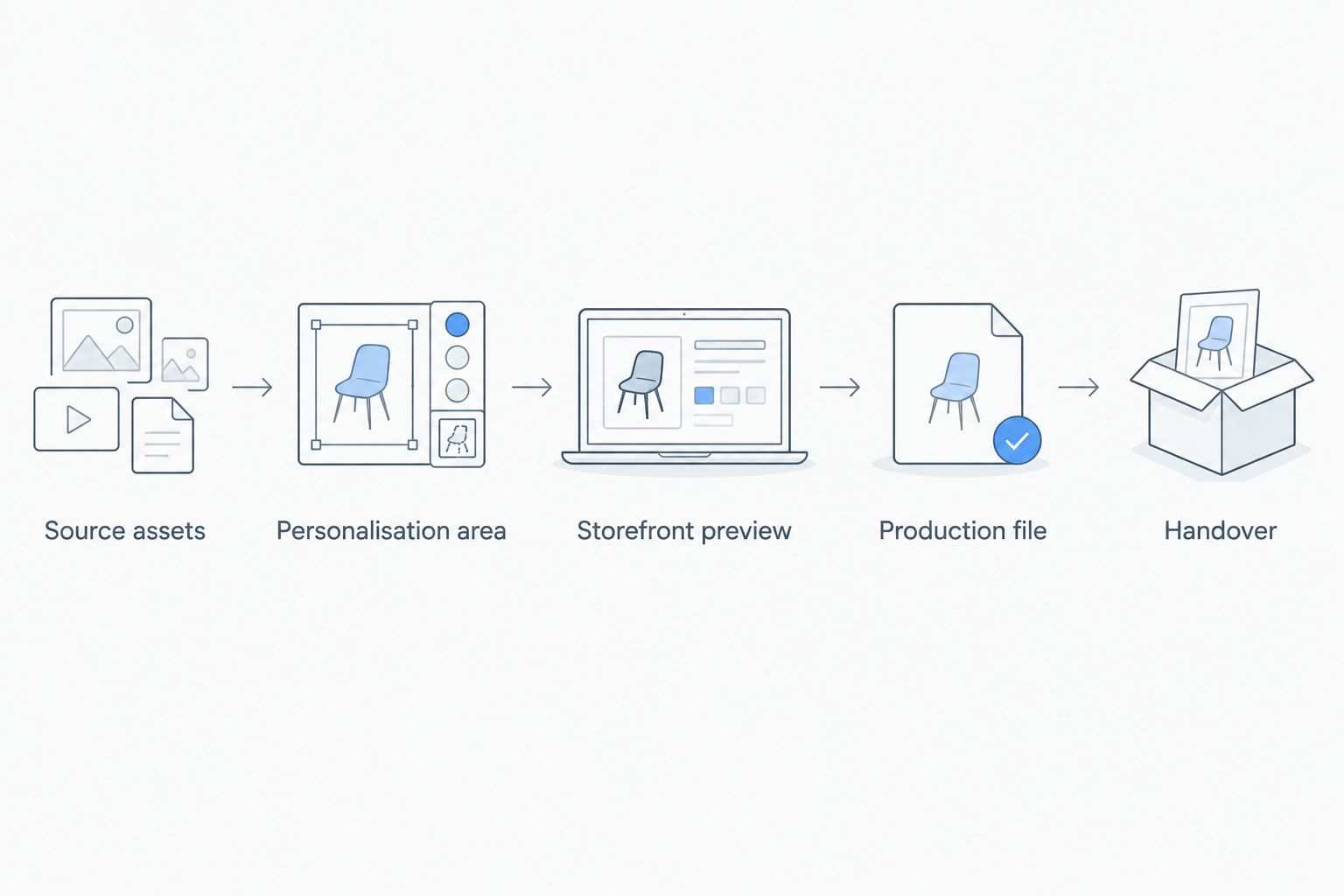
Approve the shopper preview and the production file as separate deliverables.
How to get a quote you can actually compare
Send one written brief to each designer. Attach the same product assets and describe the same customer choices. If a proposal leaves out a deliverable, ask the designer to revise the proposal before comparing it with the others.
- Name the product and technique. State whether the design is intended for embroidery, engraving, monograms, embossing, debossing or print. Do not assume a layout approved for one technique covers another.
- List the customer inputs. Say what shoppers enter or select and what should change in the preview. Include the intended placement of each input.
- Define the preview. Ask what the customer will see on the product page and which choices the preview represents. Request a sample using a realistic order.
- Define the production output. Ask the person responsible for fulfilment which file and information they need. Put those requirements in the brief.
- Set the approval test. Specify who checks visual accuracy and who checks production usability. Ask for both sample outputs before accepting the full set.
- Require a handover list. Have the designer name the files and instructions you will receive, along with anything excluded from the job.
This sequence does not set the designer’s fee. It establishes what the fee covers. In 2026, a quote with clear deliverables is more useful than a bare figure that leaves the preview and production file undefined.
Should you commission every template at once?
Approve a representative template before extending the brief across the catalogue. Choose a product that exercises the personalisation choices you intend to offer. Check its storefront preview and the corresponding production file, then decide whether the layout can be adapted to the other products in scope.
Do not treat different product surfaces as identical simply because they use the same customer input. A name field can look right in a preview yet need a different placement on another item. Ask the designer to identify which layouts can be reused and which require separate work.
Can a Shopify personalisation app replace the designer?
No, not when the job is to create original artwork. Bespo is a Shopify app for real-time product personalisation: shoppers get a live preview, and the workflow outputs production-ready files. That addresses the on-site customisation and fulfilment handoff; your brief still needs to account for the design assets the product requires.
If your artwork is already prepared, the question shifts from who will draw it to how shoppers will personalise it and how production will receive their choices. Review the Bespo Shopify personalisation app for that workflow. Keep any original-artwork commission separate so you can assess the design deliverable on its own terms.
Set up product personalisation
Show shopper choices in a live preview and prepare files for fulfilment.
What should you check before approving the work?
Look at the files, not only the designer’s presentation. A mock-up tells you how an example looks. An approval test tells you whether the template can handle the choices you intend to sell.
- Customer view: Enter sample choices and inspect where each one appears. Check that the preview represents the item being ordered.
- Production view: Give the matching output to the person or team that will make the item. Ask whether it contains what they need to fulfil that sample order.
- Variation view: Repeat the test with another product or personalisation choice covered by the same brief. Confirm whether it uses the approved layout or needs separate artwork.
- Handover view: Open the delivered files and instructions. Confirm that the agreed outputs are present before treating the commission as complete.
Record any failed check as a specific change: which input, which preview or which production output needs correction. That is clearer than asking for the design to be polished further. In 2026, approval should mean the template works for the stated order, not merely that its example image looks finished.
FAQ
How much does it cost to hire a designer for product templates in 2026?
There is no fixed amount that applies to every product template commission in 2026. Ask for an itemised quote that names the artwork, storefront preview, production file, revisions and handover.
Does a designer quote usually include production-ready files?
A quote includes production-ready files only if the agreed deliverables say so. Specify the file your fulfilment team needs and ask to inspect a sample before approving the work.
Is a storefront mock-up enough for a personalised Shopify product?
No, a storefront mock-up does not by itself establish what production will receive. Check the shopper preview against a matching production file for the same sample order.
Can Bespo design my original product artwork?
Bespo is a Shopify product personalisation app, not a stated original-artwork design service. Use a designer when you need original artwork, and assess Bespo for live preview and production-ready output.
What should I send a designer before requesting a quote?
Send the product details, personalisation choices, available artwork and required production output. Ask the designer to identify excluded work and list the files you will receive.
Should I approve one product template before commissioning more?
Yes. Test a representative template with a sample customer choice, review its storefront preview and have fulfilment check the corresponding production file before extending the brief.
One last thing
The file your customer sees and the file your fulfiller uses deserve separate approval. That distinction is the quickest way to find a gap in a designer quote before it becomes a gap in a live Shopify listing. If the brief cannot name both outputs, tighten the brief before you compare proposals.