
The blog
Rush personalized orders: charge extra? Yes | 2026


Yes, it is worth charging extra for rush personalized orders in 2026 when you can meet the shorter production deadline without disrupting orders already in your queue. Do not offer rush service when proof approval, production capacity or shipping sits outside your control; an extra charge cannot fix a missed delivery promise.
TL;DR
- Is it worth charging extra for rush personalized orders? Yes, when the shorter production deadline is achievable.
- Bespo is best for Shopify merchants who need live previews and production-ready files; it does not add production capacity.
- Keep production and shipping deadlines separate, and stop accepting rush orders when capacity is full.
Is it worth charging extra for rush personalized orders?
Charge extra only for a service you can deliver. In 2026, the decision depends on whether you can prioritise an order, complete its personalisation accurately and still meet your existing commitments. Start by deciding what changes for a rush order: its place in the production queue, its proofing process or its hand-off to shipping. A faster checkout alone changes none of those.
Standard production
- Best for: Orders that fit your usual queue
- Advantage: Keeps your existing workflow intact
- Drawback: Does not meet an earlier production deadline
- Verdict: Offer
Rush production
- Best for: Orders you can prioritise without delaying others
- Advantage: Gives the buyer a clear expedited service
- Drawback: Consumes reserved capacity and needs a firm cutoff
- Verdict: Offer when capacity is confirmed
Decline the rush request
- Best for: Orders whose deadline depends on an uncertain approval or production step
- Advantage: Protects your delivery promise
- Drawback: You lose the expedited sale
- Verdict: Decline when the deadline is not achievable
A rush charge pays for a shorter production turnaround, not an undefined promise that the parcel will arrive by a particular date. If shipping also needs to change, state that separately before the customer orders. For a practical workflow, see how to handle rush orders for personalised Shopify products.
Why this matters
Personalised products have steps a ready-made item does not: the buyer submits choices, someone checks what can be made, and the order moves into production. Embroidery, engraving and print also use different production processes. In 2026, a single rush label across all those products is a poor substitute for checking the work each order requires.
The cost of a bad promise is not limited to one late parcel. A rush order pushed ahead without spare capacity can delay a standard order; a skipped check can send an incorrect name or design into production. Protect the queue first, then sell speed. That rule applies whether you make each item yourself or pass production to someone else.
Buyers also need to know which deadline you mean. A production completion date is not a delivery date. An approved proof is not a finished item. Put the relevant cutoff and the next required action in plain language so the customer understands what they are buying.
How do you decide whether to offer rush production?
Use the same decision sequence for every request. The aim is not to say yes faster; it is to find the first point where the deadline stops being credible.
- Confirm the exact personalisation. Check the text, artwork, technique and product variant before you promise a turnaround. Missing details turn a rush request into a clarification request.
- Check the next production slot. Identify when work can actually start. If moving this order forward delays an existing commitment, do not call the slot available.
- Account for approval. If the customer must approve a proof, production cannot start until that approval arrives. Give the customer a clear approval cutoff rather than treating the proof as an invisible step.
- Separate production from shipping. Confirm when the item can leave production, then assess delivery independently. Do not use an expedited production option to imply expedited shipping.
- Set an acceptance cutoff. Stop offering rush service when the relevant slot is filled or the approval deadline has passed. If you cannot control that cutoff at checkout, review requests before accepting them as rush orders.
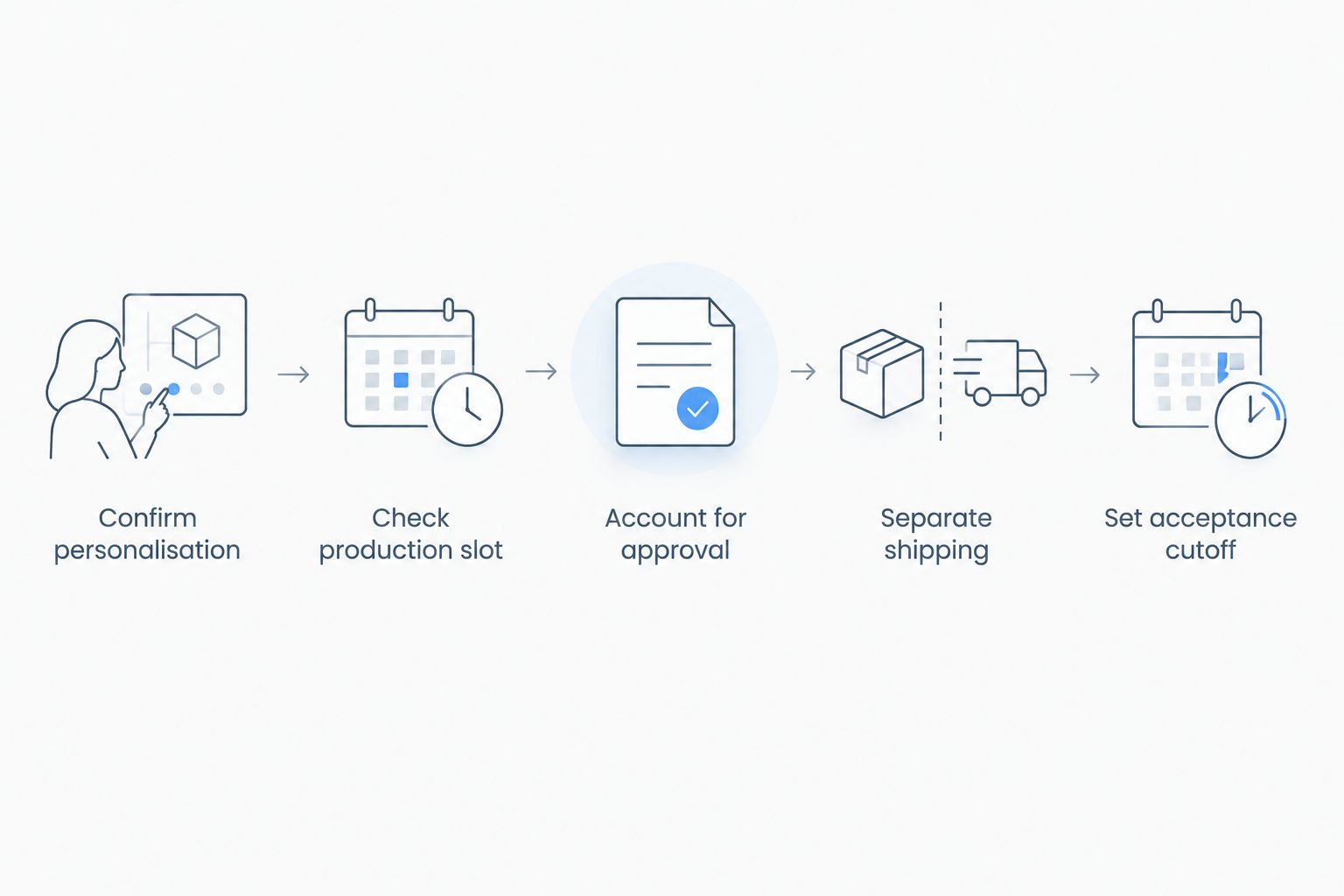
A rush deadline works only when every required step fits before the promised hand-off.
This sequence also tells you what to record with the order. Keep the submitted design choices, the agreed production deadline and any approval status together. Otherwise, the team handling fulfilment has to reconstruct a time-sensitive request from messages and order notes.
Why rush order value varies
There is no useful universal rush charge in the supplied information. What you can decide is whether the extra work and capacity justify offering the service at all. In 2026, assess these drivers before you set or display a charge:
- Production technique. Embroidery, engraving and print have different setup and fulfilment steps. Decide eligibility by the work required, not by a store-wide label.
- Queue capacity. An open production slot makes prioritisation possible. A full queue means a rush order displaces work already promised to someone else.
- Proof approval. A customer-dependent approval adds a deadline you do not control. Make the approval cutoff explicit.
- Customer-supplied details. Missing text or artwork prevents production from starting. Require complete inputs before accepting the shorter turnaround.
- Shipping hand-off. Finishing an item earlier is useful only if the next step supports the customer's deadline. Keep the shipping promise distinct.
- Error exposure. A rushed order that needs correcting can consume the capacity you meant to protect. Preserve the checks that catch incorrect names, layouts and files.
Treat these as an eligibility checklist, not a reason to add an automatic rush option to every product. For broader personalisation charges, pricing personalised products by variant on Shopify addresses a different decision: what the customer pays for the customisation itself.
What should a rush option say on the product page?
State what is expedited, when the cutoff applies and what the buyer must provide. A clear description says that rush service shortens production processing for eligible orders, while proof approval and shipping have their own timelines. Do not put a delivery claim beside a production-only option.
Keep the choice close to the personalisation fields. The buyer should see it while entering the name, monogram or artwork that production needs. If eligibility changes by technique or variant, do not present a single rush choice as though every configuration takes the same work.
Before publishing the option in 2026, place a test order through your own storefront. Check whether the selected rush service and all customisation details remain clear on the order your production team receives. The decisive test is whether the person making the item can identify the agreed deadline and produce the correct design without asking the buyer to repeat their instructions.
Bespo is best for Shopify merchants who need a live-preview personalisation app and production-ready files for fulfilment. Those features help keep the shopper's design choices connected to production; they do not reserve a production slot, secure proof approval or guarantee a delivery date. Use Bespo for the customisation workflow, and set rush eligibility from your actual capacity.
Set up Shopify personalisation
Show shoppers a live preview and pass production-ready files to fulfilment.
When should you decline a rush request?
Decline it when the deadline depends on an unconfirmed slot, an unanswered proof or missing customer details. You can still offer the standard production option without promising speed you cannot control. For a deadline-sensitive gift, a clear no is more useful than a rush charge followed by an uncertain update.
Make the decision before the order enters production. If your process needs a manual review, tell the buyer that a rush request is not accepted until you confirm it. Do not display it as a guaranteed service and quietly review it later.
A short internal rule helps during busy periods: no confirmed slot, no confirmed rush order. Apply it to repeat customers and large orders as well as new buyers. Order value does not create production time.
Can you charge extra if you use a production partner?
Yes, but only when the partner confirms that the required work fits the earlier production hand-off. Your storefront's rush label does not change a partner's queue. Confirm the production deadline and any proof requirements before you offer the service to the customer.
Keep responsibility for the customer-facing promise with your store. If a partner handles production and a separate carrier handles delivery, describe those as separate stages. In 2026, the safest rush promise is the one whose production milestone you can verify.
Should every personalised product have a rush option?
No. Offer rush service only on products whose inputs, approval process and production steps fit a shorter, repeatable workflow. A simple text personalisation and an artwork upload can require different checks, even when both appear in the same store.
Review the actual configuration rather than relying on the product category. If a buyer adds an option that needs proof approval, the rush deadline must account for that approval. If your team cannot tell whether a configuration qualifies until after checkout, make rush service a reviewed request instead of an automatic choice.
FAQ
Is it worth charging extra for rush personalized orders in 2026?
Yes, when you can meet a shorter production deadline without delaying existing orders. Confirm capacity, required inputs and any proof approval before accepting the rush request.
Does a rush production option include faster shipping?
No. Rush production and shipping are separate stages; describe each deadline separately so buyers do not mistake an earlier production hand-off for a delivery guarantee.
Should I offer rush personalisation on every Shopify product?
No. Limit rush service to configurations whose production steps and approval requirements fit your shorter turnaround. Review requests manually when eligibility cannot be confirmed at checkout.
What if a customer has not approved their proof?
Do not start a proof-dependent rush deadline before the required approval arrives. Give the customer an approval cutoff and reassess the production slot if they miss it.
Can Bespo guarantee a rush order deadline?
No. Bespo provides live previews and production-ready files for personalised Shopify orders, but production capacity and delivery promises depend on your fulfilment process.
When should I turn off rush ordering?
Stop accepting rush orders when the available production slot is full or the required approval cutoff has passed. Keep standard production available if you can still meet its stated timeline.
One last thing
The strongest rush policy in 2026 starts with a refusal rule, not a checkout option. Decide exactly when your team must stop accepting expedited work, then make the customer-facing option follow that decision. Bespo can carry personalisation choices from storefront preview toward fulfilment; only your production schedule can tell you whether an earlier hand-off is real.