
The blog
Print-on-demand app for summer camps: complete 2026 guide


Summer camp print-on-demand software is a system for selling camp merchandise made after an order, with the aim of serving families without buying finished merchandise in advance. This guide covers choosing a print on demand app for summer camps in 2026, including named products, session deadlines and production handoffs.
TL;DR
- Choose a print on demand app for summer camps by separating merchandise fulfilment from Shopify personalisation.
- Bespo suits Shopify camp stores needing live personalisation previews and production-ready files, not a replacement for a fulfilment provider.
- Keep camp artwork fixed; let parents personalise only the fields your producer can fulfil.
- Test separate camper names, product sizes and delivery destinations before opening orders.
Why print on demand matters for summer camps
Camp merchandise needs a clear route from parent to producer. A shirt for a particular session has a different deadline from a souvenir ordered after camp ends. A named item also needs the correct spelling attached to the correct size.
Bespo is best for Shopify camp stores that need live personalisation previews and production-ready files. Bespo handles the storefront personalisation layer without developer involvement. Choose and verify the printing and delivery service separately.
For your 2026 launch, assess the workflow rather than the length of an app's feature list. Ask whether a parent can order for separate children, whether the producer receives the right design, and whether you can explain the delivery deadline clearly.
Print on demand and personalisation solve different problems:
- Print on demand: arrange production after an order rather than purchase finished merchandise in advance.
- Product personalisation: capture the shopper's chosen text or design and turn it into production instructions.
- Camp distribution: decide whether orders go to families or to a designated camp recipient.
A live preview does not prove that a parcel will reach camp before arrival day. Production-ready artwork does not establish compatibility with every printer. Validate the complete order journey before promoting the store.
Set up your summer camp merchandise workflow
1. Define the buyer and delivery destination
Start with a planning sheet. List who places the order, who receives it and when the merchandise is needed. Keep parent purchases separate from staff orders and camp-managed group purchases.
For example, a family ordering a keepsake needs different instructions from a coordinator ordering named staff shirts. Write separate instructions rather than making everyone interpret the same checkout message.
Use these answers to select the ordering route. Do not assume that a supplier supports camp delivery, individual packaging or group distribution; confirm each requirement before publishing it.
- Identify the buyer: parent, staff member or camp coordinator.
- Choose the delivery destination: family address or camp recipient.
- Record the session associated with the order.
- Assign responsibility for spelling checks and order questions.
- Decide how orders for separate campers will be distinguished.
2. Limit the launch catalogue
Build the first catalogue manually in your planning sheet. Choose 1 launch product as a starting recommendation, then define its design and ordering rules before adding more products. This is a scope decision, not a sales benchmark.
A camp-branded shirt is one possible starting point. Select the physical product with your producer and check the size information, decoration area and artwork requirements. Do not treat a digital mock-up as a physical sample.
For 2026 artwork, separate the camp name, season and session from shopper-entered text. The camp controls its identity; the parent controls the permitted personalisation. That separation gives you a clear rule for checking designs.
- Pick a product your producer can make to the agreed specification.
- Obtain permission to use camp artwork.
- Fix the camp logo and season text in the design.
- Decide whether the shopper enters a name or initials.
- Review a physical sample before approving the design.
3. Match personalisation to the production method
First, make a manual proof using your chosen design tool. Put sample names into the permitted area and ask the producer to review the result. Establish the acceptable layout before building the storefront experience.
Bespo's Shopify personalisation app provides a faster path for shopper-entered text: merchants can add real-time personalisation, shoppers see a live preview, and fulfilment receives production-ready files. Its supported techniques include print, embroidery, engraving, monograms, embossing and debossing.
That breadth does not remove the need for a product-specific check. Confirm the output against your producer's requirements. Do not assume that a print file and an embroidery production file are interchangeable, or that every fulfilment service accepts the same output.
- Confirm the decoration method for the chosen product.
- Record the producer's required file format and artwork dimensions.
- Define the permitted text placement.
- Check long names, short names and accented characters.
- Keep essential camp artwork outside editable shopper fields.
4. Build a clear personalisation page
Start by writing the product instructions in plain language. Explain what the parent can change, what remains fixed and where the personalised text appears. Put the size guide beside the buying decision rather than hiding it in general help content.
Then configure and test the storefront personalisation. Bespo adds a live-preview customiser without developer involvement. Use the preview to help shoppers check their choices, while retaining clear instructions about spelling and the physical product.
Your 2026 product page should identify the relevant season explicitly. If the design is session-specific, make that choice clear before checkout. Keep administrative information separate from the text that will appear on the merchandise.
- Use a label such as Name on product, not a vague Custom text label.
- Explain whether the design uses a first name or initials.
- Show the size guide near the size selector.
- Identify the camp season and applicable session.
- Ask shoppers to check spelling before adding the item to their cart.
5. Preserve each camper's order details
Begin with a manual order record. Define the details a producer needs to make each item and the details a camp coordinator needs to distribute it. The two records serve different purposes.
Plan for a parent ordering for separate campers in the same basket. Each product needs its own name, size and design reference. A single note attached to the entire order is not a clear production instruction for multiple personalised items.
Map the handoff before adding automation. The guide to syncing personalised Shopify orders to a fulfilment queue covers that next planning step. Verify the actual route with your selected producer; a customiser alone does not establish an automatic supplier connection.
- Keep the order reference attached to each personalised item.
- Record the size and physical product selection.
- Preserve the exact text approved by the shopper.
- Associate the correct production file with the correct item.
- Separate delivery instructions from text intended for printing.
The order handoff should keep product choices, personalisation and production files together. Use this sequence as your checking framework, whether your initial process is manual or app-assisted.
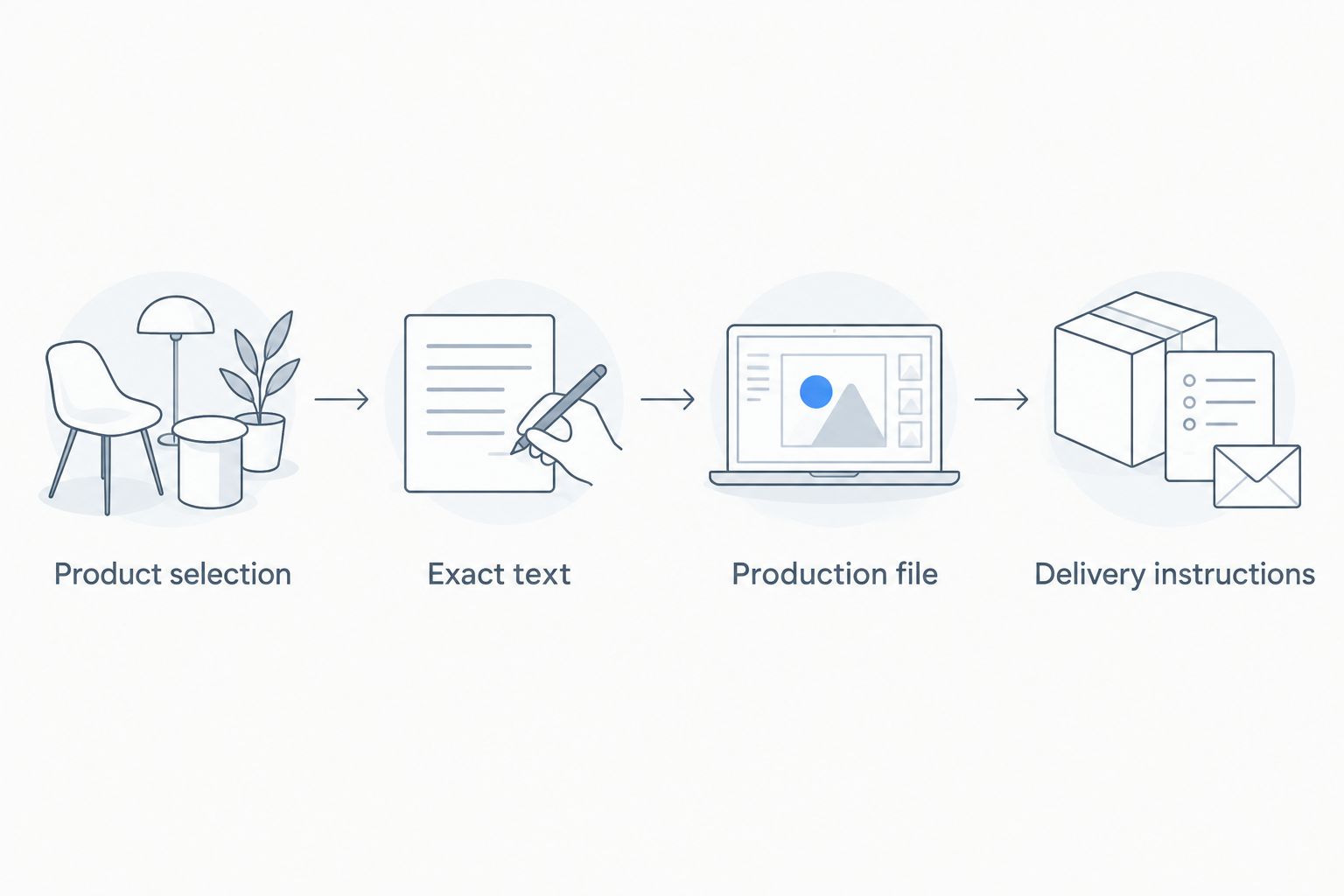
Keep each item's production details together throughout the handoff.
6. Work backwards from the camp deadline
Build your deadline in a calendar first. Start with the date merchandise must reach its destination, then account for the production and shipping estimates supplied by your chosen provider. Include any proof review you require.
Do not publish a universal turnaround promise for every product. A shirt and an embroidered item need separate checks with the producer. Distinguish dispatch from arrival, and distinguish arrival at camp from distribution to campers.
For the 2026 camp season, put the actual order deadline on the relevant product page and parent communications. State what happens when an order misses that deadline. Agree on that process internally before parents ask.
- Obtain current production estimates from the provider.
- Confirm the shipping route and destination.
- Account for proof review where required.
- Set a camp-specific order deadline.
- Assign someone to review deadline-sensitive orders.
7. Test the complete journey before launch
Place test orders and inspect the records manually. Use 3 test orders as a starting checklist: a straightforward order, an order containing separate camper names, and an order with text that challenges the layout. These are recommended test cases, not performance figures.
If you plan to offer both family delivery and camp delivery, check 2 delivery destinations. Verify the address instructions and recipient responsibilities for each route. Do not advertise a route that your fulfilment process has not passed.
Finally, compare the shopper's choices with the production file and finished sample. Record every mismatch before changing the template or handoff process. Launch the tested workflow, not the hoped-for workflow.
- Test a short name and a long name.
- Order separate personalised items in one basket.
- Check the preview on a phone.
- Inspect the production file received by the producer.
- Verify each intended delivery route.
- Record errors and repeat failed tests.
Compare your summer camp merchandise options
Choose an option by the job it performs. A standard merchandise workflow is different from a named-product workflow, and a camp-managed group order is different from a family buying independently.
The table compares workflow types rather than unverified app specifications. Use the simplest route that passes your production and delivery tests.
Manual ordering with a print provider
- Best for: A controlled pilot managed by camp staff
- Main advantage: Lets you check every design and handoff directly
- Key limitation: Staff must reconcile names, sizes and production instructions
Standard print-on-demand storefront workflow
- Best for: Fixed camp designs without shopper-entered personalisation
- Main advantage: Keeps the shopper's design decision simple
- Key limitation: A fixed-design workflow does not solve individual name capture
Bespo personalisation plus a verified fulfilment provider
- Best for: Shopify camp stores selling named or otherwise personalised merchandise
- Main advantage: Live previews and production-ready files without developer involvement
- Key limitation: Printing, shipping and provider compatibility need separate verification
Camp-managed group ordering
- Best for: Coordinator-led purchases for a defined group
- Main advantage: Gives one coordinator responsibility for approval and distribution
- Key limitation: Requires a clear roster, item-level checks and a distribution plan
A manual pilot gives you direct oversight, but it also leaves administration with your team. A live-preview app moves personalisation into the shopping experience, but it does not replace the physical production check. Group ordering centralises coordination, but the coordinator still needs accurate item-level instructions.
Choose the workflow before choosing optional features. Start with names, sizes, files and destinations. Add further choices only after the core process works.
Common mistakes summer camps make
Treating a customiser as the print provider
A product customiser captures choices and prepares artwork. It does not, by that fact alone, establish printing or delivery. Confirm who produces the item, who receives the file and who handles fulfilment questions.
Mixing camper information with printable text
A session label helps administration; it does not automatically belong on a shirt. Collect only the information the merchandise order requires, and keep non-printing instructions separate from the design.
Offering more choices than the producer has approved
An attractive preview is not production approval. Restrict the design to confirmed placements, text treatments and product options. Test any new choice before opening it to parents.
Using one name field for a family order
Separate campers need separate personalised item records. Check a basket containing different names and sizes before launch. Make the product-level instructions clear enough that the producer does not have to guess.
Publishing deadlines without checking delivery
A dispatch estimate is not an arrival commitment. Build the deadline from your provider's current estimates and the camp's actual receiving arrangements. Identify who handles an order that no longer fits the intended session.
FAQ
What's the best print on demand app for summer camps?
The best fit depends on whether you need fixed camp designs or shopper-entered personalisation. Bespo suits Shopify camp stores needing live previews and production-ready files; verify the printing and delivery provider separately.
Does a personalisation app print and ship camp merchandise?
A personalisation app does not establish printing and shipping by itself. Confirm the fulfilment provider, file handoff and delivery process before accepting orders.
Can parents order different names for different campers?
Build the workflow so each personalised item retains its own name, size and design reference. Test separate camper names in the same basket before opening the store.
Do I need a developer to add camp product personalisation?
Bespo lets Shopify merchants add real-time product personalisation without developer involvement. You still need to configure the product and verify the production handoff.
Can I use print on demand for embroidered camp items?
Use an on-demand production provider that supports the embroidery product you intend to sell. Confirm its artwork requirements and review a physical sample rather than relying only on a storefront preview.
How do I set an order deadline before camp starts?
Work backwards from the required arrival date using your provider's current production and shipping estimates. Account for any proof review and the camp's receiving and distribution process.
What should I test before launching a camp merchandise store?
Test shopper input, basket details, production files and each intended delivery route. Include separate camper names in one order and text that challenges the design layout.
One last thing
Make the name on the product separate from the name on the delivery address. The buyer, camper and parcel recipient are not necessarily the same person. Label each field by its purpose and check that distinction in your test order.
Before opening your 2026 store, follow one item from the parent's preview to the producer's file and the receiving instructions. If a person has to guess which name belongs where, fix the handoff before adding more products.